https://github.com/waynesutton/todohosted
An open source chat and reminder application built with Convex, Clerk, and React. This application features real-time chat, task management, and an administrative dashboard for moderation.
https://github.com/waynesutton/todohosted
ai chatbot chatgpt convex database sync
Last synced: over 1 year ago
JSON representation
An open source chat and reminder application built with Convex, Clerk, and React. This application features real-time chat, task management, and an administrative dashboard for moderation.
- Host: GitHub
- URL: https://github.com/waynesutton/todohosted
- Owner: waynesutton
- License: mit
- Created: 2025-02-11T23:14:13.000Z (over 1 year ago)
- Default Branch: main
- Last Pushed: 2025-02-24T07:18:39.000Z (over 1 year ago)
- Last Synced: 2025-04-04T17:07:09.980Z (over 1 year ago)
- Topics: ai, chatbot, chatgpt, convex, database, sync
- Language: TypeScript
- Homepage: https://syncengine.dev/
- Size: 6.47 MB
- Stars: 3
- Watchers: 1
- Forks: 0
- Open Issues: 0
-
Metadata Files:
- Readme: README.md
- License: LICENSE
Awesome Lists containing this project
README
# Realtime AI Chat, ToDo List, and Notes Sync App on Convex - Sync Engine
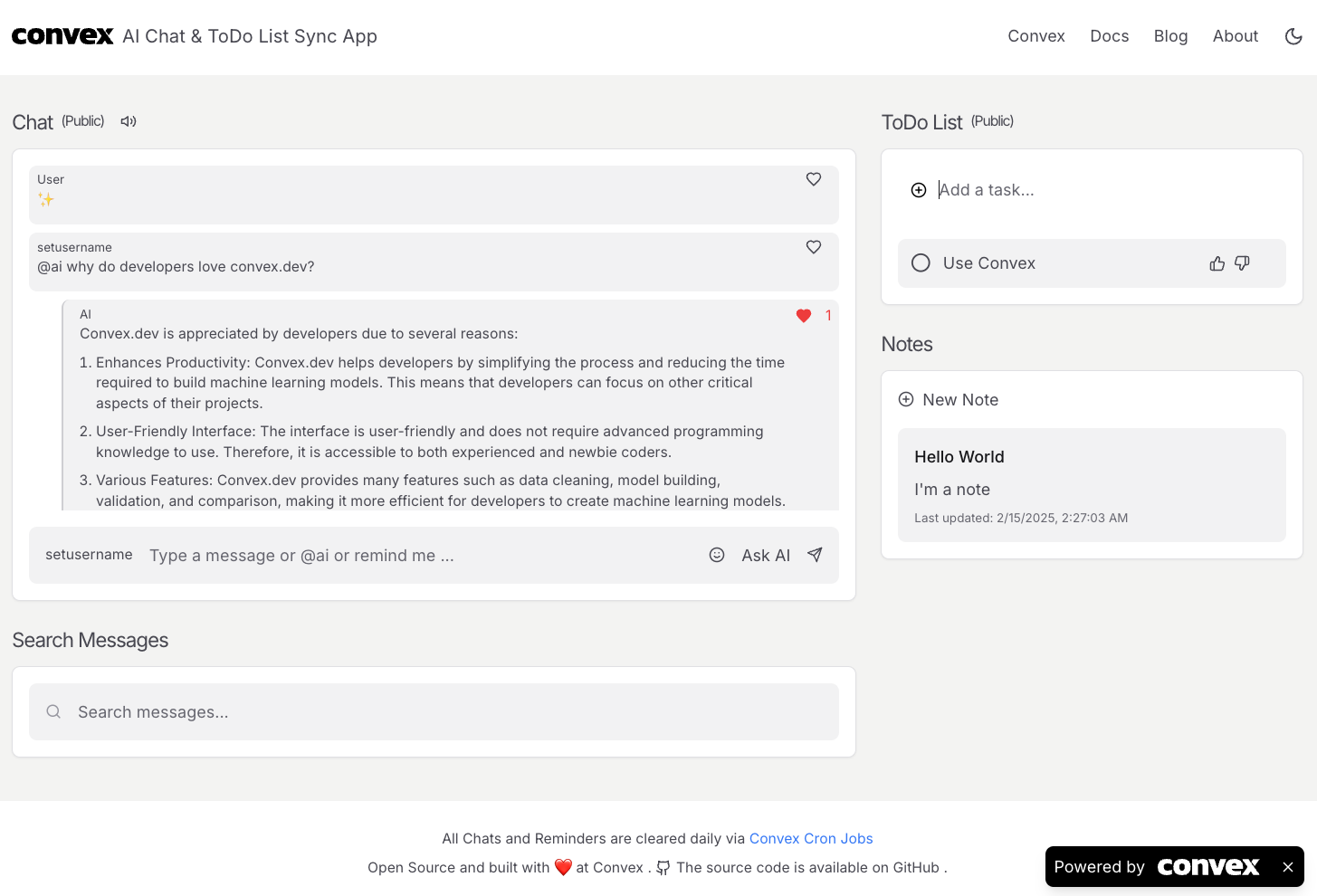
An open source chat and reminder application built with [Convex](https://convex.link/chatsynclinks), Clerk, and React. This application features real-time chat, task management, collaborative document editing, and an administrative dashboard for moderation.
## Features
- **Real-time Chat:**
- Public content warning for first-time users
- Send and receive chat messages instantly
- Set and customize your username at any time
- AI-powered chat responses using "@ai" command
- Real-time message streaming from OpenAI
- Create reminders by typing "remind me" in chat
- Create notes by typing "note:" in chat
- Search functionality for messages using vector search
- Like messages and see like counts
- Send emoji reactions
- Threaded AI responses
- Message highlighting for search results
- Code block syntax highlighting with copy functionality
- Markdown support for rich text formatting
- Real-time message streaming with typing indicators
- Assistant UI integration for enhanced chat experience
- Automatic cleanup every hour with system message restoration
- Easy to integrate OpenAI chat features (not included by default)
- **Collaborative Document Editing:**
- Real-time collaborative text editing with Liveblocks
- Multiple users can edit documents simultaneously
- Live presence indicators showing who is typing
- Document title collaboration
- Save and manage multiple documents per page
- Rich text formatting with TipTap editor
- Document version history
- Expandable document preview
- Quick actions for editing and deleting documents
- Live cursors and selections
- Collaborative comments and threads
- Document organization with titles and content
- Real-time updates across all clients
- Automatic content saving
- Document search and filtering
- Per-page document management
- Document deletion controls
- Document preview with content truncation
- Last updated timestamps
- Bulk document management per page
- **User Experience:**
- First-time user warning about public content
- Customizable username setting
- Mobile-responsive design
- Real-time message streaming
- Instant search results
- Beautiful UI with smooth transitions
- Hover tooltips for better UX
- Expandable content sections
- Tab-based navigation for different content types
- Local storage for user preferences
- Responsive mobile menu with hamburger navigation
- Accessible UI elements with ARIA labels
- Smooth scrolling to highlighted messages
- Copy functionality for code blocks and notes
- Automatic data cleanup every hour
- **Notes:**
- Create and manage notes for each page
- Rich text editing support
- Title and content organization
- Preview with content truncation
- Copy note content with one click
- Real-time updates across all clients
- Edit and delete functionality
- Timestamp tracking for updates
- Expandable note content
- Group hover controls for note actions
- Toggle view for messages, todos, and notes per page
- Bulk actions for clearing messages, todos, and notes
- Individual content management for each page
- Real-time content updates
- Markdown support for notes
- **Reminders/Todos:**
- Create and manage public reminders
- Toggle completion status
- Upvote and downvote reminders
- Real-time updates across all connected clients
- Delete reminders with hover controls
- Create todos directly from chat using "remind me"
- Vote count display
- Group hover animations for controls
- Visual completion indicators
- Timestamp tracking for todos
- **Search Functionality:**
- Real-time search as you type
- Message highlighting for search results
- Search results dropdown
- Click-to-scroll to message
- Search in both desktop and mobile views
- Clear search functionality
- Visual feedback for search matches
- Vector-based semantic search
- Filter search by sender
- **Admin Dashboard:**
- Moderation dashboard at `/mod`
- Sign in using Clerk to manage your profile
- View and delete individual or all chat messages
- Manage all reminders from one place
- Download chat history as CSV
- Create and manage multiple chat rooms
- Enable/disable chat rooms
- View message and reminder statistics
- Toggle view for messages, todos, notes, and documents per page
- Bulk actions for clearing messages, todos, notes, and documents
- Individual content management for each page
- Real-time content updates
- Document management per page
- Document preview in admin interface
- Document deletion controls
- Document organization by page
## Stack
- **Frontend:**
- **Language:** TypeScript
- **Framework:** React 18
- **Build Tool:** Vite
- **Styling:** Tailwind CSS
- **Routing:** React Router
- **UI Components:** Lucide Icons
- **Code Highlighting:** react-syntax-highlighter
- **Markdown:** react-markdown
- **Real-time Collaboration:** Liveblocks
- **Rich Text Editor:** TipTap
- **Backend:**
- **Database & Functions:** [Convex](https://convex.link/chatsynclinks)
- **Vector Search:** Convex Vector Search
- **Cron Jobs:** Convex Scheduling
- **WebSocket:** Convex Real-time Sync
- **Authentication:**
- **Provider:** Clerk
- **Features:** User management, role-based access
- **Hosting:**
- **Platform:** Netlify
- **Database:** Convex Cloud
- **Real-time:** WebSocket (Convex)
## Data Cleanup
All data (chats, reminders, notes, and documents) is automatically cleared every hour via Convex Cron Jobs. After each cleanup, a system message is automatically posted to each chat to maintain context. This helps maintain a clean and fresh environment for all users.
## Getting Started
1. Clone the repository:
```bash
git clone https://github.com/waynesutton/todohosted.git
cd todohosted
```
2. Install dependencies:
```bash
bun install
```
3. Set up environment variables:
Create a `.env.local` file with:
```
VITE_CONVEX_URL=your_convex_deployment_url
VITE_CLERK_PUBLISHABLE_KEY=your_clerk_publishable_key
OPENAI_API_KEY=your_openai_api_key
```
4. Start the development server:
```bash
bun dev
```
## Contributing
Contributions are welcome! Please feel free to submit a Pull Request.
## License
This project is licensed under the MIT License.
[](https://app.netlify.com/sites/insyc/deploys)