https://github.com/weazzylee/kamysh-tracker
KamyshTracker is a native OBS Studio plugin for Windows. It reads the current media session through Windows System Media Transport Controls (SMTC) and answers a Twitch chat command with the current track.
https://github.com/weazzylee/kamysh-tracker
mixitup music-bot obs obs-plugin obs-studio windows windows-app
Last synced: about 2 months ago
JSON representation
KamyshTracker is a native OBS Studio plugin for Windows. It reads the current media session through Windows System Media Transport Controls (SMTC) and answers a Twitch chat command with the current track.
- Host: GitHub
- URL: https://github.com/weazzylee/kamysh-tracker
- Owner: weazzylee
- License: mit
- Created: 2025-11-22T13:48:02.000Z (7 months ago)
- Default Branch: main
- Last Pushed: 2026-04-25T14:20:43.000Z (about 2 months ago)
- Last Synced: 2026-04-25T15:21:37.979Z (about 2 months ago)
- Topics: mixitup, music-bot, obs, obs-plugin, obs-studio, windows, windows-app
- Language: C++
- Homepage:
- Size: 165 KB
- Stars: 0
- Watchers: 1
- Forks: 0
- Open Issues: 0
-
Metadata Files:
- Readme: README.md
- License: LICENSE
Awesome Lists containing this project
README
# KamyshTracker
**Language / Язык:** **ENG** | [RU](README.ru.md)
KamyshTracker is a native OBS Studio plugin for Windows. It reads the current media session through Windows System Media Transport Controls (SMTC) and answers a Twitch chat command with the current track.
The old tray application and local HTTP API were removed. The plugin no longer opens `127.0.0.1:5050`, no longer exposes `/json` or `/widget`, and no longer uses an OBS Browser Source.
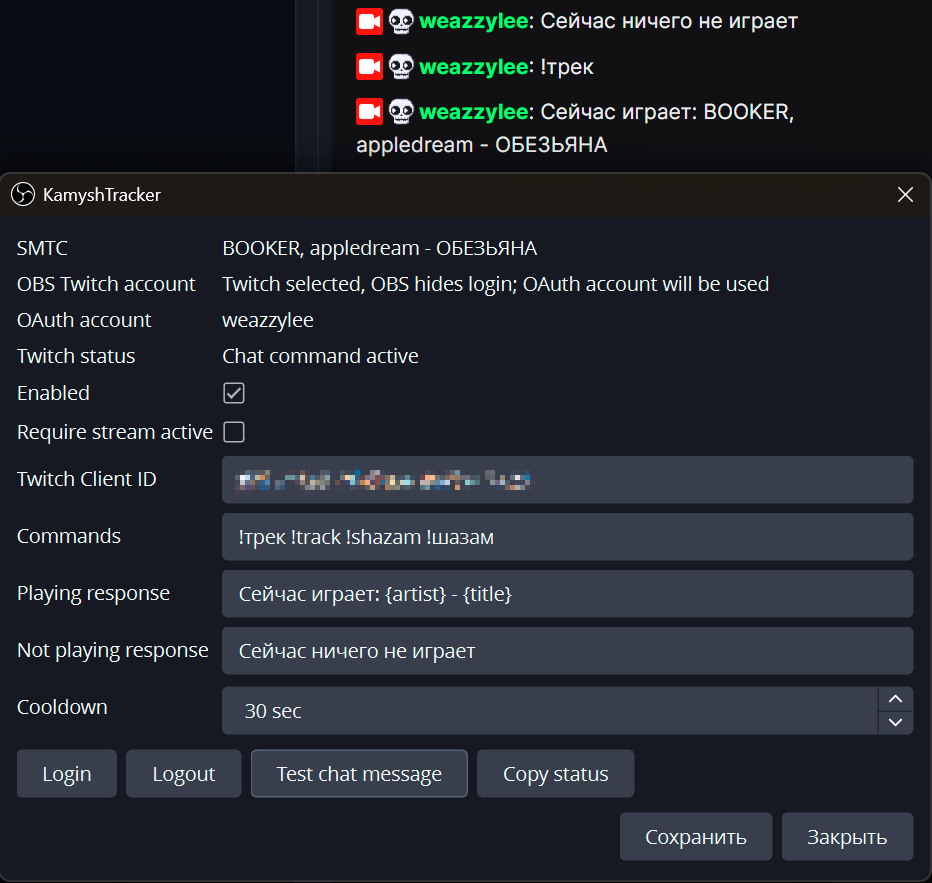
## What It Does
- Tracks current media from SMTC, with priority for Spotify and Yandex Music.
- Filters common non-music sources such as browsers, YouTube, Twitch, Netflix, Prime Video, Facebook, Instagram, and similar sources.
- Adds a `Tools -> KamyshTracker` settings window inside OBS.
- Authorizes Twitch separately with OAuth Authorization Code + PKCE.
- Checks that the authorized Twitch account matches the Twitch account selected in OBS before answering chat.
- Listens for chat messages through Twitch EventSub WebSocket.
- Sends replies through Twitch Helix Send Chat Message API.
## Requirements
- Windows 10/11 x64.
- OBS Studio 30.0.0+.
- For the prebuilt release package: no Visual Studio, CMake, Qt, or OBS development files are required.
- For building from source:
- Visual Studio 2022 Build Tools with MSVC.
- CMake 3.24+.
- Qt 6 with Widgets and Network.
- OBS/libobs development files available to CMake.
- A Twitch application Client ID. If the Twitch app is configured as Public client type, no client secret is required. If it is Confidential, fill `Twitch Client Secret` in the plugin settings so token refresh can work.
## Install From Release
1. Download `kamyshtracker-obs-plugin.zip` from the latest GitHub Release: .
2. Close OBS Studio.
3. Extract the archive into your OBS Studio installation directory, usually `C:\Program Files\obs-studio`.
4. Confirm that the extracted files land in these folders:
- `obs-plugins\64bit\kamyshtracker.dll`
- `data\obs-plugins\kamyshtracker\locale\`
5. Start OBS Studio and open `Tools -> KamyshTracker`.
The release package intentionally does not include Qt DLLs or Qt TLS plugins. KamyshTracker uses the Qt runtime bundled with OBS Studio, which avoids mixing incompatible Qt versions.
## Build
Configure the project with paths that match your OBS and Qt installation:
```powershell
cmake -S . -B build -G "Visual Studio 17 2022" -A x64 `
-DCMAKE_PREFIX_PATH="C:\Path\To\Qt;C:\Path\To\OBS"
cmake --build build --config Release
cmake --install build --config Release --prefix "C:\Program Files\obs-studio"
```
The plugin module is `kamyshtracker.dll`.
## Setup In OBS
1. Select and authorize Twitch as the current OBS streaming service.
2. Open `Tools -> KamyshTracker`.
3. Keep the default Twitch Client ID or replace it with your own application ID. If your Twitch app is Confidential, also fill `Twitch Client Secret`.
4. Click `Login`; your browser opens Twitch activation, then authorize the same Twitch account that OBS uses.
5. Configure the command and response templates.
Defaults:
- Commands: `!трек !track !shazam !шазам`
- Playing response: `Сейчас играет: {artist} - {title}`
- Not playing response: `Сейчас ничего не играет`
Available placeholders:
- `{artist}`
- `{title}`
- `{track}`
- `{source}`
If OBS is not configured for Twitch, KamyshTracker will not answer chat commands. If OBS exposes the Twitch login, the plugin requires it to match the OAuth account. If OBS only exposes a Twitch stream-key service and hides the login, the plugin uses the OAuth account and shows this in the settings window.
## Notes
OBS does not expose a supported public API for third-party plugins to reuse the Twitch OAuth token from the OBS login. KamyshTracker therefore performs its own OAuth login and treats OBS account matching as a safety gate.
Tokens and the optional Twitch Client Secret are stored in the current OBS profile configuration file `kamyshtracker.ini`. Access tokens, refresh tokens, and client secrets should not be shared.