https://github.com/web3nelly/change-obs-scene
Node.js npm module. Using obs-websocket-js to automate our live stream. See Automations in action on:
https://github.com/web3nelly/change-obs-scene
automatic-scene-switcher automation change-obs-scene nodejs npm-package obs obs-scene obs-scene-switcher obs-scenes obs-studio obs-switch-scene obs-websocket-js scene-switcher setcurrentprogramscene streaming switch-scenes websocket websocket-application
Last synced: 2 months ago
JSON representation
Node.js npm module. Using obs-websocket-js to automate our live stream. See Automations in action on:
- Host: GitHub
- URL: https://github.com/web3nelly/change-obs-scene
- Owner: web3nelly
- License: mit
- Created: 2023-04-05T03:07:25.000Z (about 3 years ago)
- Default Branch: main
- Last Pushed: 2023-04-07T08:59:41.000Z (about 3 years ago)
- Last Synced: 2025-09-27T11:36:57.357Z (9 months ago)
- Topics: automatic-scene-switcher, automation, change-obs-scene, nodejs, npm-package, obs, obs-scene, obs-scene-switcher, obs-scenes, obs-studio, obs-switch-scene, obs-websocket-js, scene-switcher, setcurrentprogramscene, streaming, switch-scenes, websocket, websocket-application
- Language: JavaScript
- Homepage: https://twitch.tv/breaking3Dreality
- Size: 24.4 KB
- Stars: 1
- Watchers: 1
- Forks: 0
- Open Issues: 0
-
Metadata Files:
- Readme: README.md
- Changelog: change-obs-scene.js
- License: LICENSE.md
Awesome Lists containing this project
README
# `@b3nelly/change-obs-scene` Node.js npm Package
With just a few lines of code, automate changing your OBS scenes using the [@b3nelly/change-obs-scene](https://www.npmjs.com/package/@b3nelly/change-obs-scene?activeTab=readme) npm package. 💜
## Dependancies
- [OBS](https://obsproject.com/)
- [Node.js](https://nodejs.org/)
- [NPM](https://www.npmjs.com/)
- [obs-websocket-js](https://www.npmjs.com/package/obs-websocket-js)
## Installation
```shell
npm install @b3nelly/change-obs-scene
```
## Usage
**First, launch OBS and enable the WebSocket Server**
`Tools > WebSocket Server Settings`:
- 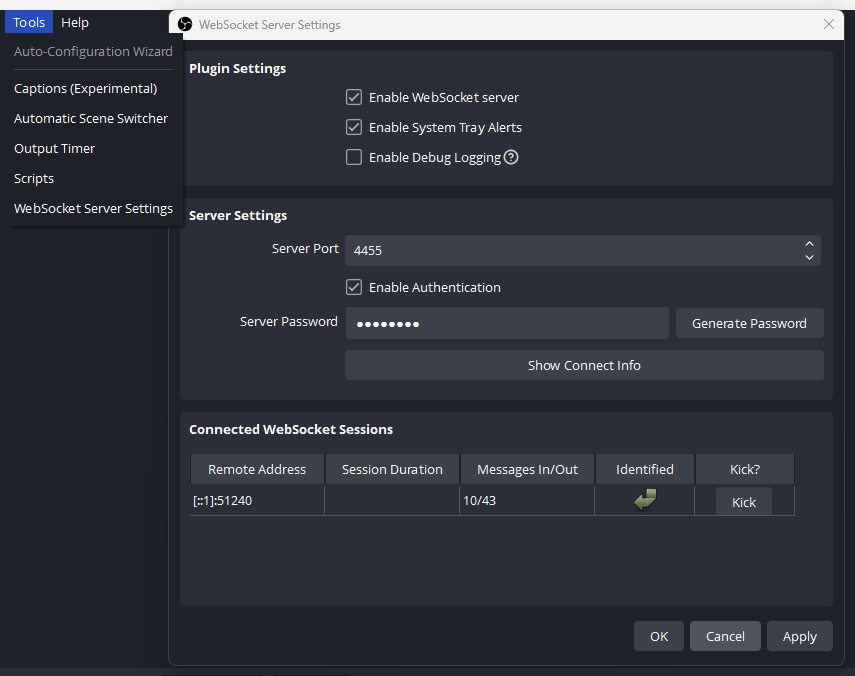
- Don't forget to set your _Server Password_
- If you do not set a password, you do not need to pass the `obsWebSocketServerPassword` param to `changeScene()`
### Simple Usage Example
```js
const changeScene = require("@b3nelly/change-obs-scene").default;
const intervalInSeconds = 30; // 30 seconds per scene
changeScene(intervalInSeconds); // it's that simple.
```
### CommonJS (cjs) Usage Example
```js
const changeScene = require("@b3nelly/change-obs-scene").default;
const obsSkipScenes = [];
const intervalInSeconds = 30;
const obsWebSocketServerPassword = "your-password-here";
const obsWebSocketServerURL = "ws://localhost:4455";
changeScene(
intervalInSeconds,
obsSkipScenes,
obsWebSocketServerPassword,
obsWebSocketServerURL
);
```
### ECMAScript Module (esm) Usage Example
```js
import changeScene from "@b3nelly/change-obs-scene";
const obsSkipScenes = [];
const intervalInSeconds = 30;
const obsWebSocketServerPassword = "your-password-here";
changeScene(intervalInSeconds, obsSkipScenes, obsWebSocketServerPassword);
```
### Asynchronous Module Definition (amd) Usage Example
```html
AMD Example
require.config({
paths: {
changeScene: "@b3nelly/change-obs-scene/dist/change-obs-scene.amd",
},
});
require(["changeScene"], function (changeScene) {
const obsSkipScenes = [];
const intervalInSeconds = 90;
const obsWebSocketServerPassword = "your-password-here";
changeScene(
intervalInSeconds,
obsSkipScenes,
obsWebSocketServerPassword
);
});
```
## API
```js
changeScene(
intervalInSeconds,
obsSkipScenes,
obsWebSocketServerPassword,
obsWebSocketServerURL
);
```
| Parameter | Type | Default | Description |
| :-------------------------------------- | :-------------: | :----------------------: | ----------------------------------------------------- |
| `intervalInSeconds` (optional) | `number` | `60` | Number of seconds between each scene |
| `obsSkipScenes` (optional) | `Array` | `[]` | An array of scene names to skip when switching scenes |
| `obsWebSocketServerPassword` (optional) | `string` | `undefined` | OBS WebSocket Server Password |
| `obsWebSocketServerURL` (optional) | `string` | `"ws_://localhost:4455"` | OBS WebSocket Server URL / IP |
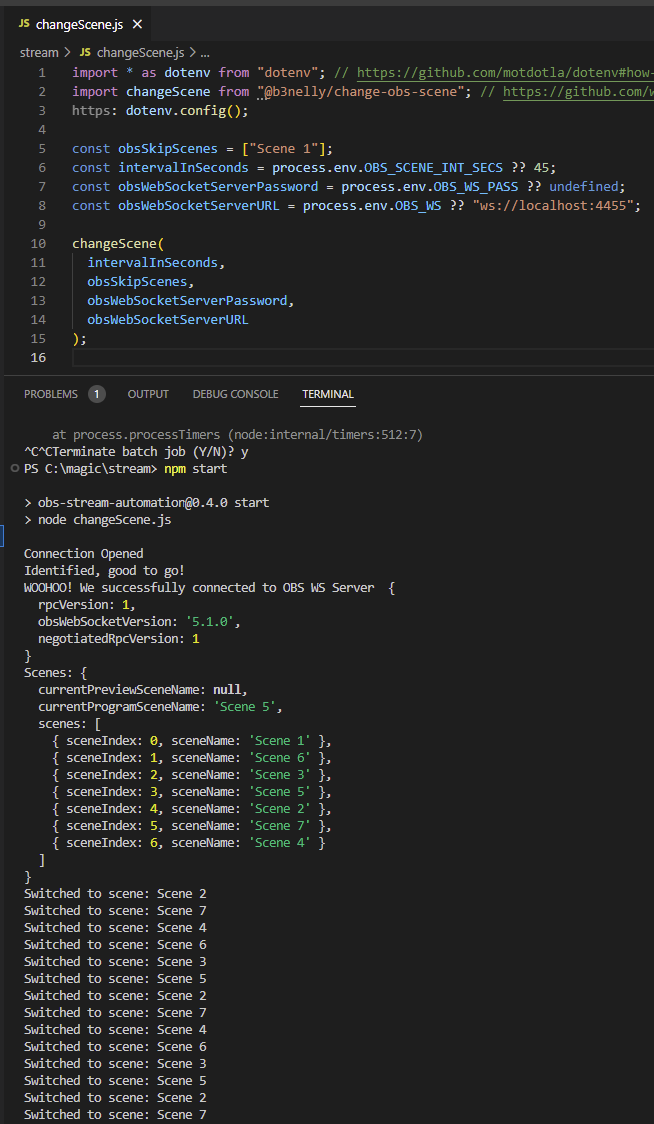
## `change-obs-scene` In Action
## CLI
```shell
npm run cli
```
You will be prompted to enter in the `changeSence()` params. Leave param blank to use default value.
## Build
```shell
npm run build
```
Running the `build` command will automatically create the `dist/` dir and create/update the `cjs`, `esm`, and `amd` files inside.
Configuration file [rollup.config.js](https://github.com/web3nelly/change-obs-scene/blob/275bf0d4d8e13b7ae7547e292f0d0997a192806b/rollup.config.js)
## Development Dependancies
- [@babel/core](https://www.npmjs.com/package/@babel/core)
- [@babel/preset-env](https://www.npmjs.com/package/@babel/preset-env)
- [@rollup/plugin-babel](https://www.npmjs.com/package/@rollup/plugin-babel)
- [@rollup/plugin-commonjs](https://www.npmjs.com/package/@rollup/plugin-commonjs)
- [@rollup/plugin-json](https://www.npmjs.com/package/@rollup/plugin-json)
- [@rollup/plugin-node-resolve](https://www.npmjs.com/package/@rollup/plugin-node-resolve)
- [@rollup/plugin-terser](https://www.npmjs.com/package/@rollup/plugin-terser)
- [rollup](https://www.npmjs.com/package/rollup)
## License
### MIT
This `README.md` file provides installation and usage instructions, as well as a brief description of the API for the [@b3nelly/change-obs-scene](https://www.npmjs.com/package/@b3nelly/change-obs-scene?activeTab=readme) package. Feel free to modify it as needed.