https://github.com/webdevtodayjason/mct2032
ESP32 Pen Testing Dev Project
https://github.com/webdevtodayjason/mct2032
cybersecurity esp32 penetration-testing pentesting
Last synced: 9 months ago
JSON representation
ESP32 Pen Testing Dev Project
- Host: GitHub
- URL: https://github.com/webdevtodayjason/mct2032
- Owner: webdevtodayjason
- Created: 2025-06-01T00:46:09.000Z (about 1 year ago)
- Default Branch: main
- Last Pushed: 2025-06-02T03:08:47.000Z (about 1 year ago)
- Last Synced: 2025-10-06T01:30:31.969Z (10 months ago)
- Topics: cybersecurity, esp32, penetration-testing, pentesting
- Language: C++
- Homepage: https://webdevtodayjason.github.io/mct2032/
- Size: 900 KB
- Stars: 5
- Watchers: 0
- Forks: 1
- Open Issues: 1
-
Metadata Files:
- Readme: README.md
Awesome Lists containing this project
README
# MCT2032 - Mini Cyber Tool 2032

[](https://github.com/webdevtodayjason/mct2032/releases)
[](https://opensource.org/licenses/MIT)
[](https://www.espressif.com/)
[](https://platformio.org/)
[](https://www.python.org/)
[](https://webdevtodayjason.github.io/mct2032/)
**A portable cybersecurity toolkit that fits in your pocket**
[Web Installer](https://webdevtodayjason.github.io/mct2032/) • [Documentation](docs/) • [Report Bug](https://github.com/webdevtodayjason/mct2032/issues) • [Request Feature](https://github.com/webdevtodayjason/mct2032/issues)
---
## 🎯 About The Project
MCT2032 transforms the Waveshare ESP32-S3-LCD-1.47 into a powerful cybersecurity research tool. With its circular display, dual-core processor, and wireless capabilities, it's the perfect platform for security professionals and enthusiasts.
**Why "Mini"?** At just 50mm × 38.5mm and $12.99, MCT2032 proves that powerful security tools don't need to be expensive or bulky. It's the most affordable entry point into professional WiFi security research.

---
## 🛡️ Hardware: Waveshare ESP32-S3-LCD-1.47
### Why This Device?
The Waveshare ESP32-S3-LCD-1.47 is the **first of its kind** to be transformed into a dedicated cybersecurity tool. While others focus on generic IoT projects, we're pioneering its use in the security sector.
### Technical Specifications
| Component | Specification |
|-----------|---------------|
| **Processor** | ESP32-S3 Dual-core Xtensa LX7 @ 240MHz |
| **Memory** | 512KB SRAM, 384KB ROM, 16MB Flash, 8MB PSRAM |
| **Display** | 1.47" Round LCD (172×320, 262K colors, ST7789 driver) |
| **Wireless** | 2.4GHz WiFi (802.11 b/g/n), Bluetooth 5.0 LE |
| **Storage** | MicroSD card slot (SPI) |
| **USB** | Type-C with native USB support |
| **GPIO** | 14 programmable pins |
| **Extras** | RGB LED, BOOT/RESET buttons |
| **Power** | 5V via USB-C, 3.3V operating |
| **Size** | 50.0mm × 38.5mm (pocket-sized!) |
| **Price** | ~$12.99 (Incredible value!) |
### Why It's Perfect for Cybersecurity
- 🚀 **Dual-Core Power**: Run packet capture on one core, UI on the other
- 📡 **Integrated Antenna**: No external antenna needed for WiFi/BLE operations
- 💾 **Massive Memory**: 8MB PSRAM handles large packet buffers
- 🎨 **Circular Display**: Unique form factor with custom cyberpunk UI
- 🔌 **Native USB**: Direct serial communication, no adapter needed
- 💰 **Affordable**: Professional features at hobbyist price
---
## ✨ Current Features
### 🟢 Working
- ✅ **WiFi Scanner** - Comprehensive network analysis
- SSID, BSSID, Channel, RSSI, Security detection
- Hidden network discovery
- Channel-specific scanning
- Real-time signal strength indicators
- ✅ **Stop Scan** - Interrupt long-running scans
- ✅ **BLE Admin Console** - Full device control via Bluetooth
- Cross-platform Python application
- Dark hacker-themed UI
- Real-time data visualization
- ✅ **Chunked Data Transfer** - Handle large datasets over BLE
- ✅ **Web Installer** - Browser-based firmware flashing
- ✅ **Circular UI** - Custom LVGL interface with animations
### 🟡 Framework Ready (Not Active)
- 🔨 Packet Monitor (promiscuous mode)
- 🔨 Deauth Attack capability
- 🔨 Beacon Spam framework
- 🔨 PCAP capture infrastructure
- 🔨 Evil Portal framework
---
## 🐛 Known Issues
- 🔴 **BLE Scanning**: Not implemented (returns "Not implemented yet")
- 🟡 **SD Card**: Not tested, may need initialization
- 🟡 **Battery Monitor**: Returns dummy value (100%)
- 🟡 **Advanced Features**: Framework only, not functional yet
---
## 📋 TODO List
### High Priority
- [ ] Implement BLE scanning functionality
- [ ] Add SD card support for PCAP storage
- [ ] Implement packet injection for deauth
- [ ] Create settings persistence system
- [ ] Add OTA update capability
### Medium Priority
- [ ] Battery voltage monitoring
- [ ] Channel hopping visualization
- [ ] Signal strength graphs
- [ ] Export scan results to CSV
- [ ] Implement WPS pin attacks
### Low Priority
- [ ] Custom boot logo
- [ ] Sound effects via piezo
- [ ] RGB LED patterns for status
- [ ] Power saving modes
---
## 🗺️ Roadmap
### Phase 1: Foundation (Current)
- ✅ Basic WiFi scanning
- ✅ BLE communication
- ✅ Admin console
- ✅ Web installer
### Phase 2: Security Tools (Q1 2025)
- 🎯 Active packet monitoring
- 🎯 Deauth attack implementation
- 🎯 Beacon spam activation
- 🎯 PCAP file creation
### Phase 3: Advanced Features (Q2 2025)
- 🎯 Evil Portal deployment
- 🎯 WPS vulnerability scanner
- 🎯 Bluetooth device scanner
- 🎯 Mesh network analysis
### Phase 4: Professional Tools (Q3 2025)
- 🎯 Custom packet crafting
- 🎯 Protocol fuzzing
- 🎯 MITM capabilities
- 🎯 Network mapping visualization
### Phase 5: Integration (Q4 2025)
- 🎯 Cloud dashboard
- 🎯 Multi-device coordination
- 🎯 AI-powered threat detection
- 🎯 Automated penetration testing
---
## 🤝 Contributing
**We need YOUR help to make MCT2032 the ultimate pocket cyber tool!**
### How You Can Help
#### 🐍 Python Developers
- Enhance the admin console UI
- Add data visualization features
- Implement export formats
- Create automated testing scripts
#### 🔧 C++ Developers
- Implement BLE scanning
- Optimize packet capture
- Add new attack vectors
- Improve memory management
#### 🎨 UI/UX Designers
- Create custom icons
- Design new UI themes
- Improve user workflows
- Create animation effects
#### 📚 Documentation Writers
- Write tutorials
- Create video guides
- Translate documentation
- Document API endpoints
#### 🧪 Security Researchers
- Test attack implementations
- Find vulnerabilities
- Suggest new features
- Create PoC exploits
### Getting Started
1. Fork the repository
2. Check our [Issues](https://github.com/webdevtodayjason/mct2032/issues) page
3. Pick a task from the TODO list
4. Create a feature branch
5. Submit a Pull Request
### Development Setup
```bash
# Clone the repo
git clone https://github.com/webdevtodayjason/mct2032.git
cd mct2032
# Set up firmware development
cd mct2032-firmware
pio lib install
# Set up admin console
cd ../mct2032-admin
python -m venv venv
source venv/bin/activate
pip install -r requirements.txt
```
---
## 🚀 Quick Start
### Option 1: Web Installer (Recommended)
1. Visit [https://webdevtodayjason.github.io/mct2032/](https://webdevtodayjason.github.io/mct2032/)
2. Connect your ESP32-S3 device via USB
3. Click "Install" and follow the prompts
4. Download and run the admin console
### Option 2: Build from Source
```bash
# Clone the repository
git clone https://github.com/webdevtodayjason/mct2032.git
cd mct2032
# Build and upload firmware
cd mct2032-firmware
pio run -t upload
# Run admin console
cd ../mct2032-admin
python -m venv venv
source venv/bin/activate # Windows: venv\Scripts\activate
pip install -r requirements.txt
python main.py
```
## UI Design
### ESP32 Display
- **Background**: Deep dark blue (#0a0e27, #0f0f23)
- **Border**: Purple gradient with glow effect (#8b5cf6)
- **Status Text**: Terminal green (#00ff41)
- **Mode Indicators**: Color-coded (Idle=Green, Scanning=Cyan, Attack=Red, etc.)
- **Connection Status**: Visual indicator (Red=Disconnected, Green=Connected)
### Admin Console
- **Framework**: Python Tkinter with CustomTkinter
- **Theme**: Dark hacker aesthetic matching the device
- **Features**:
- Real-time WiFi network display with signal strength indicators
- Console log with timestamp
- Tabbed interface for different functions
- Stop scan functionality
## Technical Details
### Communication Protocol
- **Transport**: Bluetooth LE with custom GATT service
- **Chunking**: Automatic chunking for responses > 512 bytes
- **Format**: JSON-based command/response protocol
- **Commands**: SCAN_WIFI, SCAN_BLE, GET_STATUS, and more
### Security Features
- **Passive Scanning**: Non-intrusive network discovery
- **Channel Hopping**: Monitor multiple channels
- **Packet Analysis**: Detailed frame type statistics
- **Research Mode**: Advanced features for security testing
## Development with Claude Code
This project is configured for Claude Code. See `CLAUDE.md` for detailed instructions.
### Key Points:
- Always update tasks in Dart before starting work
- Use Context7 for latest documentation
- Follow the dark hacker theme with purple gradients
- Test with Playwright
- Log all development activities
## Project Structure
```
mct2032/
├── mct2032-firmware/ # ESP32 firmware (PlatformIO)
│ ├── include/ # Header files
│ ├── src/ # Source files
│ └── platformio.ini # Build configuration
├── mct2032-admin/ # Python admin console
│ ├── mct2032_admin/ # Package source
│ └── requirements.txt # Python dependencies
├── web-installer/ # Web-based firmware installer
├── docs/ # Additional documentation
├── scripts/ # Build and release scripts
├── .claude/ # Claude Code configuration
└── logs/ # Development logs
```
## Building from Source
### Firmware
```bash
cd mct2032-firmware
pio run # Build
pio run -t upload # Upload to device
pio device monitor # Serial monitor
```
### Admin Console
```bash
cd mct2032-admin
pip install -r requirements.txt
python main.py
```
## Contributing
1. Check Dart for open tasks
2. Follow the established code style
3. Test all changes thoroughly
4. Update documentation as needed
---
## 📸 Screenshots

Compact Design

Scanning Mode

Admin Console
---
## 🏆 Why MCT2032?
### Compared to Other Tools
| Feature | MCT2032 | Flipper Zero | WiFi Pineapple | Proxmark3 |
|---------|---------|--------------|----------------|-----------|
| **Price** | $12.99 | $169 (+$29 for WiFi) | $99-$399 | $300+ |
| **WiFi Attacks** | ✅ Native | ⚠️ With addon | ✅ Specialized | ❌ |
| **Bluetooth** | ✅ BLE 5.0 | ✅ BLE | ❌ | ❌ |
| **Display** | ✅ Color LCD | ✅ Monochrome | ❌ Web UI | ❌ |
| **Sub-GHz Radio** | ❌ | ✅ | ❌ | ❌ |
| **NFC/RFID** | ❌ | ✅ | ❌ | ✅ Specialized |
| **Infrared** | ❌ | ✅ | ❌ | ❌ |
| **Open Source** | ✅ | ✅ | ✅ | ✅ |
| **Pocket Size** | ✅ (50mm) | ✅ | ⚠️ Varies | ✅ |
| **Web Installer** | ✅ | ❌ | ❌ | ❌ |
| **Battery** | USB-C Power | ✅ Built-in | ⚠️ Varies | USB Power |
| **Target Users** | WiFi/BLE Research | Multi-Protocol | WiFi Pentesting | RFID Research |
---
## 🛠️ Technical Architecture
```mermaid
graph TD
A[ESP32-S3] -->|SPI| B[1.47" LCD]
A -->|WiFi| C[2.4GHz Networks]
A -->|BLE| D[Admin Console]
A -->|GPIO| E[RGB LED]
A -->|SPI| F[SD Card]
D -->|Python| G[Cross-Platform GUI]
C -->|Scan| H[Network Data]
H -->|JSON| D
```
---
## 📚 Documentation
- 📖 [Getting Started Guide](docs/GETTING_STARTED.md)
- 🔧 [Hardware Setup](docs/HARDWARE_SETUP.md)
- 💻 [API Reference](docs/API_REFERENCE.md)
- 🎨 [UI Customization](docs/UI_CUSTOMIZATION.md)
- 🔐 [Security Features](docs/SECURITY_FEATURES.md)
- 📡 [Protocol Documentation](docs/PROTOCOL.md)
---
## 🌟 Community
- 💬 [Discord Server](https://discord.gg/mct2032) *(Coming Soon)*
- 🐦 [Twitter Updates](https://twitter.com/mct2032) *(Coming Soon)*
- 📺 [YouTube Tutorials](https://youtube.com/@mct2032) *(Coming Soon)*
- 📝 [Blog](https://mct2032.tech) *(Coming Soon)*
---
## 🙏 Acknowledgments
- Inspired by [ESP32 Marauder](https://github.com/justcallmekoko/ESP32Marauder) and [Bruce](https://github.com/pr3y/Bruce)
- Built with [ESP-IDF](https://github.com/espressif/esp-idf) and [PlatformIO](https://platformio.org/)
- UI powered by [LVGL](https://lvgl.io/)
- Admin console uses [CustomTkinter](https://github.com/TomSchimansky/CustomTkinter)
---
## ⚖️ Legal Disclaimer
**IMPORTANT:** This tool is designed for legitimate security research and testing on networks you own or have explicit permission to test.
- ⚠️ **Unauthorized network scanning or attacks are illegal**
- ⚠️ **Users are responsible for complying with all applicable laws**
- ⚠️ **We are not responsible for misuse of this tool**
- ✅ **Only use on networks you own or have written permission to test**
---
## 📄 License
This project is licensed under the MIT License - see the [LICENSE](LICENSE) file for details.
---
### Made with ❤️ by the MCT2032 Community
[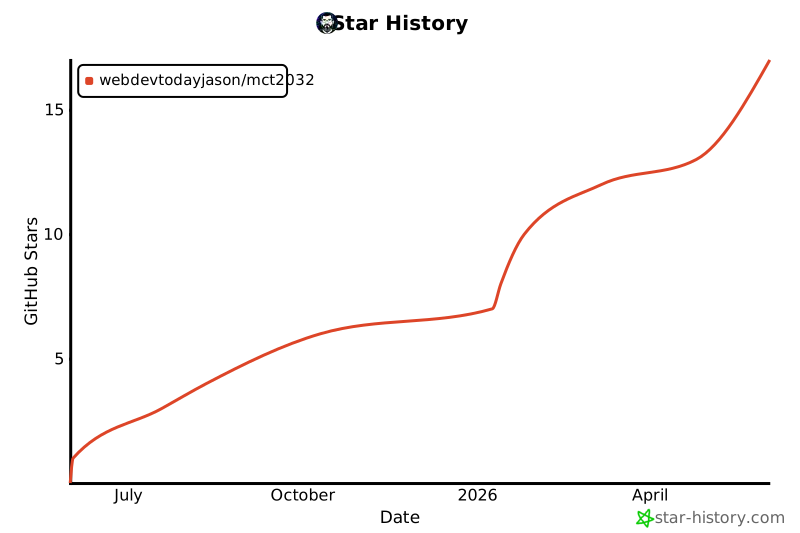](https://star-history.com/#webdevtodayjason/mct2032&Date)
**If you find this project useful, please consider giving it a ⭐!**