https://github.com/webhookrelay/node-red-contrib-webhookrelay
https://github.com/webhookrelay/node-red-contrib-webhookrelay
Last synced: 5 months ago
JSON representation
- Host: GitHub
- URL: https://github.com/webhookrelay/node-red-contrib-webhookrelay
- Owner: webhookrelay
- Created: 2018-12-18T23:20:59.000Z (over 7 years ago)
- Default Branch: master
- Last Pushed: 2020-03-01T13:21:56.000Z (over 6 years ago)
- Last Synced: 2025-10-04T10:18:47.967Z (9 months ago)
- Language: JavaScript
- Size: 11.7 KB
- Stars: 8
- Watchers: 1
- Forks: 2
- Open Issues: 4
-
Metadata Files:
- Readme: README.md
Awesome Lists containing this project
README

[](https://drone-kr.webrelay.io/webhookrelay/node-red-contrib-webhookrelay)
## Webhook Relay
`node-red-contrib-webhookrelay` package provides an easy way to receive webhooks without exposing whole Node-RED instance to the internet. Webhooks are received through public cloud endpoint and then are streamed over secure connections to your Node-RED.
## What problem does it solve?
Node-RED is great at receiving and processing various kinds of events but is not considered safe to be exposed to the internet (more info [here](https://github.com/node-red/cookbook.nodered.org/wiki/How-to-safely-expose-Node-RED-to-the-Internet)). Also, to expose Node-RED to the internet, you will need to either deploy it on a public cloud instance or configure your router NAT/firewall.
## Example use case
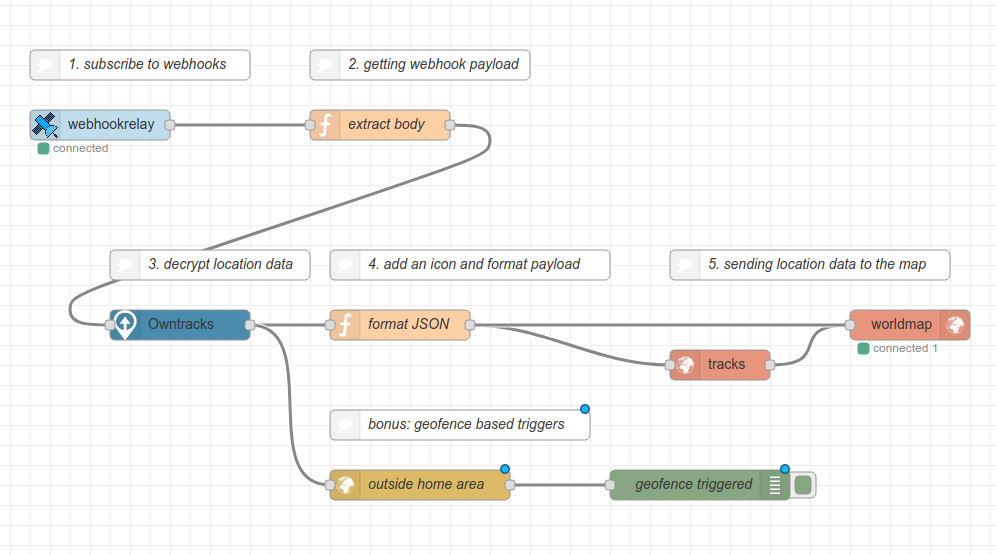
Here's an example of how to receive and process webhooks on your private Node-RED server (than can be running on your laptop) from a remote device such as a smartphone. Other services such as IFTTT, Zapier or Google Home are great examples of useful integrations. You can get all the webhook details from the node:
## How it works
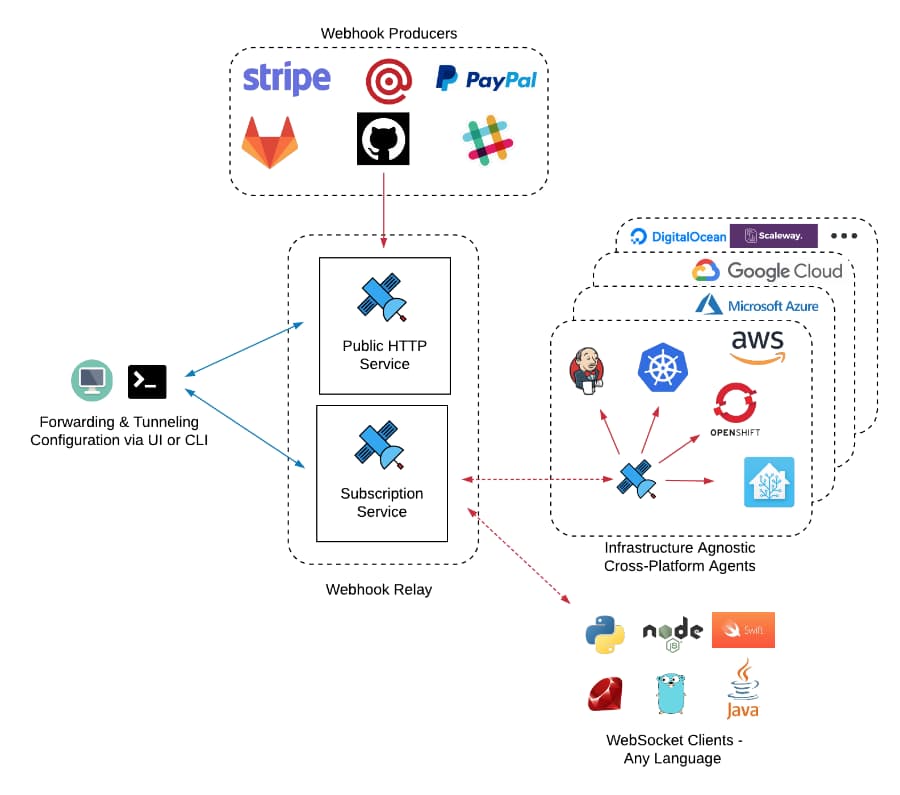
Webhook Relay acts as a gateway to accept all webhooks and then route them to connected clients based on routing configuration. Connected clients can either be lightweight executables, Docker containers or WebSocket clients (this library is based on [our ws client](https://www.npmjs.com/package/webhookrelay-ws-client)):
## Usage
1. Create a bucket `nodered` (or any other name) on the [buckets page](https://my.webhookrelay.com/buckets)
2. Get your authentication [token key and secret](https://my.webhookrelay.com/tokens)
3. Install our node:
```bash
npm install node-red-contrib-webhookrelay
```
4. Open node your node to add bucket name, authentication key and secret.
5. Connect any other node to your output.
Example JSON input to the `https://my.webhookrelay.com/v1/webhooks/544a6fe8-83fe-4361-a264-0fd486e1665d` endpoint:
```json
{
"msg": "hello Node-RED!"
}
```
Example JSON object output from the node:
```json
{
"topic": "nodered",
"payload": {
"type": "webhook",
"meta": {
"id": "xxxxx-xxxx-xxxx-ab1d-89a8b0505693",
"bucked_id": "12302faf-43bd-43c4-ab1d-89a8b0505693",
"bucket_name": "nodered",
"input_id": "544a6fe8-83fe-4361-a264-0fd486e1665d",
"input_name": "Default public endpoint",
"output_name": "",
"output_destination": ""
},
"headers": {
"Content-Type": ["application/json"],
"Accept": ["*/*"],
"Content-Length": ["29"],
"User-Agent": ["insomnia/6.3.1"],
"Cookie": ["__cfduid=dc244a014f0b1e2965544ddb483c3fe1b1525866866"]
},
"query": "",
"body": "{\n\t\"msg\": \"hello Node-RED!\"\n}",
"method": "PUT"
},
"_msgid": "43de3dbf.04f4c4"
}
```
### Sending responses back to the caller
First, ensure that your bucket's input is configured to return responses (by default for security reasons it will always return 200 status code and an empty body):
1. Go to your buckets page https://my.webhookrelay.com/buckets
2. Go to the bucket details
3. Click on input's settings
4. From the dropdown select "Any output"
Now, to send back responses from the Node-RED back to Webhook Relay so it can respond to the caller, form a payload:
```javascript
return {
meta: msg.payload.meta, // this is original meta field from the payload (it's important to include it so we have the message ID)
status: 200, // status code to return (200, 201, 400, etc)
body: "any payload here (if you want to send JSON, just stringify it first)", // body
headers: {
someheader: ['somevalue']
}
};
```
Then, send this payload back to the Webhook Relay node through its input.
## Alternative methods
You can also use Webhook Relay CLI. One way forwarding webhooks
```bash
relay forward --bucket nodered http://127.0.0.1:1880/your/http/endpoint
```
Or exposing whole Node-RED to the internet:
```bash
relay connect http://127.0.0.1:1880
```
## Pricing - Free + paid options
Webhook Relay has a free tier that can be enough for a lot of integration (CI/CD) but consider subscribing to a paid plan to support the project. Pricing can be found here: https://webhookrelay.com/pricing/.