https://github.com/webpatch/asset2enum
Automatic generate swift enum based on xcassets file
https://github.com/webpatch/asset2enum
Last synced: 11 months ago
JSON representation
Automatic generate swift enum based on xcassets file
- Host: GitHub
- URL: https://github.com/webpatch/asset2enum
- Owner: webpatch
- Created: 2015-08-13T14:35:55.000Z (almost 11 years ago)
- Default Branch: master
- Last Pushed: 2015-08-14T01:59:11.000Z (almost 11 years ago)
- Last Synced: 2025-07-27T09:50:07.521Z (12 months ago)
- Language: Python
- Homepage:
- Size: 199 KB
- Stars: 0
- Watchers: 1
- Forks: 0
- Open Issues: 0
-
Metadata Files:
- Readme: README.md
Awesome Lists containing this project
README
# Asset2Enum
Automatic generate enum based on `.xcassets` file
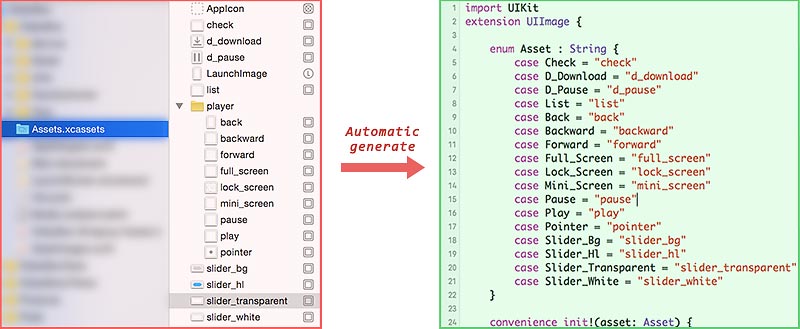
## Enum file
The enum file `AssetImages.swift` will look like the following:
```swift
import UIKit
extension UIImage {
enum Asset : String {
case Check = "check"
case List = "list"
case Back = "back"
case Backward = "backward"
case Forward = "forward"
case Full_Screen = "full_screen"
case Lock_Screen = "lock_screen"
case Mini_Screen = "mini_screen"
}
convenience init!(asset: Asset) {
self.init(named: asset.rawValue)
}
}
```
Once the enum file generated and added to Xcode, you can use it like the following:
```swift
let img1 = UIImage(asset: .Back)
let img2 = UIImage(asset: .Forward)
```
##Usage
###Install (Once for all)
1. Download the [xcassets.py](https://raw.githubusercontent.com/webpatch/xcassets-enum-automatic-generator/master/xcassets.py) and copy it to project's root directory (where the `.xcodeproj` file is located).
2. Open terminal, `cd` to project's root directory, and excute the script in terminal:
```shell
python xcassets.py -i
```
3. All done!
> When you change the `.xcassets` file, you need to rebuild the project first, and then it will automatic update the enum file.
###Uninstall
1. Delete the `AssetImages.swift` (choose `Move to Trash`) from Xcode.
2. In project's `Build Phases` settings, delete the entry of `Auto generate xcassets enums`.
3. Delete `xcassets.py`.
##Script argument
|arg|description|
|---|---|
|`-i`|init the script|
|`-u`|update the enum file|
|`-f`|force to update the enum file|
|`-h`|help|