https://github.com/webplusmultimedia/filament-json-media
a media library base on json field with custom properties + Galleries on front-end
https://github.com/webplusmultimedia/filament-json-media
columns documents fields filament galery infolists json media
Last synced: 10 months ago
JSON representation
a media library base on json field with custom properties + Galleries on front-end
- Host: GitHub
- URL: https://github.com/webplusmultimedia/filament-json-media
- Owner: webplusmultimedia
- License: mit
- Created: 2024-02-24T20:10:25.000Z (over 2 years ago)
- Default Branch: main
- Last Pushed: 2025-07-20T21:16:18.000Z (12 months ago)
- Last Synced: 2025-07-20T22:46:15.868Z (12 months ago)
- Topics: columns, documents, fields, filament, galery, infolists, json, media
- Language: PHP
- Homepage: https://filamentphp.com/plugins/webplusm-json-media
- Size: 289 KB
- Stars: 13
- Watchers: 2
- Forks: 4
- Open Issues: 0
-
Metadata Files:
- Readme: README.md
- Changelog: CHANGELOG.md
- Contributing: .github/CONTRIBUTING.md
- Funding: .github/FUNDING.yml
- License: LICENSE.md
- Security: .github/SECURITY.md
Awesome Lists containing this project
README
# A Gallery media (Json) for Filament
[](https://packagist.org/packages/webplusm/gallery-json-media)
[](https://github.com/webplusmultimedia/filament-json-media/actions?query=workflow%3Arun-tests+branch%3Amain)
[](https://packagist.org/packages/webplusm/gallery-json-media)
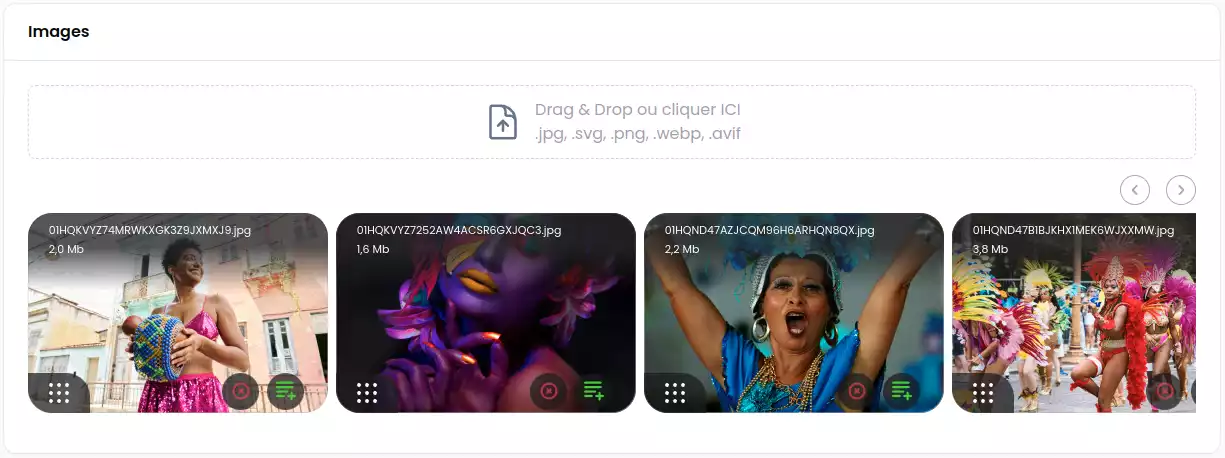
This package add a json field media for images/documents to filament V3.x and fluents api for front-end in Laravel to display photos and url link for documents ...
It is a simple and easy way to manage media in your Laravel application using Filament.
[V3x doc](https://github.com/webplusmultimedia/filament-json-media/tree/3.x) => **Filament V3.x**
## Features
- **Fluent API**: A fluent API for managing media in your Laravel application.
- **Blade Components**: Blade components for displaying media in your Laravel application.
- **Custom Properties**: Custom properties for media, allowing you to add additional informations to your media.
[](https://postimg.cc/wtLMvcK9)
## Requirements
V4.x => **Filament V4.x** (^PHP 8.2 need)
## Installation
You can install the package via composer:
```bash
composer require webplusm/gallery-json-media
```
## Configuration
Publish the config file with:
```bash
php artisan vendor:publish --tag="gallery-json-media-config"
```
You can change the driver for cropping :
```php
use Spatie\Image\Enums\ImageDriver;
return [
...
'images' => [
'driver' => ImageDriver::Gd, // or ImageDriver::Imagick
],
...
]
```
### Translations
You can publish the translations :
```bash
php artisan vendor:publish --tag="gallery-json-media-translations"
```
### CSS configuration
1. You need to [create a theme for your panel](https://filamentphp.com/docs/4.x/styling/overview#creating-a-custom-theme) if you don't have one already,
2. and then add the following to your `theme.css` file:
```css
@import '../../../../vendor/webplusm/gallery-json-media/resources/css/json-media.css';
```
Optionally, you can publish the views using, but please if you don't know what it is, don't do it.
```bash
php artisan vendor:publish --tag="gallery-json-media-views"
```
## Discord
Find it on [discord](https://discord.com/channels/883083792112300104/1220043851977199616)
## Usage
### Prepare your model
```php
use GalleryJsonMedia\JsonMedia\Concerns\InteractWithMedia;
use GalleryJsonMedia\JsonMedia\Contracts\HasMedia;
class Page extends Model implements HasMedia
{
use HasFactory;
use InteractWithMedia;
protected $casts =[
'images' => 'array',
'documents' => 'array',
];
// for auto-delete media thumbnails
protected function getFieldsToDeleteMedia(): array {
return ['images','documents'];
}
...
}
```
### In Filament Forms
```php
use GalleryJsonMedia\Form\JsonMediaGallery;
JsonMediaGallery::make('images')
->directory('page')
->reorderable()
->acceptedFileTypes()
->visibility() // only public for now - NO S3
->maxSize(4 * 1024)
->minSize()
->maxFiles(2)
->minFiles(1)
->replaceTitleByAlt() // If you want to show alt customProperties against file name
->image() // only images by default , u need to choose one method (image or document)
->document() // only documents (eg: pdf, doc, xls,...)
->downloadable()
->deletable()
->withCustomProperties(
customPropertiesSchema: [
...some form fields here
],
editCustomPropertiesOnSlideOver: true,
editCustomPropertiesTitle: "Edit customs properties"
)
->editableCustomProperties(bool|Closure) // if you want to enable/disable the custom properties edition ;
```
### In Filament Tables

```php
use GalleryJsonMedia\Tables\Columns\JsonMediaColumn;
JsonMediaColumn::make('images')
->avatars(bool|Closure)
```
### In Filament Infolists
```php
use GalleryJsonMedia\Infolists\JsonMediaEntry;
use GalleryJsonMedia\Infolists\JsonDocumentsEntry;
JsonMediaEntry::make('images')
->avatars()
->thumbHeight(100)
->thumbWidth(100)
->visible(static fn(array|null $state)=> filled($state))
// or for Documents, you can download them here
GalleryJsonMedia\Infolists\JsonDocumentsEntry::make('documents')
->columns(4)
->columnSpanFull()
```
### In Blade Front-end
```html
@foreach($page->getMedias('images') as $media)
{{ $media }}
@endforeach
@foreach($page->getDocuments('documents') as $document)
-
{{ $document->getCustomProperty('title') }}
@endforeach
```
You can also control the entire view to render the media by passing a blade file to your view like this :
```html
@foreach($page->getMedias('images') as $media)
{{ $media->withImageProperties( width : 200,height: 180)->withView('page.json-media') }}
@endforeach
@php
use GalleryJsonMedia\JsonMedia\Media;
/** @var Media $media*/
$media
@endphp
%20}})
```
## Testing
```bash
composer test
```
## Changelog
Please see [CHANGELOG](CHANGELOG.md) for more information on what has changed recently.
## Contributing
Please see [CONTRIBUTING](.github/CONTRIBUTING.md) for details.
## Security Vulnerabilities
Please review [our security policy](https://github.com/webplusmultimedia/filament-json-media/security/policy) on how to report security vulnerabilities.
## Credits
- [webplusm](https://github.com/webplusmultimedia)
## License
The MIT License (MIT). Please see [License File](LICENSE.md) for more information.