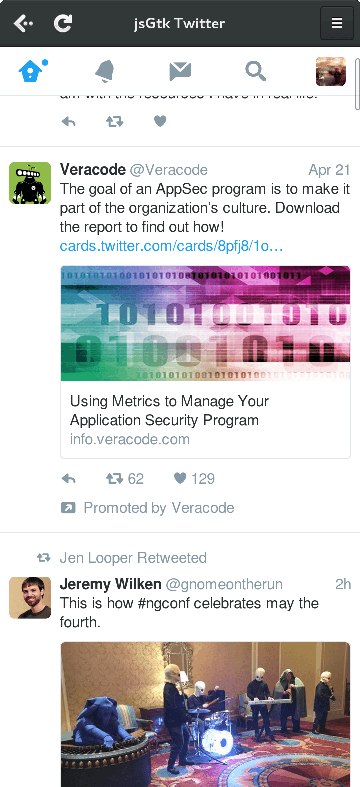
https://github.com/webreflection/jsgtk-twitter
JSGtk Desktop Twitter Client based on Mobile Twitter
https://github.com/webreflection/jsgtk-twitter
Last synced: about 1 year ago
JSON representation
JSGtk Desktop Twitter Client based on Mobile Twitter
- Host: GitHub
- URL: https://github.com/webreflection/jsgtk-twitter
- Owner: WebReflection
- Created: 2016-05-04T15:46:56.000Z (over 10 years ago)
- Default Branch: master
- Last Pushed: 2016-06-30T19:08:44.000Z (about 10 years ago)
- Last Synced: 2025-04-21T01:05:07.705Z (over 1 year ago)
- Language: JavaScript
- Size: 330 KB
- Stars: 31
- Watchers: 3
- Forks: 1
- Open Issues: 0
-
Metadata Files:
- Readme: README.md
Awesome Lists containing this project
README
# A Desktop Client for Twitter Mobile
... if that makes any sense to you.
### WAT!?!
Twitter released a new https://mobile.twitter.com/ which looks pretty nice.
You can finally have it as stand-alone application on Linux Desktop too,
through a simple wrapper written in few hours of JavaScript writing and testing.

This is the beauty of [writing native App with JavaScript](https://www.webreflection.co.uk/blog/2015/12/08/writing-native-apps-with-javascript).
## How To Install on Mac / OSX
**Note**: Highly experimental, it takes long time to install due lack of pre-built WebKit2GTK quartz package via MacPorts.
If you don't have Command Line Tools already installed, please write this on your terminal:
```sh
# content in https://github.com/WebReflection/jsgtk/blob/gh-pages/clt
sh -c "$(curl -fsSL https://webreflection.github.io/jsgtk/clt)"
```
After that, the only current working packages manager is MacPorts.
Please download and install it [from the official page](https://www.macports.org/install.php).
The last step is to install [jsgtk]() and all dependencies, including WebKit2 GTK.
Please write this in console.
```sh
# content in https://github.com/WebReflection/jsgtk/blob/gh-pages/install
WEBKIT=true sh -c "$(curl -fsSL https://webreflection.github.io/jsgtk/install)"
```
Please note it might take very long time to fully build all dependencies.
In case you have/want X11 instead of quartz as UI backend, please export `X11=true` too.
If you don't want any `gstreamer1-gst-plugin-bad`, neither `x11` nor `gtk2`, you can export `PURE_QUARTZ=true`.
## How To Install on Linux
The dependency number 1 is [jsgtk](https://github.com/WebReflection/jsgtk).
There are [few ways to install it](https://github.com/WebReflection/jsgtk#how-to-install), just pick your favorite.
The easiest way is to write this on a terminal:
```sh
# content in https://github.com/WebReflection/jsgtk/blob/gh-pages/install
WEBKIT=true sh -c "$(curl -fsSL https://webreflection.github.io/jsgtk/install)"
```
## How to run
I haven't yet created a proper [AUR](https://wiki.archlinux.org/index.php/Arch_User_Repository) or [npm](https://www.npmjs.com/) package yet, but I eventually will.
The simplest way to use this app is to clone this repository and then launch `./app`.
The first time only you'll need to login through the website.
This app doesn't hold, send, use, or analyze anything about you, your account, your twitter activity, or your credentials.
### How to install on Linux as Desktop App
There is an `app.install` which, if executed, should make the app available through the main Desktop environment, at least in ArchLinux and GNOME, [which is my primary OS of choice](http://archibold.io/).
### How to test stuff ?
Remember to launch the app via `./app --debug` to get notified about all the things and have no conflicts with the live web app.