https://github.com/webuccinoco/mysql-pivot-tables
Build complex MySQL pivot tables without touching a single line of code. This free PHP tool lets you visually connect your database and map out your data sources with a few simple clicks.
https://github.com/webuccinoco/mysql-pivot-tables
business-analytics business-intelligence crosstab data-analysis data-analytics data-visualization mysql mysql-database mysql-pivot-table mysql-reports mysql-virtualization php php-pivot-table php-reports pivot-tables reporting-tools
Last synced: 5 months ago
JSON representation
Build complex MySQL pivot tables without touching a single line of code. This free PHP tool lets you visually connect your database and map out your data sources with a few simple clicks.
- Host: GitHub
- URL: https://github.com/webuccinoco/mysql-pivot-tables
- Owner: webuccinoco
- License: mit
- Created: 2025-08-04T10:53:58.000Z (11 months ago)
- Default Branch: main
- Last Pushed: 2026-02-03T21:42:11.000Z (5 months ago)
- Last Synced: 2026-02-04T10:34:32.036Z (5 months ago)
- Topics: business-analytics, business-intelligence, crosstab, data-analysis, data-analytics, data-visualization, mysql, mysql-database, mysql-pivot-table, mysql-reports, mysql-virtualization, php, php-pivot-table, php-reports, pivot-tables, reporting-tools
- Language: PHP
- Homepage: https://mysqlreports.com/php-mysql-pivot-tables/
- Size: 3.38 MB
- Stars: 1
- Watchers: 0
- Forks: 0
- Open Issues: 0
-
Metadata Files:
- Readme: README.md
- License: LICENSE
Awesome Lists containing this project
README
# 📊 Smart Pivot Table - A Free MYSQL Pivot Table Builder
Transform your MySQL data into insightful pivot tables with Smart Pivot Table—a completely free PHP tool that eliminates the need for coding. Its intuitive visual interface allows you to connect your database and define data sources instantly, making complex data analysis accessible to everyone.
## What is a Pivot Table?
A pivot table is a powerful data processing tool used to summarize, sort, reorganize, group, count, total, or average data stored in a database. It allows you to transform rows of raw data into a meaningful multidimensional summary without changing the original data.
Pivot tables provide powerful summarization of data, allowing you to condense thousands of rows into a few key metrics. They are essential for identifying trends, comparing large datasets, and turning overwhelming amounts of information into actionable insights. Instead of scrolling through endless records, a pivot table gives you a bird's-eye view of your business performance in seconds.
## Ways to create MYSQL Pivot Tables
- Manual Coding: You can write complex SQL queries using CASE statements and GROUP BY clauses. This "do-it-yourself" approach requires deep SQL expertise and significant time to maintain [check this blog post for more details.](https://mysqlreports.com/php-mysql-pivot-tables/)
- Free Visual Tools: Use a tool like Smart Pivot Table to build these tables visually. It’s a great way to skip the coding process entirely while keeping your project budget-friendly.
- Commercial Solutions: A professional tool like [Smart Report Maker.](https://mysqlreports.com/php-mysql-pivot-tables/) offers more advanced features, enhanced security, and premium support.
## Main Features of Smart Report Maker
### Core Functionality
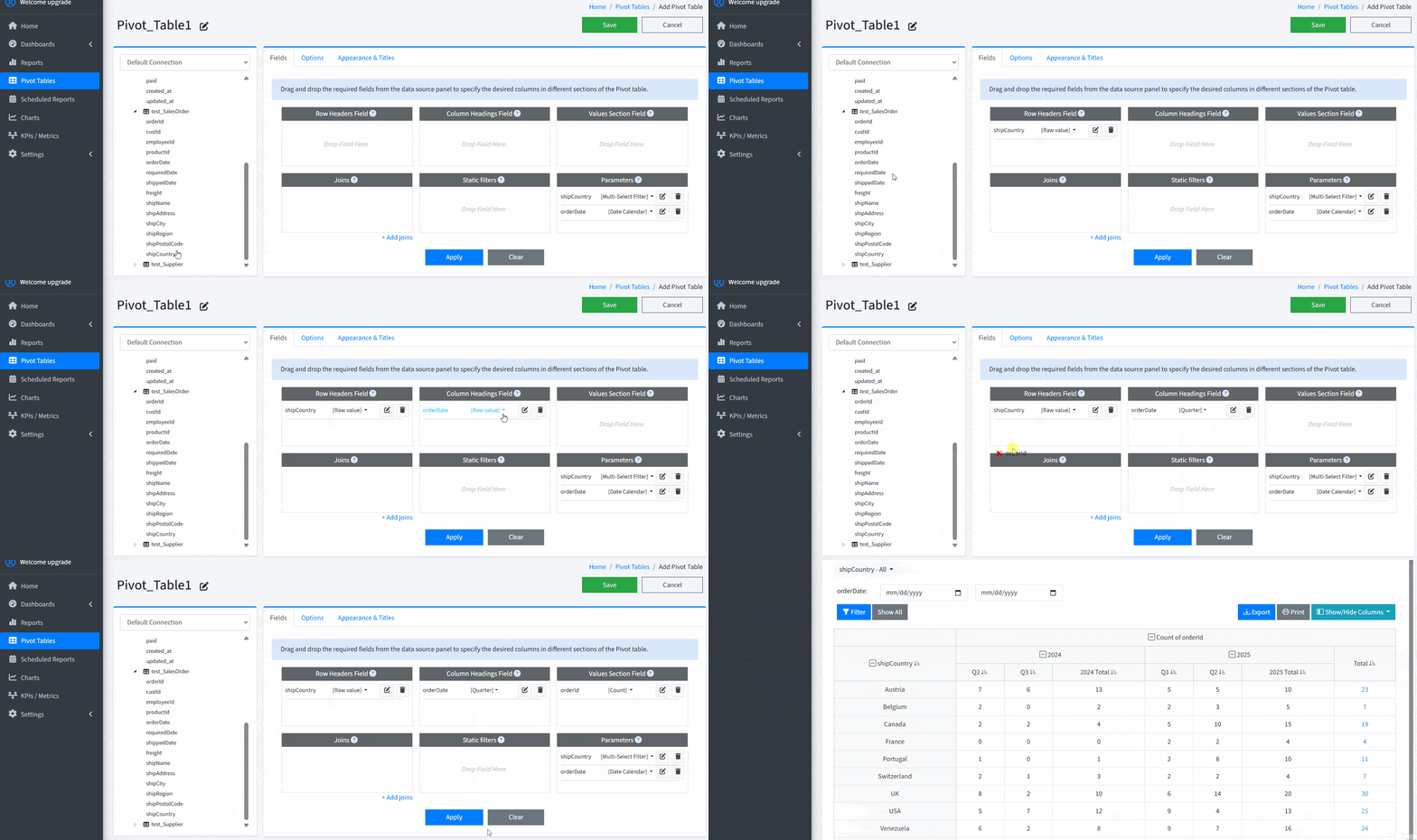
- Visual Pivot Builder: Create complex MySQL pivot tables without writing SQL. Connect to databases, select tables or views, and map fields to axes using an intuitive graphical interface.
- No-Code Data Shaping: Define rows, columns, and metrics through simple wizard.
- Flexible Data Sources: Combine multiple tables or views with simplified join rules managed entirely through the UI.
### Data Analysis & Logic
- Advanced Aggregations: Apply operations including Sum, Count, Average, Min, Max, Distinct Count, and custom expressions.
- Dynamic Filtering & Slicing: Implement row/column filters, date/numeric ranges, and interactive slices for real-time data exploration.
- Column Management: You can hide and show any columns from the table to focus on the data that matters most.
### Management & Deployment
- Developer Friendly: While no-code by default, the tool is lightweight, fast, and allows for full PHP code customization for advanced users.
- Easy Installation: Very easy to install and use; just upload the PHP files and get it to work out of the box.
- Protect your definitions with a simple permission model for secure team collaboration.
### UI & Performance
- Accessibility: A modern interface allowing you to easily browse even large pivot tables.
- Lightweight Architecture: Designed for rapid deployment on standard PHP/MySQL stacks with local storage for pivot repositories
- Instant Summaries: View data transformations immediately within a clean, themed UI optimized for speed.
## Benefits & Who It's For
- Maximize Productivity: Save hours of manual work by generating visual MySQL pivot tables instantly without writing any code.
- Customized Summaries: Summarize your data using any function you need and collaborate seamlessly with your team on shared insights.
- Versatile Audience: Whether you are a developer, data analyst, or business owner, this tool makes it easy to explore and understand your MySQL data regardless of technical skill level.
Built entirely using **native PHP**, it’s lightweight, easy to set up, and released under the **MIT License** — giving you full freedom to **use**, **modify**, and **distribute** it even in commercial projects.
👉 However, if you’re looking for a **more advanced** and **modern** experience — including a **drag-and-drop pivot table builder**, dynamic filters, and enhanced features — check out the latest module in [Smart Report Maker](https://mysqlreports.com/mysql-reporting-tools/the-best-mysql-report-builder/):
[](https://mysqlreports.com/php-mysql-pivot-tables/)
[More info about our drag-and-drop editor for building MySQL Pivot Tables effortlessly.](https://mysqlreports.com/php-mysql-pivot-tables/)
[Try the Demo version of Smart Report Maker.](https://demo.mysqlreports.com/pivot-tables/create)
---
## 🚀 Getting Started
### 🔧 Installation
To install **Smart Pivot Table**:
- Place the `MPT` directory inside a folder located within your web server's root directory (e.g., `htdocs` or `www`).
- Open your browser and navigate to the folloiwng link after replacing the "path-to-MPT" with the actual path.
`localhost/path-to-MPT/MPT`
- This should take you to the login setup page:
`localhost/path-to-MPT/MPT/wizard/login.php?from=setconfig`
---
### 📝 Signup Page
You’ll see a signup page where you can create your **Admin profile**.

---
### 👤 Create Your Admin Account
After signing up:
- The system will instruct you to delete the signup file for security reasons.
- Once done, log in using the Admin account you created.
---
### 🧩 Build Pivot Tables with Ease
After logging in, you’ll be greeted with a simple, intuitive interface to visually build your first MySQL Pivot Table as follow :
- Connect to your MYSQl OR MariaDB database.
- Choose a data source: one or more tables or views.
- Define the rows: select the fields that will form the row axis.
- select the fields that will form the column.
- select the fields that will form the Rows.
- select the fields that will form the values.

---
## 🛠 Need More Features?
If you need advanced filtering options, custom parameters, or a more powerful pivot table builder, check out the upgraded module in [Smart Report Maker.](https://mysqlreports.com/mysql-reporting-tools/the-best-mysql-report-builder/):
[](https://mysqlreports.com/php-mysql-pivot-tables/)
[Try the Demo version of Smart Report Maker.](https://demo.mysqlreports.com/pivot-tables/create)
[More info about our drag-and-drop editor for building MySQL Pivot Tables effortlessly.](https://mysqlreports.com/php-mysql-pivot-tables/)
## ❓ Frequently Asked Questions (FAQ)
#### What is the difference between Smart Pivot Table and Smart Report Maker?
Smart Pivot Table is a lightweight, free yet effective tool for building MYSQL pivot tables. [Explore our drag-and-drop editor for building MySQL Pivot Tables effortlessly.](https://mysqlreports.com/php-mysql-pivot-tables/) is a premium solution that includes a drag-and-drop interface, advanced dynamic filters, PDF/Excel exporting, and professional security features.
#### Can I use this on a shared hosting environment?
Yes, Since the tool is built with native PHP and requires only a standard MySQL connection, it works perfectly on any shared hosting provider.
#### Does this tool support large MySQL datasets?
Absolutely. The architecture is designed to be lightweight and fast, allowing you to browse and summarize large tables through an optimized UI.
#### Is this PHP pivot table tool really free?
Yes! Smart Pivot Table is open-source and released under the MIT License. You can use it for both personal and commercial projects at no cost.
#### Can I customize the source code?
Yes, the MIT License allows you to modify the PHP code to fit your specific needs or integrate it into your existing web applications.
#### Is MariaDB supported, or only MySQL?
Yes, MariaDB is fully supported. Since MariaDB is a drop-in replacement for MySQL, Smart Pivot Table works seamlessly with MariaDB databases using the same connection settings.
## Related Links
- [Explore our drag-and-drop editor for building MySQL Pivot Tables effortlessly.](https://mysqlreports.com/php-mysql-pivot-tables/)
- [Try the Demo version of Smart Report Maker.](https://demo.mysqlreports.com/pivot-tables/create)
- [Smart Report Maker Home Page.](https://mysqlreports.com/mysql-reporting-tools/the-best-mysql-report-builder/)