https://github.com/webui-dev/elixir-webui
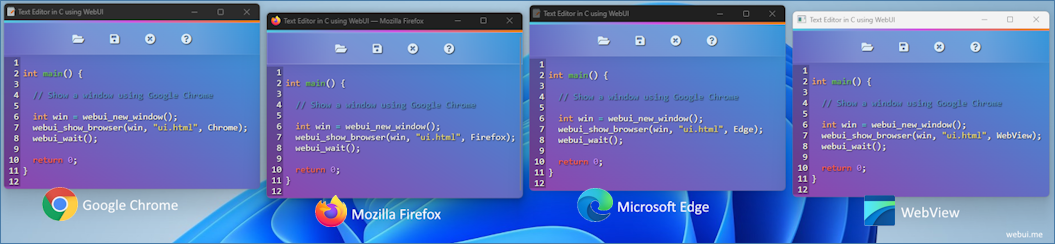
Use any web browser or WebView as GUI, with Elixir in the backend and modern web technologies in the frontend, all in a lightweight portable library.
https://github.com/webui-dev/elixir-webui
Last synced: 7 days ago
JSON representation
Use any web browser or WebView as GUI, with Elixir in the backend and modern web technologies in the frontend, all in a lightweight portable library.
- Host: GitHub
- URL: https://github.com/webui-dev/elixir-webui
- Owner: webui-dev
- License: mit
- Created: 2026-07-17T12:50:36.000Z (21 days ago)
- Default Branch: main
- Last Pushed: 2026-07-17T16:10:32.000Z (21 days ago)
- Last Synced: 2026-07-17T17:29:38.858Z (21 days ago)
- Language: Elixir
- Size: 73.2 KB
- Stars: 1
- Watchers: 0
- Forks: 0
- Open Issues: 0
-
Metadata Files:
- Readme: README.md
- License: LICENSE
Awesome Lists containing this project
README
# Elixir WebUI v2.5.1
Use any web browser or WebView as GUI, with Elixir in the backend and modern web technologies in the frontend, all in a lightweight portable library.
> [!NOTE]
> This binding is under development and has not yet been published to Hex.
## Why
[WebUI](https://webui.me) drives a browser you already have installed instead of
bundling a browser engine, so applications stay small and portable. Your UI is
HTML/CSS/JS; your backend is Elixir.
## Install
Unlike the other WebUI bindings, this one compiles a small C shim, so a C
compiler is required. Erlang has no runtime FFI, so there is no way to call
WebUI without one.
| Platform | Needs |
|---|---|
| Linux | `gcc`, `make` |
| macOS | Xcode command line tools |
| Windows | MSVC — see the note below |
One command fetches Elixir deps, downloads the WebUI static library for your
platform, and builds the NIF:
```sh
mix setup
```
> [!IMPORTANT]
> **On Windows, run this from a Developer Command Prompt for VS** (or a shell
> where you have run `vcvarsall.bat`). The build uses `nmake` and `cl`, which
> are only on `PATH` there. From an ordinary prompt it fails with:
> ```
> ** (Mix) "nmake" not found in the path.
> ```
Prefer the steps individually, or already have the deps? They are:
```sh
bash bootstrap.sh # Linux / macOS (bootstrap.bat on Windows)
mix deps.get
mix compile
```
WebUI is linked **statically** into the NIF, so there is no `webui-2.dll` /
`libwebui-2.so` to ship or locate at runtime — `priv/webui_nif.*` is
self-contained.
To build against a local WebUI checkout instead of the released library:
```sh
WEBUI_DIR=/path/to/webui/dist WEBUI_INCLUDE=/path/to/webui/include mix compile
```
## Minimal example
```elixir
win = WebUI.new_window()
WebUI.show(win, ~S( Hello World! ))
WebUI.wait()
WebUI.clean()
```
Every page must load ``. WebUI generates that
file in memory — you do not create it.
## Calling Elixir from JavaScript
Bound functions appear in the page as async JS functions of the same name. The
handler's return value resolves the Promise.
```elixir
win = WebUI.new_window()
WebUI.bind(win, "add", fn e ->
WebUI.Event.get_int(e, 0) + WebUI.Event.get_int(e, 1)
end)
WebUI.show(win, ~S"""
Add
""")
WebUI.wait()
```
Responses cross to JavaScript as strings. Numbers, booleans and atoms are
converted for you; `nil` and `:ok` become `""`. Return structured data by
encoding it yourself:
```elixir
WebUI.bind(win, "load_user", fn e ->
e |> WebUI.Event.get_int(0) |> Users.get!() |> Jason.encode!()
end)
```
## Calling JavaScript from Elixir
```elixir
WebUI.run(win, "document.title = 'Set from Elixir'") # fire and forget
{:ok, "42"} = WebUI.script(win, "return 6 * 7;") # wait for a result
```
`script/3` takes `:timeout` (seconds, `0` waits forever) and `:buffer_size`
(bytes, default `8192` — longer results are truncated).
## Catching every event
Binding an empty element name catches all events on the window:
```elixir
WebUI.bind(win, "", fn
%WebUI.Event{type: :connected} -> IO.puts("connected")
%WebUI.Event{type: :disconnected} -> IO.puts("disconnected")
%WebUI.Event{type: :navigation} = e -> IO.puts("going to #{WebUI.Event.get_string(e, 0)}")
_ -> :ok
end)
```
## Examples
See [examples/](examples/).
## API
Full documentation lives in the module docs — start at `WebUI`. The API mirrors
the [C API](https://webui.me) with Elixir naming: `webui_show` → `WebUI.show/2`,
`webui_set_size` → `WebUI.set_size/3`, predicates as `WebUI.shown?/1`.
## License
MIT — see [LICENSE](LICENSE).