https://github.com/welikegraphql/wordpress-graphql-api-example
GraphQL API example in Wordpress
https://github.com/welikegraphql/wordpress-graphql-api-example
Last synced: 9 months ago
JSON representation
GraphQL API example in Wordpress
- Host: GitHub
- URL: https://github.com/welikegraphql/wordpress-graphql-api-example
- Owner: WeLikeGraphQL
- Created: 2016-09-29T17:21:07.000Z (over 9 years ago)
- Default Branch: master
- Last Pushed: 2016-10-22T11:06:07.000Z (over 9 years ago)
- Last Synced: 2025-03-29T16:22:20.572Z (about 1 year ago)
- Language: PHP
- Homepage:
- Size: 8.81 MB
- Stars: 36
- Watchers: 2
- Forks: 2
- Open Issues: 1
-
Metadata Files:
- Readme: README.md
Awesome Lists containing this project
README
# wordpress-graphql-api-example
>The aim of this repo is to give an example of publishing [GraphQL](http://graphql.org/) API in [Wordpress](https://wordpress.org/download/).
[Here](https://github.com/WeLikeGraphQL/react-apollo-example) is the app that consumes this API.
## Execution
The project can be run using one of the following (what is convenient for you):
**[Vagrant](https://www.vagrantup.com/)** - for one-command virtual machine provisioning in Windows, Linux, OSX... (the best option when Ansible/Docker not installed). Requirements: *Vagrant >=1.8*
**[Ansible](https://www.ansible.com/)** - for one-command own host provisioning and containerizing the app in Linux (the best option when Docker not installed). Requirements: *ansible-playbook*
**[Docker](https://www.docker.com/)** - for containerizing the app in Linux. Requirements: *docker*, *docker-compose*, *[local-persist](https://github.com/CWSpear/local-persist)*
**Manually** - (any OS, required Apache2/Nginx, PHP >= 5.6, MySQL, [Composer](https://getcomposer.org/) etc.)
**We give you a lot of installation options, because we assume that not every developer will come from PHP World and have already installed all needed stuff for manual set-up. If you are not interested in the backend part, just choose the simplest way of installation and run the [Web App](https://github.com/WeLikeGraphQL/react-apollo-example), which consumes this Wordpress GraphQL API.**
The project publishes the following endpoints:
- `localhost:8000/graphql` - GraphQL API Endpoint
- `localhost:8888` - PhpMyAdmin
You can customize data in `.env` file.
### Vagrant (for Windows, Linux, OSX)
Vagrant makes the project executable in Windows, Linux, OSX... (as Docker is available out-of-the-box only for [some Linux instances](https://docs.docker.com/engine/installation/linux/)). So, if you want to set everything up automatically, then install [Vagrant>=1.8](https://www.vagrantup.com/) and execute:
- `bash -x scripts/run_vagrant.sh`
It might take some time for running the project at first, as all dependencies have to be downloaded, but it is all what you need to do to run the API. Check `localhost:8000/graphql` (if there is no 404 then ok).
Sample data are included automatically after every run.
### Ansible (for Linux)
If you do not have Docker installed, then you can install everything using [Ansible](https://www.ansible.com/). Invoke:
- `ansible-playbook -vvv main.yml`
- `bash -x scripts/load_db.sh`
It will install and run the needed stuff on your host (now you have Docker installed and you can use in the second run). Sample data are included automatically thanks to the second command.
If you have Linux distribution that is not supported by Docker and it causes errors, then change the following part in `roles/vagrant/tasks/install.yml`:
`{{ ansible_distribution|lower}}-{{ ansible_distribution_release }}`
onto one of [supported distributions](https://docs.docker.com/engine/installation/linux/) (`ubuntu-trusty`, `debian-wheezy` etc.)
### Docker (for Linux)
You can use [Docker Compose](https://docs.docker.com/compose/) in order to set everything up and containerize automatically. Install [local-persist](https://github.com/CWSpear/local-persist#running-outside-a-container) docker plugin and just execute:
- `docker-compose up`
- `bash -x scripts/load_db.sh`
Sample data are included automatically thanks to the second command.
### Manually (for Windows, Linux, OSX)
- `cd wordpress && composer install`
- change data in `wp-config.php` according to your MySQL Server
- `bash -x scripts/add_to_plugin.sh` (due to [this](https://github.com/tim-field/graphql-wp/pull/9))
- copy/paste `wordpress` folder to your PHP Server
- `cd mysql && mysql -u -p < wp_backup.sql` (inserting sample data) Caveat: change database name in `wp_backup.sql` accordingly.
## Backup
If you wish to do a database backup, then execute one of the following (depending how you set up the project):
- Vagrant: `vagrant ssh` and `cd /vagrant/scripts && sudo bash -x backup.sh`
- Ansible or Docker: `cd scripts && sudo bash -x backup.sh`
- Manually: `cd scripts && mysqldump -h$ -u$ -p$ $ > wp_backup.sql`
## GraphiQL
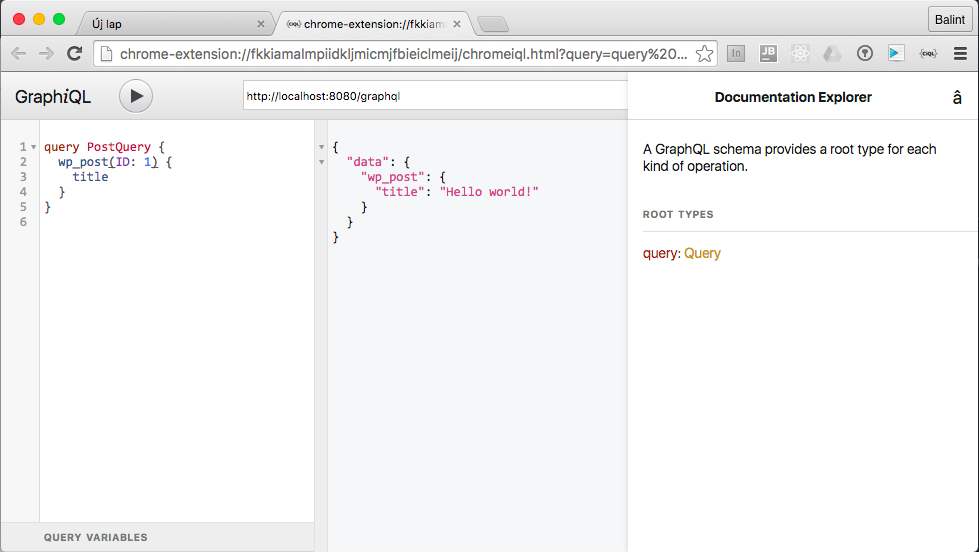
It is recommended to explore possibilities of GraphQL API Endpoint. The fastest way to do it is to use one of the following solutions:
- [ChromeiQL](https://chrome.google.com/webstore/detail/chromeiql/fkkiamalmpiidkljmicmjfbieiclmeij)
- [GraphIQL Feen](https://chrome.google.com/webstore/detail/graphiql-feen/mcbfdonlkfpbfdpimkjilhdneikhfklp)
But you can also set up the original tool created by GraphQL Team: [GraphiQL](https://github.com/graphql/graphiql)
Screenshot from ChromeiQL:
## Acknowledgements
Thanks for @tim-field, who published his work: [graphql-wp](https://github.com/tim-field/graphql-wp)