https://github.com/wesleych3n/my-work-log
A self project to record and analyze work's check in/out time on google sheet with telegram bot.
https://github.com/wesleych3n/my-work-log
data-analysis telegram-bot worklog
Last synced: 12 months ago
JSON representation
A self project to record and analyze work's check in/out time on google sheet with telegram bot.
- Host: GitHub
- URL: https://github.com/wesleych3n/my-work-log
- Owner: WesleyCh3n
- License: mit
- Created: 2022-04-13T04:20:26.000Z (over 4 years ago)
- Default Branch: main
- Last Pushed: 2022-11-29T06:36:08.000Z (over 3 years ago)
- Last Synced: 2025-03-23T10:16:52.587Z (over 1 year ago)
- Topics: data-analysis, telegram-bot, worklog
- Language: Python
- Homepage:
- Size: 31.3 KB
- Stars: 0
- Watchers: 1
- Forks: 1
- Open Issues: 1
-
Metadata Files:
- Readme: README.md
- License: LICENSE
Awesome Lists containing this project
README
# My Work Log
[](https://github.com/WesleyCh3n/work-log-py/actions/workflows/main.yml)
This is a self project to record and analyze my work's check in/out time on
google sheet with basic weather info using telegram bot.
## Getting Started
The main program is a telegram (tg) bot, which receiving tg input message/cmd.
Overview of the pipeline,
```
tg message (e.g. checkin/checkout)
↳ tg bot
↳ get weather api
↳ insert a row to google sheet
```
### Available command
- `\checkin`: record check in time
- `\checkout`: record check out time
- `\today`: check today check in time
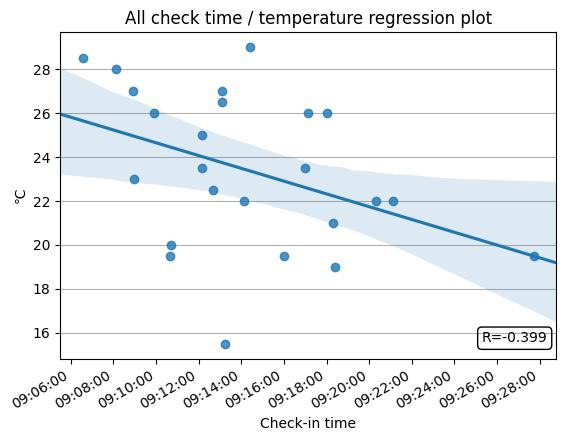
- `\draw`: get time series/correlation figure between selected time and
temperature.
For example:
### Prerequisites
Requirements of this project
- Your telegram user id. [*Tutorial*](https://www.alphr.com/telegram-find-user-id/)
- A telegram bot token. [*Tutorial*](https://core.telegram.org/bots#6-botfather)
- [CWB open weather data api](https://opendata.cwb.gov.tw/index) access token. [*Tutorial*](https://ithelp.ithome.com.tw/articles/10276375)
- Google Sheet api credential and a google sheet ID. [*Tutorial*](https://www.learncodewithmike.com/2020/08/python-write-to-google-sheet.html)
Place the token in `.env` file, like
```env
TG_BOT_TOKEN=""
TG_BOT_USER=""
WEATHER_API_KEY=""
GOOGLE_SHEET_KEY=""
```
Also there is a `credential.json` to access google sheet api.
## Running
```shell
pip3 install -r requirements.txt
python main.py
```
## Deploy on Heroku
To use github action to deploy the bot on Heroku, first create an Heroku
account and create an app for deployment. Setting the following in github
secrets.
- `HEROKU_API_KEY`: heroku api key to automate deployment
- `GOOGLE_API_CREDENTIAL`: content of google credential.json
- `GOOGLE_SHEET_KEY`
- `TG_BOT_TOKEN`
- `TG_BOT_USER`
- `WEATHER_API_KEY`
and follow [main.yml](https://github.com/WesleyCh3n/work-log-py/tree/main/.github/workflows)
to create an action pipeline.
> Remember to change [app name and email](https://github.com/WesleyCh3n/work-log-py/blob/5fb6ec69aa5ffebeb3901a39dfed275869790822/.github/workflows/main.yml#L24-L25) and [host address and timezone](https://github.com/WesleyCh3n/work-log-py/blob/5fb6ec69aa5ffebeb3901a39dfed275869790822/.github/workflows/main.yml#L31-L32) to match your setting.
Reference: [Deploy a Telegram Bot using Heroku](https://towardsdatascience.ggcom/how-to-deploy-a-telegram-bot-using-heroku-for-free-9436f89575d2)
## Mentionable Note
Send message to tg bot directly from api. So you can easily create something
more useful like using `ios shortcut` send msg directly.
[*Reference*](https://core.telegram.org/bots/webhooks#testing-your-bot-with-updates)
E.g.
```sh
# check in message
curl --tlsv1.2 -k -X POST -H "Content-Type: application/json" -d '{
"update_id": 10000000,
"message": {
"message_id": 000,
"entities": [
{
"length": 8,
"offset": 0,
"type": "bot_command"
}
],
"chat": {
"id": ,
"last_name": "Ch3n",
"type": "private",
"first_name": "Wesley"
},
"date": ,
"text": "/checkin",
"from": {
"id": ,
"first_name": "Wesley",
"last_name": "Ch3n",
"is_bot": false,
"language_code": "en"
}
}
}' "https:///"
```
## License
MIT