https://github.com/wesovilabs/mollydb
A GraphQL configuration file database
https://github.com/wesovilabs/mollydb
configuration database go golang graphql graphql-api hooks storage yml
Last synced: 11 months ago
JSON representation
A GraphQL configuration file database
- Host: GitHub
- URL: https://github.com/wesovilabs/mollydb
- Owner: wesovilabs
- License: other
- Created: 2018-03-23T06:26:28.000Z (over 8 years ago)
- Default Branch: master
- Last Pushed: 2018-12-18T03:17:31.000Z (over 7 years ago)
- Last Synced: 2025-03-24T09:02:51.456Z (over 1 year ago)
- Topics: configuration, database, go, golang, graphql, graphql-api, hooks, storage, yml
- Language: Go
- Homepage:
- Size: 10.4 MB
- Stars: 8
- Watchers: 2
- Forks: 0
- Open Issues: 4
-
Metadata Files:
- Readme: README.md
- Contributing: CONTRIBUTING.md
- License: LICENSE
- Code of conduct: CODE_OF_CONDUCT.md
Awesome Lists containing this project
README
docker run -it \
-p 9090:9090 \
-v /tmp/data/mollydb:/var/mollydb/data \
wesovilabs/mollydb:0.0.1-alpha
# Project Status
mollydb is not stable at all, the API is in continuous definition and some
architecture topics are not closed.
Learning from provided feedback to toward the project correctly.
# About
MollyDB is a **configuration file database** that provides a **GraphQL** API.
It permits interacting with configuration files like If they were
tables in a relational database system or documents in a document based
database.
# Architecture overview
## MollyDB Hierarchy
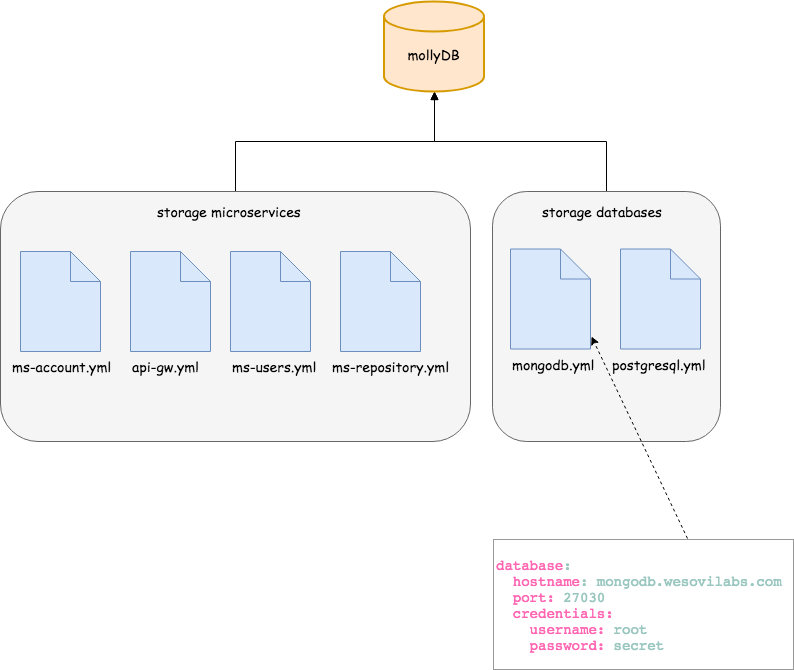
MollyDB works in a distributed way and it's able to deal with storage that are
hosted on different paths.
Hierarchy in mollydb is defined as:
### Storage
A storage can be defined as a place where documents are hosted.
So far, only local directories are supported but in the near future other
places such as **ssh directory**, **database collections** or even git
repository could be understand as **a storage**
Sample of storage would be:
- file:/var/data/databases
- file:/var/data/micro-services
### Documents
As is said in the storage paragraph description, a storage contains documents.
So far, **only files with yml extension are supported**.
For example, the storage database, in path *file:/var/data/databases*
contains the files: *mongodb.yml*, *mysql.yml* and ListOfDocuments.docs, but
only the following will be understood as document.
- mongodb.yml
- mysql.yml
### Property
A property is defined as any configurable value in a document
For example, a document api-gateway.yml whose content is:
```yaml
self:
port: 7000
address: 0.0.0.0
log:
level: DEBUG
services:
accounts:
address: localhost:7001
```
provides the following properties:
- self.port
- self.addres
- log.level
- services.accounts.address
### Scenario
A clearer scenario is showed below
## Registering a storage
Once mollydb is up and running we must proceed to **register a storage** in the
system. We can do it by making use of the provided **GraphQL API**.
```bash
curl -XPOST http://localhost:9090/graphql \
-H 'Content-Type: application/graphql' \
-d 'mutation registerI18nDirectory { register
(path:"resources/data/databases",
name:"db"){ name len documents { name } } }'
```
Once the storage is registered in mollydb, a daemon will be launch
and it will monitor documents in the storage. In case of a new documentis
created mollydb will be updated. The same occurs when a file is deleted
or a file is modified.
## Creating a hook
Mollydb provide you a way yo avoid being making connections every now and
then if you need to be informed whena property is changed.
To do this we can make use of the **hooks**. So far, only Rest hooks are
supported. Yo will create a hook by setting the **property path** you want
to listen and the url and verb that will be invoked when the property changed.
**RestHook**
```bash
curl -XPOST http://localhost:9090/graphql \
-H 'Content-Type: application/graphql' \
-d 'mutation { addRestHook (uri:
"http://localhost:3000/properties/mongodb-port", verb: "PUT", path:
"mollydb://db/mongodb?key=database.port") }'
```
*What does the above code means?*
When the poperty database.port in document mongodb (that belongs to the
registered storage db) changes, then mollydb will make the next request **PUT
http://localhost:3000/properties/mongodb-port** with the
below body
```json
{
"path": "mollydb://db/mongodb?key=database.port",
"key": "database.port",
"value": 27030
}
```
# Running mollyDB
## Download executables
- [Mac executable](https://github.com/wesovilabs/mollydb/releases/download/0.0.1-alpha/mollydb.darwin)
- [Windows executable](https://github.com/wesovilabs/mollydb/releases/download/0.0.1-alpha/mollydb.exe)
- [Linux executable](https://github.com/wesovilabs/mollydb/releases/download/0.0.1-alpha/mollydb.linux)
## From the code
- Clone the repository into your local machine:
```shell
git clone https://github.com/wesovilabs/mollydb.git
```
- Checkout the chosen tag.
```shell
git checkout
```
- Run the following command:
```shell
make run
```
## Docker
Docker images are published as far as a new tag on master branch are created.
By default mollydb is launched on **port 9090**, so in case of you want to
forwarding to a different one you will need to indicate it when running
docker command
In order to being able to make use of local directories as storage in the
container you will need to mount a volume when running docker.
**Scenario**: For the below sample we assume you have the path
**/tmp/data/mollydb* on your local machine and no processes running
on port 9090
```bash
docker run -it -p 9090:9090 \
-v /tmp/data/mollydb:/var/mollydb/data wesovilabs/mollydb:0.0.1-alpha
```
# GraphQL
MollyDB provides a GraphQL API that can be consumed easily
## Types
Types managed by GraphQL API are the below
### Storage
A mollyDB storage.
*Fields*
- **documents**: The list of documents that belong to this storage
- **len**: The number of documents in the storage
- **name**: The name of a storage
### Document
A mollyDB document.
*Fields*
- **name**: The name of the document.
- **len**: The number of properties in the document.
- **properties**: List of properties of the document
### Property
Document content
*Fields*:
- **key**: The key of the property
- **path**: The path of the property
- **value**: The value of the property
## Queries
**storageList(name: String = "any"): [Storage]**
This query allow us to deep from the root of the mollyDB system until a
Property definition.
*Sample*
**request**
```graphql
query StorageQuery {
storageList { # optional filter name
name
len
documents(name: "mongodb") { # optional filter name
name
len
properties { # optional filter key
key
value
path
}
}
}
}
```
**response**
```json
{
"data": {
"storageList": [
{
"documents": [],
"len": 6,
"name": "i18n"
},
{
"documents": [
{
"len": 4,
"name": "mongodb",
"properties": [
{
"key": "database.hostname",
"path": "mollydb://db/mongodb?key=database.hostname",
"value": "mongodb.wesovilabs.com"
},
{
"key": "database.port",
"path": "mollydb://db/mongodb?key=database.port",
"value": "27030"
},
{
"key": "database.credentials.username",
"path": "mollydb://db/mongodb?key=database.credentials.username",
"value": "root"
},
{
"key": "database.credentials.password",
"path": "mollydb://db/mongodb?key=database.credentials.password",
"value": "secret"
}
]
}
],
"len": 3,
"name": "db"
},
{
"documents": [],
"len": 3,
"name": "ms"
}
]
}
}
```
**properties(storage:String = "any" document:String = "any" property:String =
"any"): [Property]**
Find properties by filtering records by the name of the storage or/and the
name of the document or/and the key of the property. Default value for
filters is any. The output is an array of type Property
*Sample*
**request**
```graphql
query FindProperties {
properties(storage: "ms", property: "log.level") {
path
key
value
}
}
```
**response**
```json
{
"data": {
"properties": [
{
"key": "log.level",
"path": "mollydb://ms/api-gateway?key=log.level",
"value": "${mollydb://ms/global?key=log.level}:DEBUG"
},
{
"key": "log.level",
"path": "mollydb://ms/global?key=log.level",
"value": "DEBUG"
},
{
"key": "log.level",
"path": "mollydb://ms/ms-account?key=log.level",
"value": "DEBUG"
}
]
}
}
```
**property(path: String): Property** Find a property in any document of any
storage by the connection path. This is an unique value for each property in
all the mollydb system. The output is a single Property
*Sample*
**request**
```graphql
query PropertyPath {
property(path: "mollydb://db/mongodb?key=database.hostname") {
path
key
value
}
}
```
**response**
```json
{
"data": {
"property": {
"key": "database.hostname",
"path": "mollydb://db/mongodb?key=database.hostname",
"value": "mongodb.wesovilabs.com"
}
}
}
```
## Mutations
**register(name: String!path: String!): Storage**
The purpose of this mutation is registering a new storage into mollyDB
*Sample*
**request**
```graphql
mutation registerI18nDirectory {
register(path: "resources/data/i18n", name: "i18n") {
name
}
}
```
**response**
```json
{
"data": {
"register": {
"name": "i18n"
}
}
}
```
**unRegister(name: String!): String**
The purpose of this mutation is unregister an existing storage from mollyDB
*Sample*
**request**
```graphql
mutation unRegisterI18nDirectory {
unRegister(name: "i18n")
}
```
**response**
```json
{
"data": {
"unRegister": "storage deleted successfully!"
}
}
```
**propertyRestHook(uri: String! verb: String! path: String!): String**
The purpose of this mutation is hook property and be notified when these have
changed
*Sample*
**request**
```graphql
mutation AddHook {
propertyRestHook(
uri: "http://localhost:3000/properties/mongodb-port",
verb: "PUT",
path: "mollydb://db/mongodb?key=database.port"
)
}
```
**response**
```json
{
"data": {
"propertyRestHook": "property hooked"
}
}
```
# Playing with GraphQL
**GraphiQL** is interated with MollyDB
Once the system si launched you can deal with MollyDB by making use of
GraphiQL. GraphiQL is deployed in the same port that mollydb. So assuming you
use the default port 9090, once you have launched molly you can open
the browser and play with [GraphiQL](http://localhost:9090/)
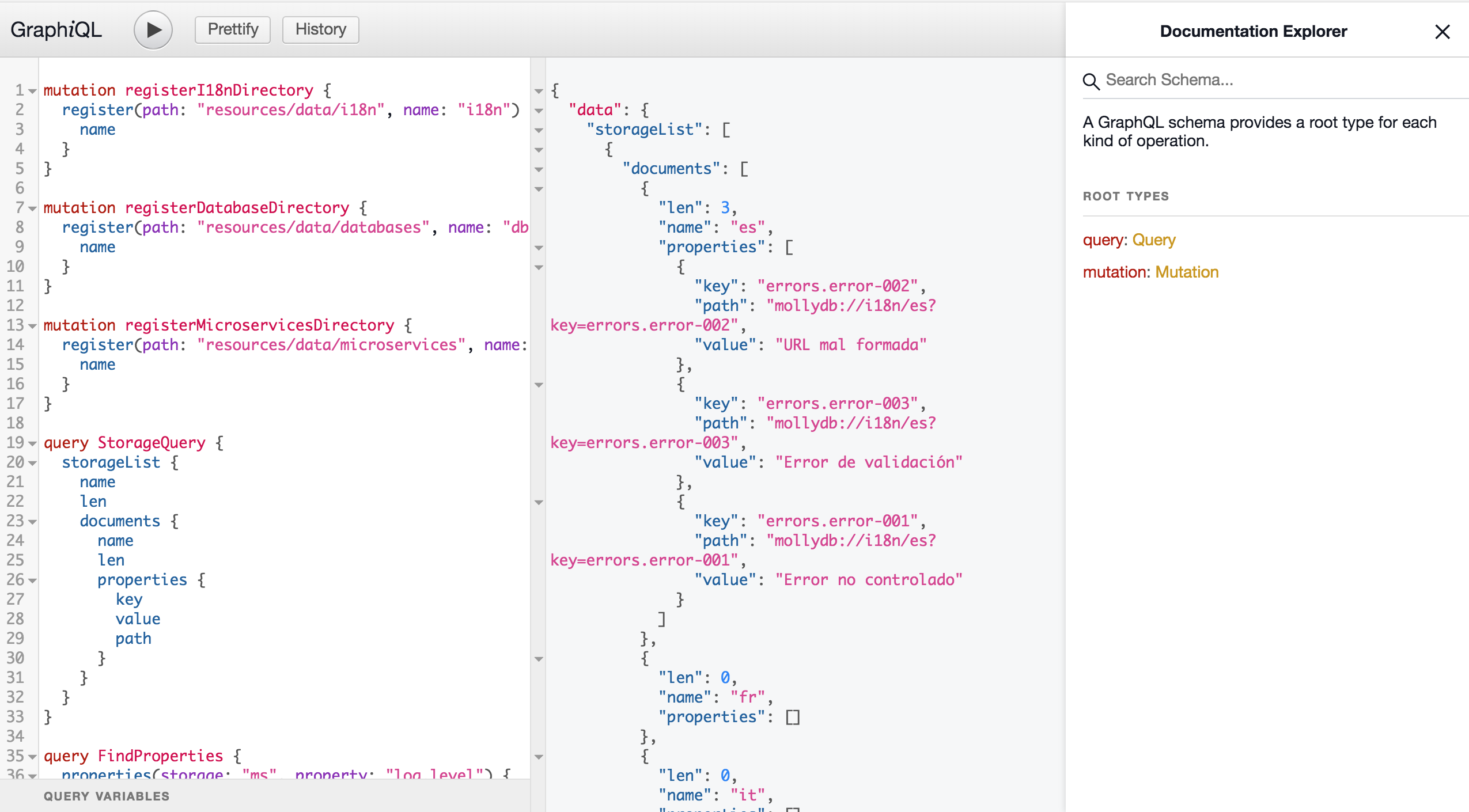
Below some examples of graphql queries and mutations used to test manually
the system:
```graphql
mutation registerI18nDirectory {
register(path: "resources/data/i18n", name: "i18n") {
name
}
}
mutation unRegisterI18nDirectory {
unRegister(name: "i18n")
}
mutation registerDatabaseDirectory {
register(path: "resources/data/databases", name: "db") {
name
}
}
mutation registerMicroservicesDirectory {
register(path: "resources/data/microservices", name: "ms") {
name
}
}
query StorageQuery {
storagesList {
name
len
documents(name:"mongodb"){
name
len
properties {
key
value
path
}
}
}
}
query FindProperties {
properties(storage: "ms", property: "log.level") {
path
key
value
}
}
query PropertyPath {
property(path: "mollydb://db/mongodb?key=database.hostname") {
path
key
value
}
}
mutation HookQuery {
propertyRestHook(uri: "http://localhost:3000/properties/mongodb-port", verb: "PUT", path: "mollydb://db/mongodb?key=database.port")
}
```
## Links
MollyDB documentation can be found on **Wiki**:
## Other Links
[Architecture overview](https://github.com/wesovilabs/mollydb/wiki/Architecture-overview)
[Running mollydb](https://github.com/wesovilabs/mollydb/wiki/Running-mollydb)
[GraphQL](https://github.com/wesovilabs/mollydb/wiki/GraphQL)
[Playing with graphql](https://github.com/wesovilabs/mollydb/wiki/Playing-with-graphql)
[Changelog](https://github.com/wesovilabs/mollydb/wiki/CHANGELOG)
[The road map](https://github.com/wesovilabs/mollydb/wiki/The-road-map)
[Contributing](https://github.com/wesovilabs/mollydb/wiki/Contributing)