https://github.com/wfurphy/vscode-button-card-js
VSCode Syntax Highlighting for JS blocks enclosed in triple square brackets ([[[ ]]]) within YAML strings. Used when configuring Home Assistant Lovelace card, Button Card.
https://github.com/wfurphy/vscode-button-card-js
button-card home-assistant javascript square-brackets visual-studio-code yaml
Last synced: 15 days ago
JSON representation
VSCode Syntax Highlighting for JS blocks enclosed in triple square brackets ([[[ ]]]) within YAML strings. Used when configuring Home Assistant Lovelace card, Button Card.
- Host: GitHub
- URL: https://github.com/wfurphy/vscode-button-card-js
- Owner: wfurphy
- License: mit
- Created: 2022-12-03T17:34:47.000Z (over 3 years ago)
- Default Branch: master
- Last Pushed: 2023-01-13T00:57:16.000Z (over 3 years ago)
- Last Synced: 2025-10-20T21:46:22.897Z (8 months ago)
- Topics: button-card, home-assistant, javascript, square-brackets, visual-studio-code, yaml
- Homepage:
- Size: 320 KB
- Stars: 5
- Watchers: 1
- Forks: 0
- Open Issues: 1
-
Metadata Files:
- Readme: README.md
- Changelog: CHANGELOG.md
- License: LICENSE
Awesome Lists containing this project
README
# Button-Card Javascript Support in YAML for VSCode


This is a very niche extension for Visual Studio Code which provides embedded Javascript language support for code blocks in YAML enclosed by triple+ square brackets (`[[[ ... ]]]`). Used when configuring the advanced _javascript templates_ properties of [Button-Card](https://github.com/custom-cards/button-card) cards for Home Assistant Lovelace dashboards.
* Javascript is now treated as an embedded language (not just YAML string content with syntax highlighting).
* ESLint diagnostics are shown for JavaScript inside matching Button-Card templates when an ESLint configuration is available in the workspace.
* "Double quoted" and block YAML strings supported.
* Support for Button-Card 7.0+ [nested templates](https://custom-cards.github.io/button-card/v7.0/examples/js-templates/#nested-custombutton-card) with longer bracket sequences like `[[[[ ... ]]]]`+.
* Works with the standard YAML language and the `home-assistant` YAML language created by the [Home Assistant Config Helper](https://github.com/keesschollaart81/vscode-home-assistant) plugin.
* Now includes ESLint support!
> :raising_hand_man: _I made this while I was working on [Creative Button Card Templates](https://github.com/wfurphy/creative-button-card-templates) and could not handle writing any more JS without syntax highlighting. Hopefully it can also provide you with relief from the same, same, string game!_
## Preview
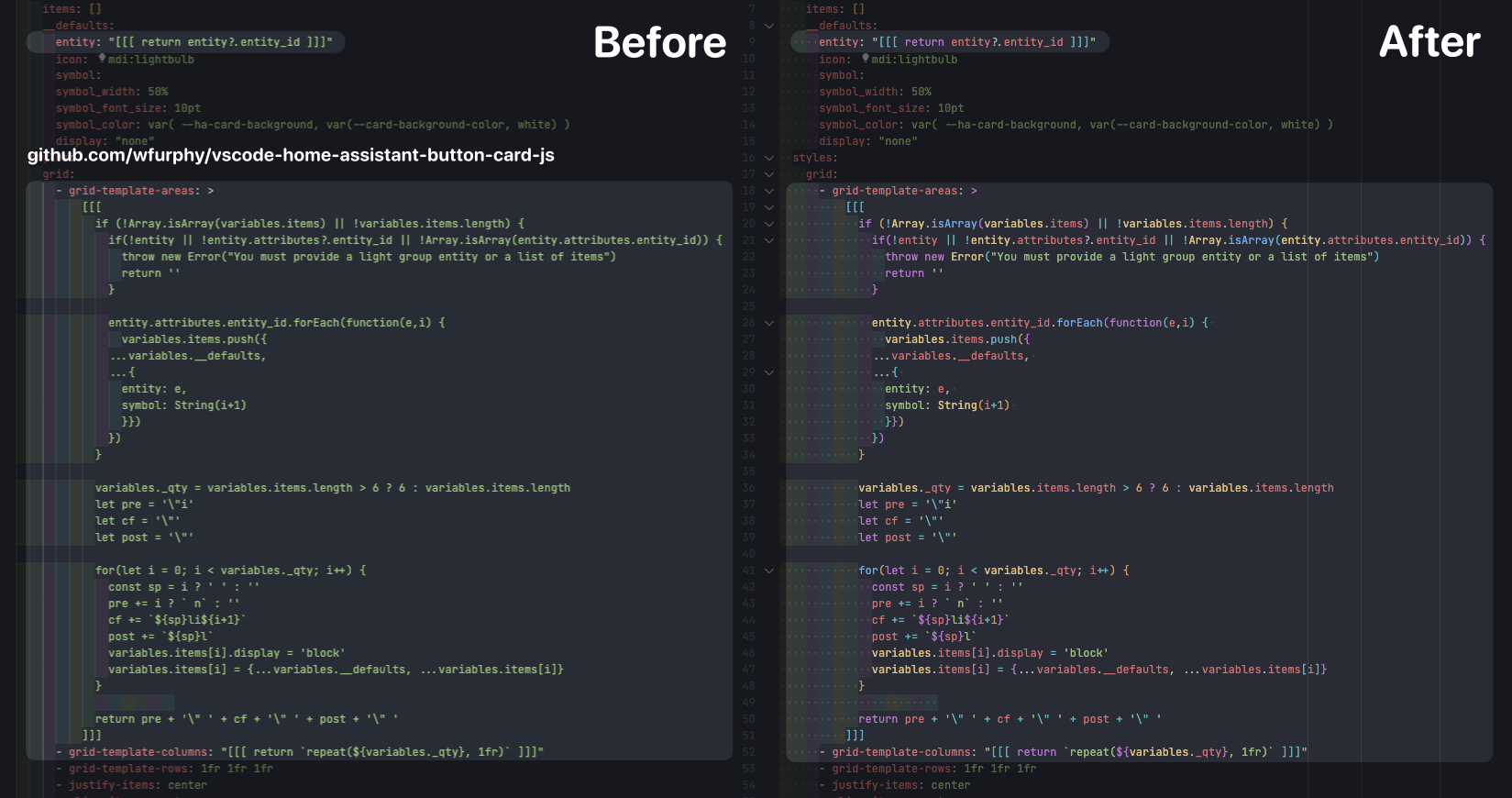
_The preview above is using the OneDark Pro theme, however this plugin will work with any theme that supports yaml and javascript._
## Installation
### Install from [Visual Studio Marketplace](https://marketplace.visualstudio.com/items?itemName=wfurphy.vscode-button-card-js) or [Open VSX Registry](https://open-vsx.org/extension/wfurphy/vscode-button-card-js)
## Usage
Once installed you don't need to do anything else. Just open a YAML file that contains `[[[ ... ]]]` blocks and you should see the JavaScript syntax highlighting and language features working inside those blocks.
The JavaScript in single line `"[[[ ... ]]]"` templates needs to be terminated with a closing semicolon (`;`) or else it can break the syntax highlighting in some cases.
## ESLint
ESLint doesn't support the linting of embedded JavaScript within YAML files by default. However, the extension extracts JavaScript from Button-Card `[[[ ... ]]]` templates and runs ESLint against those snippets in the background. Feedback is mapped back to the original YAML so lint errors appear on the embedded JavaScript code inline just like you're used to.
You will need to have [ESLint](https://eslint.org/) installed in your project for linting to work. Syntax highlighting and embedded JavaScript language support still work normally when ESLint is not installed.
The extension will pick up your project's ESLint configuration if available. If no ESLint configuration is available, it falls back to syntax-only JavaScript parsing. I strongly recommend adding the globals below to avoid false positives since the JavaScript templates have access to Home Assistant and Button-Card specific variables that ESLint would otherwise not recognise.
### Recommended ESLint Configuration
Install ESLint in the project that contains your Button-Card templates:
```sh
npm install --save-dev eslint
```
Then add an `eslint.config.mjs` file in the project root:
```js
export default [
{
files: [
'**/*.yaml.button-card-*.js',
'**/*.yml.button-card-*.js'
],
languageOptions: {
ecmaVersion: 'latest',
sourceType: 'script',
globals: {
entity: 'readonly',
entities: 'readonly',
states: 'readonly',
variables: 'readonly',
user: 'readonly',
hass: 'readonly',
config: 'readonly',
helpers: 'readonly',
console: 'readonly',
window: 'readonly',
document: 'readonly',
localStorage: 'readonly',
setTimeout: 'readonly',
clearTimeout: 'readonly',
setInterval: 'readonly',
clearInterval: 'readonly',
fetch: 'readonly',
cbcJS: 'readonly',
CBCError: 'readonly',
CBCWarn: 'readonly'
}
},
rules: {
'no-undef': 'error',
'no-unused-vars': ['warn', {
args: 'none',
varsIgnorePattern: '^_',
caughtErrors: 'none'
}],
'no-redeclare': 'error',
'no-unreachable': 'error',
'no-constant-condition': 'warn',
eqeqeq: ['warn', 'smart'],
curly: ['warn', 'multi-line'],
'no-var': 'error',
'prefer-const': 'warn',
'object-shorthand': 'warn',
'no-console': 'off'
}
}
];
```
### VSCode Settings
```json
{
"buttonCardJs.eslint.enable": true, // (true|false)
"buttonCardJs.eslint.run": "onType" // (onType|onSave)
}
```