https://github.com/wgy6055/wgdigitfield
📱 A customizable digit input field.
https://github.com/wgy6055/wgdigitfield
autofill cocoapods customizable digit input ios keyboard objective-c security-code uicontrol uikit uitextfield
Last synced: 4 months ago
JSON representation
📱 A customizable digit input field.
- Host: GitHub
- URL: https://github.com/wgy6055/wgdigitfield
- Owner: wgy6055
- License: mit
- Created: 2018-10-19T05:51:12.000Z (over 7 years ago)
- Default Branch: master
- Last Pushed: 2020-07-17T05:30:43.000Z (almost 6 years ago)
- Last Synced: 2026-02-11T06:58:40.993Z (4 months ago)
- Topics: autofill, cocoapods, customizable, digit, input, ios, keyboard, objective-c, security-code, uicontrol, uikit, uitextfield
- Language: Objective-C
- Homepage:
- Size: 86.9 KB
- Stars: 18
- Watchers: 2
- Forks: 5
- Open Issues: 0
-
Metadata Files:
- Readme: README.md
- License: LICENSE
Awesome Lists containing this project
README
# WGDigitField
[](https://travis-ci.org/王冠宇/WGDigitField)
[](https://cocoapods.org/pods/WGDigitField)
[](https://cocoapods.org/pods/WGDigitField)
[](https://cocoapods.org/pods/WGDigitField)
## Overview
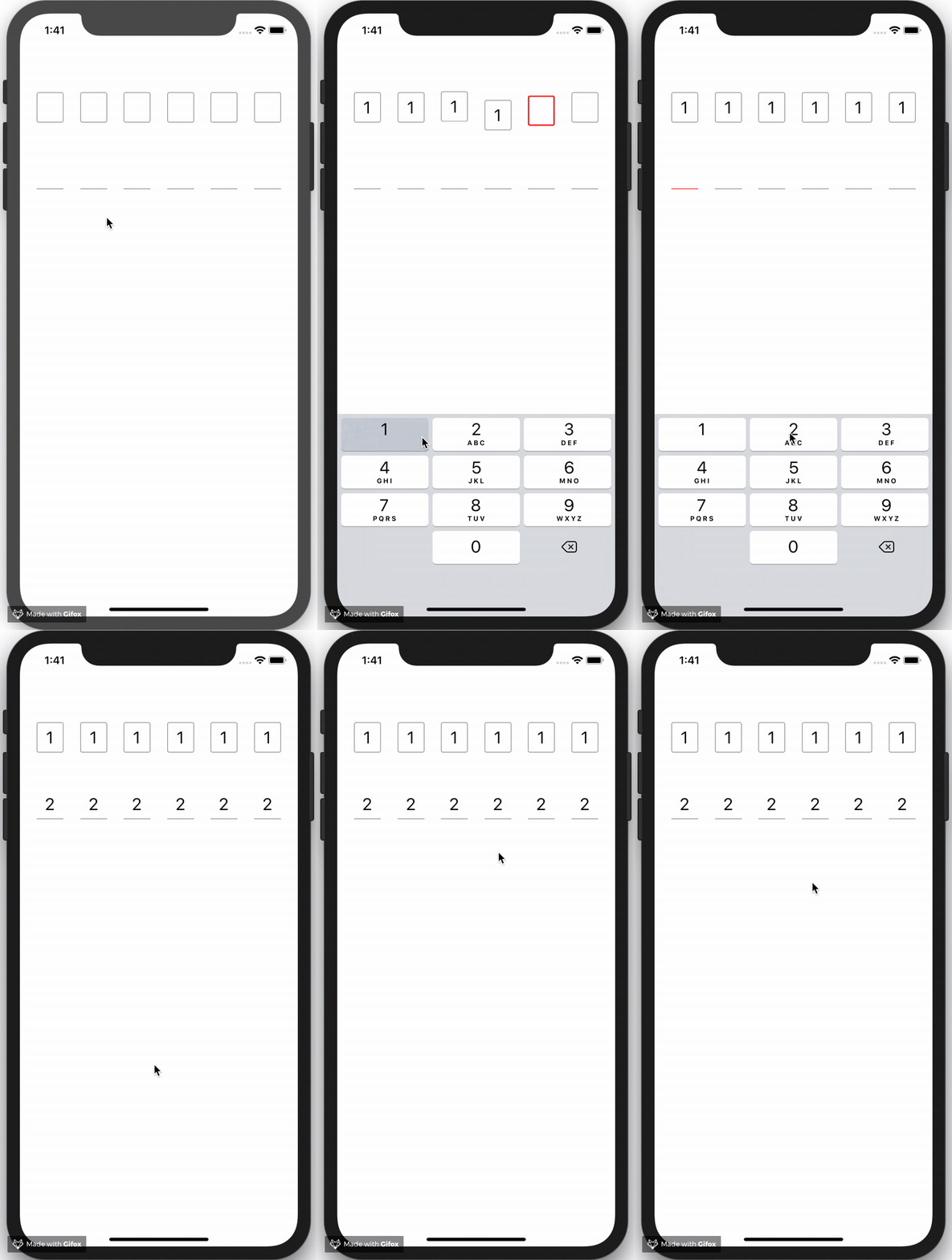
**WGDigitField** is a customizable digit input control for iOS. You can initialize a powerful digit input control with a very simple way.
## Example
To run the example project, clone the repo, and run `pod install` from the Example directory first.
## Features
* Customizable style for every single digit view.
* Customizable animation for highlighting and unhighlighting digit view.
* Supporting autofill for iOS 12.
## Installation
WGDigitField is available through [CocoaPods](https://cocoapods.org). To install
it, simply add the following line to your Podfile:
```ruby
pod 'WGDigitField'
```
## How To Use
```objectivec
// WGDigitField *> means you have to initialize this WGDigitField with an instance of WGDigitView as digitView
WGDigitField *> *field = [[WGDigitField *> alloc] initWithDigitViewInitBlock:^WGDigitView * (NSInteger index){
// initializing a background view (UIView or any subclass of UIView if you want)
UIView *background = [[UIView alloc] initWithFrame:CGRectMake(0, 0, 40, 45)];
background.backgroundColor = [UIColor whiteColor];
background.layer.borderColor = [UIColor grayColor].CGColor;
background.layer.borderWidth = 1.f;
background.layer.cornerRadius = 3.f;
// `WGDigitView` means you have to initialize this WGDigitView with an instance of UIView as backgroundView
return [[WGDigitView alloc] initWithBackgroundView:background digitFont:[UIFont systemFontOfSize:25.f] digitColor:[UIColor blackColor]];
} numberOfDigits:6 leadSpacing:25 tailSpacing:25 weakenBlock:^(WGDigitView * _Nonnull digitView) {
// getting it normal
digitView.backgroundView.layer.borderColor = [UIColor grayColor].CGColor;
digitView.backgroundView.layer.borderWidth = 1.f;
} highlightedBlock:^(WGDigitView * _Nonnull digitView) {
// making some UI changes
digitView.backgroundView.layer.borderColor = [UIColor redColor].CGColor;
digitView.backgroundView.layer.borderWidth = 2.f;
// or implementing animations
CAKeyframeAnimation *animation = ...
} fillCompleteBlock:^(WGDigitField * _Nonnull digitField, NSArray *> * _Nonnull digitViewArray, NSString * _Nonnull text) {
// dismissing keyboard and starting requests
[digitField resignFirstResponder];
}];
```
## Author
王冠宇, Weibo: [@冠宇住在贝克街](http://weibo.com/131471169)
## License
WGDigitField is available under the MIT license. See the LICENSE file for more info.