https://github.com/whiterabb17/r3ngine
r3ngine is the rebirth of the automated reconnaissance framework for web applications with a focus on dynamic streamlined recon process, backed by a database, & simple yet intuitive User Interface. r3ngine makes it easy for penetration testers to gather reconnaissance with min config & with the help of r3ngine's correlation, making recon effortless
https://github.com/whiterabb17/r3ngine
automated-recon correlation cybersecurity-tools opsec reconnaissance rengine rengine-ng scanner vulnerability-scanner
Last synced: about 2 months ago
JSON representation
r3ngine is the rebirth of the automated reconnaissance framework for web applications with a focus on dynamic streamlined recon process, backed by a database, & simple yet intuitive User Interface. r3ngine makes it easy for penetration testers to gather reconnaissance with min config & with the help of r3ngine's correlation, making recon effortless
- Host: GitHub
- URL: https://github.com/whiterabb17/r3ngine
- Owner: whiterabb17
- License: gpl-3.0
- Created: 2026-05-01T10:11:09.000Z (3 months ago)
- Default Branch: main
- Last Pushed: 2026-06-08T09:40:00.000Z (about 2 months ago)
- Last Synced: 2026-06-08T11:23:43.996Z (about 2 months ago)
- Topics: automated-recon, correlation, cybersecurity-tools, opsec, reconnaissance, rengine, rengine-ng, scanner, vulnerability-scanner
- Language: Python
- Homepage:
- Size: 59.1 MB
- Stars: 4
- Watchers: 0
- Forks: 0
- Open Issues: 0
-
Metadata Files:
- Readme: README.md
- Changelog: CHANGELOG.md
- Contributing: .github/CONTRIBUTING.md
- Funding: .github/FUNDING.yml
- License: LICENSE
- Code of conduct: .github/CODE_OF_CONDUCT.md
- Security: .github/SECURITY.md
Awesome Lists containing this project
README

Phoenix: From the Ashes even Stronger
r3ngine v3 — The Ultimate Web Reconnaissance & Vulnerability Scanner
New V3 Dashboard



r3ngine 3.5.0: The Phoenix Rebirth
r3ngine v3.5.0 is the production-stabilized, enterprise-grade evolution of the platform. This release delivers a complete CVE Enrichment System (NVD, EPSS, CISA KEV), a Burp Suite Professional Integration Plugin, and deep Neo4j graph sync with CVE metadata. The infrastructure has been hardened with Django 5.2.3 LTS, PostgreSQL 16, and Gunicorn + Uvicorn ASGI production serving. Building on the v3.2.0 Celery → Temporal migration — which replaced the legacy at-most-once task broker with a durable workflow engine providing crash-safe execution, full replay history, and pause/resume signaling — v3.5.0 focuses on intelligence enrichment, operational security, and production reliability at scale.

Attack Path Modeling Engine


r3NgineMobileSOC: Beta Release Out Now

| Dashboard | Geo-Tactical Map | Scan Details | Scan Orchestration |
| :---: | :---: | :---: | :---: |
|  |
|  |
|  |
|  |
|
The r3ngine Mobile SOC companion app provides a full command-and-control interface for managing scans, reviewing findings, and monitoring targets from any device. Features include a 4-step scan wizard, plugin selector, real-time task log streaming, animated activity badge, ReconX monitoring settings, and geo-tactical map visualization.

r3Ngine Plugins: Alpha Release Out Now

| Active Directory |
| :---: |
|  |
|
| Active Exploitation |
| :---: |
|  |
|
| Exploit Readiness Layer |
| :---: |
|  |
|
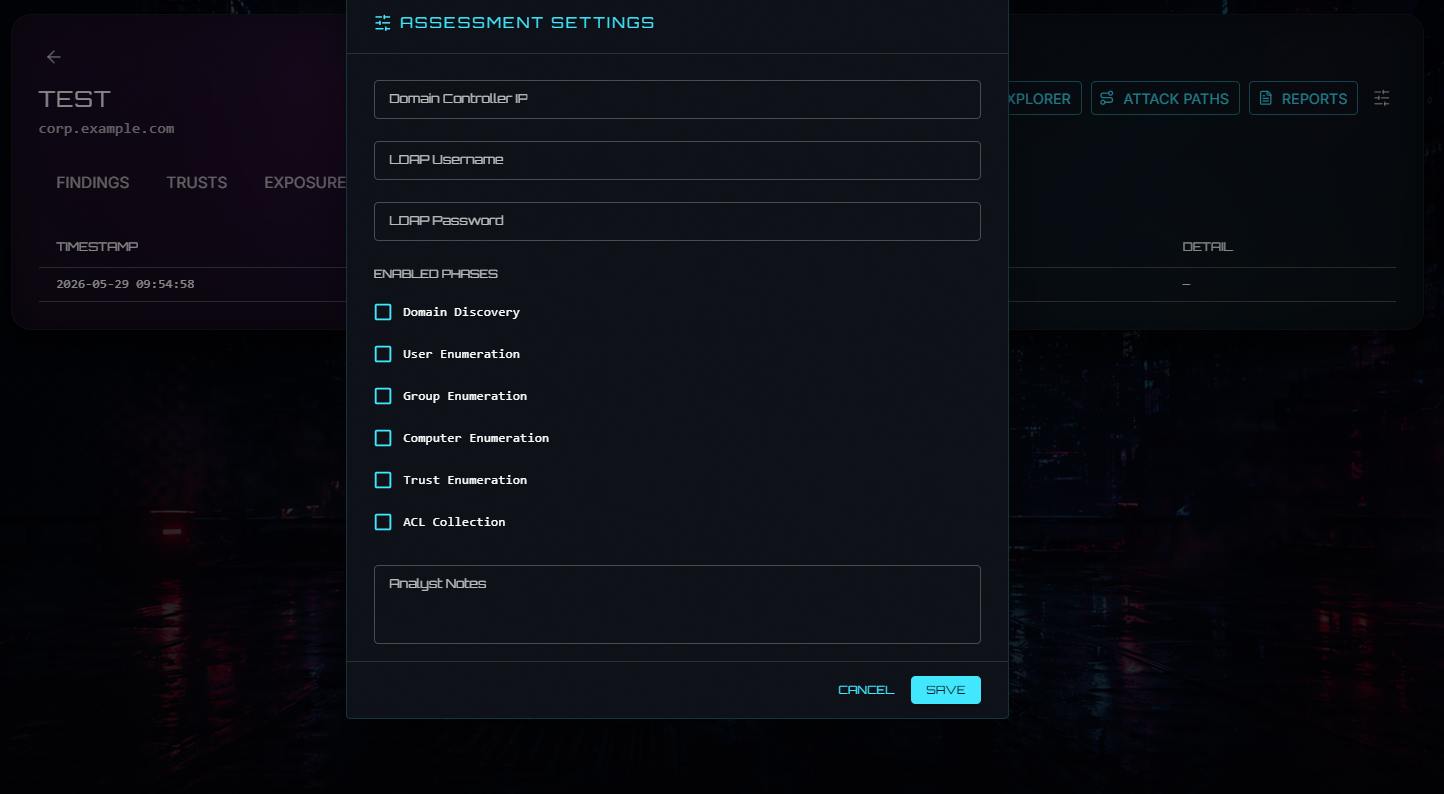
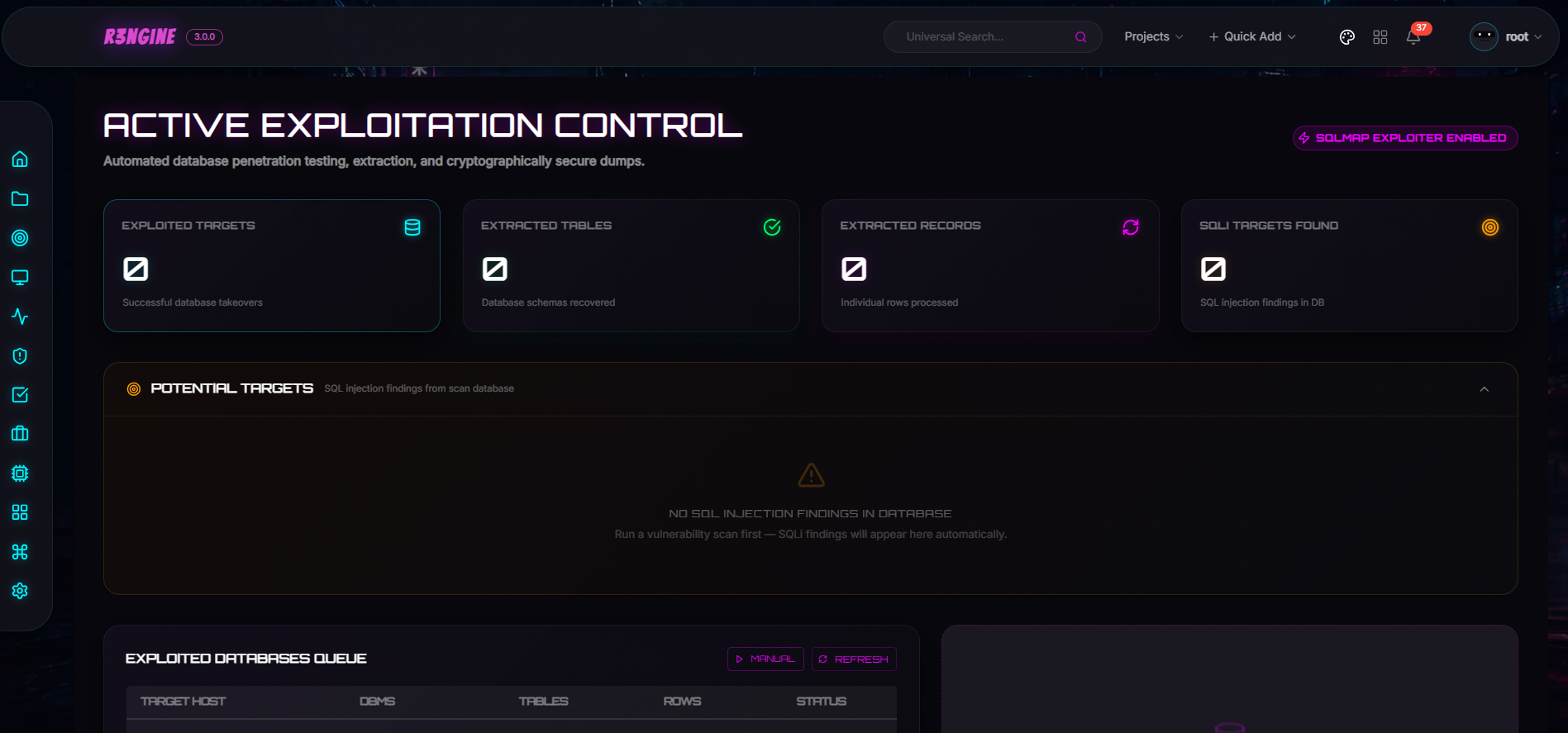
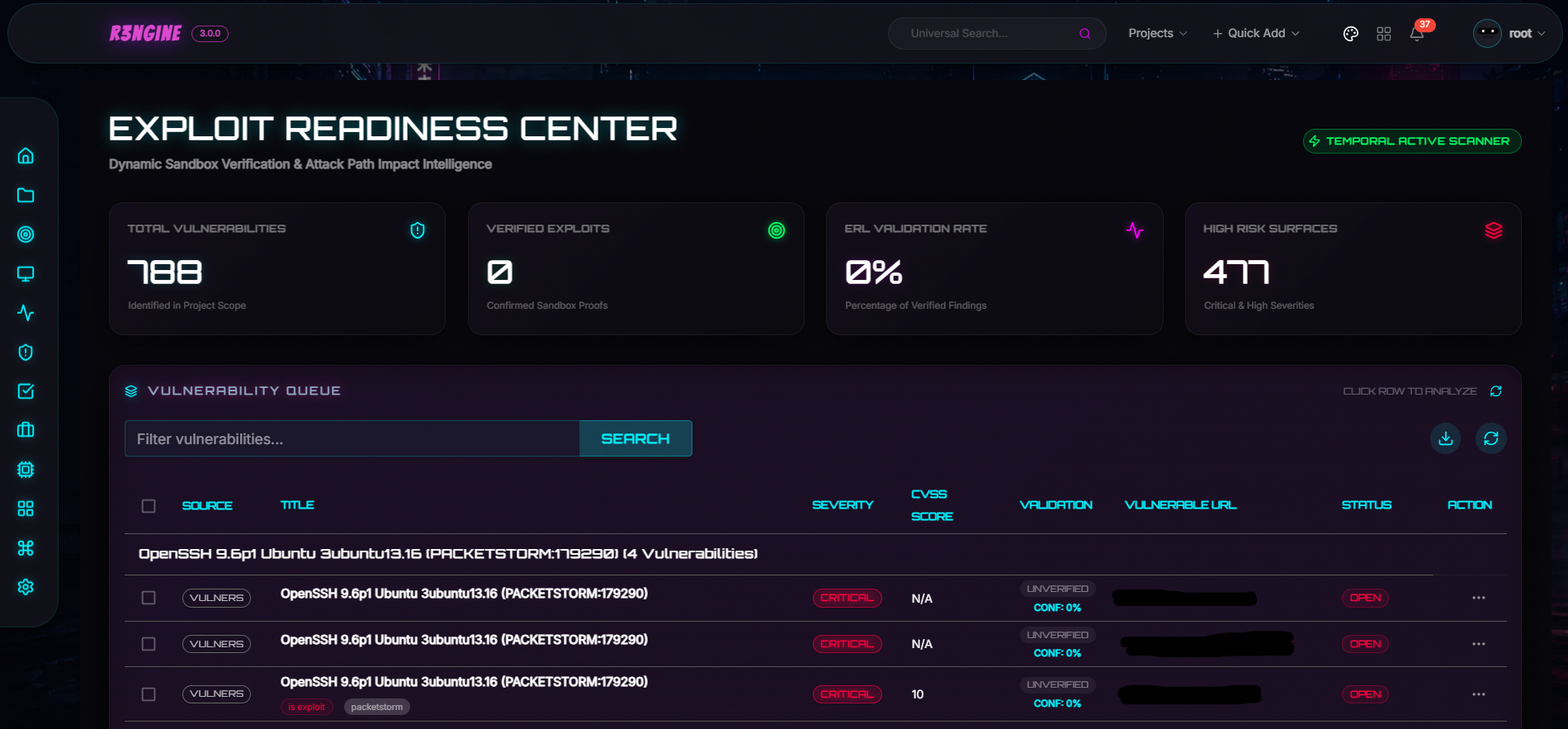
The plugin system supports dynamic installation, signed `.r3n` packages with Ed25519 verification, Temporal-wired activities, and Module Federation UI loaded directly into the host router. Available plugins include Active Directory Intelligence, Active Exploitation, Exploit Readiness Layer, Burp Suite Integration, and Email Security.

> **IMPORTANT — Upgrading from an existing installation**
>
> v3.4.1 upgraded the infrastructure stack: **Django 3.2 → 5.2.3 LTS**, **PostgreSQL 12 → 16**, and the production server changed from `runserver` to **Gunicorn + Uvicorn ASGI**. v3.2.0 replaced Celery with Temporal. Both are breaking infrastructure changes that require a full upgrade run.
>
> **You must run the full upgrade script before starting services:**
>
> ```bash
> # Linux / macOS
> git pull
> make fullupgrade
>
> # Windows
> git pull
> make.bat fullupgrade
> ```
>
> The script will:
> - Warn you of all changes and ask for explicit confirmation before proceeding
> - Stop and remove all existing containers
> - Back up the PostgreSQL database and upgrade it from pg12 → pg16 (automated, idempotent)
> - Rebuild all images from scratch with `--no-cache`
> - Apply all database migrations
> - Start the full updated stack and verify Gunicorn is serving
>
> **Your data is safe.** All Docker volumes (`scan_results`, `postgres_data`, `nuclei_templates`, `wordlist`, etc.) are fully preserved.
>
> **Do not run `make up` or `docker compose up` directly** on an existing install without running `fullupgrade` first — migrations will not be applied automatically.
>
> Any scans running at the time of upgrade **will be interrupted**. Ensure no critical scans are in progress before upgrading.

## Table of Contents
* [About r3ngine](#about-r3ngine)
* [Workflow](#workflow)
* [Features](#features)
* [Quick Installation](#quick-installation)
* [Administration & Recovery](#-administration--recovery)
* [Contributing](#contributing)
* [Reporting Security Vulnerabilities](#reporting-security-vulnerabilities)
* [License](#license)

## About r3ngine
r3ngine is a production-grade web reconnaissance and vulnerability scanning platform. It combines a 7-tier scan pipeline with AI-powered intelligence gathering, graph-based attack path modeling, CVE enrichment from official threat intel feeds, and operational security controls — all orchestrated by [Temporal](https://temporal.io) for durable, crash-safe execution.
🦾 **End-to-end reconnaissance** via 30+ integrated security tools: subdomain discovery, port scanning, HTTP crawling, directory fuzzing, screenshot capture, secret scanning, vulnerability assessment (Nuclei, Semgrep, WPScan, Dalfox), and more.
🗃️ **Unified data model** with a custom query language. Filter reconnaissance data using natural-language operators like `http_status=200&name=admin` across all finding types.
🔧 **Highly configurable scan engines** via YAML configuration. Pre-built profiles include Full Scan, Passive Scan, Screenshot Gathering, and OSINT Scan. Every parameter — threads, timeouts, rate limits — is tunable.
💎 **Subscans**: respond immediately to in-progress discoveries. Launch a targeted port scan or vulnerability assessment against any subdomain without waiting for the full pipeline.
🧠 **CVE Intelligence**: automatic CVSS v3.1 scoring from NVD, EPSS exploitation probability from FIRST, and CISA KEV marking — enriched on every startup and queryable via the API.
📃 **PDF Reports**: Full Scan, Vulnerability, and OSINT report types with customizable templates, executive summaries, LLM-generated impact narratives, and remediation priorities.
⚙️ **Role-based access control**: Sys Admin, Penetration Tester, and Auditor roles with precisely defined permissions.

## Workflow

### Temporal Scan Pipeline (v3.2.0+)
The full scan pipeline is orchestrated by `MasterScanWorkflow` on Temporal. Every tier boundary is a hard synchronisation point — no tier starts until all activities in the previous tier have completed and their results are persisted to the database.
```mermaid
flowchart TD
START([▶ Scan Initiated]) --> TP
subgraph S0["⚙️ Step 0 — Target Setup"]
direction TB
TP[TargetProfilingActivity] --> LC[LoadCheckpointActivity]
end
LC --> F1(( ))
F1 --> SD & AI & FW & OS & SF
subgraph T1["🔍 Tier 1 — Discovery · all parallel"]
direction TB
SD[RunSubdomainDiscoveryActivity]
AI[RunAmassIntelDiscoveryActivity]
FW[RunFirewallVPNScanActivity]
OS["RunGenericTaskActivity · osint"]
SF["RunGenericTaskActivity · spiderfoot_scan\n─ requires yaml spiderfoot_scan block"]
end
SD & AI & FW & OS & SF --> J1(( ))
J1 --> PDR[ParseDiscoveryResultsActivity]
PDR --> CP1{{"⏸ Pause Checkpoint"}}
CP1 --> F2(( ))
F2 --> HC & PS
subgraph T2["🌐 Tier 2 — HTTP Crawl · Port Scan · all parallel"]
direction TB
HC["RunHTTPCrawlActivity\n─ global config · feeds Tiers 3 & 4"] --> PHC[ParseHTTPCrawlResultsActivity]
PS[RunPortScanActivity]
end
PHC & PS --> J2(( ))
J2 --> FU
subgraph T3["🔗 Tier 3 — URL Fetching · sequential"]
direction TB
FU[RunFetchURLActivity]
end
FU --> DFF
subgraph T4["📁 Tier 4 — Directory & File Fuzzing · sequential"]
direction TB
DFF[RunDirFileFuzzActivity] --> PFF[ParseFuzzResultsActivity]
end
PFF --> PER[ParseEnumerationResultsActivity]
PER --> CP2{{"⏸ Pause Checkpoint"}}
CP2 --> F3(( ))
F3 --> WAD & WD & SEC
subgraph T5["🔬 Tier 5 — Analysis · all parallel"]
direction TB
WAD[RunWebAPIDiscoveryActivity]
WD[RunWAFDetectionActivity]
SEC[RunSecretScanningActivity]
end
WAD & WD & SEC --> J3(( ))
J3 --> PAR[ParseAnalysisResultsActivity]
PAR --> CP3{{"⏸ Pause Checkpoint"}}
CP3 --> F4(( ))
F4 --> NUC & WB & BF & SS
subgraph T6["🎯 Tier 6 — Assessment · BruteForcing · WAFBypass · Nuclei · Screenshot · all parallel"]
direction TB
subgraph NP["NucleiPlannerWorkflow · child workflow"]
direction TB
NUC[RunVulnerabilityScanActivity]
end
WB[RunWAFBypassActivity]
BF[RunBruteForceScanActivity]
SS[RunScreenshotActivity]
end
SS & NUC & WB & BF --> J4(( ))
J4 --> PASM[ParseAssessmentResultsActivity]
PASM --> CP4{{"⏸ Pause Checkpoint"}}
CP4 --> CV
subgraph T7["🧠 Tier 7 — Intelligence · sequential"]
direction TB
CV[CorrelateVulnerabilitiesActivity] --> CR[CalculateRiskScoresActivity]
CR --> GI["GenerateImpactAssessmentActivity\n─ requires enable_ai_impact_analysis: true"]
GI --> SG["SyncGraphActivity · APME + Neo4j\n─ requires attack_path_modeling.enabled: true"]
end
SG --> SN[SendScanNotificationActivity]
SN --> DONE([✓ Scan Complete])
```
> `(( ))` = fork/join (parallel branch split/rejoin) · `{{"⏸"}}` = pause checkpoint (workflow waits for `resume` signal) · `─ requires` = only runs when the noted YAML flag is set
>
> Full tier reference and execution notes: [`.github/workflows/temporal-scan-flow.md`](.github/workflows/temporal-scan-flow.md)

## Features
### 🔬 CVE Intelligence & Enrichment (v3.5.0)
* **CVE Enrichment Service**: Fetches CVSS v3.1 metrics from **NVD API v2.0**, exploitation probability scores from **FIRST EPSS**, and syncs the **CISA KEV** (Known Exploited Vulnerabilities) catalog. Enriched data is cached (7-day TTL for CVEs, 1-hour for KEV) and gracefully degrades when external APIs are unavailable.
* **Vulnerability History Tracking**: `VulnerabilityHistory` model traces vulnerabilities across historical scans, automatically classifying findings as new, persistent, or remediated.
* **Multi-Criteria Correlation Scoring**: Composite scores using configurable tool weights, asset criticality, CISA KEV/EPSS exploitability factors, and temporal modifiers. In-scan duplicate suppression groups findings under a `group_key` before writing.
* **Neo4j ID-Based Graph Sync**: CVE nodes in Neo4j are linked by precise CVE ID with CVSS base score and EPSS score ingested as node properties for attack path enrichment.
* **Startup Enrichment**: On every orchestrator start, `sync_cve_data` fires 5 minutes after graph sync completes — enriching all unenriched CVEs and refreshing the KEV catalog automatically.
* **Management Command**: `python manage.py sync_cve_data --all` for full manual synchronization.
### 🧠 Intelligence & AI Hub
* **Centralized AI Management**: Unified interface supporting **OpenAI, Anthropic (Claude 3), Google Gemini, and local Ollama models**.
* **Vulnerability Impact Intelligence**: Automated impact narratives, remediation strategies, and priorities via LLMs, visualized through interactive **Cytoscape.js attack paths** and a state-aware **Impact Explorer**.
* **PII Gate Security**: Advanced privacy layer that anonymizes sensitive data (IPs, emails, hostnames) before sending to external LLMs.
* **GPT Attack Surface Generator**: Automated generation of target profiles and high-value asset identification.
* **Natural Language Querying**: Complex database lookups using human-like operators.
### 🛠️ Advanced Scan & Execution Engines
* **Burp Suite Professional Integration** (v3.4.0 plugin): Two-phase Temporal sync (import → correlate), bidirectional scope push, filterable issues grid, and live connection health badge.
* **Active Directory Intelligence Plugin**: Full AD attack surface analysis — Cytoscape.js graph with 5 layout presets, real-time WebSocket streaming (150 ms batching), paginated findings API, 7-section PDF reports (`ad_modern`, `cyber_pro` templates), and RBAC evidence logs.
* **Attack Path Modeling Engine (APME)**: Neo4j-based graph discovery of feasible attack routes (e.g., SQLi → DB Access → Pivot) with 20+ security patterns and automated "Goal Injection".
* **Adaptive Stress & Resilience Engine (ASRE)**: `k6`, `wrk`, `hping3`, and `Locust` orchestration with real-time ECharts telemetry via Redis Streams and WebSockets, safety kill-switches, and LLM-powered bottleneck PDF reports.
* **Exploit Readiness Layer (ERL)**: Containerized, non-destructive vulnerability validation with native proxy rotation and OpSec compliance built into the adapter layer.
* **Autonomous Recon Orchestration**: Temporal durable workflows with crash-safe execution, 10-attempt retry cap, full history replay at `localhost:8080`, and UI-based resume.
* **Nmap Vulners NSE Grouped Findings**: Product-version grouped vulnerability display in UI and PDF reports with collapsed/expandable CVE sub-tables.
* **Nuclei Sequential Severity Execution**: `NucleiPlannerWorkflow` runs severities sequentially to prevent OOM on large target sets, with per-severity activity status in the timeline.
* **Vulnerability Correlation Engine**: Unifies findings from Nuclei, Semgrep, Trivy, Gitleaks, Acunetix, Retire.js, and more into a prioritized threat landscape with persistent state tracking.
* **Scan Queueing**: Optional concurrency limiter (`max 1 main + 1 subscan`) with Temporal polling loop and settings panel toggle.
### 🕵️ Surgical Reconnaissance & OSINT
* **Advanced Web API Discovery**: Kiterunner, Arjun, ParamSpider, LinkFinder, and InQL pipeline.
* **Deep Pursuit OSINT Engine**: Email pivoting (**holehe**), cross-platform social profile mapping (**maigret**), social presence discovery (**gosearch**), tactical identity permutation (**username-anarchy**), and a **Playwright-driven Social Intelligence Engine**.
* **URL Deduplication**: Two-pass dedup after `fetch_url` — URL signature dedup (pre-save) collapses parametric variants, content-based dedup (post-save) removes duplicate HTTP responses — reducing Tier 4–6 load.
* **Vulnerability Scanning**: Nuclei (sequential severity, auto-template updates), Semgrep (parallel downloads, 500-file cap, 5 MB per-file limit), WPScan, Dalfox (deep scan, WAF bypass, remote payloads), CRLFuzzer, S3Scanner, Gitleaks, Retire.js.
* **WHOIS, WAF Detection, and IP Geolocation**.
### 🥷 Stealth & Operational Security (OpSec)
* **Enhanced Proxy Orchestration**: Automated fetching, validation, and per-tool rotation of proxies across all discovery modules.
* **Centralized Brute-Force Orchestration**: Hydra and Medusa integration with Proxychains4. Multi-service targeting: SSH, FTP, HTTP, SMB, RDP, Telnet.
* **OpSec Presets**: User-Agent rotation, stealth timing, custom DNS resolvers, WAF bypass headers, and TOR circuit rotation.
* **Hardened Scan Termination**: `abort_scan_history()` / `abort_subscan()` cancels all child subscans and Temporal workflows before database updates, eliminating orphaned processes.
### 🎨 Visual & Administrative Interface
* **Cyberpunk V3 UI**: Glassmorphic dashboard — Hacker (Cyberpunk), Hybrid (Modern Dark), and Enterprise (Professional Slate) themes.
* **Attack Surface Map v4.0**: fCoSE and KLay layouts, hierarchical asset clustering (Domains > Subdomains > Endpoints), AI-driven graph search.
* **Tactical GeoMap Visualization**: CSS-animated markers and tooltip interactions for global asset positioning.
* **Bounty Hub**: HackerOne program management, asset tracking, and direct vulnerability reporting.
* **Automated Startup Sync**: On every orchestrator start — graph sync, CISA KEV catalog refresh, Semgrep rule sync, stuck scan recovery, and full CVE enrichment — all fire as one-shot Temporal schedules.
* **Configuration Export/Import**: Backup and restore API keys, wordlists, tool configs, and scan engines to/from a single `.zip`.
* **Scan Result Recovery**: `recover_scan_results` management command reconstructs the database from the `scan_results` volume on disk — idempotent, dry-run by default.
* **Customizable Alerts**: Notifications via Slack, Discord, Telegram, and Lark.
### ⚡ Infrastructure & Performance
* **Django 5.2.3 LTS** (supported until April 2028) + **PostgreSQL 16** (supported until November 2028).
* **Gunicorn + Uvicorn ASGI**: 4-worker production server with full ASGI support for HTTP and Django Channels WebSocket streams.
* **Temporal Workflow Engine**: Durable execution, automatic retry with configurable backoff, per-workflow cancellation.
* **Automated Infrastructure Upgrade** (`make fullupgrade`): 8-step procedure covering DB backup, PostgreSQL major-version upgrade (idempotent), image rebuild, migration apply, and health verification.
* **Global Redis Caching**: Unified Redis-backed caching replacing per-process local memory for shared state efficiency.
* **Deterministic Resource Limits**: Docker `deploy.resources` limits for all production services.

## 🛠️ Development & Type Safety
The r3ngine frontend is built with a "Safety-First" philosophy under `strict: true` TypeScript throughout.
* **Full Strict Mode**: Eliminates hidden null pointers and undefined property access at build time.
* **Contract Integrity**: Frontend models mapped to the auto-generated OpenAPI schema (`src/types/api.ts`) with `verbatimModuleSyntax` for tree-shaking.
* **Modular Architecture**: Feature-based structure — each module (`targets`, `scans`, `vulnerabilities`) maintains its own API hooks and types.
* **Production Hardening**: CI/CD validates every commit against `tsc -b` and `vite build`.

## Quick Installation
### Quick Setup for Ubuntu/VPS
1. Clone the repository
```bash
git clone https://github.com/whiterabb17/r3ngine && cd r3ngine
```
1. Configure the environment
```bash
nano .env
```
**Ensure you change the `POSTGRES_PASSWORD` for security.**
1. (Optional) For non-interactive install, set admin credentials in `.env`
```bash
DJANGO_SUPERUSER_USERNAME=yourUsername
DJANGO_SUPERUSER_EMAIL=YourMail@example.com
DJANGO_SUPERUSER_PASSWORD=yourStrongPassword
```
1. Configure Temporal worker concurrency in `.env` (optional)
```bash
TEMPORAL_MAX_CONCURRENT_ACTIVITIES=20
TEMPORAL_MAX_CONCURRENT_WORKFLOWS=10
```
Recommended values by available RAM:
* 4 GB: `TEMPORAL_MAX_CONCURRENT_ACTIVITIES=10`
* 8 GB: `TEMPORAL_MAX_CONCURRENT_ACTIVITIES=20`
* 16 GB+: `TEMPORAL_MAX_CONCURRENT_ACTIVITIES=40`
The Temporal UI is available at `http://localhost:8080` for workflow inspection, history replay, and manual intervention.
1. Run the installation script:
```bash
sudo ./install.sh
```
For non-interactive install: `sudo ./install.sh -n`
*Note: If needed, run `chmod +x install.sh` first.*
**r3ngine is accessible at `https://127.0.0.1` (or your VPS IP). Do not expose via direct port access in production.**
### Installation on Other Platforms
For Mac, Windows, or other systems, refer to the installation notes in [`docker/`](docker/) or open an issue for platform-specific guidance.
## Updating
```bash
cd r3ngine && sudo ./update.sh
```
For major version upgrades (including infrastructure changes), always use `make fullupgrade` instead of a plain `docker compose up`.

## 🔧 Administration & Recovery
### Scan Result Recovery
If the database is lost or corrupted but the `scan_results` Docker volume is intact, the `recover_scan_results` management command can reconstruct the database from files on disk.
**What is recovered** (when the corresponding output files exist):
| Data | Source file(s) |
|------|----------------|
| Domain | Parsed from folder name (`domain_scanid`) |
| ScanHistory | Folder mtime used as scan date |
| Subdomains | `#id_subdomain_discovery.txt`, `subdomains_*.txt`, subscan dirs |
| Ports + IpAddresses | `#id_port_scan.txt` — naabu JSONL and legacy JSON-object formats |
| EndPoints | `#id_fetch_url.txt`, `urls_*.txt` |
| Vulnerabilities | `*_nmap_vulns.json`, `#id_nuclei_*_module.txt` |
| WAF associations | `#id_waf_detection.txt` linked to matching subdomains |
**Usage** (run inside the `web` container):
```bash
# Dry-run — preview what would be recovered without writing anything
python manage.py recover_scan_results
# Apply — write recovered records to the database
python manage.py recover_scan_results --apply
# Recover a single scan folder
python manage.py recover_scan_results --apply --scan-dir /usr/src/scan_results/example.io_108
# Use a non-default results root
python manage.py recover_scan_results --apply --results-root /alt/path/scan_results
```
```bash
docker-compose exec web python manage.py recover_scan_results --apply
```
The command is **idempotent** — scans already in the database are skipped on every run.
### CVE Data Synchronization
```bash
# Inside the web container:
python manage.py sync_cve_data # Enrich unenriched CVEs
python manage.py sync_cve_data --kev # Sync CISA KEV catalog only
python manage.py sync_cve_data --refresh 30 # Re-enrich CVEs from last 30 days
python manage.py sync_cve_data --all # Full sync (KEV + unenriched)
```
CVE enrichment also runs automatically 5 minutes after every orchestrator startup.
### Debugging
1. Enable debug mode — edit `docker/web/entrypoint.sh` and add `export DEBUG=1` at the top, then `docker-compose restart web`.
2. View logs: `make logs` or `docker compose logs temporal-python-orchestrator`.
3. Temporal UI: `http://localhost:8080` — full workflow history, signals, event replay.
4. Disable debug mode when done: set `DEBUG=0` and restart.

## Screenshots
### Scan Results

### Live Logs

### Mobile Interface


## Contributing
Contributions of all sizes are welcome. Whether fixing a typo, improving UI, or adding new features — every contribution matters.
How you can contribute:
* Code improvements and bug fixes
* Documentation updates
* New feature suggestions and implementations
* UI/UX enhancements
* Plugin development
To get started:
1. Check our [Contributing Guide](.github/CONTRIBUTING.md)
2. Pick an [open issue](https://github.com/whiterabb17/r3ngine/issues) or propose a new one
3. Fork the repository and create your branch
4. Make your changes and submit a pull request

## Submitting Issues
When submitting issues, provide as much detail as possible:
1. Enable debug mode (see [Debugging](#debugging) above)
2. Run `make logs` to capture the full stack trace
3. Check the browser developer console for XHR 500 errors
4. Submit a GitHub issue with the stack trace, reproduction steps, and system information

## Reporting Security Vulnerabilities
**Do not** disclose security vulnerabilities publicly on GitHub issues.
Go to the [Security tab](https://github.com/whiterabb17/r3ngine/security) and click **"Report a vulnerability"** to open GitHub's private vulnerability reporting form. Include:
- Steps to reproduce
- Potential impact
- Suggested fixes or mitigations (if any)
Reports are reviewed within 48–72 hours. Responsible disclosure will be publicly acknowledged after the fix is released, unless you prefer to remain anonymous.

## License
Distributed under the GNU GPL v3 License. See [LICENSE](LICENSE) for more information.

Note: Parts of this README were written or refined using AI language models.