https://github.com/whyboris/global-income-distribution
Exploration and charting of world income distribution
https://github.com/whyboris/global-income-distribution
income-inequality
Last synced: about 1 year ago
JSON representation
Exploration and charting of world income distribution
- Host: GitHub
- URL: https://github.com/whyboris/global-income-distribution
- Owner: whyboris
- License: mit
- Created: 2019-05-17T12:16:57.000Z (about 7 years ago)
- Default Branch: master
- Last Pushed: 2019-10-15T18:47:05.000Z (almost 7 years ago)
- Last Synced: 2025-05-07T09:12:43.080Z (about 1 year ago)
- Topics: income-inequality
- Language: Jupyter Notebook
- Homepage:
- Size: 5.08 MB
- Stars: 12
- Watchers: 1
- Forks: 0
- Open Issues: 0
-
Metadata Files:
- Readme: README.md
- License: LICENSE
Awesome Lists containing this project
README
# Data Visualization Challenge: Visualize Inequality
This repository contains the code used to generate a submission that won [3rd place](http://hdr.undp.org/en/content/2019-human-development-data-visualization-challenge-winner-gender-inequality-visual-story) in the [Data Visualization Challenge](http://hdr.undp.org/en/data-visualization-challenge-2019) organized by the _United Nations Development Programme Human Development Reports_.
The submission lives at [income-inequality.info](http://income-inequality.info)
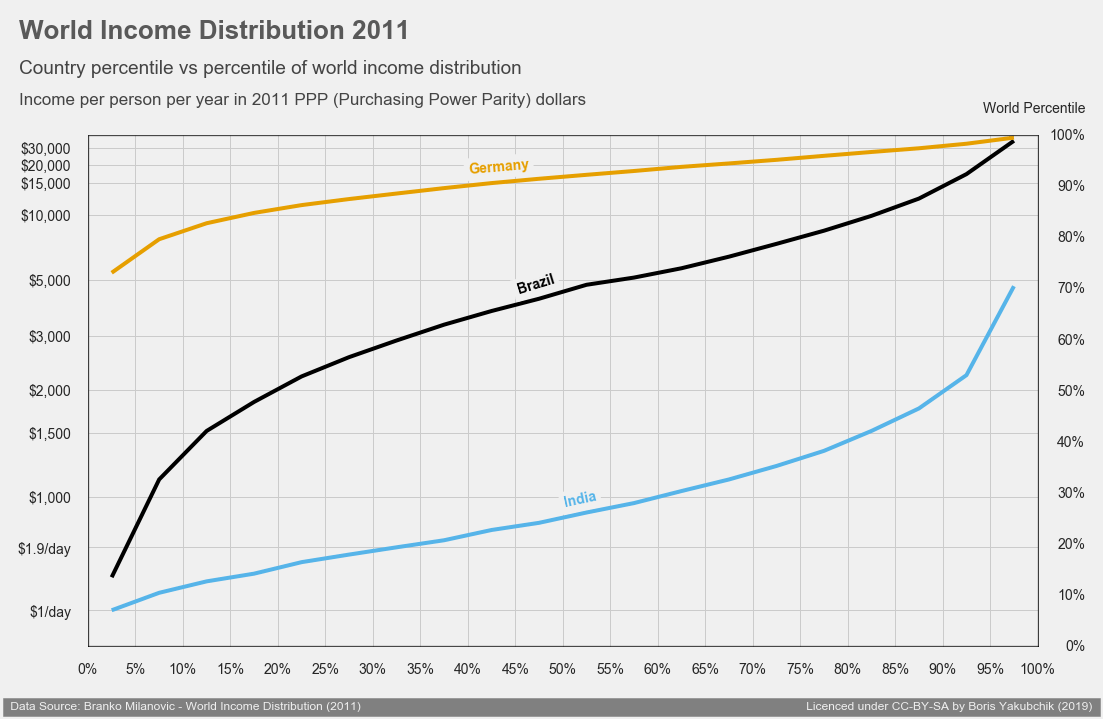
The website files are located in another GitHub repository: [Income-Inequality](https://github.com/whyboris/income-inequality.info)
To launch a live interactive version: [](https://mybinder.org/v2/gh/whyboris/Global-Income-Distribution/master?urlpath=lab)
To report errors, ask questions, or offer corrections, please use the _Issues_ section on this or the other repository.
## Notes
I tried to document my steps and processing. Please let me know if you'd like me to clarify, elaborate, or better-organize this repository.
There were very few steps I had to perform manually (without running a script), primarily cleaning the _.csv_ file headers for the _Pandas_ library to be able to read the files. Another manual step was dealing with the data for China, which was split into two categories: _urban_ and _rural_. Only four countries had to be removed from the original dataset before the final export (there was trouble with PPP conversion).
## Outline
Files are numbered for convenience and in rough chronological order:
01 - Generates the 1st, 2nd, and 3rd figures on the website
02 - Generates the 4th - 8th figures, export csv with coordinate data for the interactive graph
03 - Process csv from above step into correct format for interactive graph library
04 - Generate the js dictionaries to convert between ISO2, ISO3, and country names on the website
See the *archive* folder for the initial exploration with 2005 data
## For non-programmers who want to try
Coding is likely less scary than you think. Getting everything above to work will just take some research and patience.
The above code requires you install:
1. [*Python*](https://www.python.org/downloads/) (version 3.6 or better yet 3.7)
- this will automatically install *pip* too
2. Open your _terminal_ and use *pip* to install*:
- *jupyterlab* (a newer version of *Jupyter Notebooks*)
- *pandas*
- *matplotlib*
- *seaborn*
3. Save all the files from this repository
- if you install [git](https://git-scm.com/downloads) you can just use the command ```git clone https://github.com/whyboris/Global-Income-Distribution.git``` in your terminal
4. Finally navigate to this folder in your _terminal_ and type in `jupyter lab`
- Your browser should open the _Jupyter Lab_ interface and you'll be able to open and run the files!
\* Using `pip` to install above is as easy as typing `pip install pandas` in your terminal. Though if you start coding more-seriously, consider using virtual environments as well.
When unsure about how to do something, just search online, and on _stackoverflow_.