https://github.com/will/cb
A CLI for Crunchy Bridge with very good tab completion
https://github.com/will/cb
Last synced: about 1 year ago
JSON representation
A CLI for Crunchy Bridge with very good tab completion
- Host: GitHub
- URL: https://github.com/will/cb
- Owner: will
- License: gpl-3.0
- Created: 2021-05-25T02:18:32.000Z (about 5 years ago)
- Default Branch: main
- Last Pushed: 2021-09-20T23:12:48.000Z (over 4 years ago)
- Last Synced: 2025-02-10T11:45:39.610Z (over 1 year ago)
- Language: Crystal
- Homepage:
- Size: 227 KB
- Stars: 0
- Watchers: 3
- Forks: 1
- Open Issues: 0
-
Metadata Files:
- Readme: README.md
- Changelog: CHANGELOG.md
- License: COPYING
Awesome Lists containing this project
README
# cb
A CLI for Crunchy Bridge with very good tab completion.
## Installation
- For homebrew (on [macOS](https://brew.sh) or [linux](https://docs.brew.sh/Homebrew-on-Linux))
`brew install will/cb/cb`. This will install both `cb` and the fish shell tab
completions for you.
- For others, download the [latest release](https://github.com/will/cb/releases),
put it somewhere in your path, and be sure to manually install shell tab
completions from the `completions` directory.
## Getting started
First get your `application ID` and `application secret` from https://www.crunchybridge.com/settings/
Then run `cb login` to register the CLI with your Crunchy Bridge account.
## Usage
Once you are logged in, you can run `cb list` to see all of your clusters, and
`cb psql ` to securely connect to your database or `cb scope` to
run health checks against it. There are many more commands that you can use to
manage things such as log destinations, firewall rules, and more.
To see what commands are available run `cb --help`, and to see more detailed
information for a given command add `--help` to it, for example `cb create
--help`.
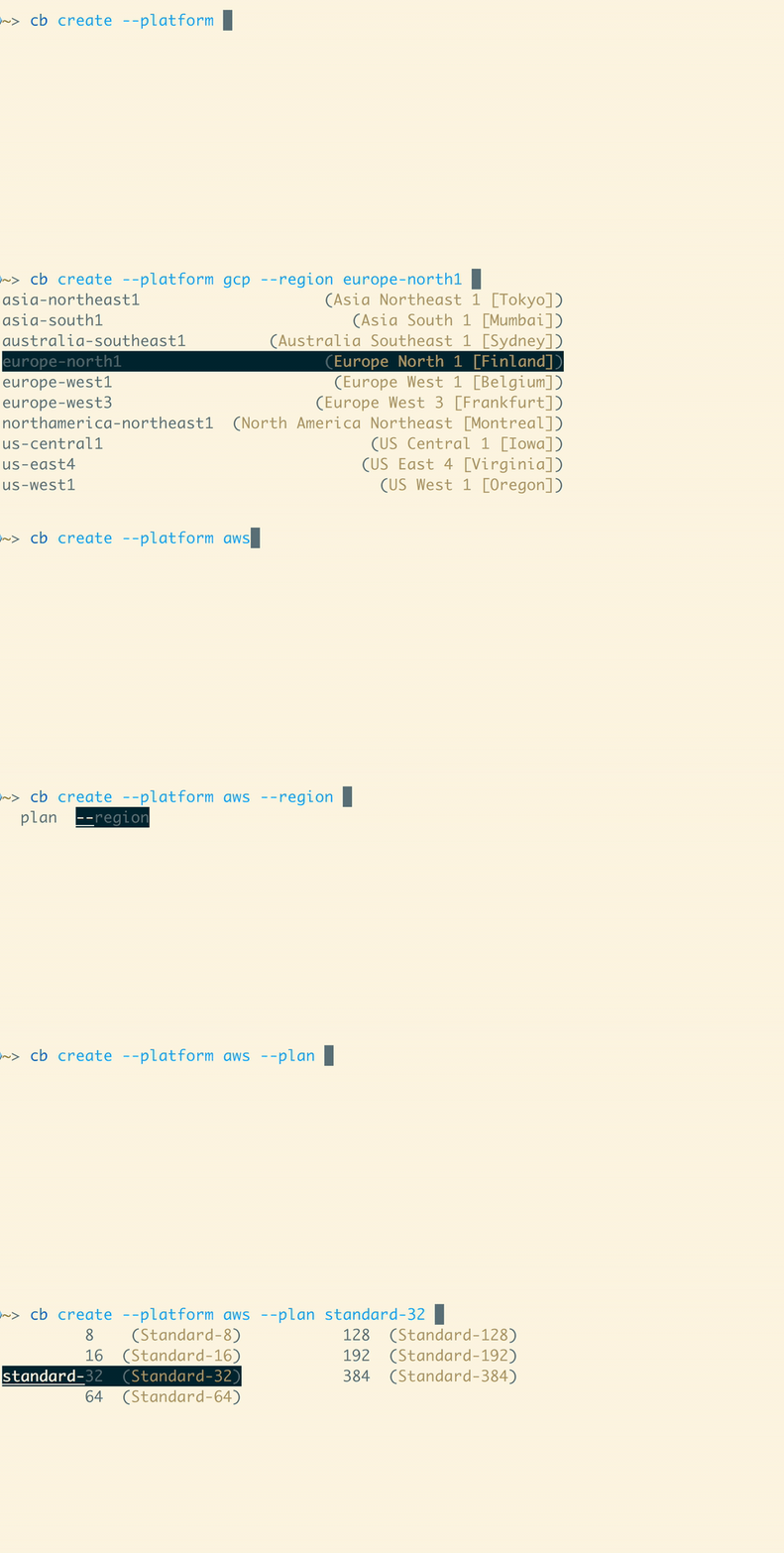
If you use the [fish command line shell](https://fishshell.com) and have the
completions installed for you (either automatically through homebrew or
otherwise), nearly all arguments can be intelligently completed for you. This
includes all cluster IDs available to just your account, in addition to normal
subcommands and flags. Also where possible the current arguments you've given
are taken into consideration. For example if you're creating a new cluster on
AWS, instances sizes on Azure or regions in GCP will not be shown.
## Development
Install dependencies: [crystal](https://crystal-lang.org/install/)
You can run quick checks by executing `src/cli.cr` directly. While this can be
handy, it is slow because the executable is being built each time, then
executed. To build a development version run `make` or `shards build`. The
binary will be at `bin/cb` by default. There is a helper script
`dev_setup.fish` which puts the local bin directory in your path so the `cb` in
that directory will be ran, as well as an `scb` alias for running `src/cli.cr`.
It will also set up completions for each.
`crystal tool --format` will format the code as required. It is useful to have
your editor run this for you on save.
### testing
You can run `crystal spec` to run all of the specs, or `make test` to also run linting checks.
## Contributing
1. Fork it ()
2. Create your feature branch (`git checkout -b my-new-feature`)
3. Commit your changes (`git commit -am 'Add some feature'`)
4. Push to the branch (`git push origin my-new-feature`)
5. Include an entry in the changelog
6. Create a new Pull Request