https://github.com/winterbe/rntimerexample
📱 React Native + Mobx sample app
https://github.com/winterbe/rntimerexample
android app ios javascript mobile mobx react react-native
Last synced: about 1 year ago
JSON representation
📱 React Native + Mobx sample app
- Host: GitHub
- URL: https://github.com/winterbe/rntimerexample
- Owner: winterbe
- License: mit
- Created: 2017-01-23T15:06:29.000Z (over 9 years ago)
- Default Branch: master
- Last Pushed: 2017-05-10T08:14:47.000Z (about 9 years ago)
- Last Synced: 2025-06-07T08:42:37.140Z (about 1 year ago)
- Topics: android, app, ios, javascript, mobile, mobx, react, react-native
- Language: JavaScript
- Homepage: https://twitter.com/winterbe_
- Size: 357 KB
- Stars: 41
- Watchers: 4
- Forks: 9
- Open Issues: 0
-
Metadata Files:
- Readme: README.md
- License: LICENSE
Awesome Lists containing this project
README
# RNTimerExample
> A mobile app for getting started with React Native and Mobx development.
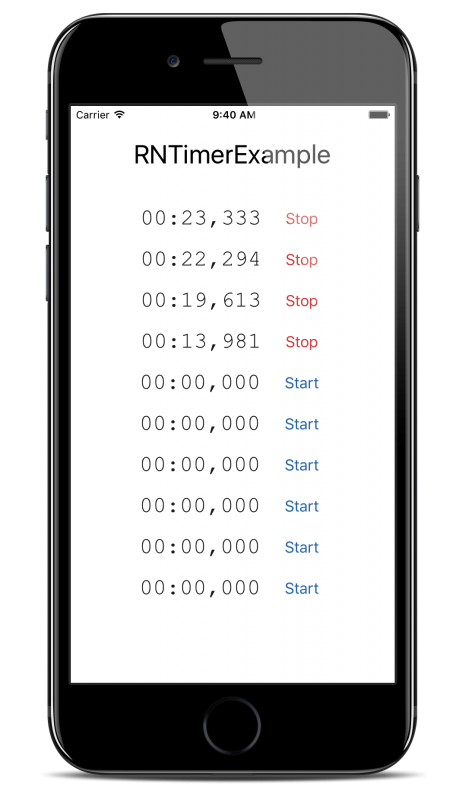
## Getting started
Follow the official [getting started guide](https://facebook.github.io/react-native/docs/getting-started.html) for iOS and/or Android. For iOS you need a Mac with Xcode installed. Developer account is not necessary unless you want to submit your app to the App Store.
> For Android emulator you should initially create file `android/local.properties` with content `sdk.dir=/path/to/your/android-sdk`
## Usage
The following run scripts can be used from the console in order to test and run the app locally from your developer machine.
- `npm test`: Run all tests.
- `npm run test:watch`: Run all tests in watch-mode.
- `npm run test:coverage`: Run all tests and create coverage report (located in project folder `/coverage`).
- `npm run lint`: Check eslint rules.
- `npm run packager`: Start the React Native packager (must be started before running the ios/android app).
- `npm run packager:reset`: Start the React Native packager and reset cache (for troubleshooting only).
- `npm run ios`: **Run the app in iOS simulator**.
- `npm run android`: **Run the app in Android emulator**.
- `npm run android:emulator`: Start the Android emulator (must be started before running the android app).
- `npm run android:devmenu`: Open developer menu in the running Android emulator.
- `npm run android:apk-assemble`: Assemble Android APK files (see folder `android/app/build/outputs/apk`).
- `npm run android:apk-install`: Install Android APK on the connected device.
## Links
- [React Native](https://facebook.github.io/react-native/docs/getting-started.html)
- [Who's using React Native?](https://facebook.github.io/react-native/showcase.html)
- [React](https://facebook.github.io/react/docs/hello-world.html)
- [Mobx](https://mobx.js.org/)
- [Jest](https://facebook.github.io/jest/docs/tutorial-react-native.html)
- [ESLint](http://eslint.org/)
- [Exponent React Native Library](https://getexponent.com/)
- [React Native Vector Icons](https://github.com/oblador/react-native-vector-icons)
- [Code Push](https://microsoft.github.io/code-push/)
- [Fast Lane](https://fastlane.tools/)
## License
MIT