https://github.com/wiseplat/learn-backtrader
Some examples for Backtrader. Showcases for indicators, run backtests, get historical data for shares, live trading and more...
https://github.com/wiseplat/learn-backtrader
algo-trading algo-trading-software algo-trading-strategies algotrading backtesting backtrader indicators live-trading trading-algorithm trading-bot trading-robot trading-robots
Last synced: about 1 year ago
JSON representation
Some examples for Backtrader. Showcases for indicators, run backtests, get historical data for shares, live trading and more...
- Host: GitHub
- URL: https://github.com/wiseplat/learn-backtrader
- Owner: WISEPLAT
- Created: 2022-04-03T04:41:25.000Z (over 4 years ago)
- Default Branch: master
- Last Pushed: 2023-04-09T03:48:50.000Z (over 3 years ago)
- Last Synced: 2025-04-12T11:58:56.239Z (over 1 year ago)
- Topics: algo-trading, algo-trading-software, algo-trading-strategies, algotrading, backtesting, backtrader, indicators, live-trading, trading-algorithm, trading-bot, trading-robot, trading-robots
- Language: Python
- Homepage:
- Size: 143 MB
- Stars: 80
- Watchers: 3
- Forks: 38
- Open Issues: 1
-
Metadata Files:
- Readme: README.md
Awesome Lists containing this project
README
<<<<<<< HEAD
#### git clone https://github.com/WISEPLAT/QuikPy
#### git clone https://github.com/WISEPLAT/BackTraderQuik
1) для настройки интеграции с Quik (отсюда можно взять последнюю версию
https://github.com/finsight/QUIKSharp/):
2) в Quik -> Сервисы -> Lua скрипты -> нажимаем кнопку добавить и выбираем
файл QuikSharp.lua из папки "lua"
3) после добавления файла убеждаемся что он выбран, и нажимаем !!!
на стрелку около кнопки Запустить,
4) выбираем пункт "Запустить в Lua 5.3.5", после запуска в строке файла
в поле "Память, КВ" начнут бежать цифры,
5) и теперь нажимаем кнопку "Закрыть" - интеграция сделана
=======
### Здесь выкладываю некие наработки по BackTrader, видосы по ним находятся здесь:
### https://www.youtube.com/@wiseplat/streams
Почему нужно брать библиотеку BackTrader с WISEPLAT?
====================================================
Потому, что вы можете размещать ваши коммиты в моем репозитории - я применю их ASAP!
Чтобы установить backtrader из моего репозитория::
pip install git+https://github.com/WISEPLAT/backtrader.git
По этой ссылке https://github.com/WISEPLAT/backtrader вы можете предложить свои коммиты, я применю их ASAP.
1-й коммит: Возможность изменить фон для отображаемых тегов значений для темной темы - чтобы получить темную тему)))
Когда вы используете темную тему, вам нужно изменить фон для отображаемых тегов значений.
2-й коммит: Исправление: В коллекциях последних версий Python.Iterable -> collections.abc.Iterable - для работы с Python 3.11+
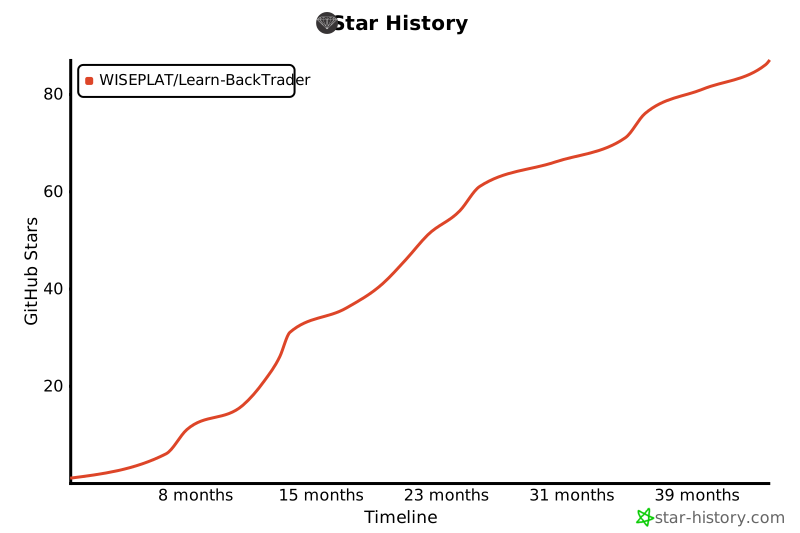
## Star History
Пожалуйста поставьте Звезду 🌟 этому коду
[](https://star-history.com/#WISEPLAT/Learn-BackTrader&Timeline)
Please put a Star 🌟 for this code
Why use BackTrader repo from WISEPLAT?
======================================
Because, you can post your commits in my repository - I will apply them!
To install backtrader from my repository::
pip install git+https://github.com/WISEPLAT/backtrader.git
By this link https://github.com/WISEPLAT/backtrader you can suggest your commits, I will apply them ASAP.
This suggestion is made here, because of no one here doesn't want to continue this cool project!
1st commit: Option to change background for plotted value tags for dark theme - to get dark theme)))
When you use dark theme you need to change background for plotted value tags.
2nd commit: Fix: In last Python versions collections.Iterable -> collections.abc.Iterable - to work with Python 3.11+
>>>>>>> origin/master