https://github.com/wiseplat/meteor-package-tools
https://github.com/wiseplat/meteor-package-tools
Last synced: 3 months ago
JSON representation
- Host: GitHub
- URL: https://github.com/wiseplat/meteor-package-tools
- Owner: WISEPLAT
- Created: 2018-02-09T19:28:41.000Z (over 8 years ago)
- Default Branch: master
- Last Pushed: 2018-02-09T19:29:04.000Z (over 8 years ago)
- Last Synced: 2025-04-10T13:33:37.352Z (over 1 year ago)
- Language: JavaScript
- Size: 7.81 KB
- Stars: 0
- Watchers: 0
- Forks: 0
- Open Issues: 0
-
Metadata Files:
- Readme: README.md
Awesome Lists containing this project
README
# Wiseplat tools
A set of helper functions for wiseplat dapps.
See here for a [demo of the template helpers](http://localhost:4000/#tools).
## Installation
You can either add it as a Meteor package using:
$ Meteor add wiseplat:tools
or add link to the `wshtools.js` in your HTML.
## Usage
This package provides formating and converting functionality.
When using the `WshTools.ticker` it will call the [cryptocompare.com public API](https://min-api.cryptocompare.com/data/price?fsym=WSH&tsyms=BTC,USD,EUR) every 30s to retrive price information for wise.
When used as a Meteor package, the following units are possible for some methods:
- `btc`
- `usd`
- `eur`
- `cad`
- `gbp`
- `jpy`
- And all wise units ('wise', 'finney', 'wei', etc)
**Note** As non-meteor package you can only use the wise units.
***
### WshTools.ticker
WshTools.ticker.start();
WshTools.ticker.findOne(unit)
**Note** This is only available when used as a Meteor package.
To start polling for ticker prices run `WshTools.ticker.start()`
It gives you the latest price for wise based on the [kraken.com public API](https://api.kraken.com/0/public/Ticker?pair=XWSHZEUR,XXBTZUSD).
`WshTools.ticker` is a reactive collection, so when used in a reactive function it will re-run this function when the price is updated.
The ticker will be updated every 30 seconds.
**Methods**
Its a normal Meteor collection
- `start(options)` - starts the polling for the ticker, the options object can be an object with `{extraParams: 'mydata'}` to be added to the ticker polling call
- `findOne(unit)` - returns an object with the price of the unit
- `find().fetch()` - returns all available price ticker units
**Returns**
- `Object`
```js
{
_id: 'btc',
price: '0.02000'
}
```
**Example**
```js
var usd = WshTools.ticker.findOne('usd')
if(usd)
console.log(usd.price) // "2.0000"
```
***
### WshTools.setLocale
WshTools.setLocale(locale)
Set the locale to display numbers differently in other countries.
This functions lets `WshTools.formatBalance()` and `WshTools.formatNumber()` reactivly re-run, to show the new format.
**Parameters**
- `locale` (`String`) - the locale to set
**Returns**
`String` - the set locale e.g. `en`
**Example**
```js
WshTools.setLocale('de');
WshTools.formatNumber(2000, '0,0.00');
// 2 000,00
```
***
### WshTools.setUnit
WshTools.setUnit(unit)
**Note** This is only available when used as a Meteor package.
Reactivly sets a unit used as default unit, when no unit is passed to other WshTools methods.
And also persists it in localstorage so its the same when you reload you app.
Default is unit `wise`.
**Parameters**
- `unit` (`String`) - the unit to set, see [Usage](#usage) for more
**Returns**
`Boolean` - TRUE if the unit is an allowed unit and could be set
**Example**
```js
WshTools.setUnit('btc');
Tracker.autorun(function(){
var amount = WshTools.formatBalance('23000000000000000000', '0,0.0[00] unit');
// amount = "0.287 btc"
});
```
***
### WshTools.getUnit
WshTools.getUnit()
**Note** This is only available when used as a Meteor package.
Reactivly gets the current set default unit, used byt other WshTools methods when no unit was passed.
And also persists it in localstorage so its the same when you reload you app.
Default is unit `wise`.
**Parameters**
none
**Returns**
`String` - the current default unit.
**Example**
```js
WshTools.setUnit('btc');
Tracker.autorun(function(){
var unit = WshTools.getUnit();
// unit === 'btc'
});
```
***
### WshTools.formatNumber
WshTools.formatNumber(number, format)
Formats any number using [numeral.js](http://numeraljs.com), e.g. `"0,0.00[0000]"`.
**Parameters**
- `number` (`String|Number`) - the number to format
- `format` (`String`) - the format see [numeral.js](http://numeraljs.com) for examples, e.g. `"0,0.00[0000]"`
**Returns**
`String` - the formated number.
**Example**
```js
var finney = WshTools.formatNumber(2000, '0,0.00');
// finney = '2,000.00'
```
***
#### Format number template helper
**Usage**
```html
{{dapp_formatNumber "1000000133" "0,0.00[0000]"}}
```
***
### WshTools.formatBalance
WshTools.formatBalance(wei, format, unit)
Formats a number of wei into any other wiseplat unit and other currencies (see [Usage](#usage)).
Default is unit `wise`.
The `format` property follows the [numeral.js](http://numeraljs.com) formatting, e.g. `"0,0.00[0000]"`.
Additionally you can add `"unit"` or `"UNIT"` (for uppercase) to display the unit after or before the number the number.
Additionally this function uses the reactive `WshTools.getUnit()` variable, when no `unit` was given.
You can then reactivly change the unit using `WshTools.setUnit('finney')`
**Parameters**
- `wei` (`String|Number`) - the amount of wei to convert and format
- `format` (`String`) - the format see [numeral.js](http://numeraljs.com) for examples, e.g. `"0,0.00[0000]"`.
- `unit` (`String`) - (optional) the unit to convert the given wei amount to, if not given it will use `WshTools.getUnit()`
**Returns**
`String` - the formated balance.
**Example**
```js
var amount = WshTools.formatBalance(112345676543212345, '0,0.0[00] unit', 'finney');
// amount = "112.346 finney"
```
***
#### Format balances template helper
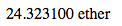
**Usage**
```html
{{dapp_formatBalance "1000000133" "0,0.00[0000]" "wise"}}
```
If you leave the last value it will use `WshTools.getUnit()`, as reactive localstorage variable.
```html
{{dapp_formatBalance "1000000133" "0,0.00"}}
```
Use then `WshTools.setUnit(finney')` to change the unit and displayed balances.
***
### WshTools.toWei
WshTools.toWei(number, unit)
Formats an amount of any supported unit (see [Usage](#usage)) into wei.
Default is unit `wise`.
Additionally this function uses the reactive `WshTools.getUnit()` variable, when no `unit` was given.
You can then reactivly change the unit using `WshTools.setUnit('finney')`
**Parameters**
- `number` (`String|Number`) - the number of a unit, see [Usage](#usage) for more
- `unit` (`String`) - the unit of the given number
**Returns**
`String` - the number in wei.
**Example**
```js
var wei = WshTools.toWei(23, 'btc');
// wei = "80000000000000000000"
```