https://github.com/wiseplat/wise-proxy
Wiseplat mining proxy
https://github.com/wiseplat/wise-proxy
Last synced: 4 months ago
JSON representation
Wiseplat mining proxy
- Host: GitHub
- URL: https://github.com/wiseplat/wise-proxy
- Owner: WISEPLAT
- License: mit
- Created: 2018-04-20T08:48:14.000Z (over 8 years ago)
- Default Branch: master
- Last Pushed: 2018-04-20T08:48:45.000Z (over 8 years ago)
- Last Synced: 2025-04-10T13:33:44.224Z (over 1 year ago)
- Language: Go
- Size: 104 KB
- Stars: 1
- Watchers: 0
- Forks: 0
- Open Issues: 0
-
Metadata Files:
- Readme: README.md
- License: LICENSE
Awesome Lists containing this project
README
# wise-proxy
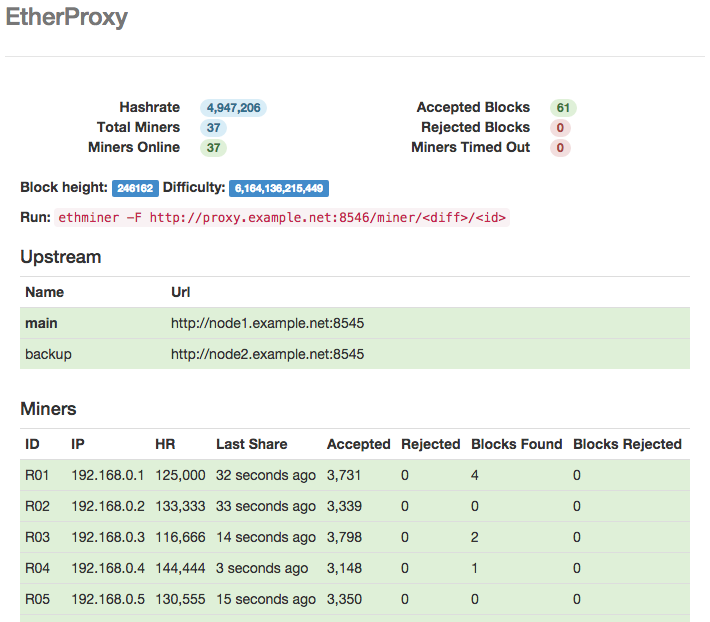
Wiseplat mining proxy with web-interface.
**Proxy feature list:**
* Rigs availability monitoring
* Keep track of accepts, rejects, blocks stats
* Easy detection of sick rigs
* Daemon failover list
### Building on Linux
Dependencies:
* go >= 1.4
* gwsh
Export GOPATH:
export GOPATH=$HOME/go
Install required packages:
go get github.com/wiseplat/wshash
go get github.com/wiseplat/go-wiseplat/common
go get github.com/goji/httpauth
go get github.com/gorilla/mux
go get github.com/yvasiyarov/gorelic
Compile:
go build -o wise-proxy main.go
### Building on Windows
Follow [this wiki paragraph](https://github.com/wiseplat/go-wiseplat/wiki/Installation-instructions-for-Windows#building-from-source) in order to prepare your environment.
Install required packages (look at Linux install guide above). Then compile:
go build -o wise-proxy.exe main.go
### Building on Mac OS X
If you didn't install [Brew](http://brew.sh/), do it. Then install Golang:
brew install go
And follow Linux installation instructions because they are the same for OS X.
### Configuration
Configuration is self-describing, just copy *config.example.json* to *config.json* and specify endpoint URL and upstream URLs.
#### Example upstream section
```javascript
"upstream": [
{
"pool": true,
"name": "EuroHash.net",
"url": "http://wsh-eu.eurohash.net:8888/miner/0xc285f9dc21232fe887830234631adb9544e40d31/proxy",
"timeout": "10s"
},
{
"name": "backup-gwsh",
"url": "http://127.0.0.1:8747",
"timeout": "10s"
}
],
```
In this example we specified [EuroHash.net](https://eurohash.net) mining pool as main mining target and a local gwsh node as backup for solo.
With "submitHashrate": true|false proxy will forward wsh_submitHashrate requests to upstream.
#### Running
./wise-proxy config.json
#### Mining
wshminer -F http://x.x.x.x:8748/miner/5/gpu-rig -G
wshminer -F http://x.x.x.x:8748/miner/0.1/cpu-rig -C
### Pools that work with this proxy
* [EuroHash.net](https://eurohash.net) EU Wiseplat mining pool
* [SuprNova.cc](https://wsh.suprnova.cc) SuprNova WSH Pool
Pool owners, apply for listing here. PM me for implementation details.
### TODO
**Currently it's solo-only solution.**
* Report block numbers
* Report luck per rig
* Maybe add more stats
* Maybe add charts
### Donations
* **WSH**: [0xc285f9dc21232fe887830234631adb9544e40d31](https://wisechain.org/account/0xc285f9dc21232fe887830234631adb9544e40d31)
* **BTC**: [1PqSFPTfKBat5w6oXvEzMcjMVgnUDUjJpk](https://blockchain.info/address/1PqSFPTfKBat5w6oXvEzMcjMVgnUDUjJpk)
Thanks to a couple of dudes who donated some Wise to me, I believe, you can do the same.
### License
The MIT License (MIT).