https://github.com/withoutbg/withoutbg
Image Background Removal Toolkit - Open Source and API Models
https://github.com/withoutbg/withoutbg
ai-background-removal background-removal background-removal-open-source background-removal-toolkit background-remover background-remover-onnx-model computer-vision computer-vision-ai docker-background-removal-open-source image-background-removal image-matting image-processing open-source-background-removal open-source-background-remover python-background-removal
Last synced: 4 months ago
JSON representation
Image Background Removal Toolkit - Open Source and API Models
- Host: GitHub
- URL: https://github.com/withoutbg/withoutbg
- Owner: withoutbg
- License: other
- Created: 2025-08-18T19:35:32.000Z (11 months ago)
- Default Branch: main
- Last Pushed: 2026-03-02T21:23:58.000Z (4 months ago)
- Last Synced: 2026-03-03T00:36:12.667Z (4 months ago)
- Topics: ai-background-removal, background-removal, background-removal-open-source, background-removal-toolkit, background-remover, background-remover-onnx-model, computer-vision, computer-vision-ai, docker-background-removal-open-source, image-background-removal, image-matting, image-processing, open-source-background-removal, open-source-background-remover, python-background-removal
- Language: Python
- Homepage: https://withoutbg.com/
- Size: 8.65 MB
- Stars: 896
- Watchers: 7
- Forks: 41
- Open Issues: 5
-
Metadata Files:
- Readme: README.md
- Changelog: CHANGELOG.md
- Contributing: CONTRIBUTING.md
- License: LICENSE
Awesome Lists containing this project
README
# withoutbg
**AI-powered background removal with local and cloud options**
[](https://pypi.org/project/withoutbg/)
[](https://opensource.org/licenses/Apache-2.0)
[](https://github.com/withoutbg/withoutbg/stargazers)
Remove backgrounds from images instantly with AI. Choose between local processing (free) or withoutBG Pro (best quality).
## ⚡ Try It in 30 Seconds

```bash
# Install and run in one go
pip install withoutbg
# Remove background from your first image
python -c "from withoutbg import WithoutBG; WithoutBG.opensource().remove_background('your-photo.jpg').save('result.png')"
```
That's it! Your photo now has a transparent background. ✨
## 🤔 Which Option Should I Use?
```
Processing 1-10 images occasionally? → withoutBG Pro (zero setup, best quality)
Processing 100+ images? → Local model (free, reusable)
Need offline processing? → Local model
Want best possible quality? → withoutBG Pro
Building commercial product? → withoutBG Pro (scalable)
Need fastest processing? → withoutBG Pro (optimized infrastructure)
```
**[Compare Focus vs Pro →](https://withoutbg.com/resources/compare/focus-vs-pro?utm_source=github&utm_medium=withoutbg-readme&utm_campaign=main-readme)**
## 🚀 Quick Start
### Docker (Web Interface)
**[View Complete Dockerized Web App Documentation →](https://withoutbg.com/documentation/integrations/dockerized-web-app?utm_source=github&utm_medium=withoutbg-readme&utm_campaign=main-readme)**

```bash
docker run -p 80:80 withoutbg/app:latest
# Open in browser
open http://localhost
```
✅ **Multi-platform support**: Works on Intel/AMD (amd64) and ARM (arm64) architectures
### Python SDK
**[View Complete Python SDK Documentation →](https://withoutbg.com/documentation/integrations/python-sdk?utm_source=github&utm_medium=withoutbg-readme&utm_campaign=main-readme)**
```bash
# Install (using uv - recommended)
uv add withoutbg
# Or with pip
pip install withoutbg
```
**Local Processing (Free):**
```python
from withoutbg import WithoutBG
# Initialize model once, reuse for multiple images (efficient!)
model = WithoutBG.opensource()
result = model.remove_background("input.jpg") # Returns PIL Image.Image
result.save("output.png")
# Standard PIL operations work!
result.show() # View instantly
result.resize((500, 500)) # Resize
result.save("output.webp", quality=95) # Different format
```
**withoutBG Pro (Best Quality):**
**[See Pro API Results →](https://withoutbg.com/resources/background-removal-results/model-pro-api?utm_source=github&utm_medium=withoutbg-readme&utm_campaign=main-readme)**
```python
from withoutbg import WithoutBG
# Get your API key from withoutbg.com
model = WithoutBG.api(api_key="sk_your_key")
result = model.remove_background("input.jpg")
result.save("output.png")
# Or set environment variable (recommended)
# export WITHOUTBG_API_KEY=sk_your_key
model = WithoutBG.api(api_key="sk_your_key")
```
**CLI:**
```bash
# Process single image
withoutbg photo.jpg
# Process entire photo album
withoutbg ~/Photos/vacation/ --batch --output-dir ~/Photos/vacation-no-bg/
# Convert to JPEG with white background (for printing)
withoutbg portrait.jpg --format jpg --quality 95
# Use withoutBG Pro for best quality
export WITHOUTBG_API_KEY=sk_your_key
withoutbg wedding-photo.jpg --use-api
# Process and watch progress
withoutbg photo.jpg --verbose
```
> **Don't have `uv` yet?** It's a fast, modern Python package installer - get it at [astral.sh/uv](https://astral.sh/uv)
### Example Outputs from the Open Source Model
**[See More Focus Model Results →](https://withoutbg.com/resources/background-removal-results/model-focus-open-source?utm_source=github&utm_medium=withoutbg-readme&utm_campaign=main-readme)**


## withoutBG Zoom is coming!

We are finalizing a new architecture designed to deliver superior accuracy and finer detail. Star the repo to bookmark this upgrade for your future toolkit ⭐.
## 📦 Repository Structure
This is a **monorepo** containing multiple components:
```
withoutbg/
├── packages/ # Reusable packages
│ └── python/ # Core Python SDK (published to PyPI)
│
├── apps/ # End-user applications
│ └── web/ # Web application (React + FastAPI)
│
├── integrations/ # Third-party tool integrations
│ └── (future: GIMP, Photoshop, Figma plugins)
│
├── models/ # Shared ML model files
│ └── checkpoints/ # ONNX model files
│
├── docs/ # Documentation
└── scripts/ # Development scripts
```
### Components
#### 📚 [Python SDK](packages/python/)
Core library for background removal. Published to PyPI.
- **Install**: `uv add withoutbg` (or `pip install withoutbg`)
- **Use**: Python API + CLI
- **Models**: Focus v1.0.0 (local), withoutBG Pro
#### 🌐 [Web Application](apps/web/)
Modern web interface with drag-and-drop UI.
- **Stack**: React 18 + FastAPI + Nginx
- **Deploy**: Docker Compose
- **Features**: Batch processing, live preview
#### 🔌 Integrations (Coming Soon)
Plugins for popular creative tools.
- GIMP plugin
- Photoshop extension
- Figma plugin
- Blender addon
## 🎯 Features
- ✨ **Local Processing**: Free, private, offline with Focus v1.0.0
- 🚀 **withoutBG Pro**: Best quality, scalable, 99.9% uptime
- 📦 **Batch Processing**: Process multiple images efficiently
- 🌐 **Web Interface**: Beautiful drag-and-drop UI
- 🔧 **CLI Tool**: Command-line automation
- 🎨 **Integrations**: Work in your favorite tools
## 💡 Common Use Cases
### Understanding Return Values
All methods return **PIL Image objects** with transparent backgrounds (RGBA mode):
```python
from withoutbg import WithoutBG
model = WithoutBG.opensource()
result = model.remove_background("photo.jpg") # Returns PIL Image.Image
# Save in different formats
result.save("output.png") # PNG with transparency
result.save("output.webp") # WebP with transparency
result.save("output.jpg", quality=95) # JPEG (no transparency)
```
### Common Gotchas
**JPEG Files Don't Support Transparency:**
```python
# ❌ This loses transparency (JPEG doesn't support alpha):
result.save("output.jpg")
# ✅ Use PNG or WebP for transparency:
result.save("output.png") # Keeps alpha channel
result.save("output.webp") # Also works!
```
**Model Downloads Happen on First Run:**
```python
# First run: ~5-10 seconds (downloading ~320MB of models from HuggingFace)
model = WithoutBG.opensource() # Downloads models to cache
# Second run: Instant! (models cached locally)
model = WithoutBG.opensource() # Uses cache
result = model.remove_background("photo.jpg") # Now processes in ~2-5s
```
**Output File Naming:**
- Single file: `photo.jpg` → `photo-withoutbg.png`
- Batch: Creates `photo1-withoutbg.png`, `photo2-withoutbg.png`, etc.
- Custom: Use `--output` or `--output-dir` to specify
### Batch Processing (Efficient Model Reuse)
```python
from withoutbg import WithoutBG
# Initialize model once - loaded into memory
model = WithoutBG.opensource()
# Process multiple images - model is reused (much faster!)
images = ["photo1.jpg", "photo2.jpg", "photo3.jpg"]
results = model.remove_background_batch(images, output_dir="results/")
# Returns list of PIL Image objects
```
### Progress Tracking
```python
def show_progress(progress):
print(f"Processing: {progress * 100:.0f}%")
model = WithoutBG.opensource()
result = model.remove_background("photo.jpg", progress_callback=show_progress)
```
### Error Handling
```python
from withoutbg import WithoutBG, APIError, WithoutBGError
try:
model = WithoutBG.api(api_key="sk_your_key")
result = model.remove_background("photo.jpg")
result.save("output.png")
except APIError as e:
print(f"API error: {e}")
except WithoutBGError as e:
print(f"Processing error: {e}")
```
## ⚡ Performance
| Metric | Local (CPU) | withoutBG Pro |
|--------|-------------|---------------|
| **First Run** | 5-10s (~320MB download) | 1-3s |
| **Per Image** | 2-5s | 1-3s |
| **Memory** | ~2GB RAM | None |
| **Disk Space** | 320MB (one-time) | None |
| **Setup** | One-time download | API key only |
| **Cost** | Free forever | Pay per use |
**Model Files (cached after first download):**
- ISNet segmentation: 177 MB
- Depth Anything V2: 99 MB
- Focus Matting: 27 MB
- Focus Refiner: 15 MB
- **Total: ~320 MB** (one-time download, cached locally)
**💡 Pro Tip:** For batch processing, initialize the model once and reuse it - this is **10-100x faster** than reinitializing for each image!
## 🔧 Troubleshooting
**Model download fails?**
- Check your internet connection
- Models are downloaded from HuggingFace on first run (~320MB total)
- Or use local model files (see [Configuration](packages/python/README.md#configuration))
**Out of memory?**
- Try processing smaller images or use withoutBG Pro
- Reduce batch size when processing multiple images
**Import errors or "module not found"?**
```bash
# Make sure you're in the right environment
which python # Check your Python path
pip list | grep withoutbg # Verify installation
# If using virtual environment
source venv/bin/activate # Activate first
pip install withoutbg # Then install
```
**API key invalid?**
- Get your API key from [withoutbg.com](https://withoutbg.com)
- Set environment variable: `export WITHOUTBG_API_KEY=sk_your_key`
**Slow processing on first run?**
- Normal! Models are being downloaded (~320MB)
- Subsequent runs will be much faster (~2-5s per image)
## 📖 Documentation
- **[Python SDK Docs](packages/python/README.md)** - Complete API reference and examples
- **[Python SDK Documentation](https://withoutbg.com/documentation/integrations/python-sdk?utm_source=github&utm_medium=withoutbg-readme&utm_campaign=main-readme)** - Online documentation
- **[Web App Docs](apps/web/README.md)** - Deployment and development guide
- **[Dockerized Web App Documentation](https://withoutbg.com/documentation/integrations/dockerized-web-app?utm_source=github&utm_medium=withoutbg-readme&utm_campaign=main-readme)** - Online documentation
- **[withoutBG Pro API Results](https://withoutbg.com/resources/background-removal-results/model-pro-api?utm_source=github&utm_medium=withoutbg-readme&utm_campaign=main-readme)** - See example outputs
- **[Focus Model Results](https://withoutbg.com/resources/background-removal-results/model-focus-open-source?utm_source=github&utm_medium=withoutbg-readme&utm_campaign=main-readme)** - See example outputs
- **[Compare Focus vs Pro](https://withoutbg.com/resources/compare/focus-vs-pro?utm_source=github&utm_medium=withoutbg-readme&utm_campaign=main-readme)** - Model comparison
## 🛠️ Development
### Python Package
```bash
cd packages/python
# Install in development mode (using uv - recommended)
uv sync --extra dev
# Or with pip
pip install -e ".[dev]"
# Run tests
pytest
# Format code
black src/ tests/
ruff check src/ tests/
```
### Web Application
```bash
# Development mode (hot-reload)
docker-compose -f apps/web/docker-compose.yml up
# Or run components separately
cd apps/web/backend
uv sync
uvicorn app.main:app --reload
cd apps/web/frontend
npm install
npm run dev
```
## 🌟 Latest Release: Focus v1.0.0
Our most advanced open source model with:
- ✅ **Significantly better edge detail** - Crisp, clean edges
- ✅ **Superior hair/fur handling** - Natural-looking fine details
- ✅ **Better generalization** - Works on diverse image types
See example outputs above and check [sample-results/](sample-results/) for more visual comparisons.
## 📄 License
Apache License 2.0 - see [LICENSE](LICENSE)
### Third-Party Components
- **Depth Anything V2**: Apache 2.0 License (only vits model)
- **ISNet**: Apache 2.0 License
### Acknowledgements
- **[segmentation-models-pytorch](https://github.com/qubvel-org/segmentation_models.pytorch)**: MIT License (used to train matting/refiner models)
See [THIRD_PARTY_LICENSES.md](THIRD_PARTY_LICENSES.md) for complete attribution.
## 🤝 Contributing
We welcome contributions! See [CONTRIBUTING.md](CONTRIBUTING.md) for guidelines.
1. Fork the repository
2. Create a feature branch
3. Make your changes
4. Add tests
5. Submit a pull request
## 📧 Support
- **Bug Reports**: [GitHub Issues](https://github.com/withoutbg/withoutbg/issues)
- **Feature Requests**: [GitHub Discussions](https://github.com/withoutbg/withoutbg/discussions)
- **Commercial Support**: [contact@withoutbg.com](mailto:contact@withoutbg.com)
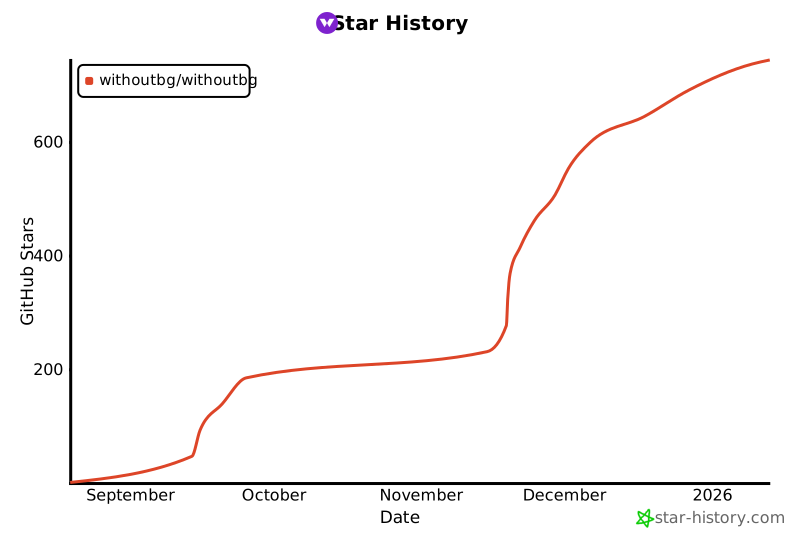
## ⭐ Star History
[](https://star-history.com/#withoutbg/withoutbg&Date)