https://github.com/wizard89/v2ray-agent
八合一共存脚本,支持多内核安装,同步和更新大佬脚本库
https://github.com/wizard89/v2ray-agent
cloudflare grpc-cloudflare nginx shell trojan trojan-grpc v2ray v2ray-core vless vmess xray-core xtls
Last synced: 4 months ago
JSON representation
八合一共存脚本,支持多内核安装,同步和更新大佬脚本库
- Host: GitHub
- URL: https://github.com/wizard89/v2ray-agent
- Owner: Wizard89
- License: agpl-3.0
- Created: 2022-12-05T00:28:00.000Z (over 3 years ago)
- Default Branch: master
- Last Pushed: 2026-02-01T16:15:35.000Z (5 months ago)
- Last Synced: 2026-02-01T20:32:18.598Z (5 months ago)
- Topics: cloudflare, grpc-cloudflare, nginx, shell, trojan, trojan-grpc, v2ray, v2ray-core, vless, vmess, xray-core, xtls
- Language: Shell
- Homepage: https://v2rays.eu.org
- Size: 46.2 MB
- Stars: 25
- Watchers: 1
- Forks: 12
- Open Issues: 0
-
Metadata Files:
- Readme: README.md
- License: LICENSE
Awesome Lists containing this project
README
# Xray-core/sing-box 一键脚本快速安装
- [感谢 JetBrains 提供的非商业开源软件开发授权](https://www.jetbrains.com/?from=v2ray-agent)
[](https://www.gnu.org/licenses/agpl-3.0)
[](documents/en/README_EN.md)
- [Cloudflare 优化方案](https://github.com/Wizard89/v2ray-agent/blob/master/documents/optimize_V2Ray.md)
- [流量中转](https://github.com/Wizard89/v2ray-agent/blob/master/documents/traffic_relay.md)
- [手动自建教程](https://github.com/Wizard89/v2ray-agent/blob/master/documents/Cloudflare_install_manual.md)
* * *
# 说明
- 只是搬运和同步更新大佬脚本
- 只测试自用脚本
- 不负责维护脚本!
* * *
# 目录
- [1.脚本安装](#1vlesstcptlsvlesswstlsvmesstcptlsvmesswstlstrojan-伪装站点-八合一共存脚本)
- [特性](#特性)
- [注意事项](#注意事项)
- [安装脚本](#安装脚本)
* * *
# 1.八合一共存脚本+伪装站点
- [Cloudflare入门教程](https://github.com/Wizard89/v2ray-agent/blob/master/documents/cloudflare_init.md)
## 特性
- 支持[Xray-core[XTLS]](https://github.com/XTLS/Xray-core)、[v2ray-core](https://github.com/v2fly/v2ray-core)、[hysteria](https://github.com/apernet/hysteria)
- 支持不同核心之间的配置文件互相读取
- 支持 VLESS/VMess/Trojan/hysteria 协议
- 支持Debian、Ubuntu、Centos系统,支持主流的cpu架构。
- 支持任意组合安装、支持多用户管理、支持DNS流媒体解锁、支持添加多端口、[支持支持任意门转发流量,可用于解锁Netflix、Google人机验证等](https://github.com/Wizard89/v2ray-agent/blob/master/documents/netflix/dokodemo-unblock_netflix.md)
- 支持卸载后保留tls证书
- 支持IPv6,[IPv6注意事项](https://github.com/Wizard89/v2ray-agent/blob/master/documents/ipv6_help.md)
- 支持WARP分流、IPv6分流、任意门分流
- 支持BT下载管理、日志管理、域名黑名单管理、核心管理、伪装站点管理、路由规则文件管理
- [支持自定义证书安装](https://github.com/Wizard89/v2ray-agent/blob/master/documents/install_tls.md)
## 核心
- Xray-core
- sing-box
## 协议
> 以下均使用TLS,支持多种协议组合
- VLESS(Reality、Vision(TCP)、WS、gRPC、XHTTP)
- VMess(TCP、WS、HTTPUpgrade)
- Trojan(TCP、gRPC)
- Hysteria2(sing-box)
- Tuic(sing-box)
- NaiveProxy(sing-box)
## 功能
- 支持不同核心之间的配置读取
- 支持个性化安装单个协议
- [支持无域名版本的VLESS Reality搭建]
- [支持多种分流用于解锁(wireguard、IPv6、Socks5、DNS、VMess(ws)、SNI反向代理)]
- [支持批量添加CDN节点并配合ClashMeta自动优选]
- 支持普通证书和通配符证书自动申请及更新
- [支持订阅以及多VPS组合订阅]
- 支持批量新增端口[仅支持Xray-core]
- 支持核心的升级以及回退
- 支持自主更换伪装站点
- 支持BT下载管理以及域名黑名单管理
## 线路推荐
- [CN2 GIA](https://github.com/Wizard89/v2ray-agent/blob/master/documents/donation_aff.md#1cn2-gia)
- [AS4837](https://github.com/Wizard89/v2ray-agent/blob/master/documents/donation_aff.md#3%E8%81%94%E9%80%9A-as4837%E6%99%AE%E9%80%9A%E6%B0%91%E7%94%A8%E7%BD%91)
- [日本软银](https://github.com/Wizard89/v2ray-agent/blob/master/documents/donation_aff.md#4%E8%81%94%E9%80%9A-%E6%97%A5%E6%9C%AC%E8%BD%AF%E9%93%B6)
- 中转+cloudflare+落地机【可拉全球】
## 注意事项
- **修改Cloudflare->SSL/TLS->Overview->Full**
- **Cloudflare ---> A记录解析的云朵必须为灰色【如非灰色,会影响到定时任务自动续签证书】**
- **如用CDN又同时使用直连,关闭云朵+自选IP,自选IP参考上方的[Cloudflare 优化方案](https://github.com/Wizard89/v2ray-agent/blob/master/documents/optimize_V2Ray.md)**
- **使用纯净系统安装,如使用其他脚本安装过并且自己无法修改错误,请重新安装系统后再次尝试安装**
- wget: command not found [**这里需要自己手动安装下wget**]
,如未使用过Linux,[点击查看](https://github.com/Wizard89/v2ray-agent/tree/master/documents/install_tools.md)安装教程
- 不支持非root账户
- **如发现Nginx相关问题,请卸载掉自编译的nginx或者重新安装系统**
- **为了节约时间,反馈请带上详细截图或者按照模版规范,无截图或者不按照规范的issue会被直接关闭**
- **不推荐GCP用户使用**
- **不推荐使用Centos以及低版本的系统,如果Centos安装失败,请切换至Debian10重新尝试,脚本不再支持Centos6、Ubuntu 16.x**
- **[如有使用不明白的地方请先查看脚本使用指南](https://github.com/Wizard89/v2ray-agent/blob/master/documents/how_to_use.md)**
- **Oracle Cloud有一个额外的防火墙,需要手动设置**
- **Oracle Cloud仅支持Ubuntu**
- **如果使用gRPC通过cloudflare转发,需要在cloudflare设置允许gRPC,路径:cloudflare Network->gRPC**
- **gRPC目前处于测试阶段,可能对你使用的客户端不兼容,如不能使用请忽略**
## [脚本使用指南](https://github.com/Wizard89/v2ray-agent/blob/master/documents/how_to_use.md)、[脚本目录](https://github.com/Wizard89/v2ray-agent/blob/master/documents/how_to_use.md#5脚本目录)
## 捐赠
[您可以使用我的AFF进行购买VPS捐赠](https://github.com/Wizard89/v2ray-agent/blob/master/documents/donation_aff.md)
## 安装脚本
- 支持快捷方式启动,安装完毕后,shell输入【**vasma**】即可打开脚本,脚本执行路径[**/etc/v2ray-agent/install.sh**]
- Latest Version【推荐】
```
wget -P /root -N --no-check-certificate "https://raw.githubusercontent.com/Wizard89/v2ray-agent/master/install.sh" && chmod 700 /root/install.sh && /root/install.sh
```
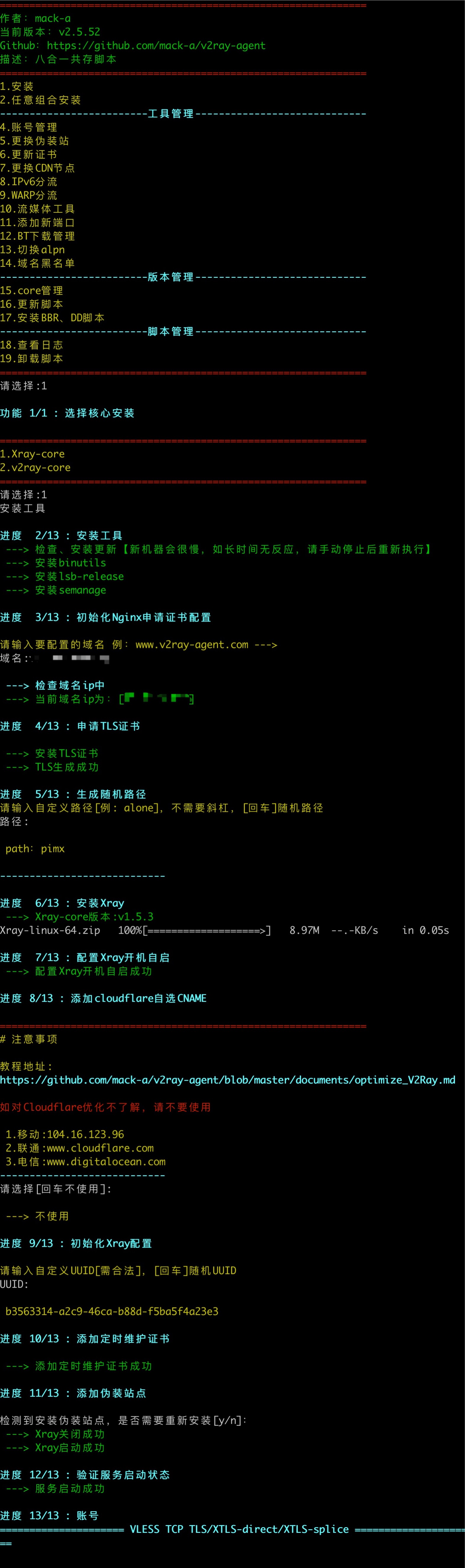
# 示例图
# 版权
- 八合一脚本作者:[mack-a](https://github.com/mack-a)
- [Wizard](https://github.com/Wizard89)
- 以及本项目的所有贡献者
# 许可证
本项根据 [AGPL-3.0 许可证](LICENSE) 授权.
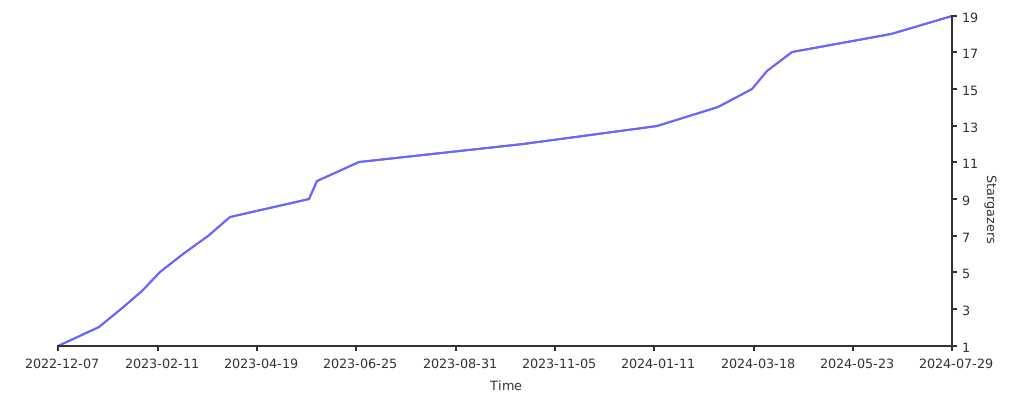
## Stargazers over time
[](https://starchart.cc/Wizard89/v2ray-agent)