https://github.com/wjlee611/gyro_provider
A plugin that provides data from gyroscopes and rotation sensors and related handy widgets.
https://github.com/wjlee611/gyro_provider
flutter gyroscope plugin sensor
Last synced: 6 months ago
JSON representation
A plugin that provides data from gyroscopes and rotation sensors and related handy widgets.
- Host: GitHub
- URL: https://github.com/wjlee611/gyro_provider
- Owner: wjlee611
- License: mit
- Created: 2024-02-05T11:30:12.000Z (over 2 years ago)
- Default Branch: main
- Last Pushed: 2024-02-27T05:15:37.000Z (over 2 years ago)
- Last Synced: 2025-11-27T17:01:17.757Z (8 months ago)
- Topics: flutter, gyroscope, plugin, sensor
- Language: Dart
- Homepage: https://pub.dev/packages/gyro_provider
- Size: 3.47 MB
- Stars: 2
- Watchers: 1
- Forks: 0
- Open Issues: 0
-
Metadata Files:
- Readme: README.md
- Changelog: CHANGELOG.md
- License: LICENSE
Awesome Lists containing this project
README
# gyro_provider
A plugin that provides data from gyroscopes and rotation sensors and related handy widgets.
## Getting Started
1. Check out the supported platforms.
| AOS | iOS | rest |
| --- | --- | ---- |
| ✅ | ✅ | ❌ |
> [**NOTE**]
>
> Vector data on unsupported devices or platforms will all have a value of (0, 0, 0).
2. [Installing](https://pub.dev/packages/gyro_provider/install) plugin.
3. Build your awesome widgets!
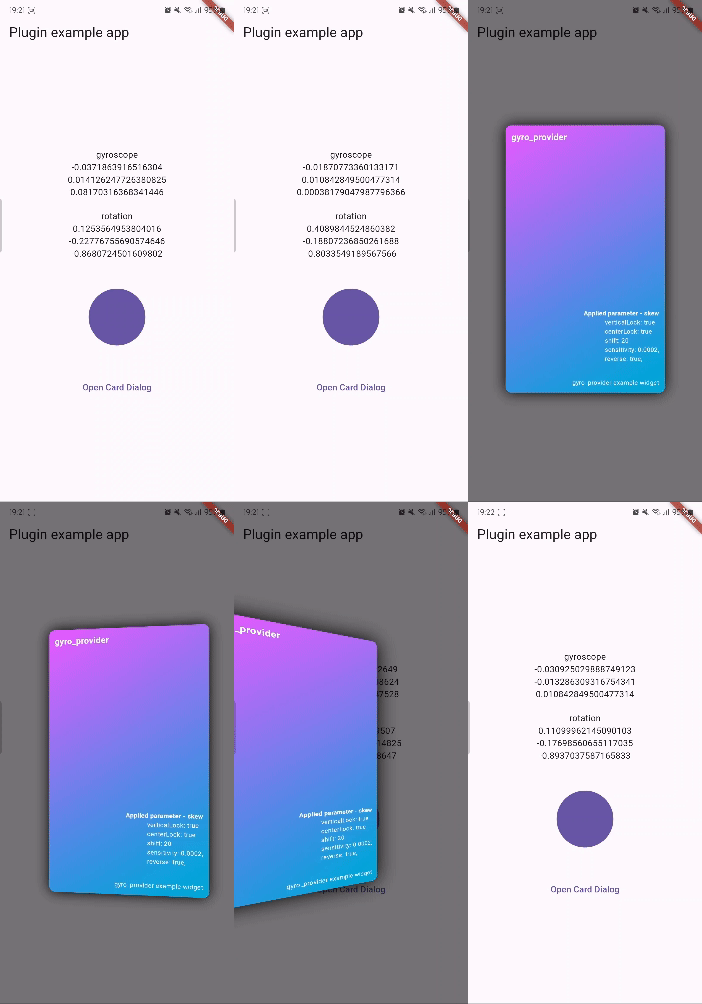
## Example
```dart
import 'package:flutter/material.dart';
import 'package:gyro_provider/gyro_provider.dart';
import 'package:gyro_provider_example/widgets/card_widget.dart';
void main() {
runApp(const MyApp());
}
class MyApp extends StatefulWidget {
const MyApp({super.key});
@override
State createState() => _MyAppState();
}
class _MyAppState extends State {
@override
Widget build(BuildContext context) {
return MaterialApp(
home: Scaffold(
appBar: AppBar(
title: const Text('Plugin example app'),
),
body: const GyroProviderTest(),
),
);
}
}
class GyroProviderTest extends StatelessWidget {
const GyroProviderTest({super.key});
void _onTap(BuildContext context) {
showDialog(
context: context,
builder: (context) => const Dialog(
backgroundColor: Colors.transparent,
surfaceTintColor: Colors.transparent,
child: GyroProvider.skew(
verticalLock: true,
resetLock: true,
shift: 20,
sensitivity: 0.0002,
reverse: true,
child: CardWidget(),
),
),
);
}
@override
Widget build(BuildContext context) {
return Center(
child: Column(
mainAxisSize: MainAxisSize.min,
children: [
GyroProvider(
// gyroscope: (vector) {
// print(vector);
// },
// rotation: (vector) {
// print(vector);
// },
builder: (context, gyroscope, rotation) => Column(
children: [
const Text('gyroscope'),
Text(gyroscope.x.toString()),
Text(gyroscope.y.toString()),
Text(gyroscope.z.toString()),
const SizedBox(height: 20),
const Text('rotation'),
Text(rotation.x.toString()),
Text(rotation.y.toString()),
Text(rotation.z.toString()),
],
),
),
const SizedBox(height: 50),
GyroProvider.skew(
child: Container(
decoration: BoxDecoration(
color: Theme.of(context).primaryColor,
shape: BoxShape.circle,
),
width: 100,
height: 100,
),
),
const SizedBox(height: 50),
TextButton(
onPressed: () => _onTap(context),
child: const Text('Open Card Dialog'),
),
],
),
);
}
}
```
## Parameters
See the comments for how to use the parameters.
- GyroProvider
| parameter | type |
| --------- | -------------------------------------------------------------- |
| gyroscope | void Function(`VectorModel`)? |
| rotation | void Function(`VectorModel`)? |
| builder | Widget Function(`BuildContext`, `VectorModel`, `VectorModel`)? |
- `VectorModel`
Same as Vector3.
A data type with x, y, and z values (double type).
- GyroProvider.skew
| parameter | type |
| ----------------- | ----------- |
| horizontalLock | `bool`? |
| verticalLock | `bool`? |
| resetLock | `bool`? |
| resetTime | `Duration`? |
| sensitivity | `double`? |
| shift | `double`? |
| animationDuration | `Duration`? |
| reverse | `bool`? |
| child | `Widget` |