https://github.com/wolframs/multi-repo-checkout
VSCode extension to check out similar branches across multiple workspace repos simultaneously.
https://github.com/wolframs/multi-repo-checkout
branch git repository vscode-extension workspaces
Last synced: 2 months ago
JSON representation
VSCode extension to check out similar branches across multiple workspace repos simultaneously.
- Host: GitHub
- URL: https://github.com/wolframs/multi-repo-checkout
- Owner: wolframs
- License: mit
- Created: 2025-04-16T10:08:38.000Z (about 1 year ago)
- Default Branch: main
- Last Pushed: 2025-05-16T11:31:40.000Z (about 1 year ago)
- Last Synced: 2025-05-16T11:36:25.301Z (about 1 year ago)
- Topics: branch, git, repository, vscode-extension, workspaces
- Language: TypeScript
- Homepage: https://marketplace.visualstudio.com/items/?itemName=WolframS.multi-repo-branch-switcher
- Size: 1.34 MB
- Stars: 0
- Watchers: 1
- Forks: 0
- Open Issues: 2
-
Metadata Files:
- Readme: README.md
- Changelog: CHANGELOG.md
- License: LICENSE
Awesome Lists containing this project
README
# Multi-Repo Branch Switcher
This VS Code extension allows you to quickly switch or create branches across all repositories in a multi-repo workspace.

## Features
- **Branch Switching**: Select any existing branch to check out simultaneously across all repositories. *Usage: Command Palette → "Multi-Repo Branch Switcher: Switch Branches"*
- **Quick Switch to Default Branch**: Fast path to switch all repositories to the default branch without enumerating all refs. *Usage: Command Palette → "Multi-Repo Branch Switcher: Switch to Default Branch"*
- **Delete Stale Local Branches**: Automatically clean up old local branches based on a configurable date cutoff, with protected branch patterns. *Usage: Command Palette → "Multi-Repo Branch Switcher: Delete Stale Local Branches"*
- **Fallback to Default Branch**: If a local/remote branch doesn't exist, the extension automatically checks out the user-defined default branch in that repository.
- **Branch Creation**: Create a new branch in every repository at once. *Usage: Command Palette → "Multi-Repo Branch Switcher: Switch Branches" → "Create New Branches for All Repos"*
- **Configurable Default Branch**: Define your preferred default branch name (e.g. `main` or `master`) in VS Code settings. *Config: `multiRepoBranchSwitcher.defaultBranchName`*
- **Auto Pull After Checkout**: Automatically pull updates from the remote branch of each repository after successful branch switches. *Config: `multiRepoBranchSwitcher.autoPullBranchUpdates` (Always/Ask/Never)*
- **Auto Reload Window**: Automatically reload the window after successful branch switches. The reload prompt now appears only after all pulls have completed. *Config: `multiRepoBranchSwitcher.autoReloadWindow` (Always/Ask/Never)*
## Usage
### Switch Branches
1. Press Ctrl+Shift+P or F1 (Windows/Linux) or Cmd+Shift+P (macOS) to open the Command Palette.

2. Run **Multi-Repo Branch Switcher: Switch Branches**.
- The extension will get info on all local and remote branches of all repositories.
3. Choose an existing branch from the list or select **Create New Branches for All Repos** to define a new branch name.
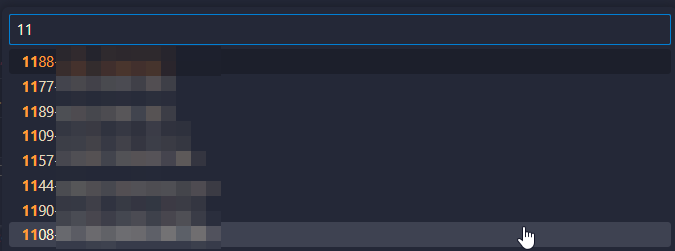
- You can filter the branches by typing in the command palette input:
4. For each repository, the extension will:
- Check out the branch if it already exists locally.
- Check out a remote-tracking branch if it exists on `origin`.
- Otherwise, it will fall back to the configured default branch.
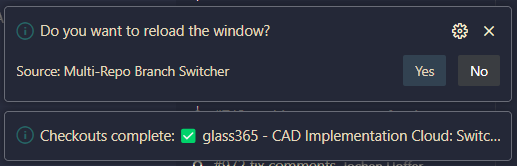
5. Choose whether to pull the most recent changes from each remote branch, if so configured

6. Choose whether to reload the window, if so configured.
### Quick Switch to Default Branch
For a faster workflow when you just want to switch all repositories to the default branch:
1. Press Ctrl+Shift+P (or Cmd+Shift+P on macOS) to open the Command Palette.
2. Run **Multi-Repo Branch Switcher: Switch to Default Branch**.
- This command skips branch enumeration and directly switches to the configured default branch (or detects it automatically).
- Handles cases where the branch exists only on remote by creating a tracking branch.
### Delete Stale Local Branches
To clean up old local branches across all repositories:
1. Press Ctrl+Shift+P (or Cmd+Shift+P on macOS) to open the Command Palette.
2. Run **Multi-Repo Branch Switcher: Delete Stale Local Branches**.
- The extension will identify branches older than the configured cutoff (default: 14 days).
- Protected branches (matching patterns like `main`, `master`, `develop`) are never deleted.
- Repositories with uncommitted changes are skipped.
- A confirmation prompt appears before deletion (unless dry-run mode is enabled).
- Results are logged to the VS Code Output channel.
## Configuration
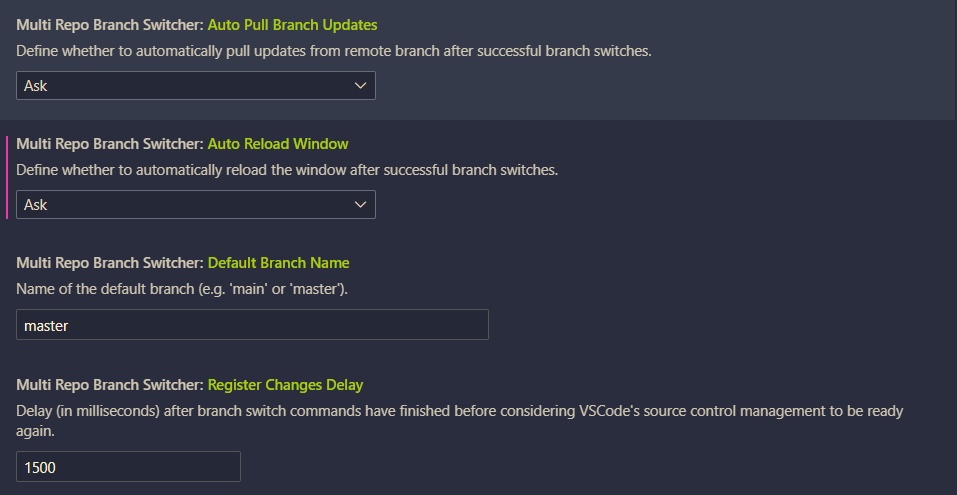
Open your VS Code settings (`Settings → Extensions → Multi Repo Branch Switcher` or in `settings.json`) and set:
```json
{
"multiRepoBranchSwitcher.autoPullBranchUpdates": "Ask", // "Always", "Ask", "Never"
"multiRepoBranchSwitcher.autoReloadWindow": "Ask", // "Always", "Ask", "Never"
"multiRepoBranchSwitcher.defaultBranchName": "main",
"multiRepoBranchSwitcher.registerChangesDelay": 1500,
"multiRepoBranchSwitcher.prune.cutoffDays": 14,
"multiRepoBranchSwitcher.prune.protected": ["^(main|master|develop)$"],
"multiRepoBranchSwitcher.prune.dryRun": false
}
```
#### Configuration Options
- **`multiRepoBranchSwitcher.defaultBranchName`**: Name of the default branch (default: `"master"`). Used when switching to default branch or as fallback.
- **`multiRepoBranchSwitcher.registerChangesDelay`**: Delay in milliseconds after branch operations before considering source control ready (default: `1500`).
- **`multiRepoBranchSwitcher.prune.cutoffDays`**: Number of days after which local branches are considered stale (default: `14`).
- **`multiRepoBranchSwitcher.prune.protected`**: Array of regex patterns for branches that should never be deleted (default: `["^(main|master|develop)$"]`).
- **`multiRepoBranchSwitcher.prune.dryRun`**: If `true`, only preview which branches would be deleted without actually deleting them (default: `false`).
## Feedback & Contributing
Feel free to open an issue or pull request on the repository if you encounter a problem or have a suggestion.
Happy coding!
## Manual VSIX Installation
1. Download the most recent [release](https://github.com/wolframs/multi-repo-checkout/releases/).
2. Go to your VS Code Extensions.
3. Open the "More Actions..." menu:

4. Select "Install from VSIX..." and open the downloaded release file.