https://github.com/workleap/storybook-icon-gallery
An icon gallery for Storybook docs that support multiple icon variants
https://github.com/workleap/storybook-icon-gallery
storybook
Last synced: 10 months ago
JSON representation
An icon gallery for Storybook docs that support multiple icon variants
- Host: GitHub
- URL: https://github.com/workleap/storybook-icon-gallery
- Owner: workleap
- License: apache-2.0
- Archived: true
- Created: 2019-12-27T14:22:01.000Z (over 6 years ago)
- Default Branch: master
- Last Pushed: 2020-09-04T03:44:14.000Z (almost 6 years ago)
- Last Synced: 2025-05-17T01:41:14.153Z (about 1 year ago)
- Topics: storybook
- Language: JavaScript
- Homepage: https://www.gsoft.com
- Size: 1.35 MB
- Stars: 9
- Watchers: 2
- Forks: 7
- Open Issues: 6
-
Metadata Files:
- Readme: README.md
- License: LICENSE
Awesome Lists containing this project
README
# Storybook Icon Gallery


[](https://app.netlify.com/sites/storybook-icon-gallery/deploys)
An icon gallery for Storybook docs that support multiple icon variants.
[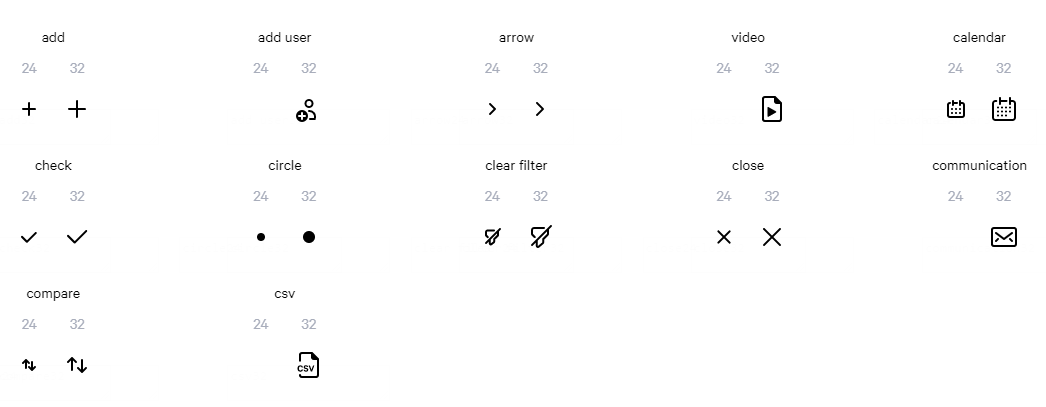](https://storybook-icon-gallery.netlify.com/)
## Installation
Install the NPM package:
```bash
npm i -D storybook-icon-gallery
```
Then import the icon gallery components:
```js
import { IconGallery } from "storybook-icon-gallery";
```
And configure your icons:
```jsx
```
Full usage documentation available at: https://storybook-icon-gallery.netlify.com/
## Maintainers
The following documentation is only for the maintainers of this repository.
### Installation
Clone the repository:
```bash
git clone https://github.com/gsoft-inc/storybook-icon-gallery.git
```
Then, install the dependencies for all the packages with Yarn (or NPM):
```bash
yarn install
```
### Development process
Once the project is installed you can start developping with Storybook by executing the following script:
```bash
yarn start-sb
```
If you want to start Storybook in `--docs` mode, use the following script:
```bash
yarn start-docs
```
At some point you might need to build a version of Storybook for production:
```bash
yarn build:sb
yarn serve-sb
yarn build:docs
yarn serve-docs
```
Or test the actual icon gallery component for production:
```bash
yarn build:pkg
```
If something is messed up and you need a clean project, use the `reset` script:
```bash
yarn reset
```
### Release
#### Process
To ensure that the consumers understand the impact of updating this package, every release should follow [semantic versioning](https://semver.org/).
#### Do the actual release
Before you release, make sure you have **write access** to the NPM package and that you are [logged in to NPM](https://docs.npmjs.com/logging-in-to-an-npm-enterprise-registry-from-the-command-line).
To release, open a terminal at the root of the project and execute the following commands:
```bash
yarn release
```
The release flow will automatically create a new [Github release](https://github.com/gsoft-inc/storybook-icon-gallery/releases) for the current release.
Make sure to document all the changes contained in the current release and dont forget to **publish** the release.
If you updated the documentation, make sure it's deployed.
To do so:
1. Go to [Netlify web app](https://app.netlify.com/sites/storybook-icon-gallery/deploys)
2. Select the latest build on master
3. Click on "Publish deploy"
## License
Copyright © 2019, GSoft inc. This code is licensed under the Apache License, Version 2.0. You may obtain a copy of this license at https://github.com/gsoft-inc/gsoft-license/blob/master/LICENSE.
[](https://www.sharegate.com)