https://github.com/worktile/pingcode-jenkins-plugin
A jenkins plugin for Worktile
https://github.com/worktile/pingcode-jenkins-plugin
Last synced: 10 months ago
JSON representation
A jenkins plugin for Worktile
- Host: GitHub
- URL: https://github.com/worktile/pingcode-jenkins-plugin
- Owner: worktile
- License: mit
- Created: 2020-04-13T09:36:02.000Z (over 6 years ago)
- Default Branch: master
- Last Pushed: 2023-02-15T19:02:42.000Z (over 3 years ago)
- Last Synced: 2025-08-03T16:39:31.352Z (about 1 year ago)
- Language: Java
- Homepage:
- Size: 232 KB
- Stars: 6
- Watchers: 16
- Forks: 12
- Open Issues: 6
-
Metadata Files:
- Readme: README.md
- Changelog: CHANGELOG.md
- License: LICENSE
Awesome Lists containing this project
README
# Worktile Plugin
## About Worktile Plugin
Worktile Plugin is an open source Jenkins plugin that can connect your builds and deployments with your Agile management in Worktile. With this simple but powerful tool, you will keep updates about what happened on Jenkins, your builds and deployments, associated with your user stories, tasks and defects in real-time without leaving Worktile.
## Usage with Worktile
### Using Worktile `IDENTIFIER`
Using `#IDENTIFIER`in your commit messages, branch names and pull request titles, then the Jenkins plugin will automatically connect related builds and deployments when the job is running. As a result, team members will find the builds/deployments with related work items. `IDENTIFIER` is a unique identifier of a work item which can be found in Worktile at the top-left corner in its popup window.
Category|Syntax|Example
---| --- | ---
Branch name| Supports bind to multiple `#IDENTIFIER` split "/".| terry/#PLM-100/#PLM-101
Commit message and pull request title|Supports bind to multiple `#IDENTIFIER` split by space.|fix(doc): #PLM-100 #PLM-101 update the doc
## Install
### Jenkins Marketplace
1. Login to your Jenkins server.
2. Navigate to the Plugin Manager.
3. Select the "Available" tab and search for `Worktile` as the plugin name then install it.
4. Restart jenkins for the install to take effect.
### Manual Install
1. Download worktile.hpi from [worktile jenkins plugins release page](https://github.com/worktile/wt-rd-jenkins-plugin/releases).
2. Login to your Jenkins server.
3. Navigate to the Plugin Manager.
4. Select the "Advanced" tab and navigate to the Upload Plugin, upload worktile.hpi file.
5. Restart jenkins for the install to take effect.
## Configure
### Create Worktile REST API App
1. Login to Worktile.
2. On the left navigation bar of each page > Product > Backstage management > Application management > Custom application.
3. Click "New application".
4. Enter the following information:
- Application name.
- Authentication method - `Client Credentials`.
- Permission - The range of data that can be accessed. Give `DevOps: 构建` and `DevOps: 发布` read and write permission.

5. Copy Client ID and Client Secret.
### Configure Plugin
1. On the left navigation bar > `Manage Jenkins` > `Configure System` > `Worktile application`.
2. Enter the following information:
- `Endpoint` - The URL of Worktile REST API. The default value is `https://open.worktile.com`.
- `Client id` - Copy from Worktile `Custom application` page (Client ID column).
- `Client secret` - Click Add > Jenkins
- For Kind, select `Secret text`.
- For Secret, copy from Worktile `Custom application` page (Secret column).
Once you add it successfully, you will find this Secret in the `Client secret` list and select it as a `Client secret`.
3. Click `Test Connection` to make sure your credentials are valid.
## Usage
The Jenkins plugin supports two styles of Jenkins items: `Freestyle project` and `pipeline`.
### Freestyle project
1. Go into a specific Freestyle project in Jenkins.
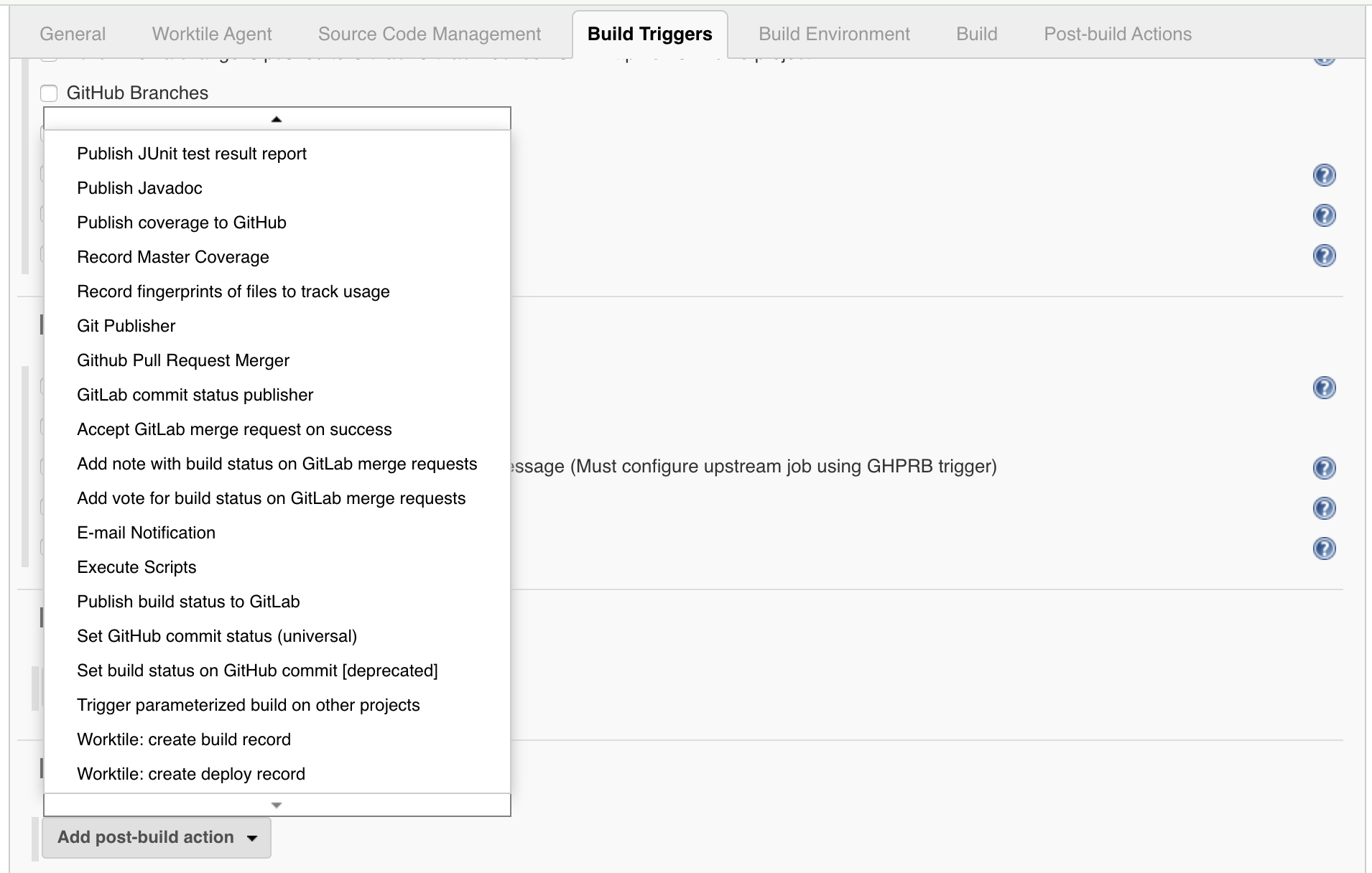
2. Find "Add post-build action" and click it.
##### Send build information
1. Select `Worktile: create build record`.
2. Enter the following information:
- `Overview pattern` - Optional. A regular expression is used to match the result summary in the build output for display in Worktile.
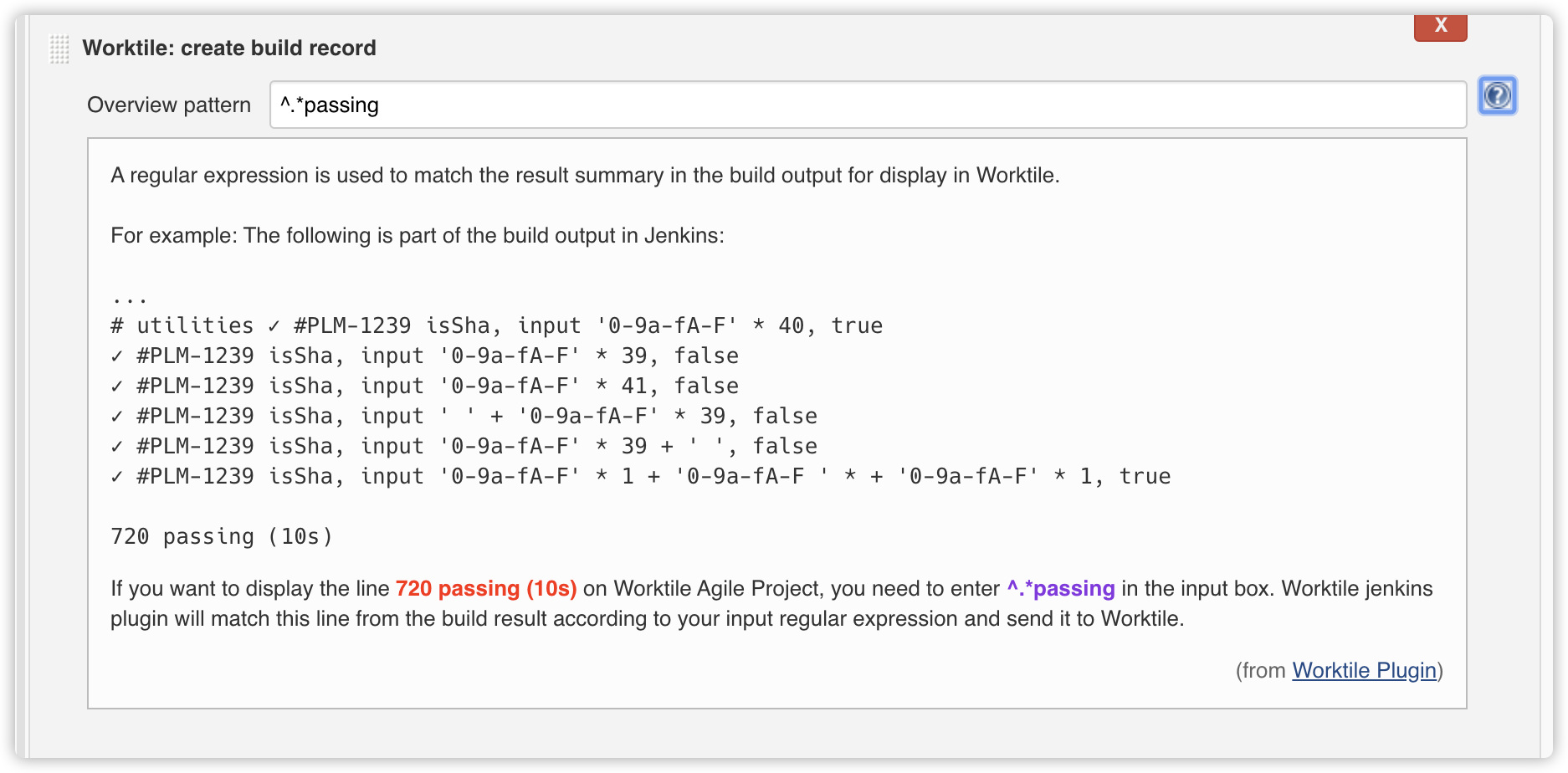
Finally, save these configurations. When the build is triggered, it will post the build information to Worktile. If there is a Worktile `#IDENTIFIER` in branch name, commit message or pull request title, you will get views in Worktile agile project about what happening on build.
##### Send deployment information
1. Select `Worktile: create deploy record`.
2. Enter the following information:
- `Release name` - Required. The name of the release. You can use environment variables for dynamic variable substitution in the name. For example: `release-${BUILD_ID}`, which means that the release name is dynamically generated using the `BUILD_ID`. All environment variables injected by the plugin can be used. If the environment variable does not exist, the source character will be retained.
- `Environment name` - Required. The name of environment that the code will be deployed to. If the environment does not exist, the plugin will automatically create.
- `Release URL` - Optional. A URL that can view the detail deployment results. If it is empty, no related links are displayed in Worktile.
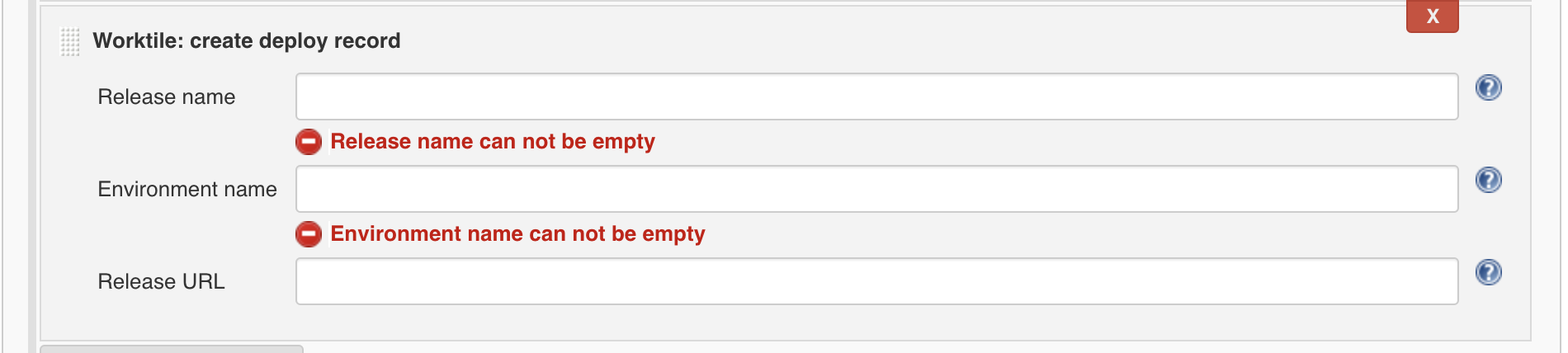
Finally, save these configurations. When the deployment is triggered, it will post the deployment information to Worktile. If there is a Worktile `#IDENTIFIER` in branch name, commit message or pull request title, you will get views in Worktile agile project about what happening on deployment.
#### Pipeline Project
##### Send build information
This is an example snippet of a very simple "build" stage set up in a Jenkinsfile. When the pipeline is triggered, it will post the build information to Worktile. If there is a Worktile `#IDENTIFIER` in branch name, commit message or pull request title, you will get views in Worktile agile project about what happening on build.
``` syntaxhighlighter-pre
node {
try {
sh "printenv"
}catch(e) {
echo e.getMessage()
}
finally{
worktileBuildRecord(
overviewPattern: "^JENKINS",
failOnError: false
)
}
}
```
About `worktileBuildRecord`, you can get the following information:
- `overviewPattern` - Optional. A regular expression is used to match the result summary in the build result for display in Worktile.
- `failOnError` - Optional. When the value is true, if the process of sending build data to Worktile fails, the entire build will be marked as failed in Jenkins, otherwise Jenkins' build results will not be affected by it. The default value is false.
##### Send deployment information
Below is an example of a very simple "deployment" stage set up in a Jenkinsfile. When the pipeline is triggered, it will post the deployment information to Worktile. If there is a Worktile `#IDENTIFIER` in branch name, commit message or pull request title, you will get views in Worktile agile project about what happening on deployment.
```syntaxhighlighter-pre
node {
try {
sh "printenv"
}catch(e) {
echo e.getMessage()
}
finally{
worktileDeployRecord(
releaseName: "release-${BUILD_ID}",
environmentName: "Product",
releaseURL: "https://www.worktile.com/release-${JENKINS_HOME}",
failOnError: false
)
}
}
```
Ref `worktileDeployRecord`, you can get the following information:
- `releaseName`- Required. The name of the release. You can use environment variables for dynamic variable substitution in the name. For example: `release-${BUILD_ID}`, which means that the release name is dynamically generated using the `BUILD_ID`. All environment variables injected by the plugin can be used. If the environment variable does not exist, the source character will be retained.
- `environmentName` - Required. The name of environment that the code will be deployed to. If the environment does not exist, the plugin will automatically create.
- `releaseURL` - Optional. A URL that can view the detail deployment results. If it is empty, no related links are displayed in Worktile.
- `failOnError` - Optional. When the value is true, if the process of sending deployment data to Worktile fails, the entire deployment will be marked as failed in Jenkins, otherwise Jenkins' deployment results will not be affected by it. The default value is false.
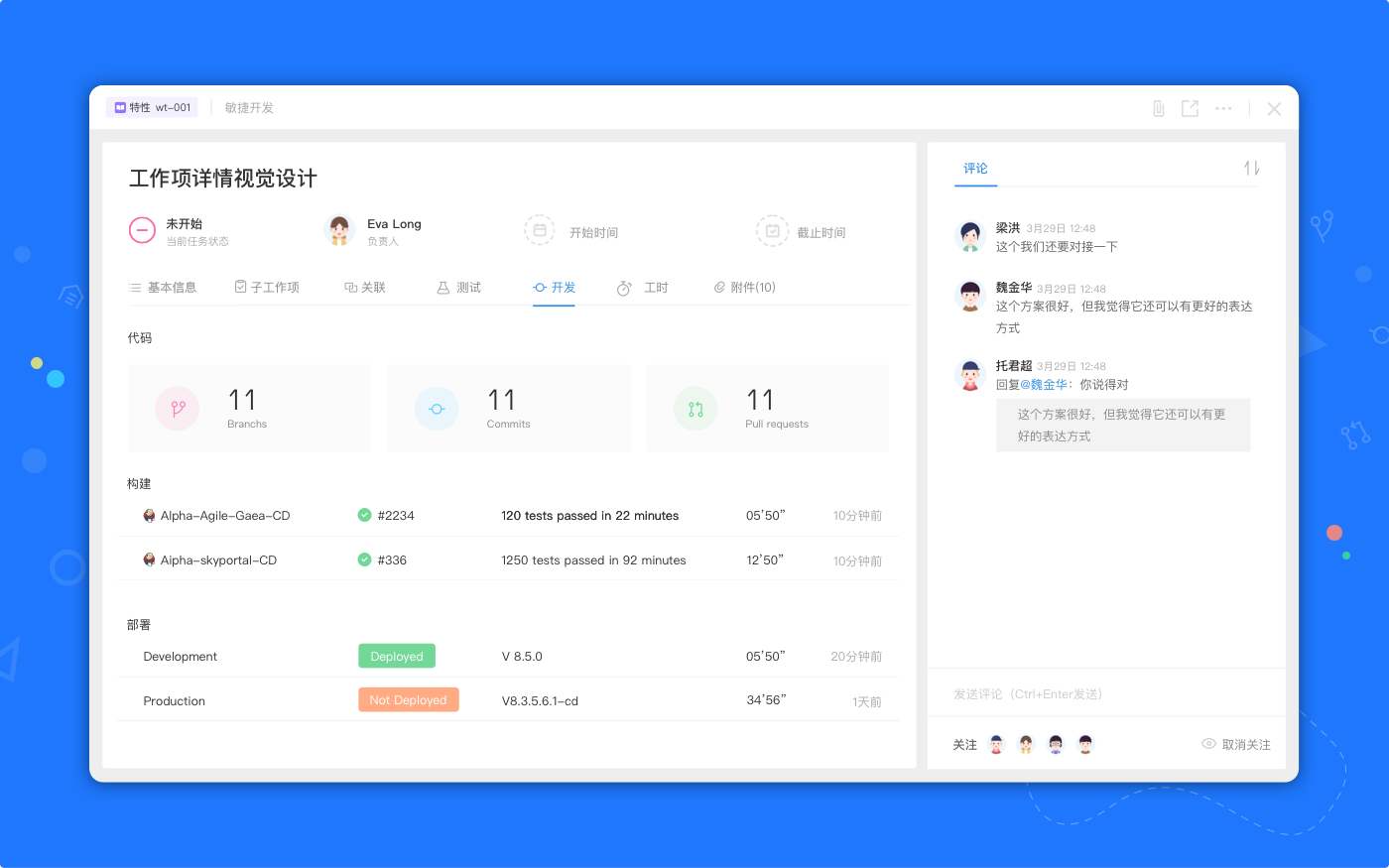
## View Builds/Deployments in Worktile
Get views in Worktile agile project about what’s happening and insights with your Jenkins for things like:
- Build
- Deployment
If you have any questions, please visit [https://worktile.com/](https://worktile.com/) and they will route it to the correct team to help you.