https://github.com/wpdas/mconsole
Internal console for mobile devices. To be used in frameworks like Phonegap, Sencha and etc. Should only be used in mobile projects.
https://github.com/wpdas/mconsole
Last synced: about 1 year ago
JSON representation
Internal console for mobile devices. To be used in frameworks like Phonegap, Sencha and etc. Should only be used in mobile projects.
- Host: GitHub
- URL: https://github.com/wpdas/mconsole
- Owner: wpdas
- License: mit
- Created: 2015-03-25T17:09:46.000Z (about 11 years ago)
- Default Branch: master
- Last Pushed: 2015-04-02T20:23:32.000Z (about 11 years ago)
- Last Synced: 2025-04-09T05:26:24.293Z (about 1 year ago)
- Language: JavaScript
- Homepage:
- Size: 602 KB
- Stars: 6
- Watchers: 5
- Forks: 1
- Open Issues: 0
-
Metadata Files:
- Readme: README.md
- License: LICENSE
Awesome Lists containing this project
README
# MobileConsole (mConsole)
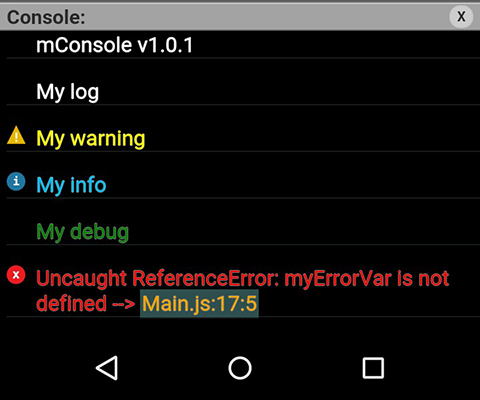
MConsole is a simple tool to be used in projects for mobile (hybrid). It was developed using the Phonegap framework as a test base. Through mConsole, you can see easily all console occurrences in the project (including errors).
Should be used only for projects mobile.
### How to use
* Copy to root folder (or any folder inside of it) the file [mconsole.js](https://github.com/Wpdas/mConsole/blob/master/mconsole/mconsole.js), insert the same in your project and call its start function.
* Example ([demo.js](https://github.com/Wpdas/mConsole/blob/master/demo.js)):
```javascript
window.onload = function(){
//Start mobile console and pass height (optional) per parameter.
//$mConsole.init(250);
$mConsole.init();
//Execute console
console.log($mConsole.version);
console.log("My log");
console.warn("My warning");
console.info("My info");
console.debug("My debug");
//Proposital error
myErrorVar;
};
```
This above code will generate something like this below: