https://github.com/x-orpheus/catch-react-error
A framework using React Boundary handles error easily
https://github.com/x-orpheus/catch-react-error
error errorboundary react
Last synced: 4 months ago
JSON representation
A framework using React Boundary handles error easily
- Host: GitHub
- URL: https://github.com/x-orpheus/catch-react-error
- Owner: x-orpheus
- Created: 2019-12-17T06:55:57.000Z (over 6 years ago)
- Default Branch: master
- Last Pushed: 2023-01-05T03:11:01.000Z (over 3 years ago)
- Last Synced: 2025-10-02T19:41:19.816Z (10 months ago)
- Topics: error, errorboundary, react
- Language: JavaScript
- Homepage:
- Size: 2.51 MB
- Stars: 44
- Watchers: 4
- Forks: 9
- Open Issues: 33
-
Metadata Files:
- Readme: README-zh_CN.md
Awesome Lists containing this project
README
# catch-react-error
[](https://www.npmjs.com/package/catch-react-error)
[](https://travis-ci.org/x-orpheus/catch-react-error)
[](https://codecov.io/gh/x-orpheus/catch-react-error)
[English](./README.md) | 简体中文
[catch-react-error 由来的故事](./doc/catch-react-error.md)
## 简介
对于 React 生命周期中发生的错误,只需要使用 `ErrorBoundary` 组件包裹可能出现异常的组件即可。
但是这种方案只适用于客户端渲染,然而对于服务端渲染出现的错误,却完全无能为力;现在大型的项目无不采用服务端渲染的方式,所以需要找到一个简单易用的能够应用于**同构应用**的 React 错误处理方案。
`catch-react-error` 正是来解决这个问题的,`catch-react-error` 在客户端渲染的时候正常使用`ErrorBoundary` 包裹组件;在服务端渲染的时候,使用 `try-catch` 包裹 `render` 函数, 这样则可以在同构应用中完美的处理 React 生命周期中发生的错误。
## Demo
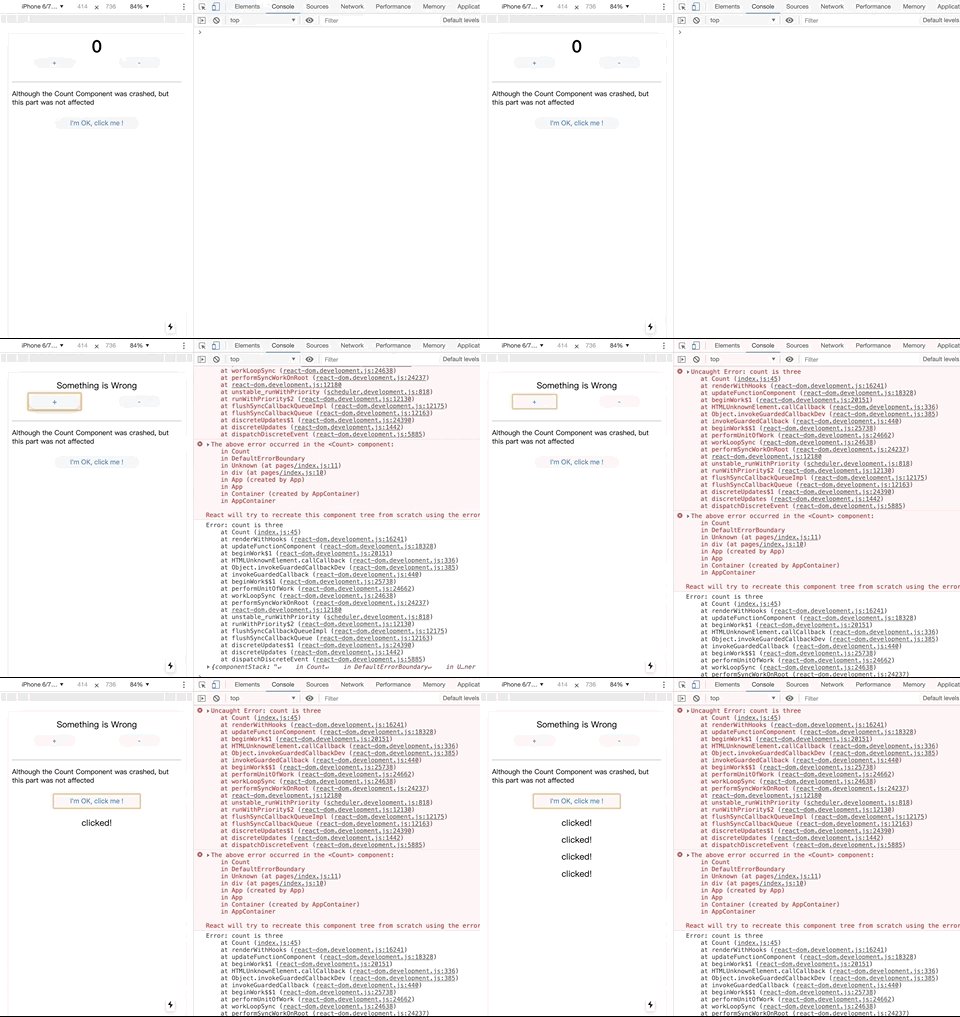
### client side render
```sh
cd example-client
npm run dev
```
### server side render
```sh
cd example-server
npm run dev
```
## How to use
### 1.安装 catch-react-error
```sh
npm install catch-react-error --save
```
### 2.安装 ES7 Decorator babel plugin
我们采用 ES7 的 `Decorator` 语法来让代码更简洁,当然也可以采用函数式的写法
```sh
npm install --save-dev @babel/plugin-proposal-decorators
npm install --save-dev @babel/plugin-proposal-class-properties
```
添加 babel plugin
```json
{
"plugins": [
["@babel/plugin-proposal-decorators", { "legacy": true }],
["@babel/plugin-proposal-class-properties", { "loose": true }]
]
}
```
### 3.导入 catch-react-error
```jsx
import catchreacterror from "catch-react-error";
```
### 4.使用@catchreacterror decorator
```jsx
@catchreacterror()
class Count extends React.Component {
render() {
const { count } = this.props;
if (count === 3) {
throw new Error("count is three");
}
return
{count}
;
}
}
```
`catchreacterror` 本质上是一个柯里化的函数,函数签名为:
```
catchreacterror :: ErrorBoundary -> Function -> Component
```
`catchreacterror` 函数接受一个参数: ErrorBoundary (默认采用`DefaultErrorBoundary`),返回一个 High-Order-Function。
其原理为:客户端渲染会用 React 16 的[Error Boundary](https://reactjs.org/blog/2017/07/26/error-handling-in-react-16.html)的相关函数来处理错误,服务端用`try catch`来捕获 render 的错误。
### 5.使用@catchreacterror 处理 FunctionComponent
上面是对于 `ClassComponent` 做的处理,但是有些人喜欢用函数组件,这里也提供使用方法,如下。
```js
// 如果没有使用 catchreacterror 包裹 Content 组件,
// 则在 count 为 3 的情况下则必然报错,导致程序崩溃
function Count({ count }) {
if (count === 3) {
throw new Error("count is three");
}
return
{count}
;
}
// 被 catchreacterror 包裹之后会 catch 住错误,
// 仅仅导致当前组件被销毁,其他内容正常展示
const SaleCount = catchreacterror()(Count);
function App() {
return (
I'm OK, click me !
);
}
```
### 6.如何编写 CustomErrorBoundary
拷贝下面 React 提供的事例,可以添加日志,自定义 fallback 内容
```js
class CustomErrorBoundary extends React.Component {
constructor(props) {
super(props);
this.state = { hasError: false };
}
static getDerivedStateFromError(error) {
// Update state so the next render will show the fallback UI.
return { hasError: true };
}
componentDidCatch(error, errorInfo) {
// You can also log the error to an error reporting service
logErrorToMyService(error, errorInfo);
}
render() {
if (this.state.hasError) {
// You can render any custom fallback UI
return
Something went wrong.
;
}
}
return this.props.children;
}
}
```
## License
MIT.