https://github.com/xavdid/universal-test-runner
A language-agnostic, zero-configuration test invoker
https://github.com/xavdid/universal-test-runner
cli python testing
Last synced: over 1 year ago
JSON representation
A language-agnostic, zero-configuration test invoker
- Host: GitHub
- URL: https://github.com/xavdid/universal-test-runner
- Owner: xavdid
- License: mit
- Created: 2023-06-05T07:01:09.000Z (about 3 years ago)
- Default Branch: main
- Last Pushed: 2024-12-14T22:01:50.000Z (over 1 year ago)
- Last Synced: 2025-04-14T03:13:40.362Z (over 1 year ago)
- Topics: cli, python, testing
- Language: Python
- Homepage: https://pypi.org/project/universal-test-runner
- Size: 142 KB
- Stars: 25
- Watchers: 2
- Forks: 0
- Open Issues: 0
-
Metadata Files:
- Readme: README.md
- Changelog: CHANGELOG.md
- License: LICENSE
Awesome Lists containing this project
README
# universal-test-runner
The Universal Test Runner is a zero-configuration, language-aware way to run unit tests in any project. It installs a command, `t`, which will determine how to run your test suite (and then run it).
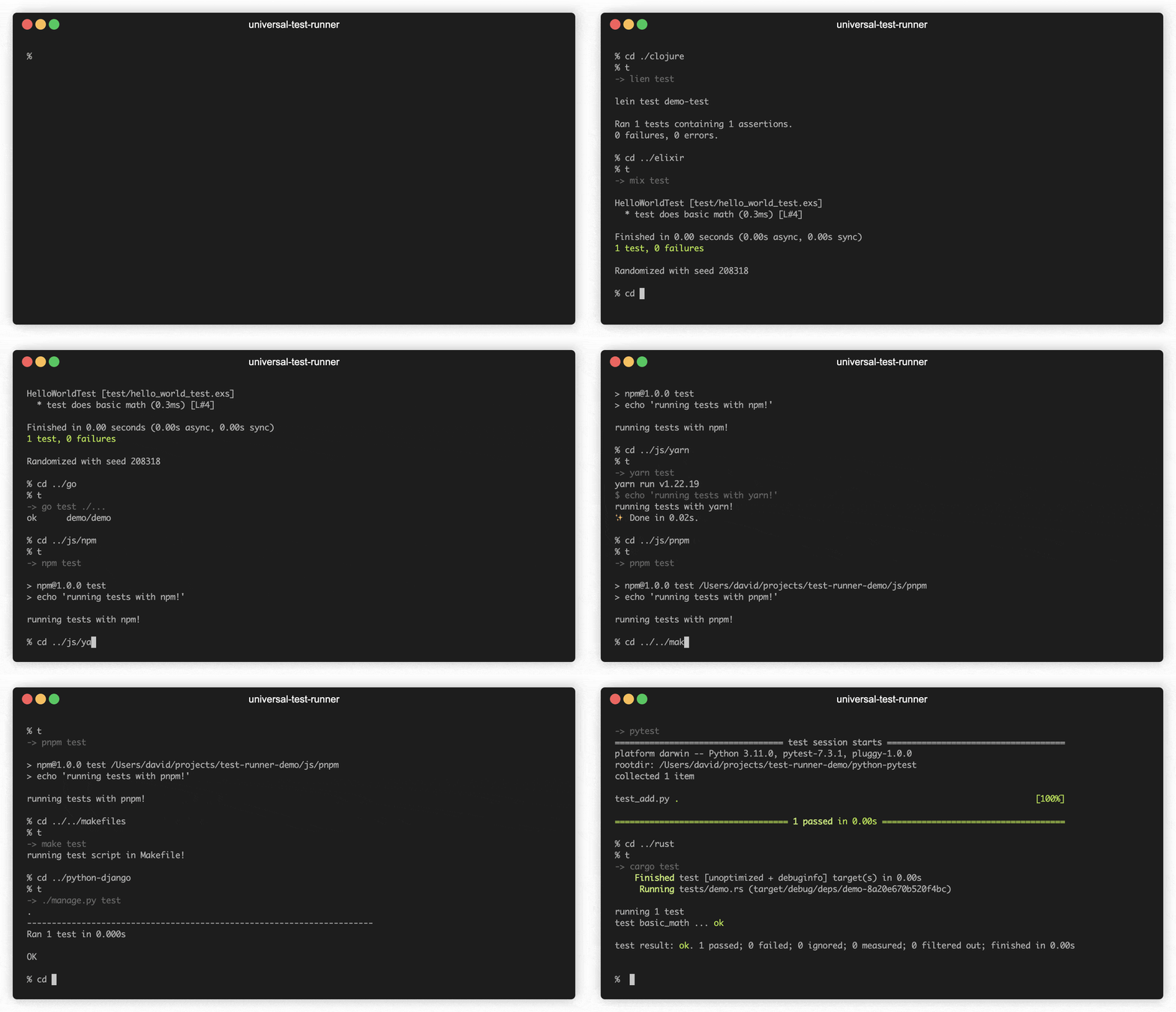
If you're working on a JS project, it runs `[your package manager here] test`. You've run `pytest` in this folder before? `pytest` it is. Rust project? `cargo test` coming right up. Is also clever about running all your `go` module tests (regardless of how they're organized). No matter the command, all args are passed directly into the test runner.
Currently [supports 7 languages](#supported-languages) (and their respective test frameworks). Please open an issue if I'm missing your favorite!
## Installation
The easiest way to install is by using [pipx](https://pypa.github.io/pipx/):
```bash
pipx install universal-test-runner
```
You can also use brew (which will build from source and take a little longer):
```bash
brew install xavdid/projects/universal-test-runner
```
## Usage
> You can also clone the [demo repo](https://github.com/xavdid/test-runner-demo) to play around with the test runner - it's got toy examples to show how tests are run in many languages!
Once installed, the command `t` will be available. Run it in a project folder's root and it'll do its best to run your unit tests:
```
% t
-> pytest
=============================== test session starts ================================
platform darwin -- Python 3.11.0, pytest-7.3.1, pluggy-1.0.0
rootdir: /Users/username/projects/test-runner
collected 78 items
tests/test_cli.py ... [ 3%]
tests/test_context.py ..................... [ 30%]
tests/test_matchers.py .................................................. [ 94%]
tests/test_runner.py .... [100%]
================================ 78 passed in 0.08s ================================
```
It passes all arguments and environment modifications down to the chosen test runner:
```
% t -k test_builder --verbose
-> pytest -k test_builder --verbose
=============================== test session starts ================================
platform darwin -- Python 3.11.0, pytest-7.3.1, pluggy-1.0.0
cachedir: .pytest_cache
rootdir: /Users/username/projects/test-runner
collected 78 items / 77 deselected / 1 selected
tests/test_context.py::test_builder PASSED [100%]
========================= 1 passed, 77 deselected in 0.03s =========================
```
It prints the command it's running as part of the output. To disable that behavior, set `UTR_DISABLE_ECHO` environment variable to anything besides `0`.
If it can't guess the testing method, it will tell you so. Feel free to open an issue to request wider language support!
### Debugging
The package also ships a command to surface info about itself: `universal-test-runner`. It has a few key pieces of functionality:
- the `universal-test-runner --version` flag, which prints info about your installed package version
- the `universal-test-runner debug` command, which prints info about which command would run (and why):
```
% universal-test-runner debug
[universal-test-runner]: checking each handler for first match
[universal-test-runner]: Checking command 01/11: pytest
[universal-test-runner]: looking for: ".pytest_cache"
[universal-test-runner]: no match, continuing
[universal-test-runner]: Checking command 02/11: py
[universal-test-runner]: looking for: "tests.py"
[universal-test-runner]: no match, continuing
[universal-test-runner]: Checking command 03/11: go_multi
[universal-test-runner]: looking for: "go.mod" and no arguments
[universal-test-runner]: no match, continuing
[universal-test-runner]: Checking command 04/11: go_single
[universal-test-runner]: looking for: "go.mod" or a file named "..._test.go"
[universal-test-runner]: no match, continuing
...
[universal-test-runner]: no matching test handler. To add a new one, please file an issue: https://github.com/xavdid/universal-test-runner/issues
```
### Clearing the Terminal
To clear the terminal and scrollback buffer before running the test command, set the `UTR_CLEAR_PRE_RUN` environment variable to anything besides `0`.
This functionality has been tested on iTerm2, `Terminal.app`, and Kitty. Please open an issue if it doesn't work on your terminal.
## Supported Languages
This list describes how each language behaves (but not the order in which languages are matched; use the [debugger](#debugging) for that).
- Python
- checks for `manage.py` (Django)
- else tries to determine if you use `pytest` in rough order of simplicity. It checks:
- if you've got a `.pytest-cache` or `pytest.ini`
- if there's a `[pytest]` line in `tox.ini`
- if there's a `setup.cfg` and a `[tool:pytest]` line
- otherwise, it tries to read `pyproject.toml`
- if you're on Python 3.11+, it parses the file and checks for dependency [locations](https://packaging.python.org/en/latest/guides/writing-pyproject-toml/#dependencies-optional-dependencies) [for](https://docs.astral.sh/uv/concepts/dependencies/#development-dependencies) [popular](https://python-poetry.org/docs/managing-dependencies/#dependency-groups) [tools](https://pdm-project.org/latest/usage/dependency/#add-development-only-dependencies)
- otherwise, it does a best-effort regex against the file contents, looking for `[tool.pytest.ini_options]` or [dependency specifiers](https://packaging.python.org/en/latest/specifications/dependency-specifiers/#dependency-specifiers) like `pytest >= 2`
- if you're using a popular package manager (`uv`, `pdm`, `poetry`) it'll run ` run pytest`
- otherwise, it runs `pytest` directly under the assumption it's available on the `$PATH`
- lastly, if there are _any_ python-related files, it runs `python -m unittest`, which does its own discovery
- Rust
- `cargo test`
- Go
- if there's a `X_test.go`, then runs a plain `go test`
- if you pass any args at all, runs `go test your-args-here`
- otherwise, runs `go test ./...`
- Elixir
- `mix test`
- Clojure
- `lein test`
- Javascript/Typescript
- if there's a `package.json` and it has a `test` script, runs `[package manager] test`, where `[package manager]` is:
- `npm` if there's a `package-lock.json`
- `yarn` if there's a `yarn.lock`
- `pnpm` if there's a `pnpm-lock.yaml`
- `bun test` if there's a `bun.lockb`
- [Just](https://github.com/casey/just)
- if there are any common justfile names, it uses the JSON api to find a `test` command
- if `just` isn't installed, it does its best to parse the file as a string
- Makefile
- looks for a line that starts with `test:`
### Exercism
[Exercism](https://exercism.org/) is a platform for learning new programming languages. It has more than 65 tracks available. The Universal Test Runner supports nearly all of them out of the box using the [Exercism CLI](https://exercism.org/docs/using/solving-exercises/working-locally)'s `exercism test` command. Just like this tool, it knows how to run each track's tests and invokes the correct one automatically.
Rather than re-implement all of the test commands `exercism` can handle, the runner will invoke the Exercism CLI when run from an exercise directory. This requires version `3.2.0` of the Exercism CLI installed.
> fun fact: I [added the test command](https://github.com/exercism/cli/pull/1092) after it was suggested in the [forum thread](https://forum.exercism.org/t/introducing-the-universal-test-runner/6228) where I announced the Universal Test Runner
## Motivation
I work in a few languages at a time, so I've actually had a [version of this in my dotfiles](https://github.com/xavdid/dotfiles/blob/6bd5f56b1f9ad2dcef9f8b72413d30779b378aef/node/aliases.zsh#L45-L73) for a while. Also, as I've been doing [Exercism's #12in23 program](https://exercism.org/challenges/12in23), I'm _really_ switching languages. It's nice not to have to re-learn any muscle memory. Plus, increasingly complex `bash` was holding me back.
### Design Philosophy
1. The runner itself should need no configuration - it Just Works
2. It should pass all arguments through to the underlying test command
3. It should have wide language and test runner support; please open an issue if your use case isn't supported!
## FAQ
### `just` errors when passing CLI args
If you run with args (like `t -k whatever`) and see an error from `just` like:
```
error: Justfile does not contain recipes `-k` or `whatever`.
```
That means your `test` recipe doesn't accept any options. Make sure it has an `*options` arg that you pass through to your test command:
```justfile
test *options:
pytest {{options}}
```
## Development
This section is people making changes to this package.
When in a virtual environment, run the following:
```bash
pip install -e '.[test]'
```
This installs the package in `--edit` mode and makes its dependencies available. You can now run `t` to run tests and `universal-test-runner` to access help, version, and debugging info.
### Running Tests
In your virtual environment, a simple `pytest` should run the unit test suite. You can also run `pyright` for type checking.
### Releasing New Versions
> these notes are mostly for myself (or other contributors)
1. bump to desired version in `pyproject.toml` and add `CHANGELOG` entry
2. Run `just release` while your venv is active
3. paste the stored API key (If you're getting invalid password, verify that `~/.pypirc` is empty)
