https://github.com/xavierjiezou/python-style-guide
Style Guide for Python.
https://github.com/xavierjiezou/python-style-guide
google guide python style
Last synced: 10 months ago
JSON representation
Style Guide for Python.
- Host: GitHub
- URL: https://github.com/xavierjiezou/python-style-guide
- Owner: XavierJiezou
- License: mit
- Created: 2022-05-11T08:06:27.000Z (about 4 years ago)
- Default Branch: main
- Last Pushed: 2022-05-12T12:01:45.000Z (about 4 years ago)
- Last Synced: 2025-03-25T11:01:59.581Z (over 1 year ago)
- Topics: google, guide, python, style
- Homepage: https://XavierJiezou.github.io/Python-Style-Guide/
- Size: 24.4 KB
- Stars: 0
- Watchers: 1
- Forks: 0
- Open Issues: 0
-
Metadata Files:
- Readme: README.md
- License: LICENSE
Awesome Lists containing this project
README
# Python-Style-Guide
在谷歌提出的 Python 编程规范上进行了简化 😊,让你快速养成良好的编程习惯 ✍,开发高质量代码 🚀。
- [Python-Style-Guide](#python-style-guide)
- [1. 背景知识](#1-背景知识)
- [2. 语言规范](#2-语言规范)
- [2.1. Lint](#21-lint)
- [2.2. 导入](#22-导入)
- [2.3. 包](#23-包)
- [2.4. 异常](#24-异常)
- [2.5. 全局变量](#25-全局变量)
- [2.6. 嵌套/局部/内部 类或函数](#26-嵌套局部内部-类或函数)
- [2.7. 推导式和生成式](#27-推导式和生成式)
- [2.8. 默认迭代器和操作符](#28-默认迭代器和操作符)
- [2.9. 生成器](#29-生成器)
- [2.10. Lambda 函数](#210-lambda-函数)
- [2.11. 条件表达式](#211-条件表达式)
- [2.12. 默认参数值](#212-默认参数值)
- [2.13. Properties](#213-properties)
- [2.14. True/False 的取值](#214-truefalse-的取值)
- [2.15. Lexical Scoping](#215-lexical-scoping)
- [2.16. 函数与方法装饰器](#216-函数与方法装饰器)
- [2.17. 线程](#217-线程)
- [2.18. 花哨的功能](#218-花哨的功能)
- [2.19. 现代化的 Python](#219-现代化的-python)
- [2.20. 代码类型注释](#220-代码类型注释)
- [3. 风格规范](#3-风格规范)
- [3.1. 分号](#31-分号)
- [3.2. 行长度](#32-行长度)
- [3.3. 圆括号](#33-圆括号)
- [3.4. 缩进](#34-缩进)
- [3.5. 序列元素尾部的逗号如何处理?](#35-序列元素尾部的逗号如何处理)
- [3.6. 空行](#36-空行)
- [3.7. 空格](#37-空格)
- [3.8. Shebang Line](#38-shebang-line)
- [3.9. 注释和文档字符串](#39-注释和文档字符串)
- [3.10. 类](#310-类)
- [3.11. 字符串](#311-字符串)
- [3.12. 文件,Sockets,以及类似的有状态的资源](#312-文件sockets以及类似的有状态的资源)
- [3.13. TODO 注释](#313-todo-注释)
- [3.14. 导入格式](#314-导入格式)
- [3.15. 语句](#315-语句)
- [3.16. Getters 与 Setters](#316-getters-与-setters)
- [3.17. 命名](#317-命名)
- [3.18. Main](#318-main)
- [3.19. 函数长度](#319-函数长度)
- [3.20. 类型注释](#320-类型注释)
- [4. 辅助工具](#4-辅助工具)
- [4.1. Python](#41-python)
- [4.1.1. 使用截图](#411-使用截图)
- [4.2. autoDocstring](#42-autodocstring)
- [4.2.1. 使用截图](#421-使用截图)
- [4.3. Python Type Hint](#43-python-type-hint)
- [4.3.1. 使用截图](#431-使用截图)
- [5. 引用参考](#5-引用参考)
## 1. 背景知识
不只是 Python 语言,一个比较系统的编程规范对于任何语言来说都是必须的,特别是在团队开发和协同开发中。此外,对于个人开发者,也应该花费一些时间来了解编程规范,这有助于你开发高质量代码,提高代码可读性,方便版本迭代和他人阅读。
## 2. 语言规范
### 2.1. Lint
> 使用 [pylint](https://github.com/PyCQA/pylint) 检查代码中存在的 bug。
同时,谷歌也给出了推荐的 pylint 配置文件:[点击下载](https://google.github.io/styleguide/pylintrc)。
具体使用方式请参考 pylint [官方文档](https://pylint.pycqa.org/en/latest/)。
### 2.2. 导入
> 使用 import 语句导入包和模块,而不单独导入函数或类。
### 2.3. 包
> 应该根据包的完整路径来导入模块。
✅
```python
from doctor.who import jodie
```
⛔
```python
import jodie
```
### 2.4. 异常
> 非必要不使用 try/except;遇到异常时,应该抛出有助于调试的信息。
✅
```python
if minimum < 1024:
raise ValueError(f'Min. port must be at least 1024, not {minimum}.')
port = self._find_next_open_port(minimum)
if port is None:
raise ConnectionError(f'Could not connect to service on port {minimum} or higher.')
assert port >= minimum, (f'Unexpected port {port} when minimum was {minimum}.')
```
🚨
```python
assert minimum >= 1024, 'Minimum port must be at least 1024.'
port = self._find_next_open_port(minimum)
assert port is not None
```
### 2.5. 全局变量
> 避免使用全局变量,推荐使用模块级别的常量。如:`MAX_HOLY_HANDGRENADE_COUNT = 3`,常量名称全部大写,使用 `_` 分隔。
### 2.6. 嵌套/局部/内部 类或函数
> 尽量避免使用嵌套类或函数。
### 2.7. 推导式和生成式
> 可以在简单情况下使用推导式和生产时,但不要在复杂情况下使用,不然会导致代码可读性不好。
✅
```python
[i for i in range(3)]
```
🚨
```python
return ((x, y, z)
for x in range(5)
for y in range(5)
if x != y
for z in range(5)
if y != z)
```
### 2.8. 默认迭代器和操作符
> 如果类型支持,就使用默认的迭代器和操作符
✅
```python
for key in adict: ...
if key not in adict: ...
if obj in alist: ...
for line in afile: ...
for k, v in adict.items(): ...
for k, v in six.iteritems(adict): ...
```
🚨
```python
for key in adict.keys(): ...
if not adict.has_key(key): ...
for line in afile.readlines(): ...
for k, v in dict.iteritems(): ...
```
### 2.9. 生成器
> 按需使用生成器。
### 2.10. Lambda 函数
> 适用于单行函数。
### 2.11. 条件表达式
> 仅在简单的情况下使用。
✅
```python
one_line = 'yes' if predicate(value) else 'no'
```
🚨
```python
bad_line_breaking = ('yes' if predicate(value) else
'no')
```
### 2.12. 默认参数值
> 可以使用,但不要在函数或方法中定义可变对象作为默认值。
✅
```python
def foo(a, b=None):
if b is None:
b = []
def foo(a, b: Optional[Sequence] = None):
if b is None:
b = []
def foo(a, b: Sequence = ()): # Empty tuple OK since tuples are immutable
...
```
🚨
```python
def foo(a, b=[]):
...
def foo(a, b=time.time()): # The time the module was loaded???
...
def foo(a, b: Mapping = {}): # Could still get passed to unchecked code
...
```
### 2.13. Properties
> 推荐使用装饰器 @property 来创建拥有简单计算逻辑的属性。
### 2.14. True/False 的取值
> 尽可能隐式的使用 False。(增加可读性)
Python 会将下列这些值认定为 False:
- None(空值)
- 0(int 类型的零)
- [](空列表)
- {}(空字典)
- ''(空字符串)
✅
```python
if not users:
print('no users')
if i % 10 == 0:
self.handle_multiple_of_ten()
def f(x=None):
if x is None:
x = []
```
🚨
```python
if len(users) == 0:
print('no users')
if not i % 10:
self.handle_multiple_of_ten()
def f(x=None):
x = x or []
```
### 2.15. Lexical Scoping
> 推荐使用语法作用域。
Python 是 Lexical Scoping,而并非 Dynamic Scoping。(点击[这里](https://zhuanlan.zhihu.com/p/67965089)了解更多关于 Python 作用域的知识)
### 2.16. 函数与方法装饰器
> 避免使用 `@staticmethod`,限制 `@classmethod`。
`@staticmethod` 和 `@classmethod` 是最常见的装饰器。
- `@staticmethod`:将普通函数转换成类的静态方法。
- `@classmethod`:将普通函数转换成类方法。
使用装饰器使代码变得优雅,但如果报错将很难捕捉和处理,因此要谨慎选择。
### 2.17. 线程
> 推荐使用 Quenu 模块里面的 Quenu 数据类型作为线程间的数据通信方式。不建议使用 Python 内建数据类型,例如字典。
### 2.18. 花哨的功能
> 避免使用 Python 中花哨的功能,例如自定义元类,字节码访问等。
### 2.19. 现代化的 Python
> Python 目前已经全面进入 3 时代了,对于需要继续支持 2.7 的历史遗留代码,请导入:
```python
from __future__ import absolute_import
from __future__ import division
from __future__ import print_function
```
### 2.20. 代码类型注释
> 建议根据 [PEP-484](https://www.python.org/dev/peps/pep-0484/) 对代码进行注释。
✅
```python
def func(a: int) -> List[int]:
"""_summary_
Args:
a (int): _description_
Returns:
List[int]: _description_
"""
return [a]
```
🚨
```python
def func(a):
return [a]
```
## 3. 风格规范
### 3.1. 分号
> 不要在行尾加入分号,也不要用分号将两条语句放在同一行。
毕竟 Python 不是 C/C++。
### 3.2. 行长度
> 每行不要超过 80 个字符。
但也有一些例外情况,如下:
- 模块导入语句
- URL,路径等标记
- 一些不便于换行的的语句
✅
```python
See details at
# http://www.example.com/us/developer/documentation/api/content/v2.0/csv_file_name_extension_full_specification.html
```
🚨
```python
# See details at
# http://www.example.com/us/developer/documentationapi/content/\
# v2.0/csv_file_name_extension_full_specification.html
```
### 3.3. 圆括号
> 尽量避免在返回语句和条件语句中使用圆括号。元组,行连接除外。
✅
```python
if foo:
bar()
while x:
x = bar()
if x and y:
bar()
if not x:
bar()
# For a 1 item tuple the ()s are more visuallyobvious than the comma.
onesie = (foo,)
return foo
return spam, beans
return (spam, beans)
for (x, y) in dict.items(): ...
```
🚨
```python
if (x):
bar()
if not(x):
bar()
return (foo)
```
### 3.4. 缩进
> 使用 4 个空格来缩进代码。
✅
```python
# Aligned with opening delimiter
foo = long_function_name(var_one, var_two,
var_three, var_four)
meal = (spam,
beans)
# Aligned with opening delimiter in a dictionary
foo = {
'long_dictionary_key': value1 +
value2,
...
}
# 4-space hanging indent; nothing on first line
foo = long_function_name(
var_one, var_two, var_three,
var_four)
meal = (
spam,
beans)
# 4-space hanging indent in a dictionary
foo = {
'long_dictionary_key':
long_dictionary_value,
...
}
```
🚨
```python
# Stuff on first line forbidden
foo = long_function_name(var_one, var_two,
var_three, var_four)
meal = (spam,
beans)
# 2-space hanging indent forbidden
foo = long_function_name(
var_one, var_two, var_three,
var_four)
# No hanging indent in a dictionary
foo = {
'long_dictionary_key':
long_dictionary_value,
...
}
```
### 3.5. 序列元素尾部的逗号如何处理?
> 当 `]`,`)`,`}` 和序列最后一个元素不在同一行时,推荐在最后一个元素后面加上逗号,否则不加。
✅
```python
golomb3 = [0, 1, 3]
golomb4 = [
0,
1,
4,
6,
]
```
🚨
```python
golomb4 = [
0,
1,
4,
6
]
```
### 3.6. 空行
> 顶级定义如函数或类空 2 行;方法定义及 `class` 所在的行和第一个方法间空 1 行。`def` 行之后也不要添加空行。
### 3.7. 空格
> 逗号之前不要空格,逗号之后加一个空格,括号内不要有多余空格。
✅
```python
# Case 1
spam(ham[1], {'eggs': 2}, [])
# Case 2
if x == 4:
print(x, y)
x, y = y, x
# Case 3
spam(1)
# Case 4
dict['key'] = list[index]
# Case 5
x == 1
# Case 6
def complex(real, imag=0.0): return Magic(r=real, i=imag)
def complex(real, imag: float = 0.0): return Magic(r=real, i=imag)
```
🚨
```python
# Case 1
spam( ham[ 1 ], { 'eggs': 2 }, [ ] )
# Case 2
if x == 4 :
print(x , y)
x , y = y , x
# Case 3
spam (1)
# Case 4
dict ['key'] = list [index]
# Case 5
x==1
# Case 6
def complex(real, imag = 0.0): return Magic(r = real, i = imag)
def complex(real, imag: float=0.0): return Magic(r = real, i = imag)
```
### 3.8. Shebang Line
> 大多数 `.py` 文件不必以 `#!` 作为文件的开始,程序的启动主文件最好以 `#!/usr/bin/python3` 打头。(方便内核查找 Python 解释器)
### 3.9. 注释和文档字符串
> 确保对模块、函数、方法、行内注释使用正确的风格。
**模块**的开头应该是对其内容和用法的描述:
```python
"""A one line summary of the module or program, terminated by a period.
Leave one blank line. The rest of this docstring should contain an
overall description of the module or program. Optionally, it may also
contain a brief description of exported classes and functions and/or usage
examples.
Typical usage example:
foo = ClassFoo()
bar = foo.FunctionBar()
"""
```
**函数**和**方法**应该使用类似如下的注释:
```python
def fetch_smalltable_rows(table_handle: smalltable.Table,
keys: Sequence[Union[bytes, str]],
require_all_keys: bool = False,
) -> Mapping[bytes, tuple[str, ...]]:
"""Fetches rows from a Smalltable.
Retrieves rows pertaining to the given keys from the Table instance
represented by table_handle. String keys will be UTF-8 encoded.
Args:
table_handle: An open smalltable.Table instance.
keys: A sequence of strings representing the key of each table
row to fetch. String keys will be UTF-8 encoded.
require_all_keys: If True only rows with values set for all keys will be
returned.
Returns:
A dict mapping keys to the corresponding table row data
fetched. Each row is represented as a tuple of strings. For
example:
{b'Serak': ('Rigel VII', 'Preparer'),
b'Zim': ('Irk', 'Invader'),
b'Lrrr': ('Omicron Persei 8', 'Emperor')}
Returned keys are always bytes. If a key from the keys argument is
missing from the dictionary, then that row was not found in the
table (and require_all_keys must have been False).
Raises:
IOError: An error occurred accessing the smalltable.
"""
```
**类**:
```python
class SampleClass:
"""Summary of class here.
Longer class information....
Longer class information....
Attributes:
likes_spam: A boolean indicating if we like SPAM or not.
eggs: An integer count of the eggs we have laid.
"""
def __init__(self, likes_spam: bool = False):
"""Inits SampleClass with blah."""
self.likes_spam = likes_spam
self.eggs = 0
def public_method(self):
"""Performs operation blah."""
```
**块注释**和**行注释**:
```python
# We use a weighted dictionary search to find out where i is in
# the array. We extrapolate position based on the largest num
# in the array and the array size and then do binary search to
# get the exact number.
if i & (i-1) == 0: # True if i is 0 or a power of 2.
```
### 3.10. 类
> 如果一个类不需要继承其它类,就显式地从 `object` 继承。
✅
```python
class SampleClass(object):
pass
```
🚨
```python
class SampleClass:
pass
```
继承 `object` 是为了使 `properties` 正常工作,并且也继承了对象的一些方法,包括:
- `__new__`
- `__init__`
- `__delattr__`
- `__getattribute__`
- `__setattr__`
- `__hash__`
- `__repr__`
- `__str__`
### 3.11. 字符串
> 使用 `f-string`,`%`,或者 `format` 方法来格式化字符串。
✅
```python
n = 'John'
s = f'name: {n}'
```
🚨
```python
n = 'John'
s = 'name:' + n
```
避免在循环中使用 `+` 或 `+=` 来累加字符串。替代的是,使用 `''.join()`,因为该方法实现复杂度更低。
✅
```python
x = ['a', 'b', 'c']
s = ''
for i in x:
s += i
```
🚨
```python
x = ['a', 'b', 'c']
s = ''.join(x)
```
在同一个文件中,应该使用一致的字符串引号,要使用单引号就都使用单引号,要使用双引号就都使用双引号,非必要情况不要滥用。
如果一个字符串太长需要占多行,推荐使用三层双引号,而非三层单引号,并且多行字符串的位置不应该随着代码的缩进调整而改变。
✅
```python
long_string = """This is fine if your use case can accept
extraneous leading spaces."""
```
🚨
```python
long_string = """This is pretty ugly.
Don't do this.
"""
```
日志记录中字符串的使用有些特殊。推荐使用 `%` 加占位符这种方式,而不是 `f-string`。
✅
```python
import tensorflow as tf
logger = tf.get_logger()
logger.info('TensorFlow Version is: %s', tf.__version__)
```
🚨
```python
import tensorflow as tf
logger = tf.get_logger()
logger.info(f'TensorFlow Version is: {tf.__version__}')
```
### 3.12. 文件,Sockets,以及类似的有状态的资源
> 文件和 Sockets 使用结束后,显式地关闭它们。推荐使用 with 语句来管理文件。
### 3.13. TODO 注释
> 可以使用 `TODO` 为临时代码,短期或不够完美的解决方案添加注释。
推荐的 TODO 格式如下:
```python
# TODO(kl@gmail.com): Use a "*" here for string repetition.
# TODO(Zeke) Change this to use relations.
```
笔者自己经常使用的样式:
```python
# TODO (name, email): Description.
```
### 3.14. 导入格式
> 每个导入都应该是单独的一行,当然也有例如,比如 `typing`。
✅
```python
import os
import sys
```
🚨
```python
import os, sys
```
此外,如果你需要导入很多库,那么应该按照先标准库,后第三方库,最后是自定义库的顺序分组导入。不同组之间空一行,同组库应该按照其首字母的 Unicode 编码排序。示例如下:
```python
import collections
import queue
import sys
from absl import app
from absl import flags
import bs4
import cryptography
import tensorflow as tf
from myproject.backend import huxley
from myproject.backend.hgwells import time_machine
from myproject.backend.state_machine import main_loop
from otherproject.ai import body
from otherproject.ai import mind
```
### 3.15. 语句
> 通常来说,每个语句应该占单独的一行。
如果只有简单的 if 而不需要 else,你也可以将它们放一行:
✅
```python
if foo: bar(foo)
```
🚨
```python
if foo: bar(foo)
else: baz(foo)
```
`try/except` 语句绝对不能放同一行:
✅
```python
try:
bar(foo)
except ValueError:
baz(foo)
```
⛔
```python
try: bar(foo)
except ValueError: baz(foo)
```
### 3.16. Getters 与 Setters
> 当获取和设置变量很复杂或成本很高时,可以使用 getters 和 setters。
### 3.17. 命名
> 模块、包、类以及函数等推荐按照如下方式运行。
- 模块名:module_name
- 包名:package_name
- 类名:ClassName
- 方法名:method_name
- 异常名:ExceptionName
- 函数名:function_name
- 全局常量名:GLOBAL_CONSTANT_NAME
- 全局变量名:global_var_name
- 实例变量名:instance_var_name
- 函数参数名:function_parameter_name
- 局部变量名:local_var_name
- query_proper_noun_for_thing
- send_acronym_via_https
命名时应尽量避免使用单个字符名称,但以下情况除外:
- `i`,`j`,`k`,`v` 在计数器或迭代器中的应用
- `e` 表示 `try/except` 中的异常
- `f` 表示 `with` 语句中的文件句柄
包名和模块名避免使用连字符 `-` 连接,替换方案是下划线 `_`。
不要使用双下划线打头单下划线结尾或单下划线打头双下划线结尾结尾的命名,因为这是 Python 保留的。
变量命名不要带有变量的类型。比如,你想定义一个变量,并且你需要将其赋值为字典类型,你可能会将其命名为 `foo_dict`,但这是不推荐的,仅仅命名为 `foo` 即可。
单下划线开头表示的模块变量或函数是受保护的。也就是说,当你使用 `from module_name import *` 时不会包含。
双下划线开头的实例变量或方法表示类内私有。但是不推荐使用,因为影响可读性,并且也不是真正意义上的私有。
Python 之父 Guido 推荐的命名方式如下:
| Type | Public | Internal |
| -------------------------- | ------------------ | -------------------------------- |
| Packages | lower_with_under | |
| Modules | lower_with_under | \_lower_with_under |
| Classes | CapWords | \_CapWords |
| Exceptions | CapWords | |
| Functions | lower_with_under() | \_lower_with_under() |
| Global/Class Constants | CAPS_WITH_UNDER | \_CAPS_WITH_UNDER |
| Global/Class Variables | lower_with_under | \_lower_with_under |
| Instance Variables | lower_with_under | \_lower_with_under (protected) |
| Method Names | lower_with_under() | \_lower_with_under() (protected) |
| Function/Method Parameters | lower_with_under | |
| Local Variables | lower_with_under | |
### 3.18. Main
> 将真正执行的语句放在 `if __name__ == '__main__'` 入口下。
示例如下:
```python
def main():
...
if __name__ == '__main__':
main()
```
如果是使用 `absl`,使用 `app.run`:
```python
from absl import app
...
def main(argv: Sequence[str]):
# process non-flag arguments
...
if __name__ == '__main__':
app.run(main)
```
### 3.19. 函数长度
> 函数块不要太长,保证短小精悍。
太长的函数不便于阅读,尽量不要超过 40 行。
### 3.20. 类型注释
> 请参考 [PEP-484](https://peps.python.org/pep-0484/) 进行类型注释。对于容易出现类型错误的代码进行注释。在代码的安全性、清晰性和灵活性上进行权衡是否注释。
增加类型注释后,函数声明会变长,可以在多行显示,但要保证同一个变量和其对应的类型注释在同一行:
```python
def my_method(self,
first_var: int,
second_var: Foo,
third_var: Optional[Bar]) -> int:
...
```
当然,下面这样也是可以的:
```python
def my_method(
self, other_arg: Optional[MyLongType]
) -> dict[OtherLongType, MyLongType]:
...
```
对于泛型类型类型,比如列表,最好也指定列表内元素的类型:
```python
def get_names(employee_ids: list[int]) -> dict[int, Any]:
...
```
如果不指定列表元素的类型,则默认是 `Any`,就是接受所有类型的输入。
## 4. 辅助工具
推荐使用 VSCode 开发,因为 VSCode 提供了非常多的 Python 开发辅助插件,能极大地提高开发效率。下面是笔者自用的几款插件,在此推荐一波。
### 4.1. [Python](https://marketplace.visualstudio.com/items?itemName=ms-python.python)
微软官方提供的 Python 开发插件,支持的功能如下:
- 智能提示
- 语法审查
- 代码导航
- 格式化代码
- 调测与测试
- ...
该插件集成了 Jupyter 支持,可轻松创建、编辑或预览 `.ipynb` 文件。此外,还继承了 TensorBoard,可轻松创建一个 TensorBoard 服务,并在 VSCode 窗口内预览深度模型的训练过程。
#### 4.1.1. 使用截图
- 选择 Python 解释器
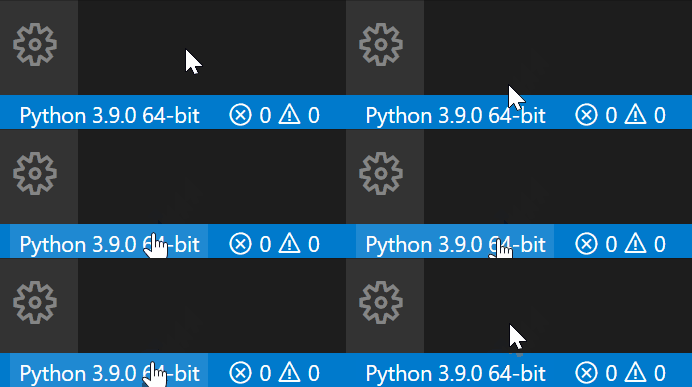
- 运行和调试代码

- 单元测试
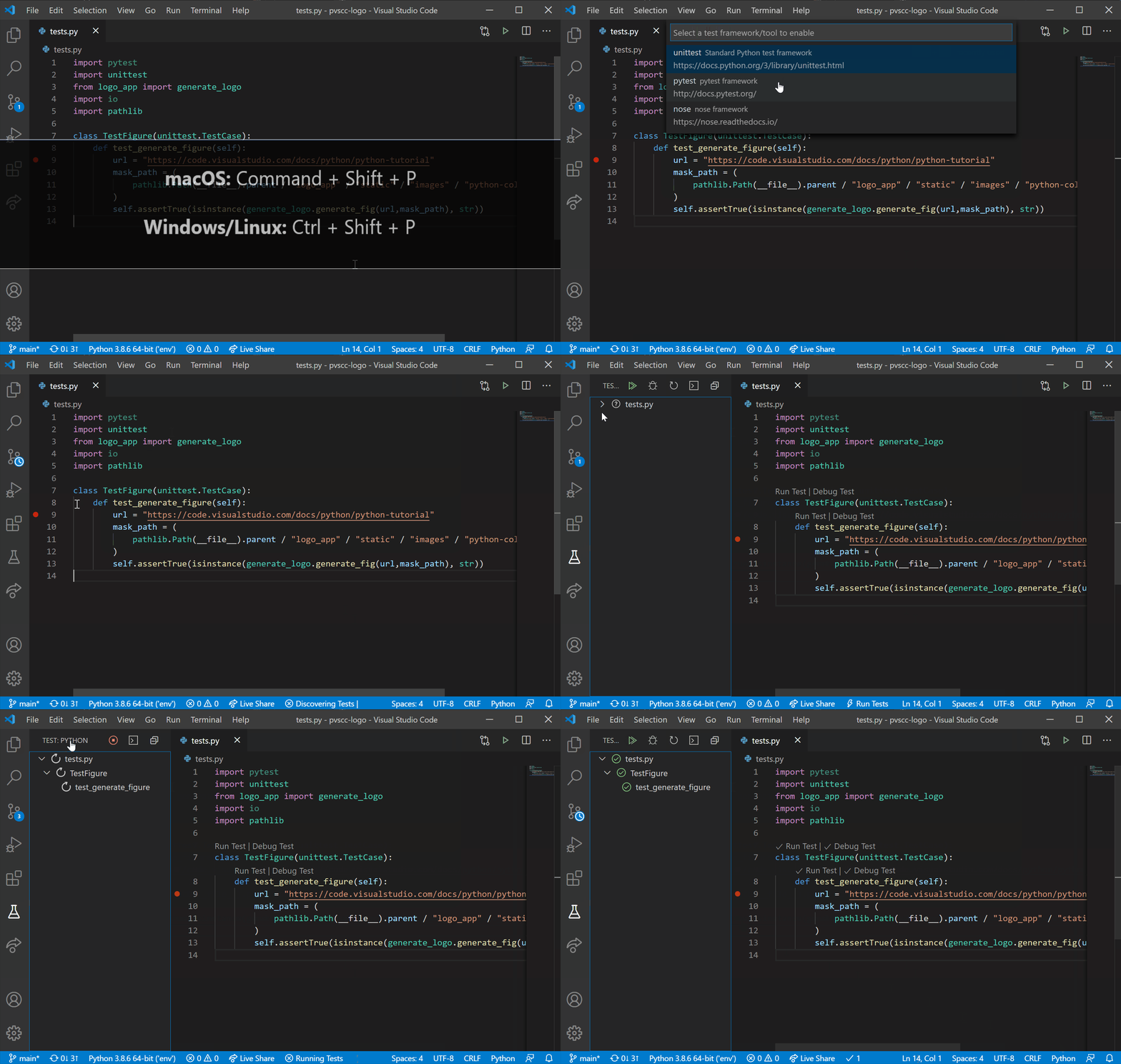
- Jupyter
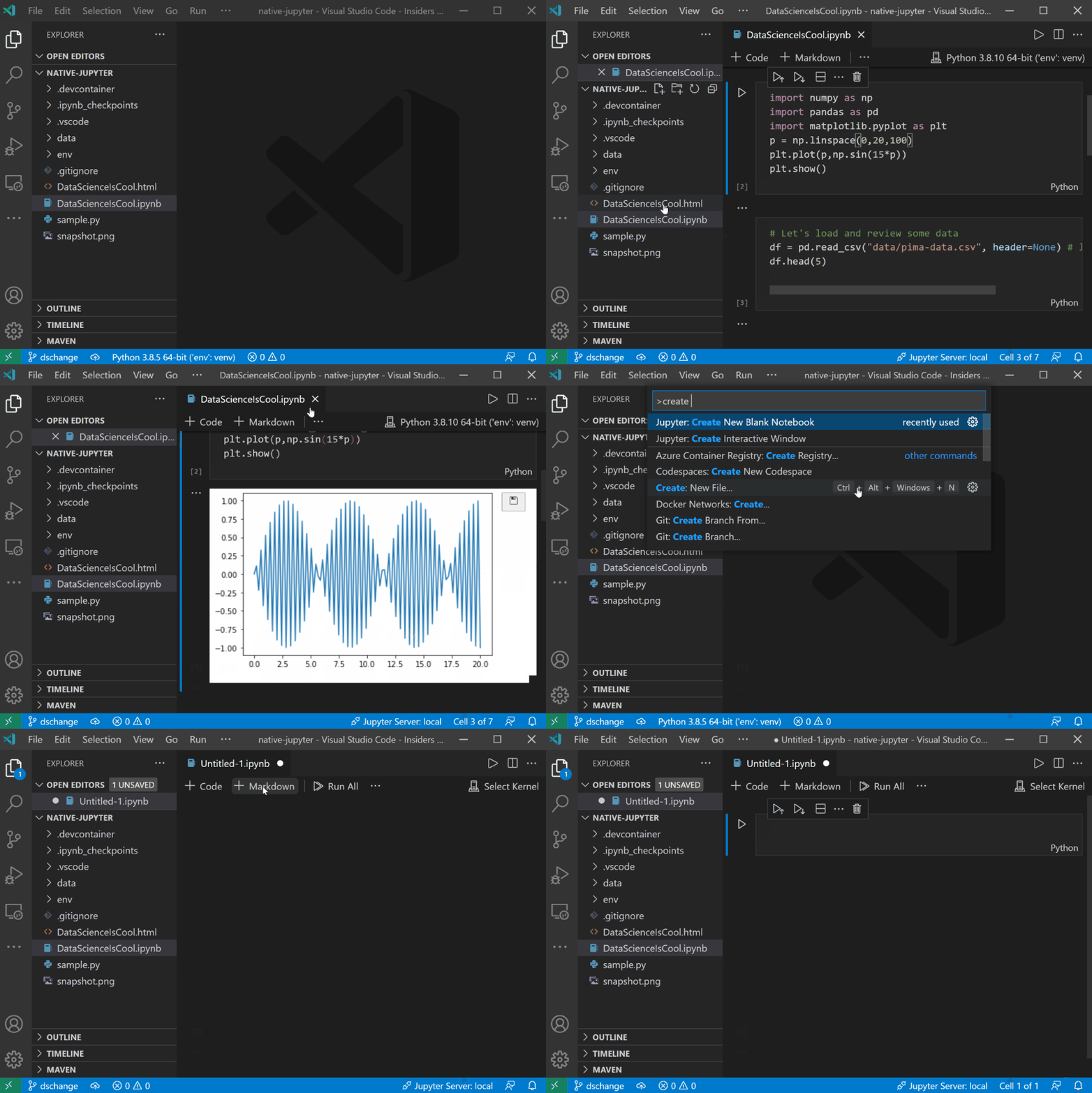
### 4.2. [autoDocstring](https://marketplace.visualstudio.com/items?itemName=njpwerner.autodocstring)
autoDocstring 用于快速生成函数的文档字符串注释,支持的功能如下:
- 快速生成可以通过标签浏览的文档字符串片段;
- 在几种不同类型的文档字符串格式之间进行选择;(比如本文提到的谷歌规范)
- 通过 pep484 类型提示、默认值和变量名称推断参数类型;
- 支持 args、kwargs、装饰器、错误和参数类型。
#### 4.2.1. 使用截图

### 4.3. [Python Type Hint](https://marketplace.visualstudio.com/items?itemName=njqdev.vscode-python-typehint)
为 Python 提示类型提示并自动补全,支持的功能如下:
- 为内置类型、估计类型和类型模块提供类型提示完成项。
- 估计作为完成项提供的正确类型。
- 可以在工作区中搜索 Python 文件以进行类型估计。
使用该插件搭配 autoDocstring 和 Python 内置库 [typing](https://docs.python.org/3/library/typing.html) 实现完美的 Python 注释编写。
#### 4.3.1. 使用截图

---
当然,如果你没有注释的需求,不需要安装 autoDocstring 和 Python Type Hint,仅仅安装微软官方提供的 Python 插件就够了,它几乎集成了开发中要用到的所有功能。虽然还有很多好用的插件,像 Python Preview 和 python snippets,但其实也没必要安装。插件不是越多越好,多了之后会造成 VSCode 卡顿,影响开发体验,多个具有相同功能的插件之间也会导致冲突。
## 5. 引用参考
> - [Google Python Style Guide](https://google.github.io/styleguide/pyguide.html)
> - [Python 风格指南(中文版)](https://zh-google-styleguide.readthedocs.io/en/latest/google-python-styleguide/)