https://github.com/xdagiz/xytz
A Beautiful TUI YouTube Downloader app
https://github.com/xdagiz/xytz
bubbletea charmbracelet cli ffmpeg go golang tui tui-go youtube-downloader yt-dlp yt-dlp-wrapper
Last synced: 5 months ago
JSON representation
A Beautiful TUI YouTube Downloader app
- Host: GitHub
- URL: https://github.com/xdagiz/xytz
- Owner: xdagiz
- License: mit
- Created: 2026-01-24T15:00:50.000Z (6 months ago)
- Default Branch: main
- Last Pushed: 2026-02-15T00:12:57.000Z (5 months ago)
- Last Synced: 2026-02-15T06:54:00.784Z (5 months ago)
- Topics: bubbletea, charmbracelet, cli, ffmpeg, go, golang, tui, tui-go, youtube-downloader, yt-dlp, yt-dlp-wrapper
- Language: Go
- Homepage:
- Size: 206 KB
- Stars: 206
- Watchers: 1
- Forks: 18
- Open Issues: 0
-
Metadata Files:
- Readme: README.md
- License: LICENSE
Awesome Lists containing this project
- awesome-tuis - xytz
README
# xytz - YouTube from your terminal
A beautiful TUI app for searching and downloading YouTube videos, built with Go and [Bubble Tea](https://github.com/charmbracelet/bubbletea).
[](https://github.com/xdagiz/xytz/blob/main/LICENSE)
[](https://github.com/xdagiz/xytz/stargazers)
[](https://github.com/rothgar/awesome-tuis#multimedia)
[](https://github.com/xdagiz/xytz/releases)
[](https://github.com/xdagiz/xytz/releases)
[](https://aur.archlinux.org/packages/xytz-bin)
[](https://github.com/xdagiz/xytz/issues)
[](https://goreportcard.com/report/github.com/xdagiz/xytz)
https://github.com/user-attachments/assets/4e3f98c7-554f-4b9e-adac-52511ae69f32
## ✨ Features
- **Interactive Search** - Search YouTube videos directly from your terminal
- **Channel Browsing** - View all videos from a specific channel with `/channel @username`
- **Channel Search** - Find YouTube channels with `/channels `
- **Playlist Support** - Browse and download videos from playlists with `/playlist `
- **Format Selection** - Choose from available video/audio formats with quality indicators
- **Batch Downloads** - Queue multiple videos for sequential download
- **Download Queue Management** - Pause, resume, skip, and retry downloads in queue
- **Resume Downloads** - Resume unfinished downloads with `/resume`
- **Video Playback** - Play videos directly with mpv without downloading using `/play `
- **Search History** - Persistent search history for quick access (use ↑/↓ to navigate)
- **Thumbnail Preview** - View video thumbnails inline in the terminal
- **Theme Switching** - Switch between themes at runtime with `/theme `
- **Cookie Authentication** - Load cookies from browser or file for authenticated content
- **Keyboard Navigation** - Vim-style keybindings and intuitive shortcuts
- **Cross-Platform** - Works on Linux, macOS, and Windows
**Requirements:**
- **yt-dlp**: Core video downloader
- Installation: https://github.com/yt-dlp/yt-dlp#installation
- **ffmpeg** - Required for full features
- Installation: https://ffmpeg.org/download.html
- **mpv** (optional) - For playing videos directly without downloading
- Installation: https://mpv.io/installation/
## Installation
### Installer Script (Linux/MacOS)
```bash
curl -fsSL https://raw.githubusercontent.com/xdagiz/xytz/main/install.sh | bash
```
### Homebrew (MacOS/Linux)
```bash
brew install xdagiz/tap/xytz
```
### AUR (Arch Linux)
```bash
paru -S xytz-bin # or yay -S xytz-bin
```
### Scoop (Windows)
```pwsh
scoop bucket add xdagiz https://github.com/xdagiz/scoop-bucket.git
scoop install xdagiz/xytz
```
### Go Install
```bash
go install github.com/xdagiz/xytz@latest
```
### Nix (Flakes)
```bash
# Run without installing
nix run github:xdagiz/xytz
# Build in the current repo
nix build
# Enter a development shell (Go, gopls, yt-dlp, ffmpeg, mpv)
nix develop
```
### Build from Source
**Requirements:**
- **Go 1.25+** - For building from source
```bash
# Clone the repository
git clone https://github.com/xdagiz/xytz.git
cd xytz
# Build
go build -o xytz .
# Move to your PATH (optional)
sudo mv xytz /usr/local/bin/
```
## Getting Started
Launch xytz by running:
```bash
xytz
```
### Basic Workflow
1. **Search** - Type your query and press `Enter` to search
2. **Select** - Use `↑/↓` or `j/k` to navigate results, `Enter` to select
3. **Choose Format** - Select your preferred video/audio format
4. **Download** - The download starts automatically
## Configuration
The config file location varies by operating system:
| OS | Config Location |
| ------- | -------------------------------------------------------------------------------------------------------------------- |
| Linux | `~/.config/xytz/config.yaml` (or `$XDG_CONFIG_HOME/xytz/config.yaml`) |
| macOS | `~/.config/xytz/config.yaml` if `XDG_CONFIG_HOME` is set, otherwise `~/Library/Application Support/xytz/config.yaml` |
| Windows | `%APPDATA%/xytz/config.yaml` |
On first run, xytz will create the config file with default values if it doesn't exist.
## CLI Arguments
xytz supports command-line arguments for quick access to search, channels, and playlists.
### Quick Reference
| Flag | Short | Description |
| ------------------------ | ----- | ---------------------------------------------------- |
| `--number` | `-n` | Number of search results |
| `--sort-by` | `-s` | Sort results: `relevance`, `date`, `views`, `rating` |
| `--query` | `-q` | Direct search query |
| `--channel` | `-u` | Browse channel (use `@username` format) |
| `--channels` | `-c` | Search for channels |
| `--playlist` | `-p` | Browse playlist (use playlist ID) |
| `--help` | `-h` | Show help message |
| `--cookies-from-browser` | | The browser name to load cookies from |
| `--cookies` | | Path to a `cookies.txt` file to read cookies from |
> **Note:** Default values for these flags are grabbed from the configuration file.
### Usage Examples
```bash
# Direct video search
xytz -q "golang tutorial"
# Browse a specific channel
xytz -u @username
# Browse a playlist
xytz -p PLplaylistId
# search for a channel
xytz -c "linux"
# Custom search results and sorting
xytz -n 50 -s date
# Combined: Search with custom options
xytz -q "rust programming" -n 10 -s views
```
## Configuration
xytz uses a YAML configuration file located at `~/.config/xytz/config.yaml`.
### Default Configuration
```yaml
search_limit: 25 # Number of search results
default_download_path: ~/Videos # Download destination
default_quality: best # Default format selection (480p, 720p, 1080p, 4k...)
sort_by_default: relevance # Default sort: relevance, date, views, rating
theme: catppuccin-mocha # Preset theme name
video_format: mp4 # The format which videos are downloaded
audio_format: mp3 # The format which audio files are downloaded
embed_subtitles: false # Embed subtitles in downloads
embed_metadata: true # Embed metadata in downloads
embed_chapters: true # Embed chapters in downloads
ffmpeg_path: "" # Custom ffmpeg path (optional)
yt_dlp_path: "" # Custom yt-dlp path (optional)
cookies_browser: "" # Browser for cookies: chrome, firefox, etc (optional)
cookies_file: "" # Path to cookies.txt file for authentication (optional)
thumbnail_preview: true # Enable thumbnail preview in video list
thumbnail_timeout_ms: 2500 # Timeout for fetching thumbnails (ms)
```
The configuration file is created automatically on first run with sensible defaults.
Available theme presets: `catppuccin-mocha` (default), `catppuccin-macchiato`, `rose-pine`, `tokyo-night`, `dracula`, `vesper`.
## Slash Commands
xytz supports slash commands for quick access to various features. Type any of these commands in the search bar:
| Command | Description |
| ------- | ------------ |
| `/channel ` | Browse videos from a specific channel |
| `/channels ` | Search for YouTube channels |
| `/playlist ` | Browse videos in a playlist |
| `/play ` | Play a video directly with mpv (no download) |
| `/resume` | Resume unfinished downloads |
| `/theme ` | Switch to a different theme |
| `/help` | Show help and keyboard shortcuts |
## Contributing
Contributions are welcome. Please ensure your fork is synced with the upstream repository before submitting pull requests.
### Commit Style
```
():
[optional body]
[optional footer]
```
### Pull Request Guidelines
- Keep changes focused and minimal
- Ensure all tests pass before submitting
- Update documentation if needed
- Follow the existing code style
## Troubleshooting
### yt-dlp not found
Ensure yt-dlp is installed and available in your PATH:
```bash
yt-dlp --version
```
If installed in a non-standard location, set `yt_dlp_path` in your config.
### ffmpeg not found
ffmpeg is required for most of features to work. Install it and ensure it's in your PATH, or set `ffmpeg_path` in your config.
### Downloads failing
- Check your internet connection
- Verify the video is available in your region
- Ensure you have sufficient disk space
- Check the download path is writable
- Make sure you have `yt-dlp` and `ffmpeg` installed
## Not seeing enough formats
- Update `yt-dlp` to the latest version
## Acknowledgments
- [Bubble Tea](https://github.com/charmbracelet/bubbletea) - TUI framework
- [yt-dlp](https://github.com/yt-dlp/yt-dlp) - YouTube download engine
- [Lipgloss](https://github.com/charmbracelet/lipgloss) - Styling library
- [Bubbles](https://github.com/charmbracelet/bubbles) - TUI components
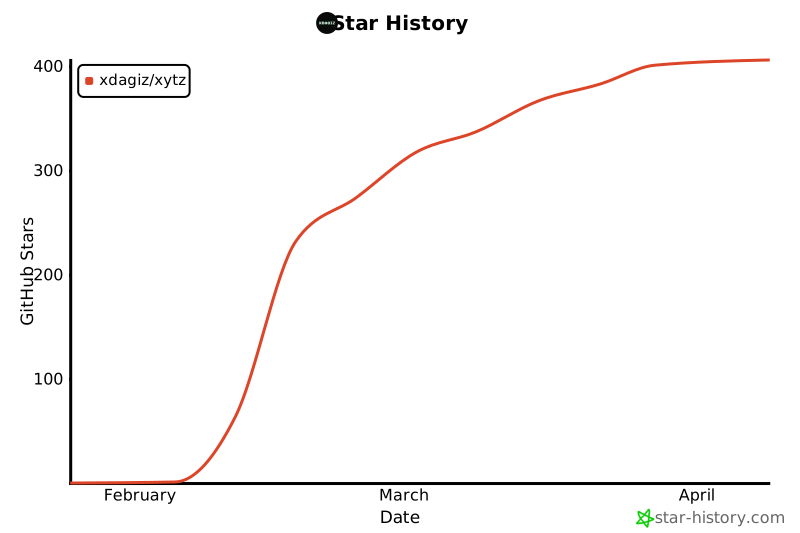
## Star History
By [xdagiz](https://github.com/xdagiz)