https://github.com/xeland314/simplex
Simplex para problemas de optimización
https://github.com/xeland314/simplex
jupyter-notebook optimization python3 simplex simplex-algorithm
Last synced: 4 months ago
JSON representation
Simplex para problemas de optimización
- Host: GitHub
- URL: https://github.com/xeland314/simplex
- Owner: xeland314
- License: mit
- Created: 2024-07-03T05:28:23.000Z (about 2 years ago)
- Default Branch: main
- Last Pushed: 2025-12-27T05:35:09.000Z (7 months ago)
- Last Synced: 2025-12-28T21:46:37.565Z (7 months ago)
- Topics: jupyter-notebook, optimization, python3, simplex, simplex-algorithm
- Language: Jupyter Notebook
- Homepage:
- Size: 254 KB
- Stars: 2
- Watchers: 1
- Forks: 0
- Open Issues: 0
-
Metadata Files:
- Readme: README.md
- License: LICENSE
- Security: SECURITY.md
Awesome Lists containing this project
README
# Simplex Solver
A comprehensive tool for solving linear programming problems, offering multiple interfaces including a command-line solver, a Domain Specific Language (DSL), and a graphical user interface (GUI).
## Features
### Core Simplex Solver
The core solver is implemented using `scipy.optimize.linprog` and provides the fundamental capabilities for solving linear programming problems. It handles maximization and minimization, various inequality types (`<=`, `>=`, `<`, `>`), and equality constraints (`=`).
### Dual Simplex Solver
In addition to the scipy-based solver, the project includes a manual implementation of the Dual Simplex algorithm in `dual_simplex.py`. This method is particularly useful for problems where the initial basic solution is primal infeasible (i.e., some right-hand side values are negative). The dual simplex iteratively adjusts the solution to achieve feasibility and optimality.
The `DualSimplex` class supports both maximization and minimization problems with inequality constraints of the form `Ax <= b`.
**Example Usage (Dual Simplex):**
```python
from dsl import DSL
problem = DSL("dual.lp") # or any .lp file
dual_solver = problem.to_dual_simplex()
solution, optimal_value = dual_solver.solve()
print(f"Solution: {solution}")
print(f"Optimal value: {optimal_value}")
```
The dual simplex implementation handles cases where the initial tableau has negative b values by performing dual pivots, and switches to primal pivots when necessary to reach optimality.
### Domain Specific Languages (DSLs)
#### 1. String-based DSL
Define your linear programming problems using a human-readable string format. This DSL supports both direct string input and loading from standard `.lp` files. It automatically handles variable types, including "free" variables by converting them into a pair of non-negative variables.
**Example Usage (String Input):**
```python
from dsl import DSL
problem = DSL("""
MINIMIZE z = 3*x1 + 5*x2
SUBJECT TO
2*x1 + x2 >= 8
x1 + 3*x2 >= 9
x1 <= 5
x2 >= 1
BOUNDS
x1 >= 0
x2 free
""")
simplex = problem.to_simplex()
simplex.solve_problem()
simplex.show_results()
# Or use dual simplex
dual_solver = problem.to_dual_simplex()
solution, optimal_value = dual_solver.solve()
print(f"Solution: {solution}, Value: {optimal_value}")
```
**Example Usage (LP File Input):**
```python
from dsl import DSL
# Assuming 'my_problem.lp' contains the problem definition
problem = DSL("my_problem.lp")
simplex = problem.to_simplex()
simplex.solve_problem()
simplex.show_results()
# Or use dual simplex
dual_solver = problem.to_dual_simplex()
solution, optimal_value = dual_solver.solve()
print(f"Solution: {solution}, Value: {optimal_value}")
```
#### 2. Pythonic DSL
For a more integrated and programmatic approach, use the Pythonic DSL inspired by `sympy`. Define variables and construct your objective function and constraints directly using Python objects and operators.
**Example Usage:**
```python
from pythonic_dsl import Model, Var, maximize
m = Model("example_lp")
x1 = Var("x1", low=0)
x2 = Var("x2", low=0)
m += maximize(5 * x1 + 4 * x2)
m += (6 * x1 + 4 * x2 <= 24)
m += (x1 + 2 * x2 <= 6)
m += (-x1 + x2 <= 1)
m += (x2 <= 2)
result = m.solve()
result.show_results()
```
### Graphical User Interface (GUI)
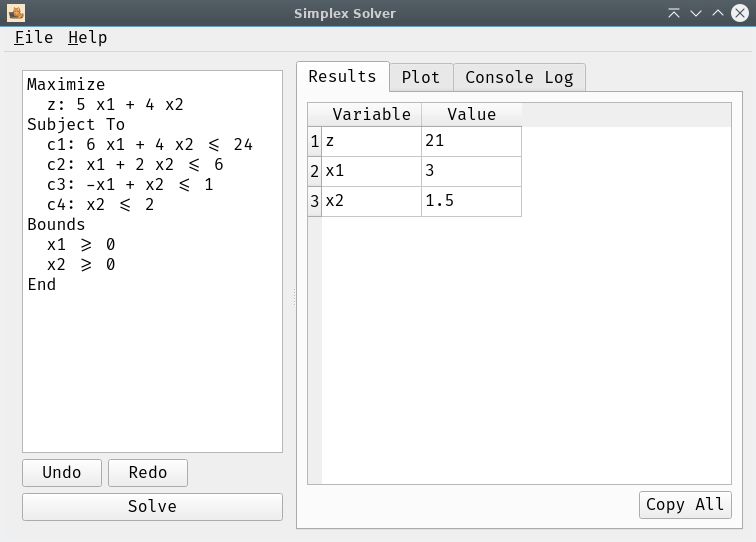
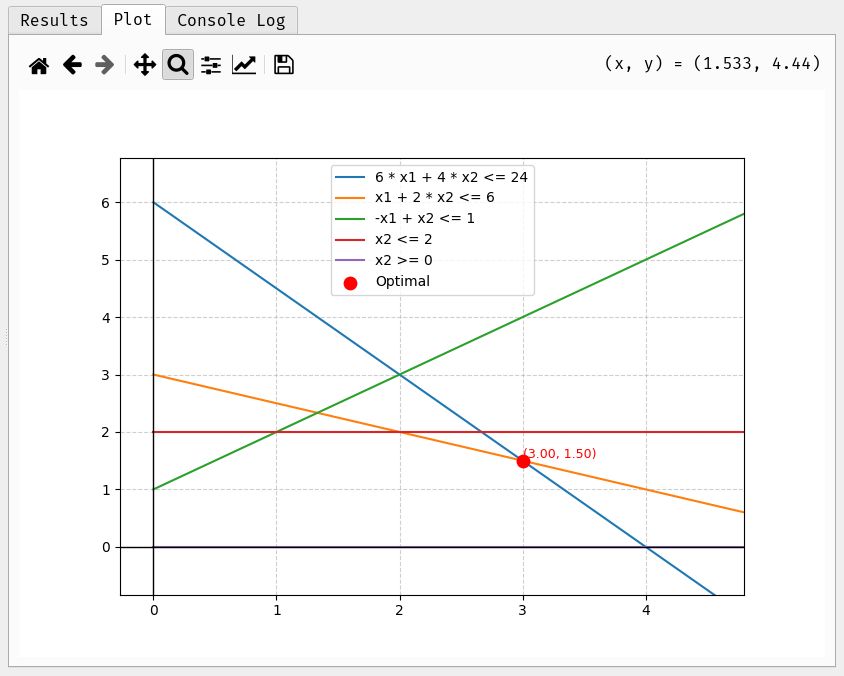
A user-friendly desktop application built with PySide6 (Qt for Python) provides an interactive environment for defining, solving, and visualizing linear programming problems.
- **Input Widget:** A text editor where you can type or load your problem definition.
- **Results Table:** Displays the optimal values for variables and the objective function.
- **Plotting:** For problems with two variables, a dedicated tab visualizes the constraints and the optimal solution point.
- **Console Log:** Redirects and displays all terminal output (e.g., `print` statements, error messages) within a dedicated tab in the GUI, ensuring readability by stripping ANSI escape codes. Includes a "Clear Console" button.
- **Menu Bar:**
- **File:**
- `Open`: Load problem definitions from `.lp` or `.txt` files.
- `Save`: Save the current problem definition from the editor to an `.lp` file.
- `Quit`: Exit the application.
- **Help:**
- `About`: Displays a custom dialog with application information, author, license, and links to GitHub and donation pages.
- **User Experience:**
- Responsive UI: The solver runs in a separate thread to prevent the application from freezing during calculations.
- Custom application icon (`pixel-cat.png`).
- Uses the FiraCode font for enhanced readability and a modern aesthetic.
## Installation
1. **Clone the repository:**
```bash
git clone https://github.com/xeland314/simplex.git
cd simplex
```
2. **Create a virtual environment (recommended):**
```bash
python -m venv .venv
source .venv/bin/activate # On Windows: .venv\Scripts\activate
```
3. **Install dependencies:**
```bash
pip install -r requirements.txt
```
## Usage
### Command Line (Interactive)
Run the basic interactive solver:
```bash
python simplex.py
```
### DSL (Programmatic)
Integrate the DSLs into your Python scripts as shown in the "Domain Specific Languages (DSLs)" section above.
### GUI Application
Launch the graphical interface:
```bash
python app.py
```
## Examples
Check the `examples/` directory for sample `.lp` and `.txt` files that can be loaded into the GUI or used with the DSLs.
## Development
- **Testing:** Run all unit tests with:
```bash
uv run python -m unittest discover
```
This includes tests for the core simplex solver, DSLs, and the dual simplex implementation (`test_dual_simplex.py`).
## License
This project is licensed under the MIT License. See the `LICENSE` file for details.