https://github.com/xero/covcom
Covert communications for private group conversations. Share an invite, talk, close the tab, and it's gone. End-to-end encrypted with post-quantum cryptography, so the messages stay private today and unreadable to the computers coming tomorrow.
https://github.com/xero/covcom
bun chat cli containerized covertcommunication e2ee ephemeral kyber kyber-crystal leviathan messenger ml-kem ml-kem-768 n-party-protocol post-quantum-cryptography ratchet self-hosted web xchacha20 xchacha20-poly1305
Last synced: about 11 hours ago
JSON representation
Covert communications for private group conversations. Share an invite, talk, close the tab, and it's gone. End-to-end encrypted with post-quantum cryptography, so the messages stay private today and unreadable to the computers coming tomorrow.
- Host: GitHub
- URL: https://github.com/xero/covcom
- Owner: xero
- License: mit
- Created: 2026-04-21T13:49:54.000Z (3 months ago)
- Default Branch: main
- Last Pushed: 2026-06-06T06:07:37.000Z (about 1 month ago)
- Last Synced: 2026-06-06T07:12:19.853Z (about 1 month ago)
- Topics: bun, chat, cli, containerized, covertcommunication, e2ee, ephemeral, kyber, kyber-crystal, leviathan, messenger, ml-kem, ml-kem-768, n-party-protocol, post-quantum-cryptography, ratchet, self-hosted, web, xchacha20, xchacha20-poly1305
- Language: TypeScript
- Homepage: https://xero.github.io/covcom/
- Size: 561 KB
- Stars: 3
- Watchers: 0
- Forks: 1
- Open Issues: 1
-
Metadata Files:
- Readme: README.md
- License: LICENSE
- Security: SECURITY.md
- Agents: AGENTS.md
Awesome Lists containing this project
README
```
▄██▀ ▀█ ▄██▀ █▄ ▀██ ██▀ ▄██▀ ▀█ ▄██▀ █▄ █▄ ▄█
▐▒▒▒ ▐▒▒▒ ▒▒▌ ▒▒ ▒▒ ▐▒▒▒ ▐▒▒▒ ▒▒▌ ▒▒▒▄▒▒▒
▐▒▒▒ ▐▒▒▒ ▒▒▌ ▒▒▌ ▒▒ ▐▒▒▒ ▐▒▒▒ ▒▒▌ ▒▒ ▀ ▒▒
▀██▄ ▄█ ▀██▄ █▀ ▀█▄▀ ▀██▄ ▄█ ▀██▄ █▀ ▄██▄ ▄██▄
Covert communications for private group conversations.
Invite, talk, close the client, and the chat vanishes.
Every message is encrypted with XChaCha20 and signed
with Ed25519. A BLAKE3 fingerprint on each key allows
peers to verify one another. SPQR's manual and epoch
ratchets add forward secrecy, while post-quantum
ML-KEM-768 encapsulation keeps recorded communications
unreadable and secure against future cryptanalysis.
```
[](https://github.com/xero/covcom/releases/latest) [](https://hub.docker.com/r/xerostyle/covcom) [](https://github.com/xero/covcom/wiki) [](https://github.com/xero/covcom/blob/main/LICENSE)
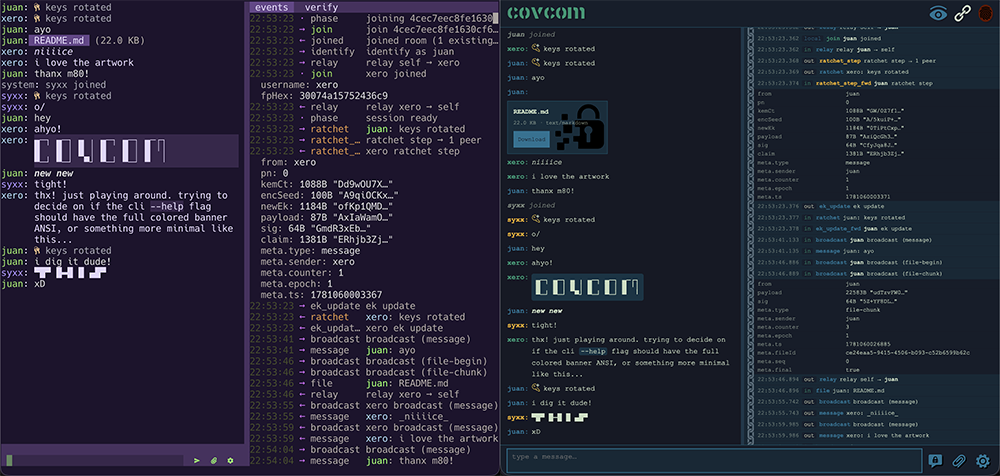
**CLI & Web Client Previews**
[](https://raw.githubusercontent.com/wiki/xero/covcom/log.png)
# https://xero.github.io/covcom/
> ### Table of Contents
> - [How it works](#how-it-works)
> - [Quickstart](#quickstart)
> - [Requirements](#requirements)
> - [Installation](#installation)
> - [Server](#server)
> - [Web client](#web-client)
> - [CLI client](#cli-client)
> - [Starting a session](#starting-a-session)
> - [Documentation](#documentation)
> - [Development](#development)
> - [Screenshots](#screenshots)
> - [License](#license)
---
## How it works
Every message is encrypted with [XChaCha20-Poly1305](https://github.com/xero/covcom/wiki/CRYPTOGRAPHY#message-encryption). That is the core cipher.
Everything else exists to get a fresh, unique XChaCha20 key to the right
people at the right time.
Each participant owns one send chain: a stateful [`KDFChain`](https://github.com/xero/leviathan-crypto/wiki/ratchet#kdfchain) that steps
forward on every message via HKDF-SHA-256, producing a unique 32-byte key
and [wiping](https://github.com/xero/leviathan-crypto/wiki/utils#wipe) the previous chain key. Message keys are wiped after use.
Past keys are unrecoverable from current state.
Epoch transitions use [ML-KEM-768](https://github.com/xero/leviathan-crypto/wiki/mlkem) (FIPS 203). When a [ratchet fires](https://github.com/xero/covcom/wiki/PROTOCOL#the-ratchet), the
sender generates a shared seed, KEM-encapsulates it separately for each
peer, and [broadcasts the result](https://github.com/xero/covcom/wiki/CRYPTOGRAPHY#chain-seed-distribution). Every peer derives the same new chain from
that seed. The KEM ciphertext travels in-band; the decapsulator's keypair
rotates immediately after use.
The group uses a Sender Keys model: one send chain per participant, not one
per pair. O(N) state regardless of room size.
Every session mints a fresh [Ed25519](https://github.com/xero/leviathan-crypto/wiki/signaturesuite#ed25519-suites) signing keypair on construction. Every
identity claim and every broadcast is [signed](https://github.com/xero/leviathan-crypto/wiki/signing) under it, so each peer can
authenticate where a message came from.
Each peer's claims form a [BLAKE3](https://github.com/xero/leviathan-crypto/wiki/blake3#blake3)-chained log: every claim binds the previous
payload's hash. The server cannot reorder, drop, or substitute a structural
event mid-session without breaking the chain.
The signing public key derives a [fingerprint](https://github.com/xero/covcom/wiki/CRYPTOGRAPHY#fingerprint-derivation) for out-of-band verification:
`BLAKE3(sessionPk, 16)` rendered as eight OKLCh swatches and a 16-char hex
string. Compare it with your peers over a trusted channel to rule out a
machine-in-the-middle.
This implements the [Sparse Post-Quantum Ratchet](https://signal.org/docs/specifications/doubleratchet/#the-sparse-post-quantum-ratchet) from Signal's Double Ratchet spec (§5, Revision 4). For more detail, see [PROTOCOL](https://github.com/xero/covcom/wiki/PROTOCOL).
Cryptographic primitives are provided by [leviathan-crypto](https://github.com/xero/leviathan-crypto).
## Quickstart
Point `chat.example.com` at the host you'll run on, then:
```sh
docker pull xerostyle/covcom:latest
docker run -d \
-p 80:80 -p 443:443 \
-e DOMAIN=chat.example.com \
xerostyle/covcom:latest
```
Open https://chat.example.com in a browser. Create a room, share the invite, & chat.
---
## Requirements
Nothing needs [Bun](https://bun.sh) at runtime. Every component installs
manually (a release binary, the Docker image, or the single-file
`covcom.html` web page) or from the npm registry with any JS package
manager. Bun is required only to develop or build from source.
| Component | Channel | Requires |
| ---------- | ---------------------------- | ---------------------------------------------- |
| Web client | hosted page | a modern browser (Chrome, Firefox, or Safari) |
| Web client | `covcom.html` release asset | a modern browser; open from disk or any static host |
| CLI | release binary | nothing |
| CLI | `npm i -g covcom` | Node 18 or newer, or Bun (launcher shim only) |
| Server | release binary | nothing |
| Server | Docker image | [Docker](https://docker.com) |
| Server | `npm i -g covcom-server` | Node 18 or newer, or Bun (launcher shim only) |
| All of it | source: develop, build, test | Bun v1.3.14 or later (the `packageManager` pin) |
The release binaries and the npm platform packages embed the runtime they
were compiled with, which is why the shim's Node is the only requirement on
the npm rows. See [SECURITY-POLICY](./SECURITY.md) for how that frozen
runtime is patched.
---
## Installation
Grab a release binary. Every asset is xz-compressed, checksummed, and
covered by a build-provenance attestation:
```sh
curl -sLO https://github.com/xero/covcom/releases/latest/download/covcom-linux-x64.xz
xz -d covcom-linux-x64.xz && chmod +x covcom-linux-x64
sudo mv covcom-linux-x64 /usr/local/bin/covcom
```
Or install from npm. The packages carry the same prebuilt binaries, so npm
installs need no Bun:
```sh
npm i -g covcom # CLI client
npm i -g covcom-server # relay server
```
The server also ships as a Docker image (see [Quickstart](#quickstart)), and
the web client as a single `covcom.html` page that opens straight from disk.
Platform targets, server one-liners, and download verification (checksums
and `gh attestation verify`) are in
[USAGE § install](https://github.com/xero/covcom/wiki/USAGE#installation). Building from source is covered in
[Development](#development).
### Platform Support
Both the server and cli are build for the following platforms:
| Binary | Target |
|----------------------------|---------------------|
| `covcom*-linux-x64` | Linux x86_64, glibc |
| `covcom*-linux-x64-musl` | Linux x86_64, musl |
| `covcom*-linux-arm64` | Linux arm64, glibc |
| `covcom*-linux-arm64-musl` | Linux arm64, musl |
| `covcom*-macos-arm64` | macOS Apple Silicon |
| `covcom*-macos-x64` | macOS Intel |
| `covcom*-win-x64.exe` | Windows x86_64 |
---
## Server
The Docker image from the [Quickstart](#quickstart) is the recommended
deployment: Caddy terminates TLS automatically via ACME and serves the web
client at your domain. It is published to
[Docker Hub](https://hub.docker.com/r/xerostyle/covcom) as
`xerostyle/covcom` and [GHCR](https://github.com/xero/covcom/pkgs/container/covcom)
as `ghcr.io/xero/covcom`. Pin a specific version (e.g. `:3.0.0`) in production
so a vulnerability disclosure does not silently upgrade you. See
[USAGE § Docker](https://github.com/xero/covcom/wiki/USAGE#docker) for tag conventions and how to extend the
image.
**Standalone binary.** Every release attaches compiled server binaries
(Linux x64/arm64 in glibc and musl flavors, macOS arm64 and x64, and
Windows x64): one downloaded file, no bun, no node, no npm. See
[USAGE § stand-alone-bin](https://github.com/xero/covcom/wiki/USAGE#standalone-binary) for verification and target
details.
**npm.** `npm i -g covcom-server`, then `covcom-server --port 1337`. The
meta package pulls the matching `@covcom/server-` binary for your
os, cpu, and libc, and a small shim execs it.
**Behind your own proxy.** Outside the Docker image the server speaks plain
HTTP on `127.0.0.1:1337`; your reverse proxy must terminate TLS and set the
security headers. See [USAGE § prod-no-docker](https://github.com/xero/covcom/wiki/USAGE#production-no-docker).
Configuration is flags and matching env vars (`--port`, `--host`,
`--max-room-size`, `--admin-token`, `--room-ttl`, plus `--help` and
`--version`; flags beat env vars), identical in every mode. See
[USAGE § flags](https://github.com/xero/covcom/wiki/USAGE#command-line-flags) for the full tables and the
`ps`-visibility caveat on `--admin-token`.
---
## Web Client
Nothing to install. Download `covcom.html` from any
[release](https://github.com/xero/covcom/releases) and open it straight from
disk (`file://`) or serve it from any static host, or open the page a Docker
deployment already hosts at your domain. All crypto, including chunked
encrypted file transfer, runs as WASM in the page under the strictest
possible CSP, `default-src 'none'`, and works in Chrome, Firefox, and
Safari/WebKit.
The interface mirrors the CLI: a chat pane plus the **Verify** and
**Event Log** sidebars. **Verify** lists your fingerprint and every peer's
side by side; **Event Log** records every inbound and outbound WebSocket
frame and crypto action, with redacted payloads and expandable detail rows.
Drag the divider between the chat and sidebar to resize, or double-click it
to reset. The eye button in the header hides or shows system messages
(joins, leaves, ratchets). Drag a file anywhere onto an open chat to send
it; drop a `.room` file on the lobby to load an invite. Press `Esc` in the
message box to open the keys-display (`R` ratchet, `E` events, `V` verify,
`Esc` return); the `/ratchet`, `/events`, and `/verify` commands work too.
The full interface tour, panel reference, and command list are in
[USAGE § interface](https://github.com/xero/covcom/wiki/USAGE#the-interface).
---
## CLI client
The CLI is a compiled standalone binary with a custom zero-dependency TUI.
```sh
npm i -g covcom
covcom
```
Prebuilt binaries ship as `@covcom/cli-` packages for macOS
arm64 and x64, Linux x64/arm64 in glibc and musl flavors, and Windows
x64; the install needs no Bun. Other platforms can grab a
[release binary](https://github.com/xero/covcom/releases) or build from
source (see [Development](#development)).
**Join directly from a `.room` file:**
```sh
covcom --join /path/to/invite.room
```
**Two paranoia flags** control how the config file is used:
```sh
covcom --clean # config neither read nor written; fully ephemeral
covcom --anon # saved server and username neither read nor written
```
`--clean` ignores `~/.config/covcom/config.json` entirely: no saved server
or username is prefilled, and nothing is written back. `--anon` is the
narrower variant: theme, copy command, sidebar width, and icons still load
and persist as usual. Combine either with `--join` for a fully ephemeral
session, e.g. `covcom --clean --join /path/to/invite.room`.
Settings persist to `~/.config/covcom/config.json`: server, username,
clipboard command, sidebar width, button glyphs, and a full color theme
(ansi16, xterm 256, or truecolor hex per slot). The flag reference, every
config field, the theme slot table, and keyboard navigation are in
[USAGE § cli-client](https://github.com/xero/covcom/wiki/USAGE#cli-client).
---
## Starting a session
**Create a room:**
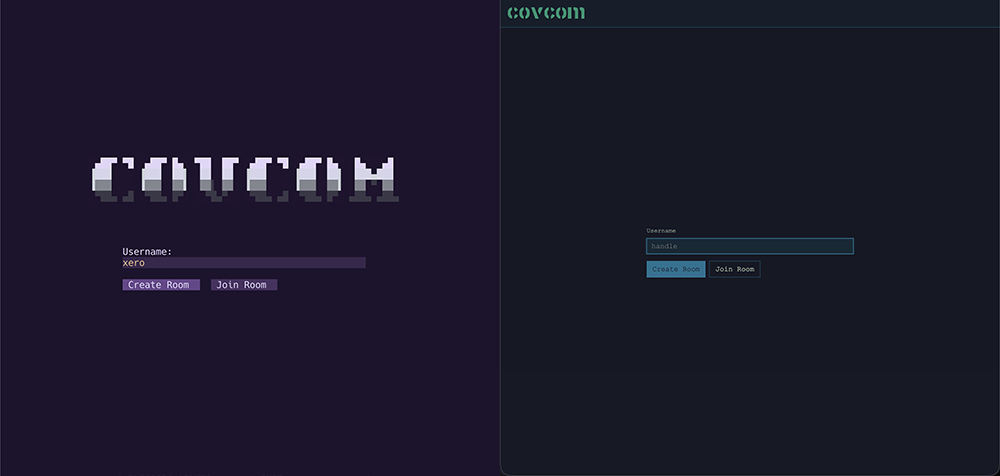
1. Enter a username and select **Create Room**.
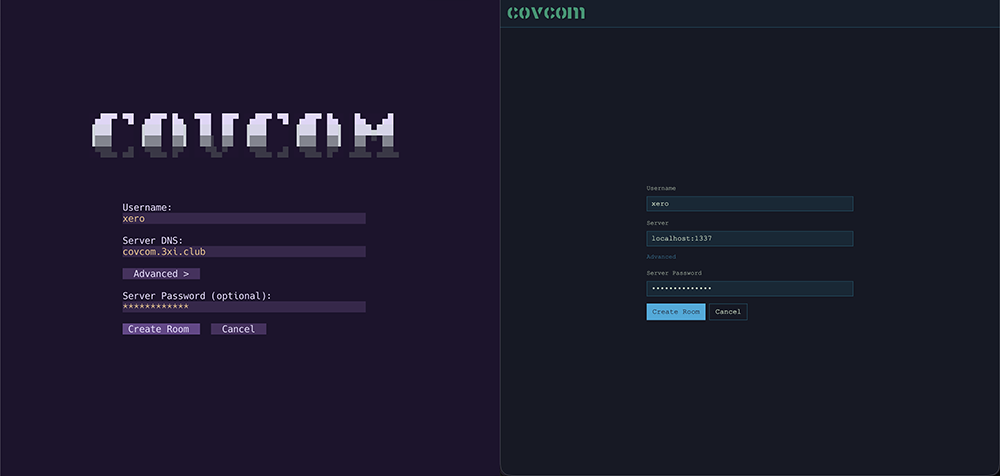
2. On the create screen, enter a server address and select **Create Room**. An
**Advanced** toggle reveals an optional server password. The web client
prefills the server with the host serving the page, which is the relay in the
single-container deployment; edit it to target a separate relay.
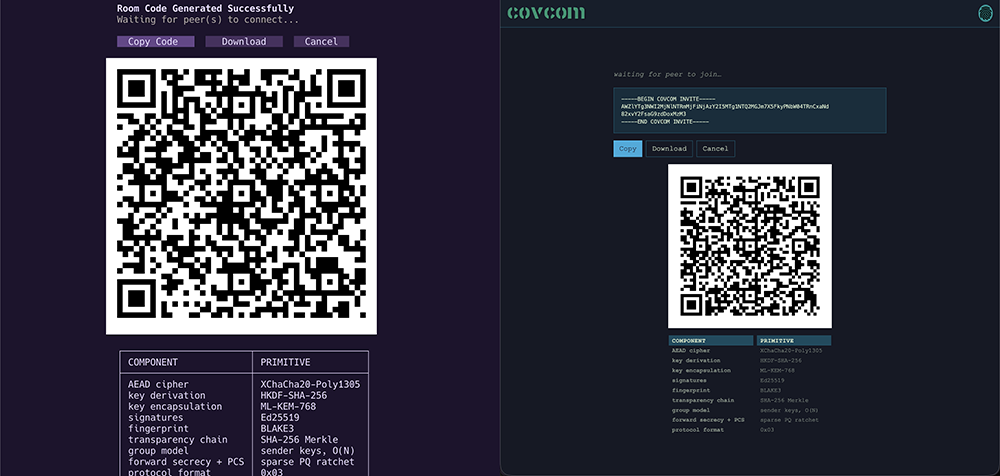
3. The lobby screen shows an armored invite block, a QR code of the same
bytes, and copy/download buttons. Share it via any channel.
4. The screen waits until a peer joins.
Sample armored invite:
```
-----BEGIN COVCOM INVITE-----
AWU5YTYyMWVhMzQwOTM2MDRkMTM5M2MxNTQ0ZDBjNjg0gCIiZMnOHFyPCn5zIfaLsGNvdmNvbS4zeGkuY2x1Yg==
-----END COVCOM INVITE-----
```
**Join a room:**
1. Enter a username and select **Join Room**.
2. On the join screen, paste the armored invite text, drag-drop the `.room`
file (web), or enter the file path and select **Browse** (CLI). A dropped or
browsed file fills the paste box.
3. Select **Join Room**. It parses the invite and connects; there is no separate
parse or connect step.
Once both sides complete the handshake, the chat opens. The server has relayed
a sequence of encrypted blobs and learned nothing about the content. Version
negotiation, reconnect behavior, and late-join semantics are covered in
[USAGE § starting-a-session](https://github.com/xero/covcom/wiki/USAGE#starting-a-session).
---
## Documentation
Deeper references for users, auditors, contributors, and the curious.
| Document | Purpose |
| ---------------------------------------------------------------- | --------------------------------------------------------------------- |
| [USAGE](https://github.com/xero/covcom/wiki/USAGE) | Install, configure, and run the server and clients; developer tooling |
| [SECURITY-POLICY](./SECURITY.md) | Supported versions, disclosure policy, cryptographic foundation |
| [DIAGRAM](https://xero.github.io/covcom/diagram.html) | Animated and annotated visualization of a complete three peer session |
| [PROTOCOL](https://github.com/xero/covcom/wiki/PROTOCOL) | Cipher, chains, ratchet, group model, session lifecycle, server role |
| [CRYPTOGRAPHY](https://github.com/xero/covcom/wiki/CRYPTOGRAPHY) | Primitives, KDF chains, wire format, invite encoding |
| [THREAT-MODEL](https://github.com/xero/covcom/wiki/THREAT-MODEL) | Principals, adversary tiers, guarantees, non-goals |
| [LIB-SPEC](https://github.com/xero/covcom/wiki/LIB-SPEC) | Shared library API, session and identity surface, invites, & files |
| [SERVER-SPEC](https://github.com/xero/covcom/wiki/SERVER-SPEC) | Server wire contract, message handlers, room lifecycle, & config |
| [WEB-SPEC](https://github.com/xero/covcom/wiki/WEB-SPEC) | Web client architecture, state, session, views, & single-file build |
| [CLI-SPEC](https://github.com/xero/covcom/wiki/CLI-SPEC) | CLI architecture, rendering, input, widgets, views, & color system |
| [TESTING](https://github.com/xero/covcom/wiki/TESTING) | Test layers, unit and end-to-end suites, cross-client interop, and CI |
> [!TIP]
> Documentation is available in the repo `./docs` folder and published to the project [Wiki](https://github.com/xero/covcom/wiki).
---
## Development
Everything below needs [Bun](https://bun.sh) v1.3.14 or later
```sh
git clone https://github.com/xero/covcom
cd covcom
bun i # install workspaces
bun dev # relay + web client together, prewired
bun run test # the four unit suites in parallel
bun check # full release gate: codegen, lint, typecheck, bake, test:all
```
Note the `bun run` prefix on `test`: a bare `bun test` invokes Bun's
built-in runner with the script name treated as a path filter, not the
package script.
**Repository layout:**
```
server/ WebSocket broker
lib/ Shared crypto session layer
web/ Vanilla SPA web client
cli/ Custom zero-dependency TUI client
scripts/ Dev tooling: build orchestrator, release scripts
docker/ Dockerfile, Caddyfile template, entrypoint
docs/ Project documentation / Wiki sources
```
The full developer reference (per-component and per-target builds, the
local Docker build, single test suites, the cross-client interop and
Playwright e2e runs, lint, typecheck, and release artifacts) is
[USAGE § development ](https://github.com/xero/covcom/wiki/USAGE#development). The test architecture is
[TESTING](https://github.com/xero/covcom/wiki/TESTING).
---
## Screenshots
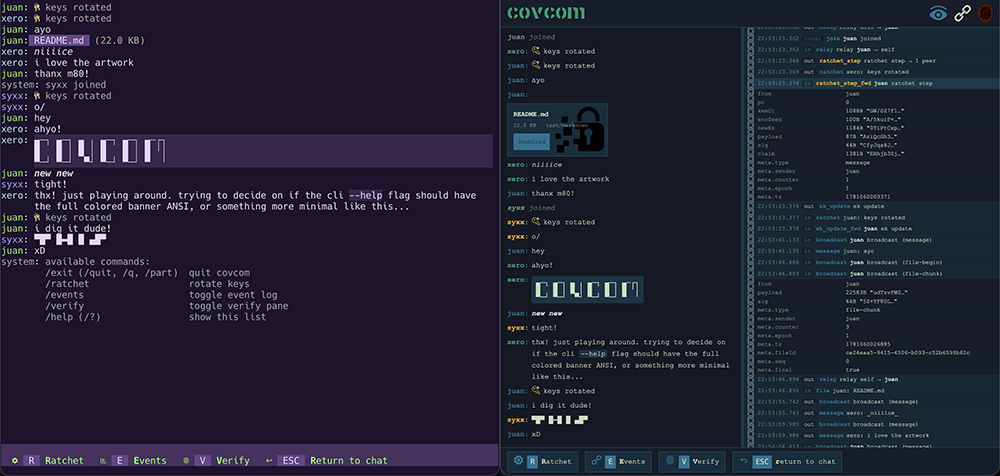
left side is the CLI client (custom theme) / right side is the web client
**Main client lobby**
[](https://raw.githubusercontent.com/wiki/xero/covcom/lobby.png)
**Invite screen**
[](https://raw.githubusercontent.com/wiki/xero/covcom/invite.png)
**Crypto log**
[](https://raw.githubusercontent.com/wiki/xero/covcom/log.png)
**Login screen**
[](https://raw.githubusercontent.com/wiki/xero/covcom/login.png)
**Modal hotkey bindings display**
[](https://raw.githubusercontent.com/wiki/xero/covcom/modal.png)
---
## License
```
▄─┐ ▄─┐ ▄ ╷ ▄─┐ ▄─┐ ▄─┌┐
█ █ │ █ │ █ █ │ █ ╵│
▀─┘ ▀─┘ ▀┘ ▀─┘ ▀─┘ ▀ ╵
```
Released under the [MIT license](./LICENSE).