https://github.com/xetera/gyazoplusplus
Google Chrome addon for gyazo that enables users to access old pictures for free.
https://github.com/xetera/gyazoplusplus
Last synced: 11 months ago
JSON representation
Google Chrome addon for gyazo that enables users to access old pictures for free.
- Host: GitHub
- URL: https://github.com/xetera/gyazoplusplus
- Owner: Xetera
- Created: 2018-03-11T12:21:47.000Z (over 8 years ago)
- Default Branch: master
- Last Pushed: 2018-03-16T12:36:22.000Z (over 8 years ago)
- Last Synced: 2025-03-26T13:29:50.978Z (over 1 year ago)
- Language: TypeScript
- Size: 70.3 KB
- Stars: 2
- Watchers: 0
- Forks: 0
- Open Issues: 0
-
Metadata Files:
- Readme: README.md
Awesome Lists containing this project
README
# Gyazo++

#### WIP: Currently working but not consistently enough to release it just yet
### How to:
Take a gyazo screenshot and... well, that's it.
The next time you're in your [gallery](https://gyazo.com/captures) it will be saved and ready to click no matter when you took it.
##### ((unless you took it before you installed this extension, I'm not a wizard you know))
## How does it work?
### Short explanation:
Despite the fact that you need gyazo ninja to access your old pictures, their links still work even after you take 10 pictures.
With this extension, those links saved on localstorage at the time of creation until we need them later.
### Long explanation:
When pictures are specifically taken on gyazo and not clicked, there's a token that gets appended to the url for a split second
before we are redirected to the picture's URL

Although the token is probably a hash that gets computed on the server-side and doesn't seem to be matching anything on their website, that is how we know which URLs are pictures we took ( and also because of the 'owner' property that the redirect reflects to us in the following div )
After that, the page that we're redirected to contains this large div block of reflected metadata about the picture we just took
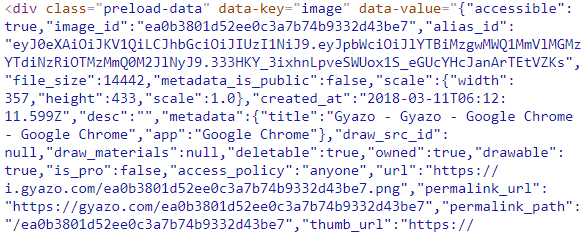
I'm not completely sure as to why this is even on there but it contains all the information about the picture that we need, specifically this one that we end up saving as `localstorage {medium_thumbnail_url : permalink_url}`
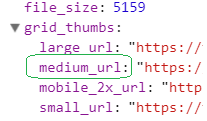
The medium thumbnail that we get in the server response isn't used for anything on the page, however, it _is_ used in the gallery page for the thumbnail of the picture. That effectively lets us find the picture we're looking for, draw a div on top and redirect to the appropriate link that matches the thumbnail key in the localstorage.
## Limitations:
* Does not work retroactively, only on new pictures that are taken after the extension is installed.
* You have to wait for the picture to actually load for it to get saved.
* Loading gallery sometimes does not work (will be fixed).
* Links are deleted when you uninstall the extension.
* Possibly very buggy for ninja users but then again, why are you using this if you're ninja?
## Fixes?
Although this sort of workaround is always going to be around as long as pictures are available through links forever, there are ways to make it a lot harder.
Don't reflect data the user doesn't need. The thumbnail along with all the other data that's saved as a DOM element don't get used for anything the user can see,
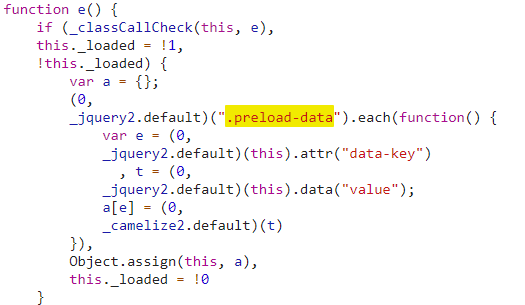
I suppose this is just a feature of the framework or something but regardless, this data really shouldn't be visible on the client side.
The best way would be to not send any meta-data to begin with. That doesn't prevent people from saving the URL but it certainly makes it harder to match saved files