https://github.com/xingchensong/modulespack2
ModulesPack version2
https://github.com/xingchensong/modulespack2
api-wrapper module-system session-manager web
Last synced: 19 days ago
JSON representation
ModulesPack version2
- Host: GitHub
- URL: https://github.com/xingchensong/modulespack2
- Owner: xingchensong
- Created: 2019-02-21T08:36:47.000Z (over 7 years ago)
- Default Branch: master
- Last Pushed: 2019-03-20T07:11:36.000Z (over 7 years ago)
- Last Synced: 2025-01-10T10:22:54.395Z (over 1 year ago)
- Topics: api-wrapper, module-system, session-manager, web
- Language: Python
- Homepage:
- Size: 72.3 KB
- Stars: 2
- Watchers: 1
- Forks: 0
- Open Issues: 0
-
Metadata Files:
- Readme: README.md
Awesome Lists containing this project
README
# modulespack2
modulespack version2 (AKA mp2)
This is a Framework-Plugin that helps your Web API implement modular calls.
这是一个可以实现**子功能模块化**的 Web API框架插件
modulespack的设计来源于这样的需求:
很多语音模型并不是端到端进行的,比如传统的ASR就需要先经过声学模型,然后通过语言模型才能得到最终的识别结果,再比如一个训练好的Voice Conversion模型只负责把源语谱图转换为目标说话人语谱图,而前期处理过程(将音频转换为spec)和后期处理过程(将spec转换为音频,也就是Vocoder)是独立于VC的模型进行的,此时如果想要对外提供完整的VC服务,就必须经过这三个子过程,而modulespack要做的就是对这三个子功能进行**封装**
一个典型的使用modulespack2的程序如下所示:
from session import Session
from graph import ModuleGraph
graph = ModuleGraph(JsonFile='module\GraphLib\RMSE_graph.json')
sess = Session(ModuleLibPath='module\ModuleLib')
feed_dic = {'firstadd':{'x1':1,'x2':2}}
ModuleTable,toposort = sess.build_graph(graph)
result = sess.run(fetches=toposort,ModuleTable=ModuleTable
,graph=graph,feed_dict=feed_dic)
modulespack2借鉴了tensorflow静态图的设计思想,子功能的**模块化**相当于在计算图中**节点化**,为此,mp2定义了 [ModuleGraph类](https://github.com/stephen-song/modulespack2/blob/master/graph/base.py#L7) 来描述节点的集合,同时定义了一种json文件来格式化描述节点与节点之间的数据流动关系。除此之外,mp2还定义了 [Session类](https://github.com/stephen-song/modulespack2/blob/master/session/base.py#L34) 来掌控静态图运行的全过程。
以下面这张静态图为例:
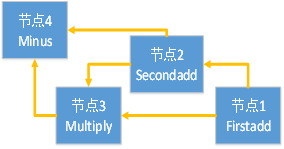
其对应的json文件定义在 [module/GraphLib/RMSE_graph.json](https://github.com/stephen-song/modulespack2/blob/master/module/GraphLib/RMSE_graph.json) 文件中

> 在modulespack2例程里静态图的执行经历了四个过程:
>
> 1. 首先读取json文件创建graph
> 2. 创建session并构建初始节点(节点1 Firstadd)的feeddict
> 3. 调用session.build_graph构建运行所需要的资源
> 4. 调用session.run执行静态图并返回计算结果
其中session通过调用 [build_graph](https://github.com/stephen-song/modulespack2/blob/master/session/base.py#L61) 函数得到该图的拓扑排序和每个节点的module实例:

之后session调用 [run](https://github.com/stephen-song/modulespack2/blob/master/session/base.py#L130) 函数根据拓扑排序结果顺序执行每个module:

实例展示:
使用django + modulespack2 搭建的Voice Conversion服务平台
https://github.com/stephen-song/django_with_modulespack2