https://github.com/xnat9/tiny
小巧的java应用微内核框架, 可用于构建小工具项目,web项目,各种大大小小的项目
https://github.com/xnat9/tiny
async framework ioc
Last synced: 5 months ago
JSON representation
小巧的java应用微内核框架, 可用于构建小工具项目,web项目,各种大大小小的项目
- Host: GitHub
- URL: https://github.com/xnat9/tiny
- Owner: xnat9
- License: apache-2.0
- Created: 2021-01-08T01:27:00.000Z (over 5 years ago)
- Default Branch: master
- Last Pushed: 2024-02-29T02:41:57.000Z (over 2 years ago)
- Last Synced: 2024-07-11T14:02:34.185Z (almost 2 years ago)
- Topics: async, framework, ioc
- Language: Java
- Homepage: https://gitee.com/xnat/tiny
- Size: 460 KB
- Stars: 26
- Watchers: 2
- Forks: 3
- Open Issues: 2
-
Metadata Files:
- Readme: README.md
- License: LICENSE
Awesome Lists containing this project
README
# 介绍
小巧的java应用微内核框架. 基于 [enet](https://gitee.com/xnat/enet) 事件环型框架结构
目前大部分高级语言都解决了编程内存自动管理的问题(垃圾回收), 但并没有解决cpu资源自动管理的问题。
基本上都是程序员主动创建线程或线程池,这些线程是否被充分利用了,在应用不同的地方创建是否有必要,
太多的线程是否造成竞争性能损耗。毕竟线程再多,而决定并发的是cpu的个数。
所以需要框架来实现一个智能执行器(线程池):根据应用的忙碌程度自动创建和销毁线程,
即线程池会自己根据排对的任务数和当前池中的线程数的比例判断是否需要新创建线程(和默认线程池的行为不同)。
会catch所有异常, 不会被业务异常给弄死(永动机)。
程序只需通过配置最大最小资源自动适配, 类似现在的数据库连接池。这样既能充分利用线程资源,
也减少线程的空转和线程过多调度的性能浪费。
> 所以系统性能只由线程池大小属性 sys.exec.corePoolSize=8, sys.exec.maximumPoolSize=16 和 jvm内存参数 -Xmx1024m 控制
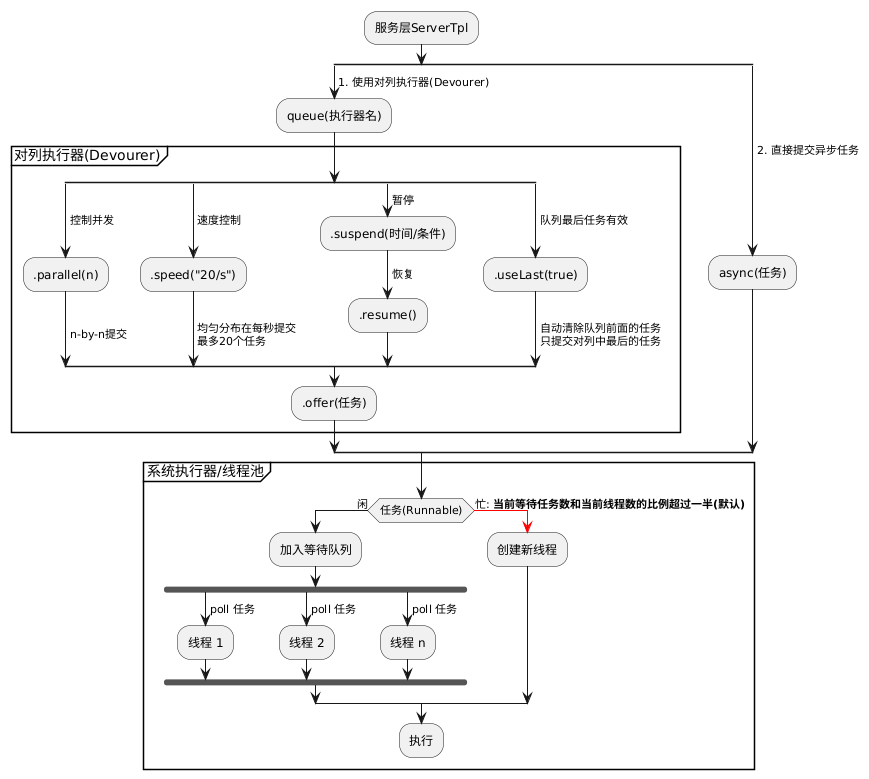
框架设计一种轻量级执行器(伪协程): __Devourer__ 来控制执行模式(并发,暂停/恢复,速度等)
上层服务应该只关注怎么组装执行任务,然后提交给 __Devourer__ 或直接给执行线程池。如下图:
# 安装教程
```xml
cn.xnatural
tiny
1.1.6
```
# 初始化
```java
// 创建一个应用
final AppContext app = new AppContext();
// 添加服务 server1
app.addSource(new ServerTpl("server1") {
@EL(name = "sys.starting")
void start() {
log.info("{} start", name);
}
});
// 添加自定义服务
app.addSource(new TestService());
// 应用启动(会依次触发系统事件)
app.start();
```
> 基于事件环型微内核框架结构图
>
> > 以AppContext#EP为事件中心的挂载服务结构
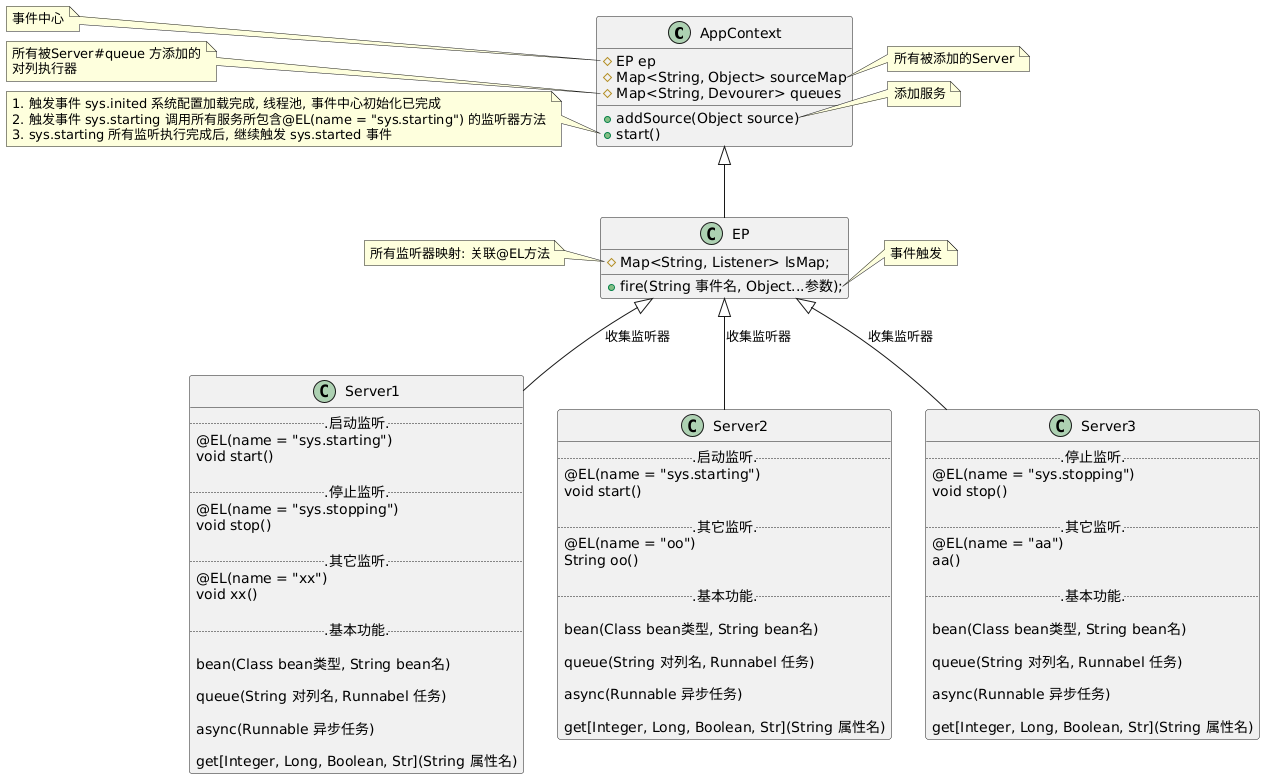
## 系统事件: app.start() 后会依次触发 sys.inited, sys.starting, sys.started
+ sys.inited: 应用始化完成(环境配置, 系统线程池, 事件中心)
+ sys.starting: 通知所有服务启动. 一般为ServerTpl
+ sys.started: 应用启动完成
+ sys.stopping: 应用停止事件(kill pid)
## 配置
> 配置文件加载顺序(优先级从低到高):
* classpath: app.properties, classpath: app-[profile].properties
* file: ./app.properties, file: ./app-[profile].properties
* configdir: app.properties, configdir: app-[profile].properties
* 自定义环境属性配置(重写方法): AppContext#customEnv
* System.getProperties()
>+ 系统属性(-Dconfigname): configname 指定配置文件名. 默认: app
>+ 系统属性(-Dprofile): profile 指定启用特定的配置
>+ 系统属性(-Dconfigdir): configdir 指定额外配置文件目录
* 只读取properties文件. 按顺序读取app.properties, app-[profile].properties 两个配置文件
* 配置文件支持简单的 ${} 属性替换
## 添加 [xhttp](https://gitee.com/xnat/xhttp) 服务
```properties
### app.properties
web.hp=:8080
```
```java
app.addSource(new ServerTpl("web") { //添加web服务
HttpServer server;
@EL(name = "sys.starting", async = true)
void start() {
server = new HttpServer(attrs(), exec());
server.buildChain(chain -> {
chain.get("get", hCtx -> {
hCtx.render("xxxxxxxxxxxx");
});
}).start();
}
@EL(name = "sys.stopping")
void stop() {
if (server != null) server.stop();
}
});
```
## 添加 [xjpa](https://gitee.com/xnat/xjpa) 数据库操作服务
```properties
### app.properties
jpa_local.url=jdbc:mysql://localhost:3306/test?useSSL=false&user=root&password=root&allowPublicKeyRetrieval=true
```
```java
app.addSource(new ServerTpl("jpa_local") { //数据库 jpa_local
Repo repo;
@EL(name = "sys.starting", async = true)
void start() {
repo = new Repo(attrs()).init();
exposeBean(repo); // 把repo暴露给全局, 即可以通过@Inject注入
ep.fire(name + ".started");
}
@EL(name = "sys.stopping", async = true, order = 2f)
void stop() { if (repo != null) repo.close(); }
});
```
## 添加 [sched](https://gitee.com/xnat/jpa) 时间调度服务
```java
app.addSource(new ServerTpl("sched") {
Sched sched;
@EL(name = "sys.starting", async = true)
void start() {
sched = new Sched(attrs(), exec()).init();
exposeBean(sched);
ep.fire(name + ".started");
}
@EL(name = "sched.after")
void after(Duration duration, Runnable fn) {sched.after(duration, fn);}
@EL(name = "sys.stopping", async = true)
void stop() { if (sched != null) sched.stop(); }
});
```
## 动态按需添加服务
```java
@EL(name = "sys.inited")
void sysInited() {
if (!app.attrs("redis").isEmpty()) { //根据配置是否有redis,创建redis客户端工具
app.addSource(new RedisClient())
}
}
```
## 让系统心跳(即:让系统安一定频率触发事件 sys.heartbeat)
> 需要用 [sched](https://gitee.com/xnat/sched) 添加 _sched.after_ 事件监听
```java
@EL(name = "sched.after")
void after(Duration duration, Runnable fn) {sched.after(duration, fn);}
```
> 每隔一段时间触发一次心跳, 1~4分钟(两个配置相加)随机心跳
> + 配置(sys.heartbeat.minInterval) 控制心跳最小时间间隔
> + 配置(sys.heartbeat.randomInterval) 控制心跳最大时间间隔
```java
// 心跳事件监听器
@EL(name = "sys.heartbeat", async = true)
void myHeart() {
System.out.println("咚");
}
```
## 服务基础类: ServerTpl
> 推荐所有被加入到AppContext中的服务都是ServerTpl的子类
```properties
### app.properties
服务名.prop=1
```
```java
app.addSource(new ServerTpl("服务名") {
@EL(name = "sys.starting", async = true)
void start() {
// 初始化服务
}
})
```
### bean注入 @Inject(name = "beanName")
> 注入匹配规则: (已经存在值则不需要再注入)
> > 1. 如果 @Inject name 没配置
> > > 先按 字段类型 和 字段名 匹配, 如无匹配 再按 字段类型 匹配
> > 2. 则按 字段类型 和 @Inject(name = "beanName") beanName 匹配
```java
app.addSource(new ServerTpl() {
@Inject Repo repo; //自动注入
@EL(name = "sys.started", async = true)
void init() {
List rows = repo.rows("select * from test")
log.info("========= {}", rows);
}
});
```
### 动态bean获取: 方法 bean(Class bean类型, String bean名字)
```java
app.addSource(new ServerTpl() {
@EL(name = "sys.started", async = true)
void start() {
String str = bean(Repo.class).firstRow("select count(1) as total from test").get("total").toString();
log.info("=========" + str);
}
});
```
### bean依赖注入原理
> 两种bean容器: AppContext是全局bean容器, 每个服务(ServerTpl)都是一个bean容器
> > 获取bean对象: 先从全局查找, 再从每个服务中获取
* 暴露全局bean
```java
app.addSource(new TestService());
```
* 服务(ServerTpl)里面暴露自己的bean
```java
Repo repo = new Repo("jdbc:mysql://localhost:3306/test?user=root&password=root").init();
exposeBean(repo); // 加入到bean容器,暴露给外部使用
```
### 属性直通车
> 服务(ServerTpl)提供便捷方法获取配置.包含: getLong, getInteger, getDouble, getBoolean等
```properties
## app.properties
testSrv.prop1=1
testSrv.prop2=2.2
```
```java
app.addSource(new ServerTpl("testSrv") {
@EL(name = "sys.starting")
void init() {
log.info("print prop1: {}, prop2: {}", getInteger("prop1"), getDouble("prop2"));
}
})
```
### 对应上图的两种任务执行
#### 异步任务
```java
async(() -> {
// 异步执行任务
})
```
#### 创建任务对列
```java
queue("队列名", () -> {
// 执行任务
})
```
## _对列执行器_: Devourer
会自旋执行完队列中所有任务
当需要控制任务最多 一个一个, 两个两个... 的执行时
服务基础类(ServerTpl)提供方法创建: queue
### 添加任务到队列
```java
// 方法1
queue("save", () -> {
// 执行任务
});
// 方法2
queue("save").offer(() -> {
// 执行任务
});
```
### 队列特性
#### 并发控制
最多同时执行任务数, 默认1(one-by-one)
```java
queue("save").parallel(2)
```
> 注: parallel 最好小于 系统最大线程数(sys.exec.maximumPoolSize), 即不能让某一个执行对列占用所有可用的线程
#### 执行速度控制
把任务按速度均匀分配在时间线上执行
支持: 每秒(10/s), 每分(10/m), 每小时(10/h), 每天(10/d)
```java
// 例: 按每分钟执行30个任务的频率
queue("save").speed("30/m")
```
```java
// 清除速度控制(立即执行)
queue("save").speed(null)
```
#### 队列 暂停/恢复
```java
// 暂停执行, 一般用于发生错误时
// 注: 必须有新的任务入对, 重新触发继续执行. 或者resume方法手动恢复执行
queue("save")
.errorHandle {ex, me ->
// 发生错误时, 让对列暂停执行(不影响新任务入对)
// 1. 暂停一段时间
me.suspend(Duration.ofSeconds(180));
// 2. 条件暂停(每个新任务入队都会重新验证条件)
// me.suspend(queue -> true);
};
// 手动恢复执行
// queue("save").resume()
```
#### 队列最后任务有效
是否只使用队列最后一个, 清除队列前面的任务
适合: 入队的频率比出队高, 前面的任务可有可无
```java
// 例: increment数据库的一个字段的值
Devourer q = queue("increment").useLast(true);
for (int i = 0; i < 20; i++) {
// 入队快, 任务执行慢, 中间的可以不用执行
q.offer(() -> repo.execute("update test set count=?", i));
}
```
```java
// 例: 从服务端获取最新的数据
Devourer q = queue("newer").useLast(true);
// 用户不停的点击刷新
q.offer(() -> {
Utils.http().get("http://localhost:8080/data/newer").execute();
})
```
#### 原理: 并发流量控制锁 LatchLock
当被执行代码块需要控制同时线程执行的个数时
```java
final LatchLock lock = new LatchLock();
lock.limit(3); // 设置并发限制. 默认为1
if (lock.tryLock()) { // 尝试获取一个锁
try {
// 被执行的代码块
} finally {
lock.release(); // 释放一个锁
}
}
```
## 数据库操作工具
#### 创建一个数据源
```java
DB repo = new DB("jdbc:mysql://localhost:3306/test?useSSL=false&user=root&password=root&allowPublicKeyRetrieval=true");
```
#### 查询单条记录
```java
repo.row("select * from test order by id desc");
```
#### 查询多条记录
```java
repo.rows("select * from test limit 10");
repo.rows("select * from test where id in (?, ?)", 2, 7);
```
#### 查询单个值
```java
// 只支持 Integer.class, Long.class, String.class, Double.class, BigDecimal.class, Boolean.class, Date.class
repo.single("select count(1) from test", Integer.class);
```
#### 插入一条记录
```java
repo.execute("insert into test(name, age, create_time) values(?, ?, ?)", "方羽", 5000, new Date());
```
#### 更新一条记录
```java
repo.execute("update test set age = ? where id = ?", 10, 1)
```
#### 事务
```java
// 执行多条sql语句
repo.trans(() -> {
// 插入并返回id
Object id = repo.insertWithGeneratedKey("insert into test(name, age, create_time) values(?, ?, ?)", "方羽", 5000, new Date());
repo.execute("update test set age = ? where id = ?", 18, id);
return null;
});
```
## http客户端
```java
// get
Utils.http().get("http://xnatural.cn:9090/test/cus?p2=2")
.header("test", "test") // 自定义header
.cookie("sessionId", "xx") // 自定义 cookie
.connectTimeout(5000) // 设置连接超时 5秒
.readTimeout(15000) // 设置读结果超时 15秒
.param("p1", 1) // 添加参数
.debug().execute();
```
```java
// post
Utils.http().post("http://xnatural.cn:9090/test/cus")
.debug().execute();
```
```java
// post 表单
Utils.http().post("http://xnatural.cn:9090/test/form")
.param("p1", "p1")
.debug().execute();
```
```java
// post 上传文件
Utils.http().post("http://xnatural.cn:9090/test/upload")
.param("file", new File("d:/tmp/1.txt"))
.debug().execute();
// post 上传文件流. 一般上传大文件 可配合 汇聚流 使用
Utils.http().post("http://xnatural.cn:9090/test/upload")
.fileStream("file", "test.md", new FileInputStream("d:/tmp/test.md"))
.debug().execute();
```
```java
// post json
Utils.http().post("http://xnatural.cn:9090/test/json")
.jsonBody(new JSONObject().fluentPut("p1", 1).toString())
.debug().execute();
```
```java
// post 普通文本
Utils.http().post("http://xnatural.cn:9090/test/string")
.textBody("xxxxxxxxxxxxxxxx")
.debug().execute();
```
## 对象拷贝器
#### javabean 拷贝到 javabean
```java
Utils.copier(
new Object() {
public String name = "徐言";
},
new Object() {
private String name;
public void setName(String name) { this.name = name; }
public String getName() { return name; }
}
).build();
```
#### 对象 转换成 map
```java
Utils.copier(
new Object() {
public String name = "方羽";
public String getAge() { return 5000; }
},
new HashMap()
).build();
```
#### 添加额外属性源
```java
Utils.copier(
new Object() {
public String name = "云仙君";
},
new Object() {
private String name;
public Integer age;
public void setName(String name) { this.name = name; }
public String getName() { return name; }
}
).add("age", () -> 1).build();
```
#### 忽略属性
```java
Utils.copier(
new Object() {
public String name = "徐言";
public Integer age = 22;
},
new Object() {
private String name;
public Integer age = 33;
public void setName(String name) { this.name = name; }
public String getName() { return name; }
}
).ignore("age").build(); // 最后 age 为33
```
#### 属性值转换
```java
Utils.copier(
new Object() {
public long time = System.currentTimeMillis();
},
new Object() {
private String time;
public void setTime(String time) { this.time = time; }
public String getTime() { return time; }
}
).addConverter("time", o -> new SimpleDateFormat("yyyy-MM-dd HH:mm:ss").format(new Date((long) o)))
.build();
```
#### 忽略空属性
```java
Utils.copier(
new Object() {
public String name;
},
new Object() {
private String name = "方羽";
public void setName(String name) { this.name = name; }
public String getName() { return name; }
}
).ignoreNull(true).build(); // 最后 name 为 方羽
```
#### 属性名映射
```java
Utils.copier(
new Object() {
public String p1 = "徐言";
},
new Object() {
private String pp1 = "方羽";
public void setPp1(String pp1) { this.pp1 = pp1; }
public String getPp1() { return pp1; }
}
).mapProp( "p1", "pp1").build(); // 最后 name 为 徐言
```
## 文件内容监控器(类linux tail)
```java
Utils.tailer().tail("d:/tmp/tmp.json", 5);
```
## nanoId(长度): nano算法生成动态唯一字符
```java
String id = Utils.nanoId();
```
## ioCopy(输入流, 输出流, 速度)
```java
// 文件copy
try (InputStream is = new FileInputStream("d:/tmp/陆景.png"); OutputStream os = new FileOutputStream("d:/tmp/青子.png")) {
Utils.ioCopy(is, os);
}
```
## 简单缓存 CacheSrv
```java
// 添加缓存服务
app.addSource(new CacheSrv());
```
```properties
## app.properties 缓存最多保存100条数据
cacheSrv.itemLimit=100
```
### 缓存操作
```java
// 1. 设置缓存
bean(CacheSrv).set("缓存key", "缓存值", Duration.ofMinutes(30));
// 2. 过期函数
bean(CacheSrv).set("缓存key", "缓存值", record -> {
// 缓存值: record.value
// 缓存更新时间: record.getUpdateTime()
return 函数返回过期时间点(时间缀), 返回null(不过期,除非达到缓存限制被删除);
});
// 3. 获取缓存
bean(CacheSrv).get("缓存key");
// 4. 获取缓存值, 并更新缓存时间(即从现在开始重新计算过期时间)
bean(CacheSrv).getAndUpdate("缓存key");
// 5. 手动删除
bean(CacheSrv).remove("缓存key");
```
### hash缓存操作
```java
// 1. 设置缓存
bean(CacheSrv).hset("缓存key", "数据key", "缓存值", Duration.ofMinutes(30));
// 2. 过期函数
bean(CacheSrv).hset("缓存key", "数据key", "缓存值", record -> {
// 缓存值: record.value
// 缓存更新时间: record.getUpdateTime()
return 函数返回过期时间点(时间缀), 返回null(不过期,除非达到缓存限制被删除);
});
// 3. 获取缓存
bean(CacheSrv).hget("缓存key", "数据key");
// 4. 获取缓存值, 并更新缓存时间(即从现在开始重新计算过期时间)
bean(CacheSrv).hgetAndUpdate("缓存key", "数据key");
// 5. 手动删除
bean(CacheSrv).hremove("缓存key", "数据key");
```
## 无限递归优化实现 Recursion
> 解决java无尾递归替换方案. 例:
```java
System.out.println(factorialTailRecursion(1, 10_000_000).invoke());
```
```java
/**
* 阶乘计算
* @param factorial 当前递归栈的结果值
* @param number 下一个递归需要计算的值
* @return 尾递归接口,调用invoke启动及早求值获得结果
*/
Recursion factorialTailRecursion(final long factorial, final long number) {
if (number == 1) {
// new Exception().printStackTrace();
return Recursion.done(factorial);
}
else {
return Recursion.call(() -> factorialTailRecursion(factorial + number, number - 1));
}
}
```
> 备忘录模式:提升递归效率. 例:
```java
System.out.println(fibonacciMemo(47));
```
```java
/**
* 使用同一封装的备忘录模式 执行斐波那契策略
* @param n 第n个斐波那契数
* @return 第n个斐波那契数
*/
long fibonacciMemo(long n) {
return Recursion.memo((fib, number) -> {
if (number == 0 || number == 1) return 1L;
return fib.apply(number-1) + fib.apply(number-2);
}, n);
}
```
## 延迟对象 Lazier
> 封装是一个延迟计算值(只计算一次)
```java
final Lazier _id = new Lazier<>(() -> {
String id = getHeader("X-Request-ID");
if (id != null && !id.isEmpty()) return id;
return UUID.randomUUID().toString().replace("-", "");
});
```
* 延迟获取属性值
```java
final Lazier _name = new Lazier<>(() -> getAttr("sys.name", String.class, "app"));
```
* 重新计算
```java
final Lazier _num = new Lazier(() -> new Random().nextInt(10));
_num.get();
_num.clear(); // 清除重新计算
_num.get();
```
## 应用例子
最佳实践: [Demo(java)](https://gitee.com/xnat/appdemo)
, [Demo(scala)](https://gitee.com/xnat/tinyscalademo)
, [GRule(groovy)](https://gitee.com/xnat/grule)
# 1.1.9 ing
- [x] fix: Utils#nanoId(0) 卡死的问题
- [x] feat: Httper 工具支持 get 传body
- [ ] upgrade: enet:1.1.1
- [ ] refactor: 心跳新配置 60~180
- [ ] feat: 空闲任务
- [ ] feat: 增加日志级别配置
- [ ] fix: Copier is开头的属性被忽略了
- [ ] feat: Httper 工具支持 websocket
- [ ] feat: 自定义注解
# 参与贡献
xnatural@msn.cn