https://github.com/xnodeoncode/i45-jslogger
A simple JavaScript logger for capturing events in the console and local storage.
https://github.com/xnodeoncode/i45-jslogger
Last synced: 6 months ago
JSON representation
A simple JavaScript logger for capturing events in the console and local storage.
- Host: GitHub
- URL: https://github.com/xnodeoncode/i45-jslogger
- Owner: xnodeoncode
- Created: 2025-08-26T15:05:37.000Z (11 months ago)
- Default Branch: master
- Last Pushed: 2025-12-19T20:53:35.000Z (7 months ago)
- Last Synced: 2025-12-22T09:03:29.395Z (7 months ago)
- Language: JavaScript
- Size: 151 KB
- Stars: 0
- Watchers: 0
- Forks: 1
- Open Issues: 0
-
Metadata Files:
- Readme: README.md
- Changelog: CHANGES.md
Awesome Lists containing this project
README
[NodeJS package](https://www.npmjs.com/package/i45-jslogger)
[](https://www.npmjs.com/package/i45-jslogger)
[](https://www.typescriptlang.org/)
[](https://opensource.org/licenses/MIT)
A browser based logger to track events during development and testing. Log entries are written to the console as well as stored in localStorage.
## ⚠️ v2.0.0 Breaking Changes
- **Event Namespacing**: CustomEvents now use `i45-logger:` prefix
- Old: `window.addEventListener("LOG", ...)`
- New: `window.addEventListener("i45-logger:LOG", ...)`
- **Property Names**: Better, clearer names
- `enableEvents` → `enableDispatchEvents` (clearer what it controls)
- `enableLogging` → `loggingEnabled` (better grammar)
- **Removed Exports**: `iLogger` and `iLoggerValidator` are no longer exported
- **Removed Deprecated**: `clearEvents()` method removed (use `clearEventLog()`, `clearConsole()`, or `clearAll()`)
- **Return Types**: `addClient()` and `removeClient()` return `boolean` instead of `0|1`
See [CHANGES.md](CHANGES.md) for full migration guide.
See [ROADMAP.md](docs/roadmap.md) to see future plans.
## Environment Support
- ✅ **Browser**: Full support with all features
- ⚠️ **Node.js**: Limited support (no localStorage, no events)
- ⚠️ **SSR (Next.js, Nuxt)**: Requires client-side initialization
The package now includes environment detection and won't crash in Node.js environments, but localStorage and CustomEvent features will be unavailable.
## Contents
- [Installation](#installation)
- [Quick Start](#quick-start)
- [API Overview](#api-overview)
- [Configuration](#configuration)
- [Custom Logger Clients](#custom-logger-clients)
- [Event Listeners](#event-listeners)
- [Advanced Usage](#advanced-usage)
## Installation
```bash
npm i i45-jslogger
```
## Quick Start
### Simple Usage (Default Instance)
```javascript
import logger from "i45-jslogger";
logger.log("Basic log message");
logger.info("This is an info message");
logger.warn("This is a warning");
logger.error("This is an error");
```
### Multiple Instances
```javascript
import { Logger } from "i45-jslogger";
// Separate loggers for different purposes
const debugLogger = new Logger();
const analyticsLogger = new Logger();
debugLogger.info("Debug information");
analyticsLogger.suppressConsole = true; // Only log to localStorage and clients
```
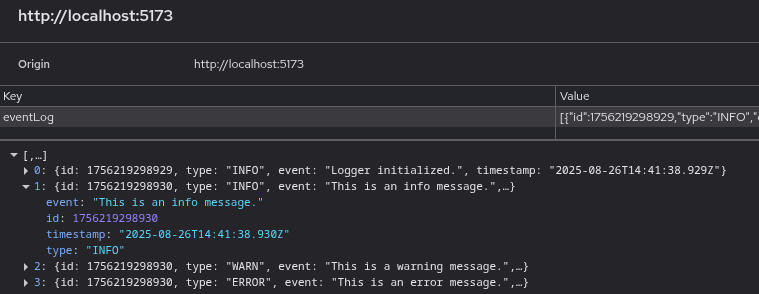
**Console output:**

**localStorage output:**
## API Overview
### Logging Methods
All methods support method chaining and return `this`.
```javascript
logger.log("message", ...args); // Basic log
logger.info("message", ...args); // Info level
logger.warn("message", ...args); // Warning level
logger.error("message", ...args); // Error level
```
### Client Management
```javascript
logger.addClient(customLogger); // Returns: boolean
logger.removeClient(customLogger); // Returns: boolean
logger.clients(); // Returns: Array
logger.removeAllClients(); // Returns: this
```
### Event Management
```javascript
logger.getEvents(); // Returns: Array of logged events
logger.clearEventLog(); // Clear localStorage events
logger.clearConsole(); // Clear browser console
logger.clearAll(); // Clear both
```
**Full API documentation available in [TypeScript definitions](src/logger.d.ts).**
## Configuration
### Properties
```javascript
// Enable/disable logging
logger.loggingEnabled = true; // Default: true
// CustomEvent dispatching to window
logger.enableDispatchEvents = true; // Default: true
// Suppress outputs
logger.suppressNative = false; // Skip localStorage/events (Default: false)
logger.suppressConsole = false; // Skip console output (Default: false)
// Storage limits
logger.maxEvents = null; // Default: null (unlimited)
// Set to positive integer to limit stored events (oldest are removed)
// Set to 0 to prevent event storage entirely
```
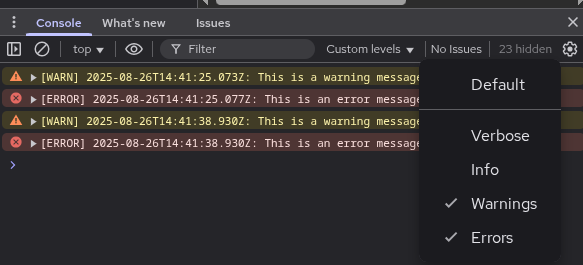
### Console Filtering
Filter by log levels in the browser console:
## Custom Logger Clients
Add custom clients to pipe logs to APIs, files, or analytics services.
### Client Interface
```javascript
const customLogger = {
log: (message, ...args) => {
/* custom logic */
},
info: (message, ...args) => {
/* custom logic */
},
warn: (message, ...args) => {
/* custom logic */
},
error: (message, ...args) => {
/* custom logic */
},
};
logger.addClient(customLogger); // Returns true if added successfully
```
### Example: API Logger
```javascript
const apiLogger = {
log: (msg, ...args) =>
fetch("/api/logs", {
method: "POST",
body: JSON.stringify({ level: "log", msg, args }),
}),
info: (msg, ...args) =>
fetch("/api/logs", {
method: "POST",
body: JSON.stringify({ level: "info", msg, args }),
}),
warn: (msg, ...args) =>
fetch("/api/logs", {
method: "POST",
body: JSON.stringify({ level: "warn", msg, args }),
}),
error: (msg, ...args) =>
fetch("/api/logs", {
method: "POST",
body: JSON.stringify({ level: "error", msg, args }),
}),
};
logger.addClient(apiLogger);
logger.info("User logged in", { userId: 123 }); // Logs to console AND API
```
## Event Listeners
Subscribe to log events using window CustomEvents with namespaced event names.
### Available Events
Events are namespaced with `i45-logger:` prefix to prevent conflicts:
```javascript
window.addEventListener("i45-logger:LOG", (event) => {
console.log(event.detail); // { message, args, timestamp }
});
window.addEventListener("i45-logger:INFO", (event) => {
/* ... */
});
window.addEventListener("i45-logger:WARN", (event) => {
/* ... */
});
window.addEventListener("i45-logger:ERROR", (event) => {
/* ... */
});
```
### Disable Events
```javascript
logger.enableDispatchEvents = false; // Stop dispatching CustomEvents
```
## Advanced Usage
### Use in Classes
```javascript
import logger from "i45-jslogger";
class DataService {
#debug;
constructor(debug = false) {
this.#debug = debug;
}
fetchData() {
if (this.#debug) logger.info("Fetching data...");
// ... fetch logic
if (this.#debug) logger.info("Data fetched successfully");
}
}
```
### Multiple Isolated Loggers
```javascript
import { Logger } from "i45-jslogger";
// Development logger
const devLog = new Logger();
devLog.enableLogging = process.env.NODE_ENV === "development";
// Analytics logger (console suppressed)
const analyticsLog = new Logger();
analyticsLog.suppressConsole = true;
analyticsLog.addClient(analyticsClient);
// Error tracking logger
const errorLog = new Logger();
errorLog.suppressNative = true;
errorLog.addClient(sentryClient);
```
### Testing with Isolated Instances
```javascript
import { Logger } from "i45-jslogger";
test("logging disabled", () => {
const logger = new Logger();
logger.enableLogging = false;
logger.info("test"); // Won't log
expect(logger.getEvents()).toHaveLength(0);
});
```
## TypeScript Support
Full TypeScript definitions included:
```typescript
import logger, { Logger, LoggerClient, LogEvent } from "i45-jslogger";
const customClient: LoggerClient = {
log: (msg) => console.log(msg),
info: (msg) => console.info(msg),
warn: (msg) => console.warn(msg),
error: (msg) => console.error(msg),
};
const events: LogEvent[] = logger.getEvents();
```
## Contributing
Contributions welcome! Please see [CHANGES.md](CHANGES.md) for the full changelog and migration guides.
Planning for v3.0.0 is underway - see the [v3.0.0 roadmap](https://github.com/xnodeoncode/i45-jslogger/blob/master/docs/v3.0.0.md) for upcoming features.
## License
MIT
## Links
- [npm package](https://www.npmjs.com/package/i45-jslogger)
- [GitHub repository](https://github.com/xnodeoncode/i45-jslogger)
- [Changelog](CHANGES.md)
- [TypeScript Definitions](src/logger.d.ts)