https://github.com/xp-forge/lambda
AWS Lambda for the XP Framework
https://github.com/xp-forge/lambda
aws aws-lambda lambda php7 php8 response-streaming serverless xp-framework
Last synced: 4 months ago
JSON representation
AWS Lambda for the XP Framework
- Host: GitHub
- URL: https://github.com/xp-forge/lambda
- Owner: xp-forge
- Created: 2021-08-20T17:27:14.000Z (almost 5 years ago)
- Default Branch: main
- Last Pushed: 2025-05-04T17:21:06.000Z (about 1 year ago)
- Last Synced: 2025-06-05T16:16:17.411Z (about 1 year ago)
- Topics: aws, aws-lambda, lambda, php7, php8, response-streaming, serverless, xp-framework
- Language: PHP
- Homepage:
- Size: 213 KB
- Stars: 2
- Watchers: 2
- Forks: 0
- Open Issues: 2
-
Metadata Files:
- Readme: README.md
- Changelog: ChangeLog.md
Awesome Lists containing this project
README
AWS Lambda for the XP Framework
========================================================================
[](https://github.com/xp-forge/lambda/actions)
[](https://github.com/xp-framework/core)
[](https://github.com/xp-framework/core/blob/master/LICENCE.md)
[](http://php.net/)
[](http://php.net/)
[](https://packagist.org/packages/xp-forge/lambda)
Serverless infrastructure.
Example
-------
Put this code in a file called *Greet.class.php*:
```php
use com\amazon\aws\lambda\Handler;
class Greet extends Handler {
/** @return callable|com.amazon.aws.lambda.Lambda|com.amazon.aws.lambda.Streaming */
public function target() {
return fn($event, $context) => sprintf(
'Hello %s from PHP %s via %s @ %s',
$event['name'],
PHP_VERSION,
$context->functionName,
$context->region
);
}
}
```
The two parameters passed are *$event* (a value [depending on where the lambda was invoked from](https://docs.aws.amazon.com/lambda/latest/dg/lambda-services.html)) and *$context* (a Context instance, see [below](https://github.com/xp-forge/lambda#context)).
### Initialization
If you need to run any initialization code, you can do so before returning the lambda from *target()*. This code is only run once during the [init phase](https://docs.aws.amazon.com/lambda/latest/dg/lambda-runtime-environment.html#runtimes-lifecycle):
```php
use com\amazon\aws\lambda\Handler;
class Greet extends Handler {
/** @return callable|com.amazon.aws.lambda.Lambda|com.amazon.aws.lambda.Streaming */
public function target() {
$default= $this->environment->properties('task')->readString('greet', 'default');
return fn($event, $context) => sprintf(
'Hello %s from PHP %s via %s @ %s',
$event['name'] ?? $default,
PHP_VERSION,
$context->functionName,
$context->region
);
}
}
```
The lambda's environment accessible via *$this->environment* is an Environment instance, see [below](https://github.com/xp-forge/lambda#environment).
### Logging
To write output to the lambda's log stream, use *trace()*:
```php
use com\amazon\aws\lambda\Handler;
class Greet extends Handler {
/** @return callable|com.amazon.aws.lambda.Lambda|com.amazon.aws.lambda.Streaming */
public function target() {
return function($event, $context) {
$this->environment->trace('Invoked with ', $event);
return sprintf(/* Shortened for brevity */);
};
}
}
```
Any non-string arguments passed will be converted to string using `util.Objects::stringOf()`. To integrate with [XP logging](https://github.com/xp-framework/logging), pass the environment's writer to the console appender, e.g. by using `$cat= Logging::all()->toConsole($this->environment->writer)`.
### Response streaming
This library supports AWS Lambda response streaming as [announced by AWS in April 2023](https://aws.amazon.com/de/blogs/compute/introducing-aws-lambda-response-streaming/). To use the stream, return a `function(var, Stream, Context)` from the handler's *target()* method instead of a `function(var, Context)`:
```php
use com\amazon\aws\lambda\{Context, Handler, Stream};
class Streamed extends Handler {
public function target(): callable {
return function($event, Stream $stream, Context $context) {
$stream->use('text/plain');
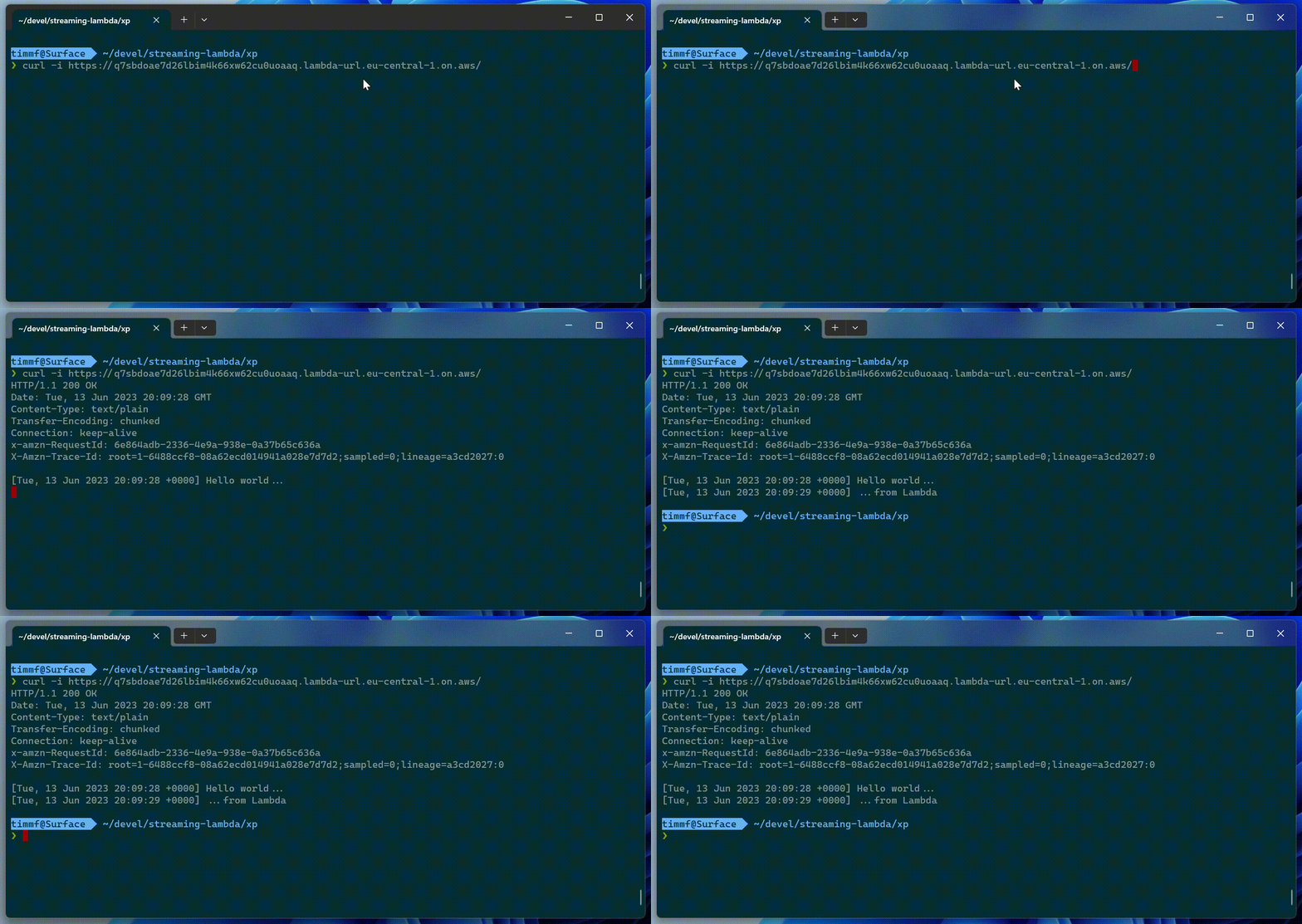
$stream->write("[".date('r')."] Hello world...\n");
sleep(1);
$stream->write("[".date('r')."] ...from Lambda\n");
$stream->end();
};
}
}
```
Invoking this lambda will yield the following:
The *Stream* interface is defined as follows:
```php
public interface com.amazon.aws.lambda.Stream extends io.streams.OutputStream, lang.Closeable {
public function transmit(io.Channel|io.streams.InputStream $source, string $mimeType): void
public function use(string $mimeType): void
public function write(string $bytes): void
public function end(): void
public function flush(): void
public function close(): var
}
```
Development
-----------
To run your lambda locally, use the following:
```bash
$ xp lambda run Greet '{"name":"Timm"}'
Hello Timm from PHP 8.2.11 via Greet @ test-local-1
```
*This does not provide a complete lambda environment, and does not have any execution limits imposed on it! To detect this programmatically, use `$this->environment->local()`, which will return true.*
Integration testing
-------------------
To test your lambda inside a local containerized lambda environment, use the *test* command.
```bash
$ xp lambda test Greet '{"name":"Timm"}'
START RequestId: 9ff45cda-df9b-1b8c-c21b-5fe27c8f2d24 Version: $LATEST
END RequestId: 9ff45cda-df9b-1b8c-c21b-5fe27c8f2d24
REPORT RequestId: 9ff45cda-df9b-1b8c-c21b-5fe27c8f2d24 Init Duration: 922.19 ms...
"Hello Timm from PHP 8.2.11 via test @ us-east-1"
```
*This functionality is provided by the [AWS Lambda base images for custom runtimes](https://gallery.ecr.aws/lambda/provided). Although this also runs on your machine, `$this->environment->local()` will return false.*
Setup
-----
The first step is to create and publish the runtime layer:
```bash
$ xp lambda runtime
$ aws lambda publish-layer-version \
--layer-name lambda-xp-runtime \
--zip-file fileb://./runtime-X.X.X.zip \
--region us-east-1
```
...and create a role:
```bash
$ cat > /tmp/trust-policy.json
{
"Version": "2012-10-17",
"Statement": [{
"Effect": "Allow",
"Principal": {"Service": "lambda.amazonaws.com"},
"Action": "sts:AssumeRole"
}]
}
$ aws iam create-role \
--role-name InvokeLambda \
--path "/service-role/" \
--assume-role-policy-document file:///tmp/trust-policy.json
```
After ensuring your dependencies are up-to-date using composer, create the function:
```bash
$ xp lambda package Greet.class.php
$ aws lambda create-function \
--function-name greet \
--handler Greet \
--zip-file fileb://./function.zip \
--runtime provided.al2 \
--role "arn:aws:iam::XXXXXXXXXXXX:role/service-role/InvokeLambda" \
--region us-east-1 \
--layers "arn:aws:lambda:us-east-1:XXXXXXXXXXXX:layer:lambda-xp-runtime:1"
```
Invocation
----------
To invoke the function:
```bash
$ aws lambda invoke \
--cli-binary-format raw-in-base64-out \
--function-name greet \
--payload '{"name":"Timm"}'
response.json
$ cat response.json
"Hello Timm from PHP 8.0.10 via greet @ us-east-1"
```
Deploying changes
-----------------
After having initially created your lambda, you can update its code as follows:
```bash
$ xp lambda package Greet.class.php
$ aws lambda update-function-code \
--function-name greet \
--zip-file fileb://./function.zip \
--publish
```
Upgrading the runtime
---------------------
To upgrade an existing runtime layer, build the new runtime and publish a new version by calling the following to create a new version:
```bash
$ xp lambda runtime
$ aws lambda publish-layer-version \
--layer-name lambda-xp-runtime \
--zip-file fileb://./runtime-X.X.X.zip \
--region us-east-1
```
Now, switch the function over to use this new layer:
```bash
$ aws lambda update-function-configuration \
--function-name greet \
--layers "arn:aws:lambda:us-east-1:XXXXXXXXXXXX:layer:lambda-xp-runtime:2"
```
Using other AWS services
------------------------
In order to programmatically use other AWS services use the *ServiceEndpoint* class:
```php
use com\amazon\aws\{Credentials, ServiceEndpoint};
use com\amazon\aws\lambda\Handler;
class WebSockets extends Handler {
/** @return callable|com.amazon.aws.lambda.Lambda|com.amazon.aws.lambda.Streaming */
public function target() {
return function($event, $context) {
// Send message to WebSocket connection
$this->environment->endpoint('execute-api')
->in($context->region)
->using($event['requestContext']['apiId'])
->resource('/{stage}/@connections/{connectionId}', $event['requestContext'])
->transmit(['message' => 'Reply'])
;
return ['statusCode' => 200];
};
}
}
```
To test this locally, pass the necessary environment variables via *-e* on the command line:
```bash
$ xp lambda test -e AWS_ACCESS_KEY_ID=... -e AWS_SECRET_ACCESS_KEY=... WebSockets '{"requestContext":...}'
# ...
```
Context
-------
The context object passed to the target lambda is defined as follows:
```php
public class com.amazon.aws.lambda.Context implements lang.Value {
public string $awsRequestId
public string $invokedFunctionArn
public string $traceId
public string $clientContext
public string $cognitoIdentity
public string $deadline
public string $functionName
public string $functionVersion
public string $memoryLimitInMB
public string $logGroupName
public string $logStreamName
public string $region
public int $payloadLength
public function __construct(array $headers, array $environment)
public function remainingTime(?float $now): ?float
public function toString(): string
public function hashCode(): string
public function compareTo(var $value): int
}
```
Environment
-----------
The runtime environment is defined as follows:
```php
public class com.amazon.aws.lambda.Environment {
public string $root
public [:string] $variables
public io.streams.StringWriter $writer
public util.PropertySource $properties
public function __construct(string $root, ?io.streams.StringWriter $writer)
public function taskroot(): io.Path
public function path(string $path): io.Path
public function tempDir(): io.Path
public function local(): bool
public function variable(string $name): ?string
public function credentials(): com.amazon.aws.Credentials
public function trace(var... $args): void
public function properties(string $name): util.PropertyAccess
}
```
Interfaces
----------
Instead of functions, a handler's *target()* method may also return instances implementing the *Lambda* or *Streaming* interfaces:
```php
public interface com.amazon.aws.lambda.Lambda {
public function process(var $event, com.amazon.aws.lambda.Context $context): var
}
public interface com.amazon.aws.lambda.Streaming {
public function handle(
var $event,
com.amazon.aws.lambda.Stream $stream,
com.amazon.aws.lambda.Context $context
): void
}
```
See also
--------
* [What is AWS Lambda?](https://docs.aws.amazon.com/lambda/latest/dg/welcome.html)
* [AWS Lambda Webservices for the XP Framework](https://github.com/xp-forge/lambda-ws)
* [AWS Core for the XP Framework](https://github.com/xp-forge/aws)
* [Lambda runtimes](https://docs.aws.amazon.com/lambda/latest/dg/lambda-runtimes.html)
* [AWS Lambda Custom Runtime for PHP: A Practical Example](https://aws.amazon.com/de/blogs/apn/aws-lambda-custom-runtime-for-php-a-practical-example/)
* [AWS SDK for PHP](https://docs.aws.amazon.com/sdk-for-php/index.html)
* [The Serverless LAMP stack - Community Resources](https://github.com/aws-samples/php-examples-for-aws-lambda/blob/master/serverless-php-resources.md)
* [Configuring a Lambda function to stream responses](https://docs.aws.amazon.com/lambda/latest/dg/configuration-response-streaming.html)
* [Implementing response streaming in a custom runtime](https://docs.aws.amazon.com/lambda/latest/dg/runtimes-custom.html#runtimes-custom-response-streaming)