https://github.com/xp-forge/terminal
Terminal control
https://github.com/xp-forge/terminal
colors terminal xp-framework
Last synced: 5 months ago
JSON representation
Terminal control
- Host: GitHub
- URL: https://github.com/xp-forge/terminal
- Owner: xp-forge
- Archived: true
- Created: 2016-06-19T11:35:02.000Z (about 10 years ago)
- Default Branch: master
- Last Pushed: 2020-10-04T14:11:26.000Z (over 5 years ago)
- Last Synced: 2025-12-20T16:52:48.560Z (6 months ago)
- Topics: colors, terminal, xp-framework
- Language: PHP
- Size: 51.8 KB
- Stars: 0
- Watchers: 1
- Forks: 0
- Open Issues: 1
-
Metadata Files:
- Readme: README.md
- Changelog: ChangeLog.md
Awesome Lists containing this project
README
Terminal
========
[](https://travis-ci.org/xp-forge/terminal)
[](https://github.com/xp-framework/core)
[](https://github.com/xp-framework/core/blob/master/LICENCE.md)
[](http://php.net/)
[](https://packagist.org/packages/xp-forge/terminal)
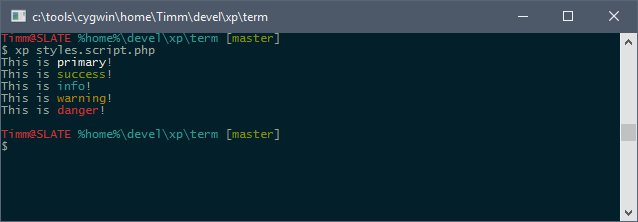
The terminal library adds support for color to the `util.cmd.Console` class.
Styles
------
There are five predefined styles:
```php
use util\cmd\Console;
Console::writeLine('This is primary>!');
Console::writeLine('This is success>!');
Console::writeLine('This is info>!');
Console::writeLine('This is warning>!');
Console::writeLine('This is danger>!');
```
Colors
------
For direct color control, the colors can be chosen directly by supplying their names. Foreground and background colors are separated by the `@` sign:
```php
use util\cmd\Console;
Console::writeLine('An error occured>');
Console::writeLine('OK: 100 Tests succeeded>');
```
The colors' names are black, dark-red, dark-green, dark-yellow, dark-blue, dark-magenta, dark-cyan, gray, dark-gray, red, green, yellow, blue, magenta, cyan and white.
Attributes
----------
There are three more attributes. Not all terminals support these, though!
```php
use util\cmd\Console;
Console::writeLine('http://localhost>');
Console::writeLine('Watch out!>');
Console::writeLine('- The XP Framework group>');
// Can be combined, too
Console::writeLine('http://localhost>');
```
Positioning
-----------
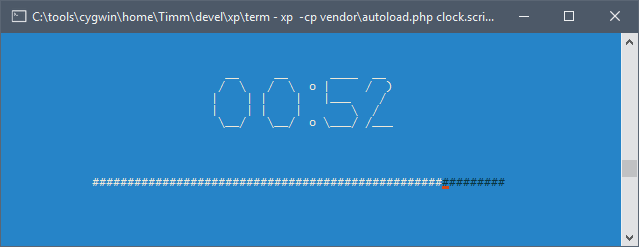
The `util.cmd.term.Terminal` class allows clearing the screen, positioning the cursor and writing text there.
```php
use util\cmd\term\Terminal;
$message= 'Hello from the middle of the screen';
// Center text in third line
$dim= Terminal::size();
$x= ($dim[0] - strlen($message)) / 2;
$y= 3;
Terminal::clear();
Terminal::write($x, $y, $message);
```
For the more advanced example seen above in the screenshot, have a look at [this code](https://gist.github.com/thekid/d1a38a0743733d2270968d7eac8f43c9).