https://github.com/xuqiang521/vui
:lock: 此项目已迁移地址,这里暂不做维护,新项目地址为 =>
https://github.com/xuqiang521/vui
components es6 javascript vue
Last synced: 4 months ago
JSON representation
:lock: 此项目已迁移地址,这里暂不做维护,新项目地址为 =>
- Host: GitHub
- URL: https://github.com/xuqiang521/vui
- Owner: xuqiang521
- Created: 2017-05-02T07:46:48.000Z (about 9 years ago)
- Default Branch: dev
- Last Pushed: 2017-12-27T03:53:50.000Z (over 8 years ago)
- Last Synced: 2025-09-01T14:45:59.375Z (11 months ago)
- Topics: components, es6, javascript, vue
- Language: JavaScript
- Homepage: https://github.com/Brickies/vui
- Size: 5.14 MB
- Stars: 64
- Watchers: 1
- Forks: 7
- Open Issues: 0
-
Metadata Files:
- Readme: README.md
- Changelog: CHANGELOG.md
Awesome Lists containing this project
README
## vui
[](https://www.npmjs.com/package/x-vui) [](https://www.npmjs.com/package/x-vui) [](https://opensource.org/licenses/MIT) [](https://travis-ci.org/xuqiang521/x-vui)
> It's a A personal Vue UI component library .
## Install
```bash
npm install x-vui -S
```
## Quick Start
### Import Components (Only for part)
```javascript
import {
Scroller,
Select
// ...
} from 'x-vui'
Vue.component(Scroller.name, Scroller)
Vue.component(Select.name, Select)
```
### Fully import
```javascript
import { VUICOMS } from 'x-vui'
VUICOMS.map(component => {
Vue.component(component.name, component)
})
```
### Import Plugins
```javascript
import {
$msg,
$modal
} from 'x-vui'
Vue.prototype.$dialog = {
msg: $msg,
modal: $modal
}
```
# Existing components
- [x] [swiper](https://github.com/xuqiang521/vui/tree/master/src/components/swiper)
- [x] [scroller](https://github.com/xuqiang521/vui/tree/master/src/components/scroller)
- [x] [search](https://github.com/xuqiang521/vui/tree/master/src/components/search)
- [x] [message](https://github.com/xuqiang521/vui/tree/master/src/components/dialog/message)
- [x] [modal](https://github.com/xuqiang521/vui/tree/master/src/components/dialog/modal)
- [x] [table](https://github.com/xuqiang521/vui/tree/master/src/components/table)
- [x] [picker](https://github.com/xuqiang521/vui/tree/master/src/components/picker)
- [x] [select](https://github.com/xuqiang521/vui/tree/master/src/components/select)
- [x] [switch](https://github.com/xuqiang521/vui/tree/master/src/components/switch)
- [x] [dropdown](https://github.com/xuqiang521/vui/tree/master/src/components/dropdown)
# Usage of vui
## swiper
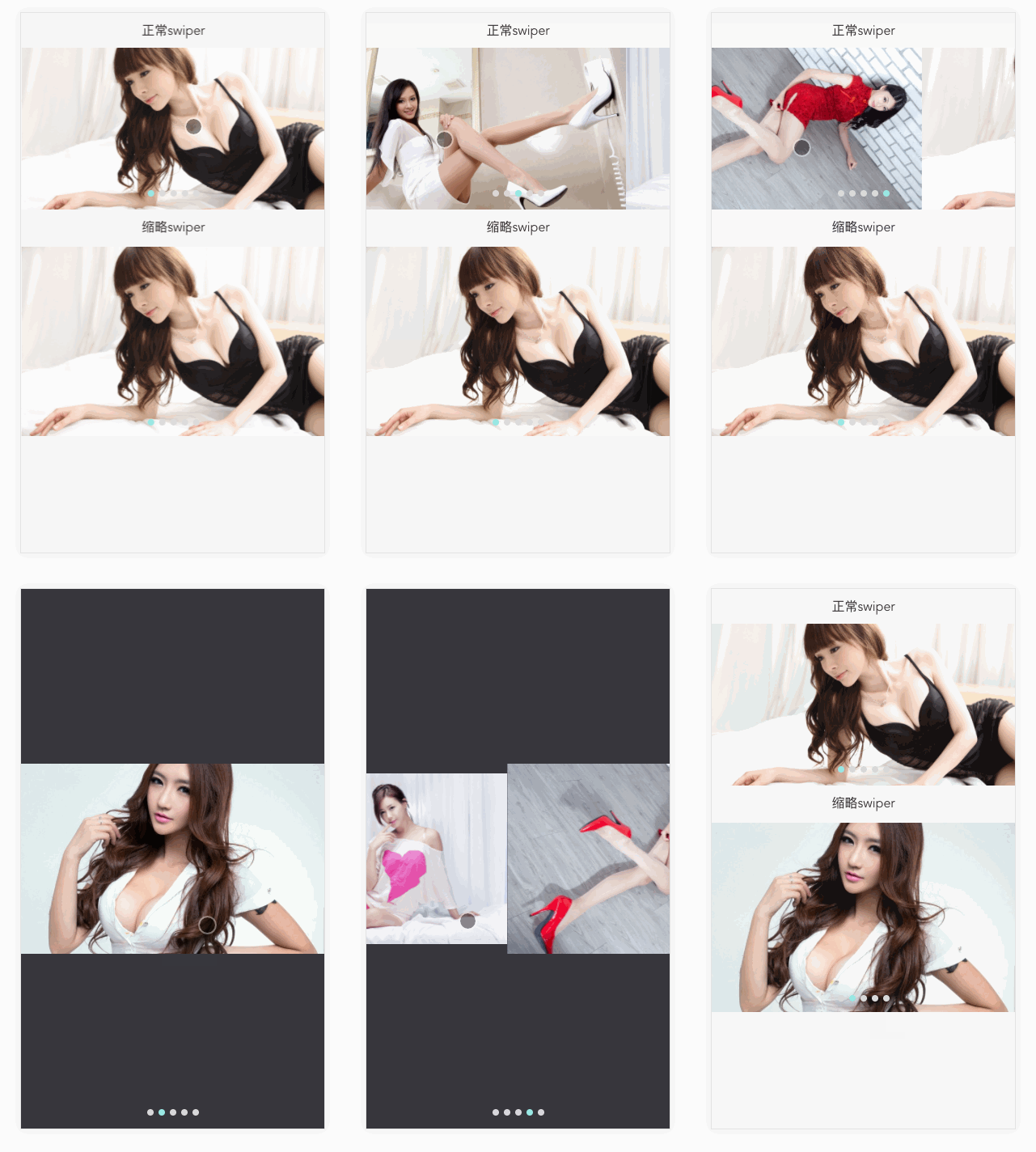
### Attributes
| 参数 | 说明 | 类型 | 可选值 | 默认值 |
|---------- |-------- |---------- |------------- |-------- |
| type | swiper类型 | string | swiper(正常)/thum(缩略) | swiper |
| auto | 自动播放时长 | number | — | 5000 |
| items | swiper展示的列表 | array | — | [] |
| showIndicators | 是否展示swiper小圆点 | boolean | — | true |
| styles | swiper样式控制 | object | — | {} |
| resetTitle | 重置title内容 | string | — | — |
### Events
| 事件名称 | 说明 | 回调参数 |
|---------- |-------- |---------- |
| change | swiper滑动回调 | 当前swiper item索引 |
### 用法
```html
正常swiper
缩略swiper
export default {
data () {
return {
items: [
require('assets/beauty_1.png'),
require('assets/beauty_2.png'),
require('assets/beauty_3.png'),
require('assets/beauty_4.png'),
require('assets/beauty_5.png')
],
}
}
}
.swiper-page {
height auto
}
```
## scroller

### Attributes
| 参数 | 说明 | 类型 | 可选值 | 默认值 |
|---------- |-------- |---------- |------------- |-------- |
| onRefresh | 下拉回调 | function | — | — |
| onInfinite | 上拉回调 | function | — | — |
| width | scroller宽度 | string | — | 100% |
| height | scroller高度 | string | — | 100% |
| isLoadMore | 是否展示上拉加载 | boolean | — | true |
| refreshText | 下拉文本内容 | string | — | 下拉刷新 |
| noDataText | 无数据文本 | string | — | 没有更多数据啦~ |
| refreshLayerColor | 下拉文本颜色 | string | — | #AAA |
| loadingLayerColor | 上拉文本颜色 | string | — | #AAA |
| animating | 是否有动画 | boolean | — | true |
| animationDuration | 动画间隔 | number | — | 250 |
| bouncing | 是否有反弹效果 | string | — | true |
| cssClass | content css class | string | — | — |
### 用法
```html
.scroller-page {
height: 330px
}
ul {
padding: 20px 0
}
li {
width: 100%;
height: 35px;
line-height: 35px;
border-bottom: 1px solid #eee;
text-align: center;
}
- 数据1
- 数据2
- 数据3
- 数据4
- 数据5
- 数据6
export default {
data () {
return {
noDataText: '没有更多数据啦~'
}
},
methods: {
refresh (done) {
setTimeout(done, 1000)
this.noDataText = ''
console.log('refresh');
},
infinite (done) {
setTimeout(done, 1000, true)
this.noDataText = '没有更多数据啦~'
console.log('infinite');
}
}
}
```
## search

### Attributes
| 参数 | 说明 | 类型 | 可选值 | 默认值 |
|---------- |-------- |---------- |------------- |-------- |
| async | 是否进行节流 | boolean | — | true |
| timeout | 搜索节流时长 | number | — | 100 |
| styles | search样式 | object | — | — |
| placeholder | placeholder | string | — | '搜索' |
| autofocus | 是否自动聚焦(iOS端autofocus无效) | boolean | — | — |
| clear | 进行搜索是否清空search框内容 | boolean | — | false |
### Events
| 事件名称 | 说明 | 回调参数 |
|---------- |-------- |---------- |
| search | search搜索回调 | 搜索文本 |
| enter | enter时搜索回调 | 搜索文本 |
| close | 点击搜索关闭按钮回调 | '' |
### 用法
#### 1、只有搜索框
```html
.search-page {
padding: 0 10px;
margin-top: 10px;
}
export default {
methods: {
searchFn (query) {
console.log('search', query)
},
searchEnter (query) {
console.log('enter', query)
},
closeFn (query) {
console.log('close', query)
}
}
}
```
#### 2、拥有默认的搜索结果列表
```html
.search-page {
padding: 0 10px;
margin-top: 10px;
}
export default {
data () {
return {
keyword: '',
visible: false, // 点击列表,列表是否消失
defaultResult: [
'Apple',
'Banana',
'Orange',
'Durian',
'Lemon',
'Peach',
'Cherry',
'Berry',
'Core',
'Fig',
'Haw',
'Melon',
'Plum',
'Pear',
'Peanut',
'Other'
]
}
},
watch: {
keyword (val) {
if (!val) {
this.visible = false;
}
}
},
methods: {
searchFn (query) {
this.keyword = query;
this.visible = true;
console.log('search', query)
},
searchEnter (query) {
this.keyword = query;
console.log('enter', query)
},
closeFn (query) {
this.keyword = query;
console.log('close', query)
},
listSearch (index) {
this.visible = false;
console.log(index, this.defaultResult[index])
}
},
computed: {
filterResult() {
return this.defaultResult.filter(item => new RegExp(this.keyword, 'i').test(item));
}
}
}
```
#### 3、定制化结果列表,关键字高亮匹配
```html
.search-page {
padding: 0 10px;
margin-top: 10px;
.search-result {
position: relative;
overflow: hidden;
.l {
width: 100%;
margin-bottom: 5px;
}
.r {
position: absolute;
right: 0;
top: 50%;
margin-top: -10px;
line-height: 20px;
}
.price {
color: #ff6f5c;
}
.gray {
font-size: 12px;
}
}
}
¥{{props.slotValue.price}}/斤
剩余{{props.slotValue.amount}}斤
export default {
data () {
return {
keyword: '',
visible: false,
defaultResult: [
{name: 'Apple', price: 5, amount: 20},
{name: 'Banana', price: 5, amount: 30},
{name: 'Orange', price: 3, amount: 10},
{name: 'Durian', price: 10, amount: 25},
{name: 'Lemon', price: 4, amount: 30},
{name: 'Peach', price: 5, amount: 40},
{name: 'Cherry', price: 20, amount: 50},
{name: 'Berry', price: 15, amount: 60},
{name: 'Core', price: 10, amount: 21},
{name: 'Fig', price: 10, amount: 22},
{name: 'Haw', price: 10, amount: 23},
{name: 'Melon', price: 10, amount: 24},
{name: 'Plum', price: 10, amount: 25},
{name: 'Pear', price: 10, amount: 26},
{name: 'Peanut', price: 10, amount: 27},
{name: 'Other'}
],
// 防止defaultResult值被污染
copy: []
}
},
watch: {
keyword (val) {
if (!val) {
this.visible = false;
}
}
},
methods: {
searchFn (query) {
this.keyword = query;
this.visible = true;
console.log('search', query)
},
searchEnter (query) {
this.keyword = query;
console.log('enter', query)
},
closeFn (query) {
this.keyword = query;
console.log('close', query)
},
listSearch (index) {
this.visible = false;
console.log(index, this.defaultResult[index].name)
}
},
computed: {
filterResult() {
// i 忽略大小写
let result = this.defaultResult.filter(item => new RegExp(this.keyword, 'i').test(item.name));
// 关键字高亮匹配
this.copy = JSON.parse(JSON.stringify(result))
this.copy.forEach((item, index) => {
let name = item.name, word = this.keyword;
name = name.toLowerCase();
word = word.toLowerCase();
if (word && name.indexOf(word) !== -1) {
let arr = item.name.split('')
let i = name.indexOf(word);
let len = word.length;
let active = '<span class="price">' + arr.splice(i, len).join('') + '</span>';
arr.splice(i, 0, active);
item.name = arr.join('');
}
})
return this.copy;
}
}
}
```
## dialog
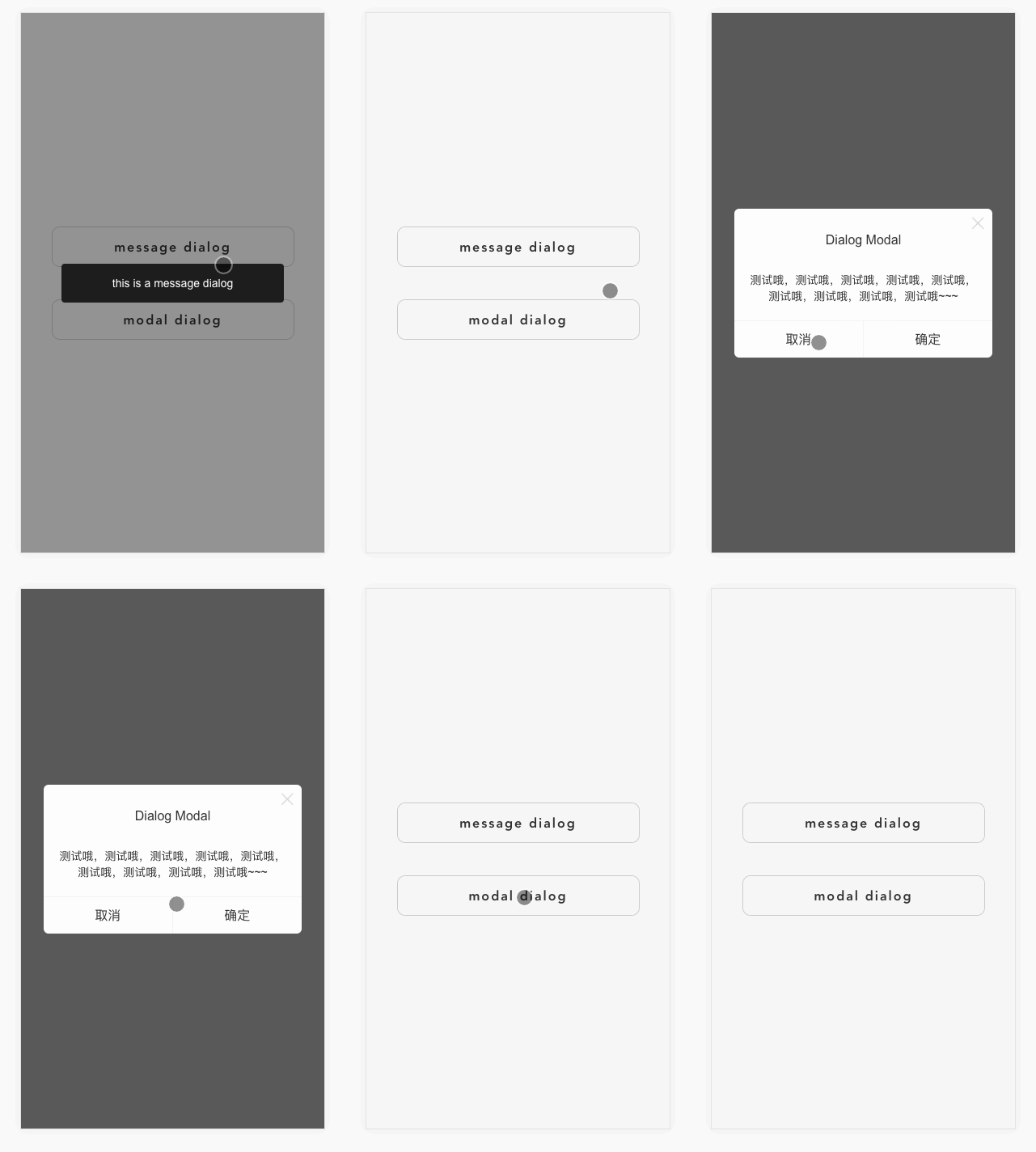
### Attributes(message)
| 参数 | 说明 | 类型 | 可选值 | 默认值 |
|---------- |-------- |---------- |------------- |-------- |
| msg | msg文本内容 | string | — | — |
| timeout | msg显示时长 | number | — | 2000 |
| callback | 回调函数 | function | — | — |
| icon | 特殊icon | string | — | — |
### 用法
```javascript
this.$dialog.msg({msg: 'hello message components ~'})
```
### Attributes(modal)
| 参数 | 说明 | 类型 | 可选值 | 默认值 |
|---------- |-------- |---------- |------------- |-------- |
| show | modal是否显示 | boolean | — | — |
| title | modal标题 | string | — | — |
| content | modal内容 | string | — | — |
| onOk | 确定按钮回调 | function | — | — |
| onCancel | 取消按钮回调 | function | — | — |
| okText | 确定按钮内容 | string | — | — |
| cancelText | 取消按钮内容 | string | — | — |
| showCloseIcon | 是否显示关闭icon | boolean | — | true |
### 用法(插件)
```javascript
this.$dialog.modal({
title: 'Demo Modal',
cancelText: '取消',
okText: '确定',
content: '测试,测试,测试,测试,测试,测试,测试,测试,测试',
onOk () {
console.log('click ok btn to do someting');
},
onCancel () {
console.log('click cancel btn to do someting');
}
})
```
### modal组件用法
```html
.dialog-page {
.dialog-btn {
width 100%
position absolute
top 50%
left 0
transform translateY(-50%)
> p {
width 80%
height 50px
line-height 50px
margin 40px auto 0
border 1px solid #CCC
border-radius 10px
font-size 16px
font-weight bold
letter-spacing 2px
text-align center
&:first-child {
margin-top 0
}
}
}
.modal-text {
text-align: center;
}
}
message dialog
modal dialog
modal components test is awesome!!!
export default {
data () {
return {
selectModel: false
}
},
methods: {
message () {
return this.$dialog.msg({msg: 'this is a message dialog'})
},
open () {
this.selectModel = true
},
close () {
this.selectModel = false
}
}
}
```
## table
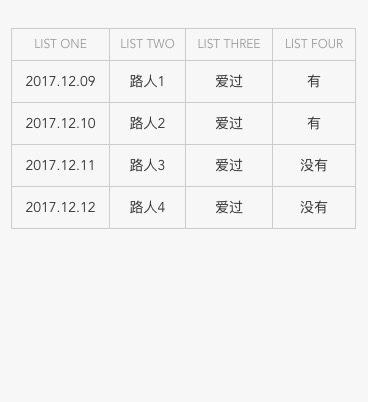
### Attributes
| 参数 | 说明 | 类型 | 可选值 | 默认值 |
|---------- |-------- |---------- |------------- |-------- |
| tableData | table数据 | array | — | — |
| label | thead标题(TableColum) | — | — |
| prop | 绑定的数据 | string | — | — |
### 用法
```html
export default {
data () {
return {
items: [
{
list_1: '2017.12.09',
list_2: '路人1',
list_3: '爱过',
list_4: '有'
},
{
list_1: '2017.12.10',
list_2: '路人2',
list_3: '爱过',
list_4: '有'
},
{
list_1: '2017.12.11',
list_2: '路人3',
list_3: '爱过',
list_4: '没有'
},
{
list_1: '2017.12.12',
list_2: '路人4',
list_3: '爱过',
list_4: '没有'
}
],
noDataText: '没有更多数据啦~'
}
},
methods: {
refresh (done) {
setTimeout(done, 1000)
this.noDataText = ''
console.log('refresh');
},
infinite (done) {
setTimeout(done, 1000, true)
this.noDataText = '没有更多数据啦~'
console.log('infinite');
}
}
}
```
## picker
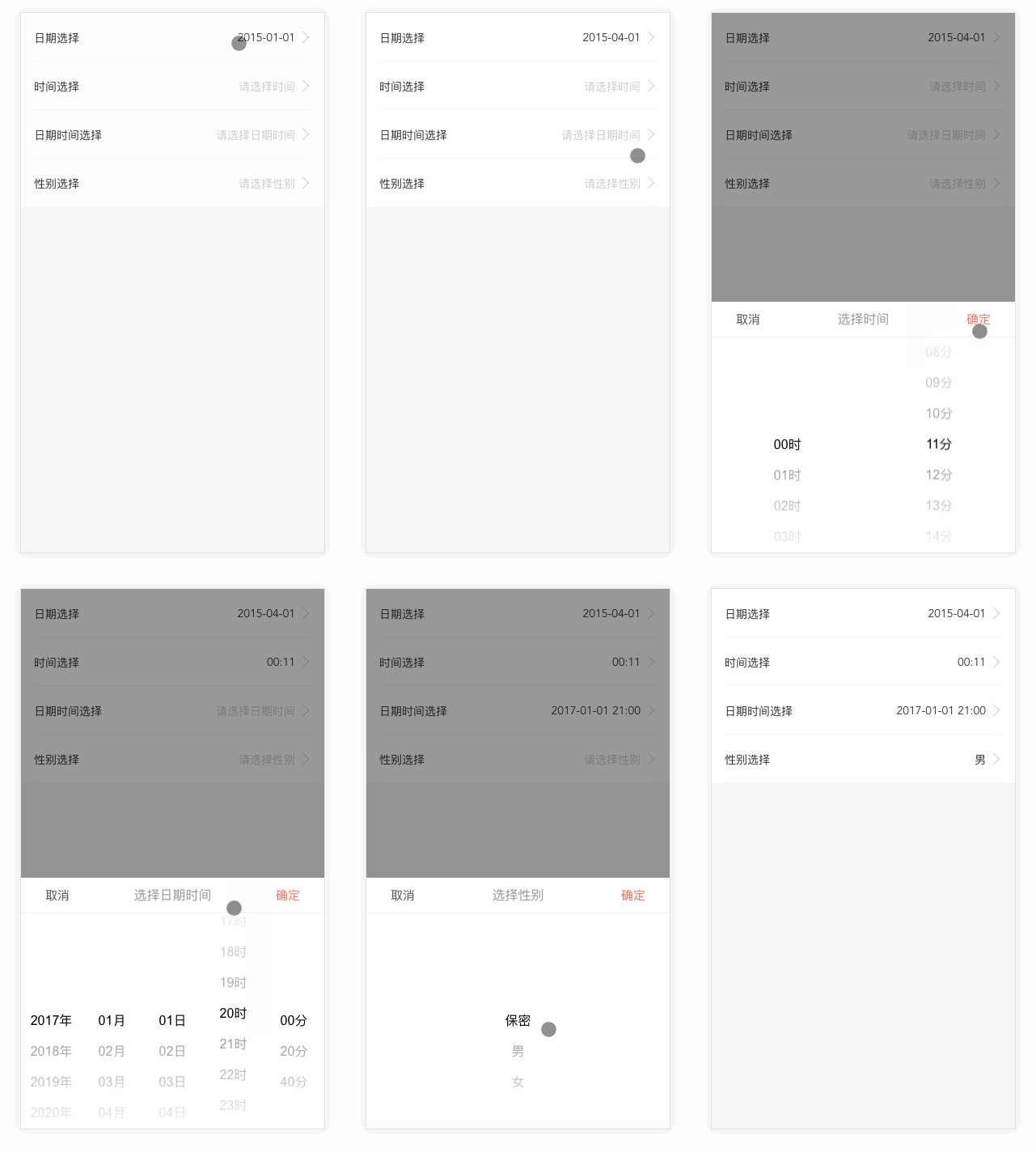
### Attributes
| 参数 | 说明 | 类型 | 可选值 | 默认值 |
|---------- |-------- |---------- |------------- |-------- |
| default | picker默认选中的值 | string/number | — | — |
| type | picker类型 | string | date/time/datetime/custom | datetime |
| title | 选择器弹窗标题 | string | — | — |
| placeholder | placeholder | string | — | 请选择时间 |
| timeStep | 时间选择粒度(有分钟的选择器) | number | — | 1 |
| startYear | 起始年份 | number/string | — | 今年 |
| endYear | 结束年份 | number/string | — | 10年的范围 |
| startDate | 起始日期 | string | — | — |
| endDate | 结束日期 | string | — | — |
| startHour | 起始时间 | number/string | — | 0 |
| endHour | 结束时间 | number/string | — | 23 |
| startMinute | 起始分钟 | number/string | — | 0 |
| endMinute | 结束分钟 | number/string | — | 59 |
| yearFormat | “年“的格式化 | string | — | '{value}年' |
| monthFormat | “月“的格式化 | string | — | '{value}月' |
| dayFormat | “日“的格式化 | string | — | '{value}日' |
| hourFormat | “时“的格式化 | string | — | '{value}时' |
| minuteFormat | “分“的格式化 | string | — | '{value}分' |
### 用法
```html
.picker-page {
.x-list {
padding: 0 0.32rem;
background: #fff;
color: #333;
font-size: 14px;
> li {
min-height: 60px;
padding-top: 21px;
border-bottom: 1px solid #f2f2f2;
overflow: hidden;
> label {
float: left;
}
> div {
float: right;
}
.x-list-arrow {
min-width: 100px;
margin-right: 10px;
position: relative;
> div {
float: right;
text-align: right;
margin-right: 10px;
}
&:after {
content: '';
position: absolute;
top: 4px;
right: -5px;
width: 10px;
height: 10px;
border-top: 1px solid #ccc;
border-right: 1px solid #ccc;
transform: rotate(45deg);
-webkit-transform: rotate(45deg);
}
}
}
}
}
-
日期选择
-
时间选择
-
日期时间选择
-
性别选择
export default {
data() {
return {
gender: {
default: -1,
value: [
{
name: "保密",
value: 0
},
{
name: "男",
value: 1
},
{
name: "女",
value: 2
}
]
},
now_date: null,
now_time: null,
now_datetime: null // new Date().getTime()/1000
};
}
};
```
## select
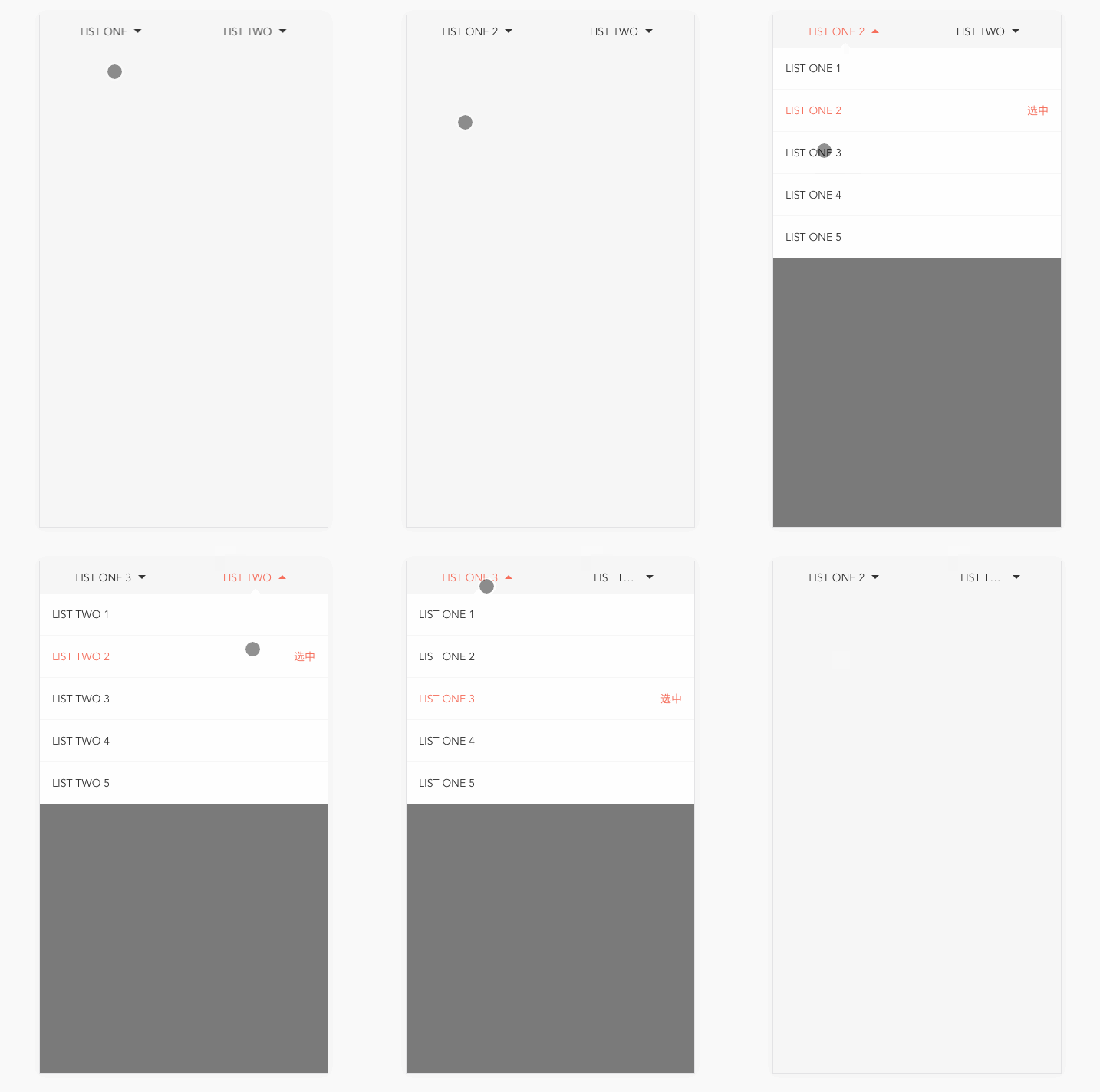
### Attributes
| 参数 | 说明 | 类型 | 可选值 | 默认值 |
|---------- |-------- |---------- |------------- |-------- |
| selectData | 下拉数据 | array | — | [] |
| title | 默认显示的标题 | string | — | '' |
| alwaysShowTitle | 是否一直显示默认标题 | boolean | — | false |
| defaultValue | 默认选中的值 | number/string | — | 0 |
| width | select组件的宽度 | string | — | '100%' |
| ellipsisWidth | select文字超过多出省略号的宽度 | string | — | '120px' |
### Events
| 事件名称 | 说明 | 回调参数 |
|---------- |-------- |---------- |
| search | select 选择时的回调函数 | 参数1:索引,参数2:所中项的id值 |
### 用法
```html
export default {
data() {
return {
selectData: [
{ id: 1, name: "LIST ONE 1" },
{ id: 2, name: "LIST ONE 2" },
{ id: 3, name: "LIST ONE 3" },
{ id: 4, name: "LIST ONE 4" },
{ id: 5, name: "LIST ONE 5" }
],
selectData1: [
{ id: 1, name: "LIST TWO 1" },
{ id: 2, name: "LIST TWO 2" },
{ id: 3, name: "LIST TWO 3" },
{ id: 4, name: "LIST TWO 4" },
{ id: 5, name: "LIST TWO 5" }
]
};
},
methods: {
searchFn(index, id) {
console.log(index, id);
},
searchFn1(index, id) {
console.log(index, id);
}
}
};
```
## switch
### Attributes
| 参数 | 说明 | 类型 | 可选值 | 默认值 |
|---------- |-------- |---------- |------------- |-------- |
| width | switch的宽度(像素) | number/string | — | 60 |
| height | switch的高度(像素) | number/string | — | — |
| disabled | 是否禁用 | boolean | — | false |
| value | switch初始化选择状态 | boolean/number/string | — | 0 |
| activeClass | switch 打开时的class | string | — | avtive |
| inactiveClass | switch 关闭时的class | string | — | inactive |
### Events
| 事件名称 | 说明 | 回调参数 |
|---------- |-------- |---------- |
| change | switch 状态发生变化时的回调函数 | 新状态的值 |
### 用法
**注:如果未使用v-model指令进行值的双向绑定,则switch会显示value值对应的位置,但不能进行on-off操作**
```html
@import '../stylus/_common.styl';
.switch-page {
.x-switch {
margin-top: -7px;
}
}
-
默认switch,值:{{val1}}
-
设置宽高,默认选中,值:{{val2}}
-
禁止点击,值:{{val3}}
-
禁止点击,值:{{val4}}
export default {
data () {
return {
val1: true,
val2: false,
val3: false,
val4: true,
}
},
methods: {
handleChange (val, oldVal) {
console.log('val:'+val, 'oldVal:'+oldVal)
}
}
}
```
## dropdown
```html
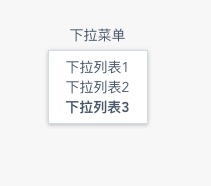
下拉菜单
下拉列表1
下拉列表2
下拉列表3
export default {
name: 'Dropdown',
methods: {
commandHandle (command, instance) {
console.log(command, instance);
}
}
}
```
## Running of this Project
``` bash
# clone the project vui
git clone https://github.com/xuqiang521/vui.git
# install dependencies
npm install
# serve with hot reload at localhost:8080
npm run dev
# build for production with minification
npm run build
# build for production and view the bundle analyzer report
npm run build --report
```