https://github.com/yaal-coop/canaille
Lightweight Identity and Autorization Management mirror https://gitlab.com/yaal/canaille
https://github.com/yaal-coop/canaille
authentication authlib database flask-application iam ldap ldap-authentication login oauth oauth2 oauth2-server openid openid-connect openid-provider openidconnect openldap
Last synced: 4 months ago
JSON representation
Lightweight Identity and Autorization Management mirror https://gitlab.com/yaal/canaille
- Host: GitHub
- URL: https://github.com/yaal-coop/canaille
- Owner: yaal-coop
- License: mit
- Created: 2020-10-23T07:11:52.000Z (almost 6 years ago)
- Default Branch: main
- Last Pushed: 2026-04-11T12:48:26.000Z (4 months ago)
- Last Synced: 2026-04-11T13:09:43.529Z (4 months ago)
- Topics: authentication, authlib, database, flask-application, iam, ldap, ldap-authentication, login, oauth, oauth2, oauth2-server, openid, openid-connect, openid-provider, openidconnect, openldap
- Language: Python
- Homepage: https://canaille.readthedocs.io
- Size: 30.8 MB
- Stars: 23
- Watchers: 7
- Forks: 2
- Open Issues: 0
-
Metadata Files:
- Readme: README.md
- Changelog: CHANGES.rst
- Contributing: CONTRIBUTING.rst
- Funding: .github/FUNDING.yml
- License: LICENSE.rst
Awesome Lists containing this project
README

**Canaille** is a French word meaning *rascal*. It is roughly pronounced **Can I?**,
as in *Can I access your data?* Canaille is a lightweight identity and authorization management software.
It aims to be very light, simple to install and simple to maintain. Its main features are :
- User profile and groups management;
- Authentication, registration, email confirmation, "I forgot my password" emails;
- Authorization management with [OpenID Connect](https://openid.net/developers/how-connect-works) identity;
- Provisioning with [SCIM](https://scim.libre.sh);
- postgresql and OpenLDAP support;
- Customizable, themable;
- The code is easy to read and easy to edit!
# Try it!
## Locally
Either run the development server
```bash
git clone https://gitlab.com/yaal/canaille.git && cd canaille
uv sync --all-extras --group devserver && uv run devserver
```
or run the Docker image
```bash
docker run -it -p 5000:5000 yaalcoop/canaille:latest
```
[Read more about installation methods](https://canaille.readthedocs.io/en/latest/howtos/install.html).
## Online!
You have access to:
- a canaille server at [https://demo.canaille.yaal.coop](https://demo.canaille.yaal.coop)
- a dummy client at [https://demo.client.yaal.coop](https://demo.client.yaal.coop)
Authentication details are available on the demo pages. Data is reset every night at 02:00 CEST.
# Documentation
- Please have a look on our [documentation](https://canaille.readthedocs.io);
- To **install** canaille, follow the [installation guide](https://canaille.readthedocs.io/en/latest/howtos/install.html);
- To **contribute** to canaille, please read the [contribution guide](https://canaille.readthedocs.io/en/latest/development/contributing.html).
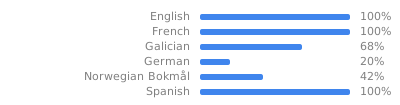
## Translation status
[](https://hosted.weblate.org/engage/canaille/?utm_source=widget)