https://github.com/yamahigashi/mayatransferinpaintweights
Unofficial implementation of Robust Skin Weights Transfer via Weight Inpainting, out of Epic Games.
https://github.com/yamahigashi/mayatransferinpaintweights
3d animation maya
Last synced: about 1 year ago
JSON representation
Unofficial implementation of Robust Skin Weights Transfer via Weight Inpainting, out of Epic Games.
- Host: GitHub
- URL: https://github.com/yamahigashi/mayatransferinpaintweights
- Owner: yamahigashi
- License: mit
- Created: 2023-12-22T07:25:45.000Z (over 2 years ago)
- Default Branch: main
- Last Pushed: 2024-06-05T13:00:49.000Z (about 2 years ago)
- Last Synced: 2025-06-06T03:06:17.091Z (about 1 year ago)
- Topics: 3d, animation, maya
- Language: Python
- Homepage:
- Size: 50.8 KB
- Stars: 50
- Watchers: 3
- Forks: 6
- Open Issues: 0
-
Metadata Files:
- Readme: README.md
- License: LICENSE
Awesome Lists containing this project
README
# Maya Transfer and Inpaint Skin Weights Plugin
Unofficial implementation of Robust Skin Weights Transfer via Weight Inpainting, out of Epic Games, as Autodesk Maya plugin.
The official implementation has been published and is now available! You can access it here: [[rin-23/RobustSkinWeightsTransferCode](https://github.com/rin-23/RobustSkinWeightsTransferCode)]
## Description
This Autodesk Maya plugin introduces a two-stage skin weight transfer process, enhancing precision and artist control in the rigging of diverse garments. By dividing the process, it ensures better results through initial weight transfer for high-confidence areas, followed by artist-guided interpolation for the rest, boosting both efficiency and quality in character design.
## Installation
- Download the [zip](https://github.com/yamahigashi/MayaTransferInpaintWeights/releases/download/v0.0.1/MayaTransferInpaintWeights.zip) file from the [Releases page](https://github.com/yamahigashi/MayaTransferInpaintWeights/releases).
- Unzip the downloaded file.
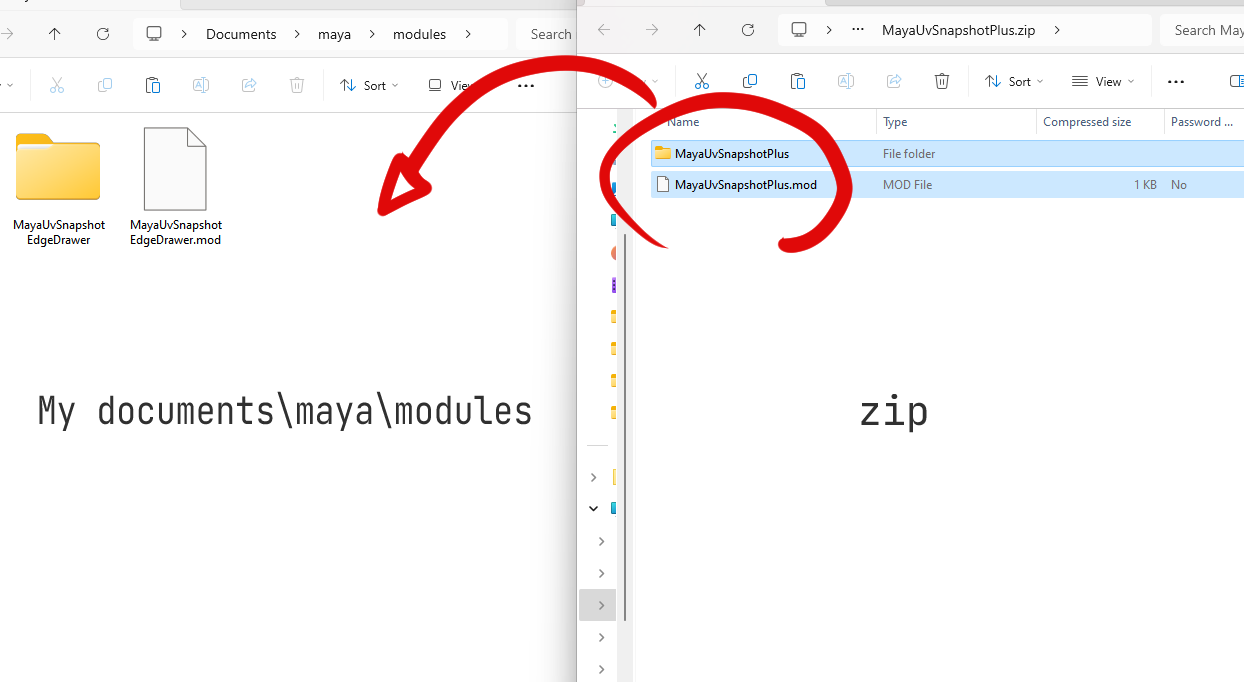
- Place the unzipped files in a folder that is recognized by the `MAYA_MODULE_PATH`, using one of the following methods:
```
a. Place it in the `MyDocuments\maya\modules` folder within your Documents.
b. Place it in any location and register that location in the system's environment variables.
```
If you are not familiar with handling environment variables, method a. is recommended. Here's a detailed explanation for method a.:
- Open the My Documents folder.
- If there is no `modules` folder inside the maya folder, create one.
- Place the unzipped files in this newly created folder.
## Dependencies
- numpy
- scipy
```bat
mayapy -m pip install numpy
mayapy -m pip install scipy
```
## Usage
### startup
1. Open Autodesk Maya.
2. Launch the tool, Go to the `Main Menu and select Window > Skin Weight Transfer Inpaint`.
3. If instructions for installing `numpy` and `scipy` appear, please follow the dialog instructions, open the command prompt, and execute the specified commands.
4. If already installed, a window will appear.
### Operation
The operation within the window is categorized into the following two stages:
1. Classify vertices between src/dst into high precision and low precision, i.e., vertices that require inpainting.
2. Perform inpainting on vertices with low precision or on currently selected vertices.

## Citation
If you use this unofficial implementation in your work, please cite the original paper as follows:
```bibtex
@inproceedings{abdrashitov2023robust,
author = {Abdrashitov, Rinat and Raichstat, Kim and Monsen, Jared and Hill, David},
title = {Robust Skin Weights Transfer via Weight Inpainting},
year = {2023},
isbn = {9798400703140},
publisher = {Association for Computing Machinery},
address = {New York, NY, USA},
url = {https://doi.org/10.1145/3610543.3626180},
doi = {10.1145/3610543.3626180},
booktitle = {SIGGRAPH Asia 2023 Technical Communications},
articleno = {25},
numpages = {4},
location = {, Sydney, NSW, Australia, },
series = {SA '23}
}
```