https://github.com/yangwangmadrid/mbfo
A program for Maximum Bonding Fragment Orbital (MBFO) analysis
https://github.com/yangwangmadrid/mbfo
bonding bonds chemical-bonding chemistry dft-calculations interaction molecular-fragments orbitals
Last synced: 5 months ago
JSON representation
A program for Maximum Bonding Fragment Orbital (MBFO) analysis
- Host: GitHub
- URL: https://github.com/yangwangmadrid/mbfo
- Owner: yangwangmadrid
- License: gpl-3.0
- Created: 2023-06-16T08:48:03.000Z (about 3 years ago)
- Default Branch: main
- Last Pushed: 2023-06-18T07:26:09.000Z (about 3 years ago)
- Last Synced: 2024-01-26T06:41:22.904Z (over 2 years ago)
- Topics: bonding, bonds, chemical-bonding, chemistry, dft-calculations, interaction, molecular-fragments, orbitals
- Homepage:
- Size: 937 KB
- Stars: 4
- Watchers: 1
- Forks: 0
- Open Issues: 0
-
Metadata Files:
- Readme: README.md
- License: LICENSE
Awesome Lists containing this project
README
# mbfo: A program for Maximum Bonding Fragment Orbital (MBFO) analysis
A useful tool for analyzing the chemical interactions between any two fragments of a molecule on the basis of a standard DFT or Hartree-Fock calculation.
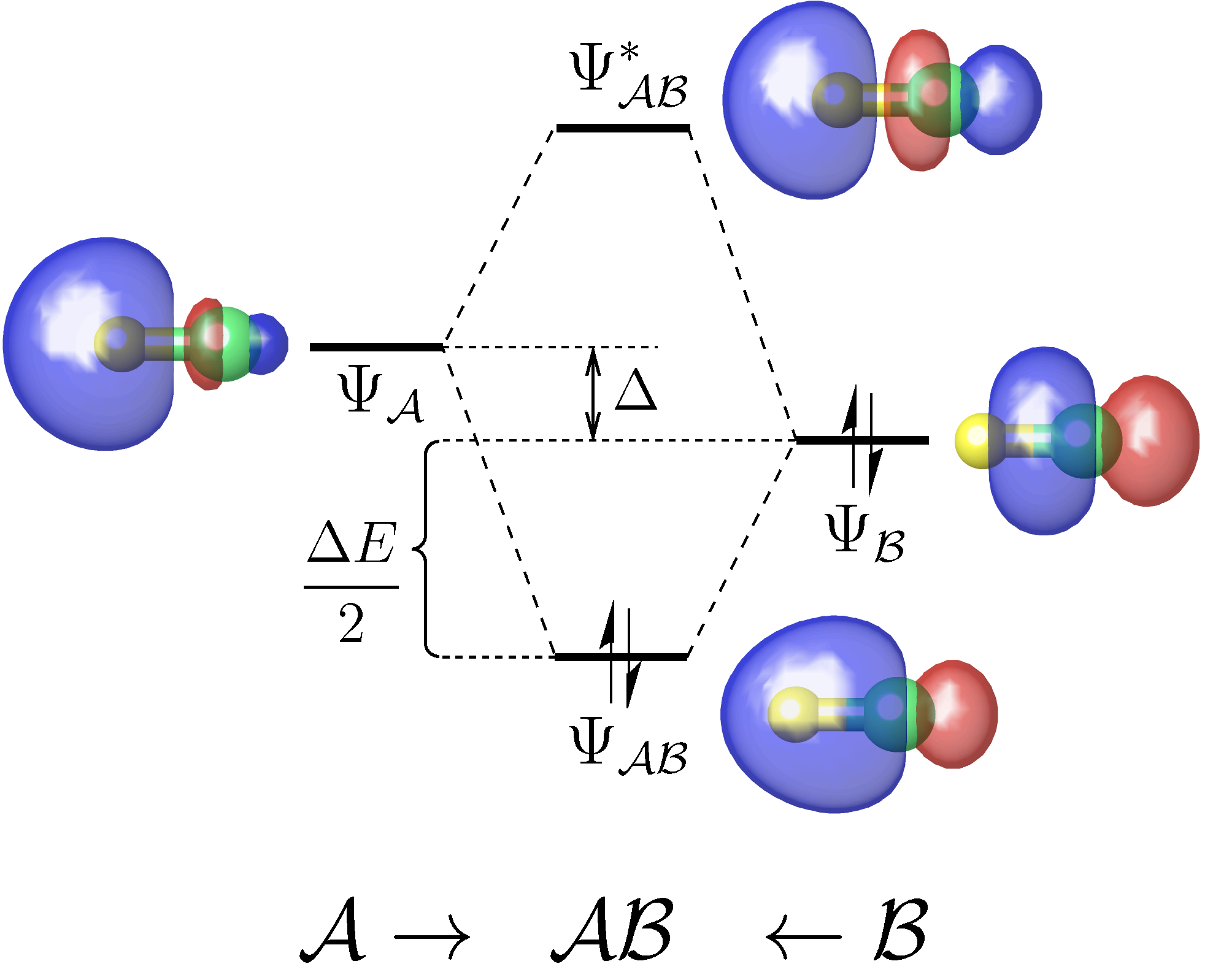
**Download link for the latest v1.1 version**:
https://github.com/yangwangmadrid/mbfo/releases/download/v1.1/mbfo_v1.1_release.zip
## How to cite
If you have used the mbfo program in your research papers or presentations,
it is obligatory to cite the following paper:
1. Yang Wang. Maximum bonding fragment orbitals for deciphering complex chemical interactions. *Phys. Chem. Chem. Phys.* 2018, 20, 13792-13809. [DOI:10.1039/C8CP01808A](https://pubs.rsc.org/en/content/articlelanding/2018/cp/c8cp01808a)
2. Yang Wang. The mbfo program. 2023. [https://github.com/yangwangmadrid/mbfo](https://github.com/yangwangmadrid/mbfo).
## Copyright and license
The Author of the mbfo program is Yang Wang
(yangwang@yzu.edu.cn; orcid.org/0000-0003-2540-2199). The mbfo program is
released under GNU General Public License v3 (GPLv3).
## Disclaimer
The mbfo program is provided as it is, with no warranties. The Author shall
not be liable for any use derived from it. Feedbacks and bug reports are always
welcome (yangwang@yzu.edu.cn). However, it is kindly reminded that the Author
does not take on the responsibility of providing technical support.
## How to install
### Requirements
- python >= 3.6
- numpy >= 1.18.0
- scipy >= 1.5.1
- matplotlib >= 3.5.1
### Installation
1. Place the folder of the mbfo package to any location as you like, which is
referred to as the source directory hereafter.
2. In the source directory, copy the template file "mbfo_v*_template.sh" to "mbfo" and make the latter executable in command line:
```
cp mbfo_v*_template.sh mbfo
chmod a+x mbfo
```
Then, open file "mbfo" with a text editor and set the `MBFO_DIR` variable as the path of the source directory.
3. Add the source directory to the global environment variable `PATH` in e.g.,
".bash_profile" or ".bashrc" under your HOME directory. To this end, the
following line (as an example) can be added to ~/.bash_profile:
```
export PATH=$PATH:${HOME}/softwares/mbfo_v1.0_release
```
Now, type the following command in terminal window to take effect immediately:
```
source ~/.bash_profile
```
4. Type `mbfo` in your terminal window. If the program is installed correctly, you shall see the following output:
```
mbfo version x.x (*** 2023)
-- A program for Maximum Bonding Fragment Orbtal (MBFO) analysis
Written by Yang WANG [yangwang@yzu.edu.cn]
Copyright 2023 Yang Wang
Usage: python mbfo.py
```
## How to use
### Gaussian calculations
1. In the Gaussian input file (e.g., abc.gjf), add in the route section the
keywords `fchk=All Pop=NBO6Read`, and at the end of the file add
`$NBO NOBOND AONAO=W $END`. In this way, the checkpoint file "Test.FChk" and the
NBO matrix file "abc.33" will be generated. Then, rename "Test.FChk" to
"abc.fchk". The Gaussian output file should have the extension name of ".out"
(If necessary, "abc.log" ought to be renamed as "abc.out").
**NOTES**:
- It is strongly recommended to use the NBO program later than version 5.0. The
free version of NBO 3.1 implemented in Gaussian package would be problematic and
give unreliable results.
- Do not use `fchk=All` to generate the checkpoint file if there are two such
jobs running at the same working directory at the same time. Otherwise, the two
jobs will write the same "Test.FChk" file. Instead, add the `%chk=abc.chk` line
to obtain the checkpoint file "abc.chk". Then, use Gaussian's formchk utility to
convert "abc.chk" to "abc.fchk".
2. Make sure that at least the following two files, as the inputs for mbfo, are in the same working directory:
- abc.fchk
- abc.33
3. Change to the working directory and prepare the input file for mbfo (vide
infra), e.g., "abc.inp". The keywords and options in the input file will be explained below in order to conduct a user-specified MBFO analysis.
4. Simply execute the following command:
`mbfo abc.inp > abc.mbfo`
As you see, you will find the MBFO analysis results in file "abc.mbfo".
### A simple example to start with MBFO analysis
Taking $\mathrm{PtCl}_{4}^{2-}$ dianion as a simple example, the bonding nature between the
central $\mathrm{Pt}^{2+}$ and the ligands, four $\mathrm{Cl}^{-}$. All input and output files of this example can be found in folder "examples/".
First, we carry out a DFT single-point calculation, based on the optimized
geometry, to obtain the two files, PtCl4-2.fchk and PtCl4-2.33, as required by
the mbfo program. The Gaussian's input file (PtCl4-2.gjf) for producing the above two files is as follows:
```
# PBEPBE/Def2TZVPP fchk=All Pop=NBO6Read NOSYMM
From PtCl4-2_opt.out
-2 1
78 -1.542120 -1.576087 0.000000
17 0.818936 -1.576087 0.000000
17 -1.542120 0.784968 -0.000000
17 -3.903175 -1.576087 0.000000
17 -1.542120 -3.937142 -0.000000
$NBO
NOBOND
AONAO=W
$END
```
Next, we prepare a text file named PtCl4-2.inp with the following content:
```
File = PtCl4-2 # Key name of the files for the calculated system
Frag = 1 # Index(es) of the atoms for defining fragment A
WriteOrb = MBFO, MBO # Write the MBFOs and MBOs to external fchk files
PlotCut = 0.1 # Only plotting MBFOs/MBOs with BO > this threshold
ExportPlot = TRUE # Export the orbital diagram to a *_diagram.pdf file
```
**NOTE**:
i) The letters in mbfo's input file are *case-insensitive*.
ii) All text following the '#' sign is commentary.
iii) Indices of atoms for `Frag` can be defined in a more compact way following the MATLAB colon syntax and the order does not matter, for example:
```
Frag = 10, 3:5 9 8/1
```
This example means that seven atoms, 1, 3, 4, 5, 8, 9 and 10, are defined as fragment A while the rest of atoms are defined as fragment B.
Then, we run mbfo using the following command under the working directory:
```
mbfo PtCl4-2.inp > PtCl4-2.mbfo
```
We will see a graphic window pop up showing the orbital correlation diagram, as
follows.
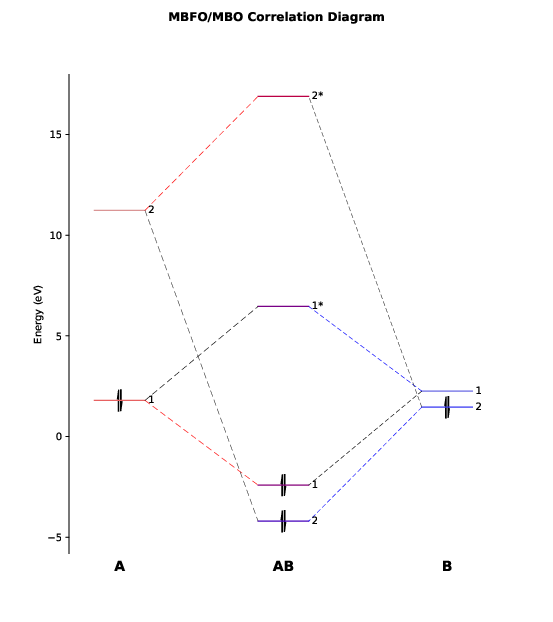
This diagram has also been exported to the file PtCl4-2_diagram.pdf.
As we can see, there are only two major bonding interactions between $\mathrm{Pt}^{2+}$ and the ligands with a considerable bond order (BO > 0.1, as specified by `PlotCut` in PtCl4-2.inp). In the output file PtCl4-2.mbfo, we can find the BO values of these two major bonding interactions, being 0.997 and 0.785:
```
No. BO Occ(A) Occ(B) E(A) E(B) E(AB) E*(AB) Eint
------------------------------------------------------------------------
1 0.99728 1.05212 0.94788 1.79 2.26 -2.41 6.46 -8.41
2 0.78525 0.53659 1.46341 11.24 1.46 -4.20 16.90 -11.32
... ...
TOT 1.95144 -21.77
```
Both BO values are close to 1 and the total BO between $\mathrm{Pt}^{2+}$ and the ligands
is close to 2 (1.951), suggesting that in this complex $\mathrm{Pt}^{2+}$ forms practically
a double bond with the ligands and hence it is not a typical ionic compound and
instead a covalent one.
The above table also provides more information about the two major pairs of
MBFOs, including their occupanies, energies, and interaction energies between
them.
The table following the above table in PtCl4-2.mbfo lists the atomic orbital hybridization of the MBFOs, as follows:
```
Hybridization of MBFOs (alpha+beta spin):
MBFO(A) MBFO(B)
------------------------------------------------------------------------
No. s p d f g h s p d f g h
------------------------------------------------------------------------
1 0.00 0.00 1.00 0.00 0.00 0.00 0.08 0.91 0.01 0.00 0.00 0.00
2 0.93 0.00 0.07 0.00 0.00 0.00 0.21 0.79 0.00 0.00 0.00 0.00
... ...
```
We see that the first MBFO of $\mathrm{Pt}^{2+}$ (fragment A) is purely a d orbital while
the first MBFO of the ligands (fragment B) take an sp11 (ca. 0.91/0.08) hybridization for the $\mathrm{Cl}^{-}$ anions. For the second pair of MBFO, $\mathrm{Pt}^{2+}$ utilizes mainly its s orbitals whereas $\mathrm{Cl}^{-}$ anions takes a hybridization of sp3.8 (ca. 0.79/0.21).
To further to confirm the above analysis, we shall like to visualize these two
leading pairs of MBFOs to see their shapes and how they overlap with each other.
To this end, we need to generate from the PtCl4-2_MBFO.fchk file the cube file
of these MBFOs by using Gaussian's cubegen utility:
```
cubegen 0 mo=1 PtCl4-2_MBFO.fchk PtCl4-2_MBFO-A1.cube -3 h
cubegen 0 mo=23 PtCl4-2_MBFO.fchk PtCl4-2_MBFO-B1.cube -3 h
cubegen 0 mo=2 PtCl4-2_MBFO.fchk PtCl4-2_MBFO-A2.cube -3 h
cubegen 0 mo=24 PtCl4-2_MBFO.fchk PtCl4-2_MBFO-B2.cube -3 h
```
Open the cube files PtCl4-2_MBFO-A1.cube and PtCl4-2_MBFO-B1.cube with JMol, we
can visualize the overlap between the first pair of MBFOs using the following
script in JMol's console:
```
zap
set frank off
background white
load PtCl4-2_MBFO-A1.cube
isosurface A cutoff 0.05 sign red blue PtCl4-2_MBFO-A1.cube translucent 0.3
isosurface B cutoff 0.05 sign pink skyblue PtCl4-2_MBFO-B1.cube translucent 0.3
```
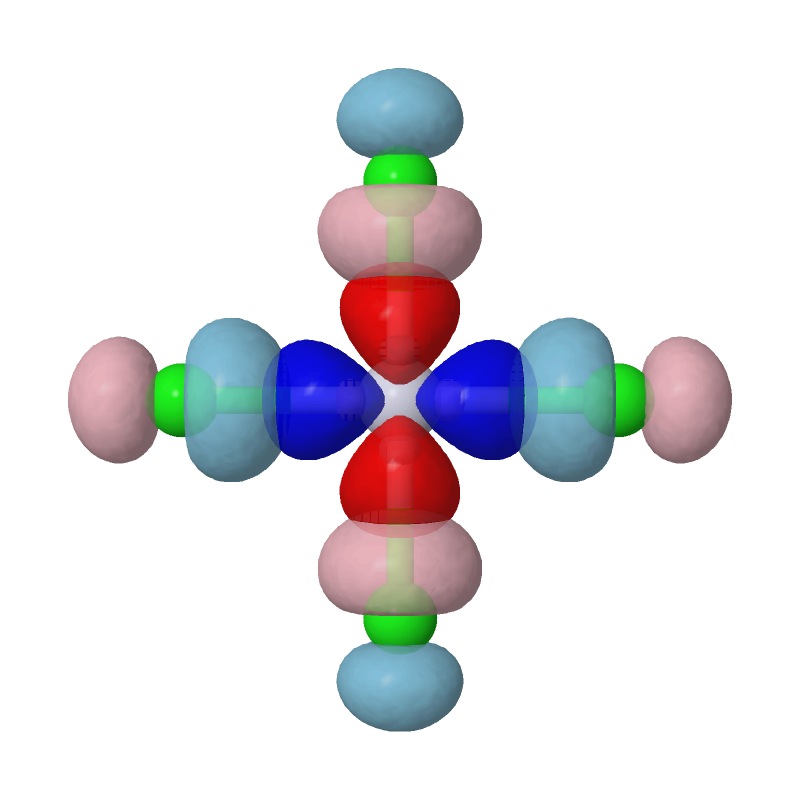
As we can see, the most important interaction is basically the chemical bonding between Pt's d(x2-y2) orbital and Cls' p orbitals. The second pair of MBFOs can be visualized by JMol in a similar way:
```
zap
set frank off
background white
load PtCl4-2_MBFO-A2.cube
isosurface A cutoff 0.05 sign red blue PtCl4-2_MBFO-A2.cube translucent 0.3
isosurface B cutoff 0.05 sign pink skyblue PtCl4-2_MBFO-B2.cube translucent 0.3
```
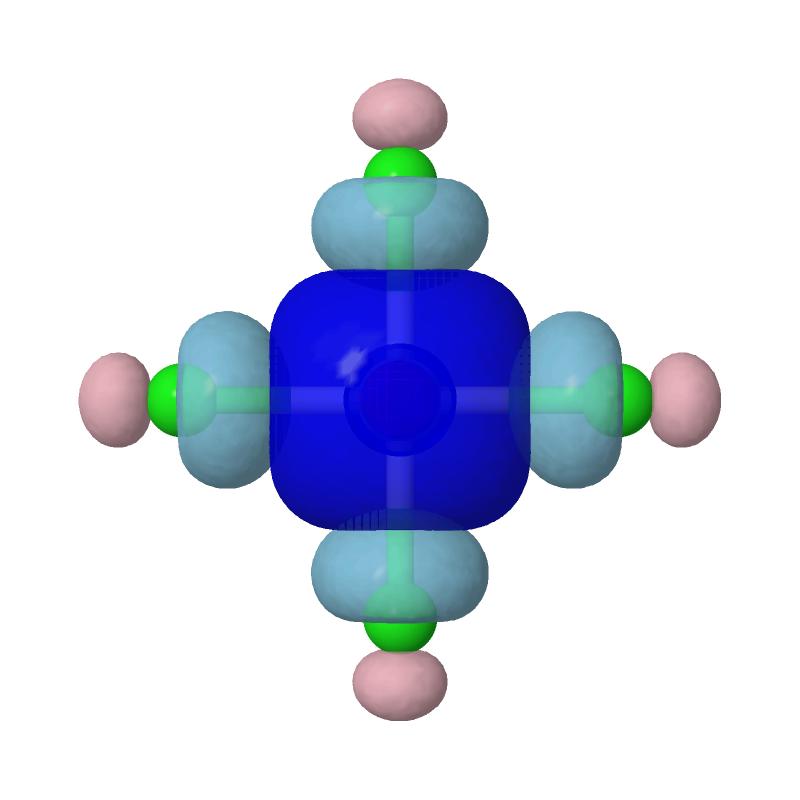
Evidently, the second most important bonding is practically between Pt's s
orbital and each of the Cls' sp4 hybridized orbitals.
### More keywords and options
- **`Plot:`** *`bool`*
Whether or not plot the orbital correltion diagram for MBFOs/MBOs
Default: TRUE
- **`PlotCut:`** *`a positive_value`* or *`a negative_value`*
In the orbital correltion diagram, only draw MBFOs/MBOs with a bond order (or an orbital interaction energy)
more significant than the cutoff value.
Positive and negative cutoff refer, respectively, to bond order and interaction energy in kcal/mol.
Default: 0.01
- **`LabelPlot:`** *`TRUE`* or *`FALSE`*
Whether or not show the labeling of MBFO/MBO levels in the orbital correltion diagram
Default: TRUE
- **`PrintPop:`** *`bool`*
Whether or not print population analysis based on the Mulliken scheme and on the natural atomic orbitals
Default: FALSE
- **`WriteOrb:`** *`MBFO`* and/or *`MBO`* and/or *`NAO`* and/or *`AO`*
Write the corresponding orbtials to external fchk files
Default: None