https://github.com/yankodimitrov/swiftkeychain
An elegant Swift wrapper around the Apple Keychain API
https://github.com/yankodimitrov/swiftkeychain
keychain swift
Last synced: about 1 year ago
JSON representation
An elegant Swift wrapper around the Apple Keychain API
- Host: GitHub
- URL: https://github.com/yankodimitrov/swiftkeychain
- Owner: yankodimitrov
- License: mit
- Created: 2014-11-14T18:31:12.000Z (over 11 years ago)
- Default Branch: master
- Last Pushed: 2023-05-23T21:38:39.000Z (about 3 years ago)
- Last Synced: 2025-04-13T09:03:53.548Z (about 1 year ago)
- Topics: keychain, swift
- Language: Swift
- Homepage:
- Size: 224 KB
- Stars: 96
- Watchers: 3
- Forks: 24
- Open Issues: 7
-
Metadata Files:
- Readme: README.md
- License: LICENSE.txt
Awesome Lists containing this project
README
#SwiftKeychain
[](https://github.com/Carthage/Carthage)
## Abstract
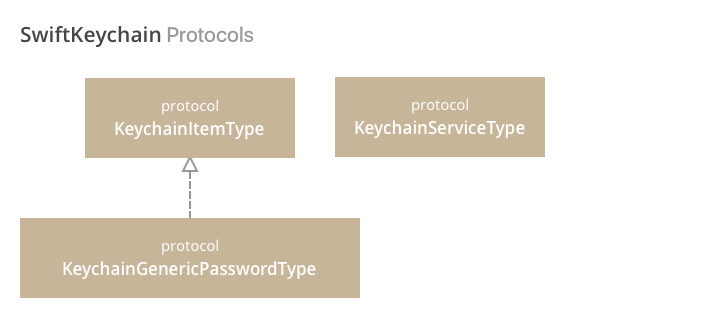
Swift wrapper for working with the Keychain API implemented with Protocol Oriented Programming.
You create an implementation of the KeychainGenericPasswordType protocol that encapsulates the data that you want to store in the Keychain. Most of the implementation is done for you by using default protocol implementations, such as setting the default service name and access mode (kSecAttrAccessibleWhenUnlocked).
Then you call the KeychainItemType methods to save, remove or fetch the item from the provided as argument KeychainServiceType protocol implementation.
Let's say we want to store the access token and username for an Instagram account in the Keychain:
```swift
struct InstagramAccount: KeychainGenericPasswordType {
let accountName: String
let token: String
var data = [String: AnyObject]()
var dataToStore: [String: AnyObject] {
return ["token": token]
}
var accessToken: String? {
return data["token"] as? String
}
init(name: String, accessToken: String = "") {
accountName = name
token = accessToken
}
}
```
In var dataToStore: [String: AnyObject] you return the Dictionary that you want to be saved in the Keychain and when you fetch the item from the Keychain its data will be populated in your var data: [String: AnyObject] property.
### Save Item
```swift
let newAccount = InstagramAccount(name: "John", accessToken: "123456")
do {
try newAccount.saveInKeychain()
} catch {
print(error)
}
```
*Note:* The provided implementation of the KeychainServiceType protocol will replace the item if it already exists in the Keychain database.
### Remove Item
```swift
let account = InstagramAccount(name: "John")
do {
try account.removeFromKeychain()
} catch {
print(error)
}
```
### Fetch Item
```swift
var account = InstagramAccount(name: "John")
do {
try account.fetchFromKeychain()
if let token = account.accessToken {
print("name: \(account.accountName), token: \(token)")
}
} catch {
print(error)
}
```
## Installation
SwiftKeychain requires Swift 2.0 and Xcode 7 and supports iOS, OSX, watchOS and tvOS.
#### Manually
Copy the Keychain/Keychain.swift file to your project.
#### Carthage
Add the following line to your [Cartfile](https://github.com/carthage/carthage)
```swift
github "yankodimitrov/SwiftKeychain" "master"
```
#### CocoaPods
Add the following line to your [Podfile](https://guides.cocoapods.org/)
```swift
pod “SwiftKeychain”
```
## License
SwiftKeychain is released under the MIT license. See the LICENSE.txt file for more info.