https://github.com/yaotutu/folder2podcast
把任何音频变成私人播客 - 上传本地音频或粘贴视频链接,自动生成 RSS,在任意播客客户端订阅收听。适合离线听书、本地音乐管理、视频课程转音频。
https://github.com/yaotutu/folder2podcast
podcast rss
Last synced: 5 months ago
JSON representation
把任何音频变成私人播客 - 上传本地音频或粘贴视频链接,自动生成 RSS,在任意播客客户端订阅收听。适合离线听书、本地音乐管理、视频课程转音频。
- Host: GitHub
- URL: https://github.com/yaotutu/folder2podcast
- Owner: yaotutu
- Created: 2025-01-26T08:01:57.000Z (over 1 year ago)
- Default Branch: main
- Last Pushed: 2026-01-08T08:25:42.000Z (6 months ago)
- Last Synced: 2026-01-09T08:57:24.677Z (6 months ago)
- Topics: podcast, rss
- Language: TypeScript
- Homepage:
- Size: 28.4 MB
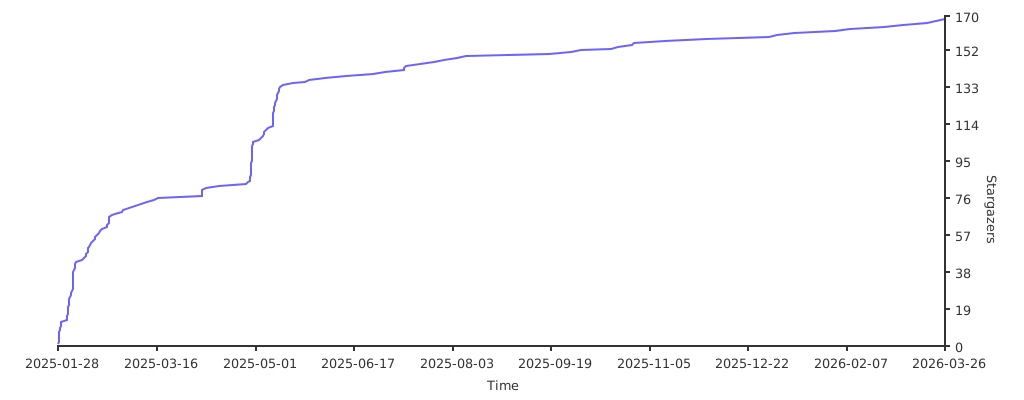
- Stars: 160
- Watchers: 5
- Forks: 10
- Open Issues: 1
-
Metadata Files:
- Readme: README.en.md
Awesome Lists containing this project
README
[](https://github.com/Akshay090/svg-banners)
# 🎙️ Folder2Podcast RSS
> Convert local audio folders to private podcast RSS feeds with one command - Zero intrusion, No side effects
[中文版](README.md)
## Table of Contents
- [🎙️ Folder2Podcast RSS](#️-folder2podcast-rss)
- [Table of Contents](#table-of-contents)
- [Background](#background)
- [✨ Features](#-features)
- [📱 Web Interface](#-web-interface)
- [🎯 Other Features](#-other-features)
- [🚀 Quick Start](#-quick-start)
- [Docker Deployment (Recommended)](#docker-deployment-recommended)
- [Docker Image Tags](#docker-image-tags)
- [📦 Directory Structure](#-directory-structure)
- [Configuration File Location](#configuration-file-location)
- [⚙️ Configuration](#️-configuration)
- [Environment Variables](#environment-variables)
- [podcast.json Configuration](#podcastjson-configuration)
- [🎨 Advanced Features](#-advanced-features)
- [📱 Client Support](#-client-support)
- [Supported Podcast Clients](#supported-podcast-clients)
- [Usage Flow](#usage-flow)
- [RSS Best Practices](#rss-best-practices)
- [Troubleshooting](#troubleshooting)
- [📋 Support \& Feedback](#-support--feedback)
- [Changelog](#changelog)
## Background
Podcast RSS is a powerful audio distribution standard that provides:
- 🔖 Complete playback progress tracking
- 🎯 Precise resume playback functionality
- 🔄 Cross-device listening history sync
- 📱 Multi-platform listening support
- 🎨 Rich media information display
Folder2Podcast RSS lets you easily convert local audio folders into private podcast RSS feeds, enjoying all the advanced features of professional podcast clients:
- 🎧 Listen using your favorite podcast apps (like Apple Podcasts, Pocket Casts)
- 📱 Continue from where you left off on any device
- 🔄 Automatically sync listening history across devices
- 📚 Systematically manage your audiobook library
- 🎯 Smart bookmarking for every audio file
Just one command to deploy, transforming your local audio into private podcast feeds instantly.
## ✨ Features
### 📱 Web Interface
The project provides a user-friendly web interface that allows users to:
- View all available podcast sources
- Copy subscription URLs with one click
- One-click subscription support for multiple podcast clients:
- Apple Podcasts
- Overcast
- Pocket Casts
- Castro
- Moon FM
- More clients coming soon...

### 🎯 Other Features
- Smart filename processing
- Automatic serialization
- Cover image management
- Multi-device sync
For detailed information, please refer to [Advanced Guide](docs/advanced-guide.en.md).
## 🚀 Quick Start
### Docker Deployment (Recommended)
1. **Preparation**
- Install Docker
- Prepare audio directories (organized by podcast content)
- Standardize filename format (e.g., 01-Chapter1.mp3, Episode02.mp3)
⚠️ **Important: BASE_URL Configuration**
When deploying to a server, you must properly configure the BASE_URL environment variable, which affects:
- Audio file links in RSS feed
- Cover image links
- All static resource access paths
Configuration examples:
```bash
# For local testing
BASE_URL=http://localhost:3000
# For server deployment (replace with your actual server IP or domain)
BASE_URL=http://192.168.55.222:3000
# or
BASE_URL=http://your-domain.com
```
Important notes:
- BASE_URL must include protocol prefix (http:// or https://)
- Include port number if using custom port
- Don't add trailing slash '/'
- Ensure the address is accessible from client devices (like podcast apps)
2. **Launch Service**
Option 1: Direct Docker command
```bash
docker run -d \
-p 3000:3000 \
-v /path/to/audiobooks:/podcasts \
-e PORT=3000 \
-e BASE_URL=http://your-server-ip:3000 \
-e PUID=$(id -u) \
-e PGID=$(id -g) \
yaotutu/folder2podcast
```
Option 2: Using Docker Compose (Recommended)
```yaml
# docker-compose.yml
version: '3.8'
services:
folder2podcast:
image: yaotutu/folder2podcast
ports:
- "3000:3000"
volumes:
- ./audiobooks:/podcasts:ro # Mount in read-only mode
environment:
- PORT=3000
- AUDIO_DIR=/podcasts
- BASE_URL=http://your-server-ip:3000
- PUID=1000 # Replace with your user ID
- PGID=1000 # Replace with your group ID
restart: unless-stopped
```
> **Permission Note**:
> - Sometimes Docker container might have trouble accessing your audio files
> - In such cases, you need to set `PUID` and `PGID` environment variables
> - These values should match the owner ID of your audio folder
> - On Mac/Linux, simply run `id -u` and `id -g` in terminal to get these values
> - Once set correctly, the app will be able to access your audio files normally
3. **Verify Deployment**
- Visit `http://localhost:3000/podcasts` to confirm service is running
- Check if podcast list displays correctly
- Test audio file access
## Docker Image Tags
- `yaotutu/folder2podcast:main` - Development version, synced with main branch, includes latest features
- `yaotutu/folder2podcast:latest` - Stable version, tested and released, recommended for production
## 📦 Directory Structure
Each podcast folder can contain its own `podcast.json` configuration file to customize that podcast's presentation and behavior. This design allows different settings for each podcast series.
### Configuration File Location
```
audiobooks/
├── podcast-series-1/
│ ├── 01-chapter1.mp3
│ └── podcast.json # Independent config for series 1
└── podcast-series-2/
├── 01.intro.mp3
└── podcast.json # Independent config for series 2
```
## ⚙️ Configuration
### Environment Variables
The system supports multiple environment variables for customization. Here's the complete list:
| Variable | Description | Default | Example |
| -------------- | ---------------------------------- | ----------------------- | ---------------------------- |
| `AUDIO_DIR` | Audio files root directory | `./audio` | `/path/to/audiobooks` |
| `PORT` | Server listening port | `3000` | `8080` |
| `BASE_URL` | Server base URL for RSS feed links | `http://localhost:PORT` | `http://192.168.55.222:3000` |
| `TITLE_FORMAT` | Episode title display format | `full` | `clean` or `full` |
| `PUID` | Audio folder owner ID | `1000` | Run `id -u` to get |
| `PGID` | Audio folder group ID | `1000` | Run `id -g` to get |
Detailed description:
1. **AUDIO_DIR**
- Purpose: Specify root directory for audio files
- Default: audio folder in current directory
- Note: Directory must have read permissions
2. **PORT**
- Purpose: Specify server listening port
- Default: 3000
- Note: Service won't start if port is occupied
3. **BASE_URL**
- Purpose: Generate URLs in RSS feed
- Default: `http://localhost:port`
- Importance: Must be set correctly to ensure audio files are accessible
- Format: Must include protocol (http/https)
4. **TITLE_FORMAT**
- Purpose: Control episode title display format
- Default: `full` (keep complete filename)
- Options:
* `full`: Keep complete filename (without extension)
* `clean`: Remove number prefix and separators
Usage example:
```bash
# Docker run example
docker run -d \
-p 3000:3000 \
-v /audiobooks:/podcasts \
-e AUDIO_DIR=/podcasts \
-e PORT=3000 \
-e BASE_URL=http://192.168.55.222:3000 \
-e TITLE_FORMAT=full \
yaotutu/folder2podcast
```
Configuration priority:
- Environment variables > Default values
- podcast.json config > Environment variables (for specific podcasts)
### podcast.json Configuration
```json
{
"title": "Podcast Title",
"description": "Podcast Description",
"author": "Author Name",
"email": "author@example.com",
"language": "en-us",
"category": "Technology",
"explicit": false,
"websiteUrl": "https://example.com",
"titleFormat": "clean",
"episodeNumberStrategy": "first", // Episode number extraction strategy: prefix (default), suffix, first, last, or { pattern: "regex" }
"useMTime": false // Whether to use file creation time as publish date, defaults to false
}
```
> 📝 **Time Management Note**:
> - When `useMTime` is `false` (default):
> - Files with numbers use number-based publish dates
> - Files without numbers use file creation time
> - When `useMTime` is `true`:
> - All files use file creation time as publish date
> - Ignores number information in filenames
> - For detailed information, refer to [Advanced Guide](docs/advanced-guide.en.md)
## 🎨 Advanced Features
## 📱 Client Support
### Supported Podcast Clients
Almost all podcast clients that support custom RSS feeds work:
- Apple Podcasts (iOS, Mac)
- Pocket Casts (All platforms)
- Overcast (iOS)
- Castro (iOS)
- Google Podcasts (Android, Web)
- AntennaPod (Android)
### Usage Flow
1. **Get Subscription Link**
- Visit `http://your-server:3000/podcasts`
- Find the podcast series you want to subscribe to
- Copy the corresponding RSS Feed URL
2. **Add to Podcast Client**
- Open your preferred podcast client
- Find "Add Podcast" or "Add RSS Feed"
- Paste your Feed URL
- Wait for content to sync
3. **Start Using**
- All episodes will automatically sync to the client
- Listening progress syncs across devices
- Supports background download and offline playback
- Can add chapter notes (supported by some clients)
### RSS Best Practices
1. **Content Organization**
- Use clear folder structure
- Maintain consistent file naming
- Add high-quality cover images (recommended 1400x1400px)
2. **Performance Optimization**
- Control the number of audio files per folder
- Use mp3 format for best compatibility
- Configure correct BASE_URL to ensure accessibility
## Troubleshooting
## 📋 Support & Feedback
- Found a bug? [Submit Issue](https://github.com/your-repo/folder2podcast/issues)
- Have suggestions? [Join Discussion](https://github.com/your-repo/folder2podcast/discussions)
- Want to contribute? [Submit PR](https://github.com/your-repo/folder2podcast/pulls)
## Changelog
View complete update history in [CHANGELOG.md](CHANGELOG.md)

👆 Scan QR code to join our WeChat group for beta testing!

### 1. Podcast List API
- Access `/podcasts` to get all available podcasts
- Returns detailed information including title, description, subscription URLs
- Feed URLs include complete access addresses ready for subscription
### 2. Resource Access
- Podcast cover: `/audio/podcast-name/cover.jpg`
- Audio files: `/audio/podcast-name/episode.mp3`
- Default resources: `/image/default-cover.jpg`