https://github.com/yashwanth2804/decenttwt
Decentralised twitter using #EOS blockchain
https://github.com/yashwanth2804/decenttwt
demuxjs eos-blockchain eosjs reactjs
Last synced: 11 months ago
JSON representation
Decentralised twitter using #EOS blockchain
- Host: GitHub
- URL: https://github.com/yashwanth2804/decenttwt
- Owner: yashwanth2804
- Created: 2018-11-21T04:31:42.000Z (over 7 years ago)
- Default Branch: master
- Last Pushed: 2018-11-26T12:27:59.000Z (over 7 years ago)
- Last Synced: 2025-04-05T02:21:55.690Z (about 1 year ago)
- Topics: demuxjs, eos-blockchain, eosjs, reactjs
- Language: JavaScript
- Homepage:
- Size: 159 KB
- Stars: 7
- Watchers: 1
- Forks: 2
- Open Issues: 0
-
Metadata Files:
- Readme: README.md
Awesome Lists containing this project
README
### Decentralised twitter, will let you to tweet to Blockchain,EOS.Every tweet you make be on open blockchain.

**Prerequisites**
* firstly install docker
* install Eos docker image
* install mongodb image
**Eos docker**
> Docker pull & run
```
docker pull eosio/eos:v1.4.2`
```
```
docker run --name eosio \
--publish 7777:7777 \
--publish 127.0.0.1:5555:5555 \
--volume CONTRACTS_DIR:CONTRACTS_DIR \
--detach \
eosio/eos:v1.4.2 \
/bin/bash -c \
"keosd --http-server-address=0.0.0.0:5555 & exec nodeos -e -p eosio --plugin eosio::producer_plugin --plugin eosio::chain_api_plugin --plugin eosio::history_plugin --plugin eosio::history_api_plugin --plugin eosio::http_plugin -d /mnt/dev/data --config-dir /mnt/dev/config --http-server-address=0.0.0.0:7777 --access-control-allow-origin=* --contracts-console --http-validate-host=false --filter-on='*'"
```
> to check if running
```
docker logs --tail 10 eosio
```
> Make alias
Add this to the end of bash.rc file
```
alias cleos='docker exec -it eosio /opt/eosio/bin/cleos --url http://127.0.0.1:7777 --wallet-url http://127.0.0.1:5555'
```
> Strat & stop docker
```
docker start eosio
docker stop eosio
```
**Docker mongo**
> Docker pull & run
```
docker pull mongo:4.0
```
```
docker run --rm --name mongo_blog_container -d -p 127.0.0.1:27017:27017 mongo:4.0
```
> Check if running
```
docker logs mongo_blog_container --follow
```
**Setup a development directory**
> select your preferred dir location and create dir
```
mkdir contracts
cd contracts
```
> take a note of absoulte path
```
pwd
```
now `CONTRACTS_DIR` = your `pwd` output
**EOSIO Contract Development Toolkit - CDT**
```
cd CONTRACTS_DIR
git clone --recursive https://github.com/eosio/eosio.cdt --branch v1.3.2 --single-branch
cd eosio.cdt
./build.sh
sudo ./install.sh
```
**Create wallet and import keys**
> create wallet
```
cleos wallet create --to-console
```
`This will create default wallet , this will echo a wallet secret key.Which will be used to unlock wallet in future.Save this Master password`
> wallet open and list, gives list of wallets
```
cleos wallet open
cleos wallet list
```
> wallet unlock
```
cleos wallet unlock
```
**Create development public key**
```
cleos wallet create_key
```
`now this will be listed in your wallet to check use ` ** cleos wallet keys**
> Take note that `YOUR_PUBLIC_DEPLOYMENT_KEY` = key genrated above
**Import Eosio private key**
This key is need to bootstrap the chain and create accounts
```
cleos wallet import
```
import this private key `5KQwrPbwdL6PhXujxW37FSSQZ1JiwsST4cqQzDeyXtP79zkvFD3`
**Create contract account**
```
cleos create account eosio blog YOUR_PUBLIC_DEPLOYMENT_KEY
```
`blog is the account where we will deploy our smart contract`
**Compile and set contract**
```
cd CONTRACTS_DIR
```
copy the blog folder fromthe github repo to this directory.
> Change the dir to blog folder and compile the cpp file, this will generate `wasm`,`abi` files.
```
cd CONTRACTS_DIR/blog
eosio-cpp -o blog.wasm blog.cpp --abigen
```
> Setting contract
```
cleos set contract blog CONTRACTS_DIR/blog -p blog@active
```
`this will push the contract to the eos blockchain running locally `
**Create user account**
Lets create a actual user who tweets to the Eos network,
```
cleos create key --to-console
```
`this above will give you pub and private keys,save these some where`
> USER_PUB_KEY = above genrated public key
> USER_PRIV_KEY = above generated private key
```
cleos create account eosio yaman USER_PUB_KEY
```
WEB APPLICATION SETUP
=========
make sure your give `npm install` to install required packages , cross check if node and mongodb are running.
**To start backend**
cd backend
npm start
**To start frontend**
cd frontend
npm start
**To stop**, press ctrl+c on your keyboard
Setting up env variables
===========
cd to `frontend`
edit .env file to your fit
`REACT_APP_EOSIO_ACCOUNT=whatever the name given (yaman)`
`REACT_APP_EOSIO_PRIVATE_KEY=USER_PRIV_KEY`
For `.env` in backend you may leave as it is
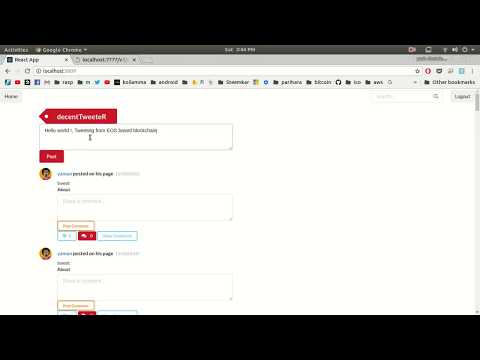
## Code in acction 🏃🏃
[](https://www.youtube.com/watch?v=PWVDlGKYahs&feature=youtu.be)