https://github.com/yasserbdj96/imbot
Imbot is an automation tool for website control. Simplify your workflow and automate repetitive tasks with ease.
https://github.com/yasserbdj96/imbot
bot python
Last synced: 3 months ago
JSON representation
Imbot is an automation tool for website control. Simplify your workflow and automate repetitive tasks with ease.
- Host: GitHub
- URL: https://github.com/yasserbdj96/imbot
- Owner: yasserbdj96
- License: other
- Created: 2021-04-08T00:10:15.000Z (over 5 years ago)
- Default Branch: main
- Last Pushed: 2023-03-20T12:05:34.000Z (over 3 years ago)
- Last Synced: 2025-12-17T01:38:04.938Z (7 months ago)
- Topics: bot, python
- Language: Python
- Homepage:
- Size: 6.45 MB
- Stars: 9
- Watchers: 1
- Forks: 3
- Open Issues: 1
-
Metadata Files:
- Readme: README.md
- Changelog: CHANGELOG
- Funding: .github/FUNDING.yml
- License: LICENSE
- Code of conduct: CODE_OF_CONDUCT.md
Awesome Lists containing this project
README
imbot
Imbot is an automation tool for website control. Simplify your workflow and automate repetitive tasks with ease.
[](https://github.com/yasserbdj96/imbot/actions/workflows/python-app-on-linux.yml)
[](https://github.com/yasserbdj96/imbot/actions/workflows/pypi-setup.yml)
[](https://github.com/yasserbdj96/imbot/actions/workflows/docker-image.yml)
[](https://github.com/yasserbdj96/imbot/actions/workflows/gcr.yml)
[](https://github.com/yasserbdj96/imbot/actions/workflows/pipup.yml)
[](https://github.com/yasserbdj96/imbot/actions/workflows/push-gitLab.yml)
[](https://github.com/yasserbdj96/imbot/actions/workflows/pages.yml)
[](https://github.com/yasserbdj96/imbot/actions/workflows/codeql-analysis.yml)
[](https://www.codefactor.io/repository/github/yasserbdj96/imbot)
[](https://pypi.org/project/imbot)
[](https://github.com/yasserbdj96/imbot)
[](https://hub.docker.com/r/yasserbdj96/imbot/)
[](https://github.com/yasserbdj96/imbot)
[](https://github.com/yasserbdj96/imbot)
[](https://github.com/yasserbdj96/imbot)
[](https://github.com/yasserbdj96/imbot)






[](https://github.com/yasserbdj96/imbot)
[](https://gitter.im/yasserbdj96/imbot?utm_source=badge&utm_medium=badge&utm_campaign=pr-badge&utm_content=badge)
Languages:
* python3
Requirements
[✓] hexor
[✓] asciitext
[✓] selenium
Docker pull,build & run:
```bash
# pull:
❯ docker pull yasserbdj96/imbot:latest
# build:
❯ docker build -t docker.io/yasserbdj96/imbot:latest .
# run:
❯ docker run -e headless=* -e json_data='*' -e opiration_title='*' -e argvs='=""' -i -t imbot:latest
# EX:
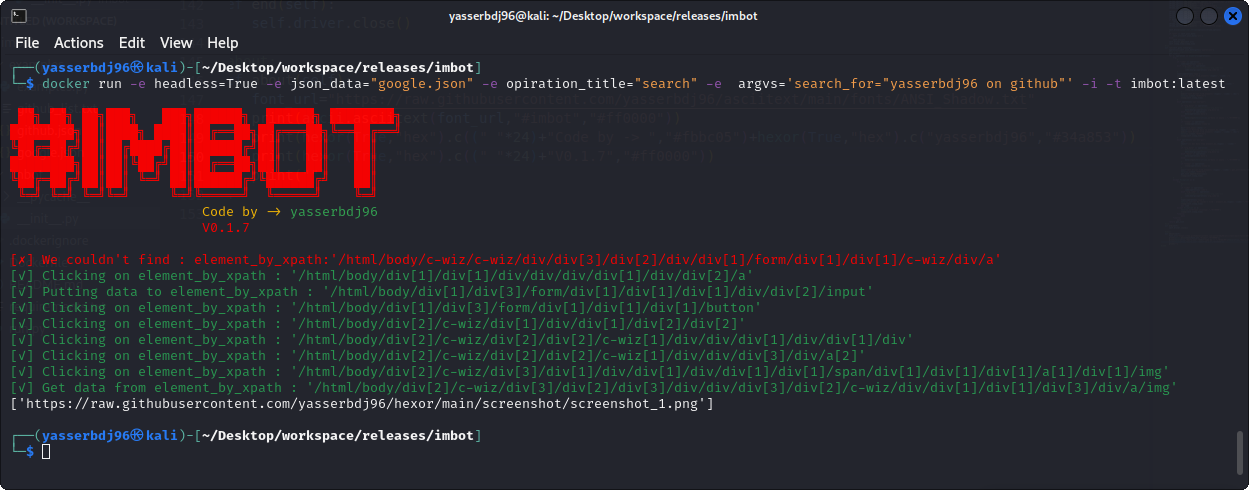
# docker run -e headless=True -e json_data="google.json" -e opiration_title="search" -e argvs='search_for="yasserbdj96 on github"' -i -t imbot:latest
# * = All inputs must be entered.
```
Github Packages pull,build & run:
```bash
# pull:
❯ docker pull ghcr.io/yasserbdj96/imbot:latest
# build:
❯ docker build -t ghcr.io/yasserbdj96/imbot:latest .
# run:
❯ docker run -e headless=* -e json_data='*' -e opiration_title='*' -e argvs='=""' -i -t ghcr.io/yasserbdj96/imbot:latest
# EX:
# docker run -e headless=True -e json_data="google.json" -e opiration_title="search" -e argvs='search_for="yasserbdj96 on github"' -i -t ghcr.io/yasserbdj96/imbot:latest
# * = All inputs must be entered.
```
Python Package Installation:
```
# Install from pypi:
❯ pip install imbot
# OR
❯ python -m pip install imbot
# Local install:
❯ git clone https://github.com/yasserbdj96/imbot.git
❯ cd imbot
❯ pip install -r requirements-pypi.txt
❯ sudo python setup.py install
# Uninstall:
❯ pip uninstall imbot
```
Run without installation:
```
❯ git clone https://github.com/yasserbdj96/imbot.git
❯ cd imbot
❯ pip install -r requirements.txt
❯ python run.py --headless --json_data '*' --opiration_title '*' --argvs '{"":""}' --exec_path ''
# EX:
# python run.py --headless False --json_data './imbot-examples/google.json' --opiration_title 'search' --argvs '{"search_for":"yasserbdj96 github"}' --exec_path './chromedriver'
# * = All inputs must be entered.
# Run with Makefile:
❯ make run headless= json_data='*' opiration_title='*' argvs='{"":""}' exec_path=''
```
Usage:
```python
from imbot import *
p1=imbot(json_data="*",sleep_time=2,url="*",headless=True,exec_path="")
p1.run(*,)
# * = All inputs must be entered.
p1.end()
"""
Default json code:
{
"url":"",
"":{
"operations":[
{"element_by":"","element_code":"","element_arg":"","opt":"","arg_data":"","data":"","sleep":}
]
}
}
Help:
# Types of finding elements : "element_by"=[id,name,xpath,link_text,partial_link_text,tag_name,class_name,css_selector]
# If you don't use the 'code' key, you must use the 'element_arg' key to enter data from your script.
# If you don't use the 'data' key, you must use the 'arg_data' key to enter data from your script.
# When using the 'put' option you must use 'data' or 'arg_data', Unlike the "click" option.
# When using the 'get' option you must use 'data' or 'arg_data', Unlike the "click" option, data=get_attribute("").
# 'arg_data' and 'element_arg' are 'variable name'.
# 'arg_data' and 'element_arg' are the variable name of the element to be inserted from the list. //Example: p1.run(,password="123456789")
# 'data' and 'element_code' for entering data like password or username from json file (this is a common option if the variables you want to use are static).
# 'sleep' To wait for a certain period before starting an operation.
"""
```
Examples:
```python
from imbot import *
# Examples
# Example 1:
# Open the website link:
p1=imbot("google.json")#,headless=False
# Here, search for a movie poster in Google Images and get the link:
print(p1.run("search",search_for="yasserbdj96 on github"))
print(p1.run("search",search_for="luffy one piece"))
# end
p1.end()
```
Screenshot:
Changelog History:
Click to See changelog History
Limitations:
# Types of finding elements : "element_by"=[id,name,xpath,link_text,partial_link_text,tag_name,class_name,css_selector]
# If you don't use the 'code' key, you must use the 'element_arg' key to enter data from your script.
# If you don't use the 'data' key, you must use the 'arg_data' key to enter data from your script.
# When using the 'put' option you must use 'data' or 'arg_data', Unlike the "click" option.
# When using the 'get' option you must use 'data' or 'arg_data', Unlike the "click" option, data=get_attribute("").
# 'arg_data' and 'element_arg' are 'variable name'.
# 'arg_data' and 'element_arg' are the variable name of the element to be inserted from the list. //Example: p1.run(,password="123456789")
# 'data' and 'element_code' for entering data like password or username from json file (this is a common option if the variables you want to use are static).
# 'sleep' To wait for a certain period before starting an operation.
Development By:
Developer / Author: [yasserbdj96](https://github.com/yasserbdj96)
License:
The content of this repository is bound by the following LICENSE.
Support:
If you like `imbot` and want to see it improve furthur or want me to create intresting projects , You can buy me a coffee

BTC: bc1q2dks8w8uurca5xmfwv4jwl7upehyjjakr3xga9
website .
github .
gitlab .
linkedin .
twitter .
instagram .
facebook .
youtube .
pypi .
docker .
telegram .
gitter .
e-mail .
sponsor