https://github.com/yehezkiel1086/docker-docs
Docker notes, scripts, small projects, and solutions from several sources
https://github.com/yehezkiel1086/docker-docs
docker linux shell
Last synced: about 1 year ago
JSON representation
Docker notes, scripts, small projects, and solutions from several sources
- Host: GitHub
- URL: https://github.com/yehezkiel1086/docker-docs
- Owner: yehezkiel1086
- Created: 2023-07-04T22:15:10.000Z (almost 3 years ago)
- Default Branch: main
- Last Pushed: 2025-02-26T08:54:19.000Z (over 1 year ago)
- Last Synced: 2025-02-26T09:35:02.797Z (over 1 year ago)
- Topics: docker, linux, shell
- Language: JavaScript
- Homepage:
- Size: 13.7 MB
- Stars: 0
- Watchers: 1
- Forks: 0
- Open Issues: 0
-
Metadata Files:
- Readme: README.md
Awesome Lists containing this project
README
# Docker Docs
Docker notes, small projects, and solutions from several sources.
## Table of Contents
- [What is docker?](#what-is-docker)
- [What is a container?](#what-is-a-container)
- [Before vs After Containers](#before-vs-after-containers)
- [Docker Image vs Container](#docker-image-vs-container)
- [Docker vs Virtual Machine](#docker-vs-virtual-machine)
- [Most Common Commands](#most-common-commands)
## What is Docker?
### What is a Container?
- A way to **package** application with all the necessary **dependencies** and **configurations**
- **Portable artifact**, easily shared and moved around
- Makes development and deployment **more efficient**.
- Layers of images
- Mostly **Linux Base Image**, bc small in size
- Application image on top
Containers live in container repositories:
- Private repositories
- Public repository for Docker (e.g: DockerHub)
### Before vs After Containers
#### Before Containers
- Installation process different on each OS environment
- Many steps where something could go wrong
- Configuration on server needed: Dependency version conflicts
- Textual guide of deployment: Misunderstandings
#### After Containers
- Own isolated environment (based on lightweight linux)
- Packaged with all needed configuration
- One command to install the app
- Run same app with 2 different versions
- Developers and Operations work together to package the application in a container
- No environmental configuration needed on server (except Docker Runtime)
### Docker Image vs Container:
- Image:
- The actual package
- **Artifact**, that can be moved around
- Container:
- Actually **start the application**
- Container environment is created
### Docker vs Virtual Machine
The difference lies on what parts of the operating system they virtualize:
- Docker virtualizes the Applications layer
- Virtual Machines virtualizes the OS Kernel and the Applications layer
This means:
- **Size**: The size of Docker images are much smaller (couple of MB)
- **Speed**: Docker containers start and run much fast
- **Compatibility**: VM of any OS can run on any OS host -- Docker can't do this, a workaround is installing a technology called **Docker Toolbox** which abstracts away the Kernel
### What is Docker?
Docker is a set of platform as a service (PaaS) products that use OS-level virtualization to deliver software in packages called containers. - [Wikipedia](https://en.wikipedia.org/wiki/Docker_(software))
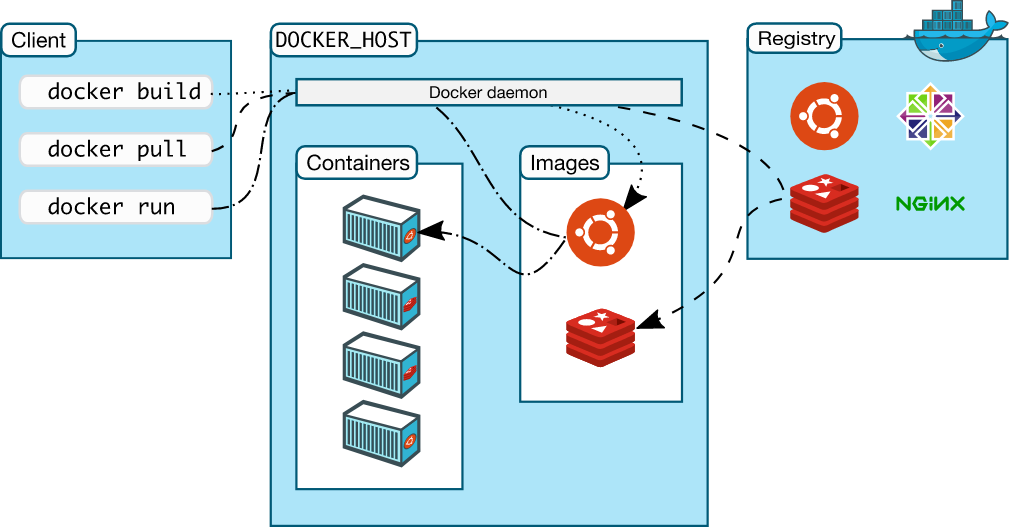
From the above definition, basically, Docker consists of three things:
1. A set of Platform as a Service (PaaS)
2. Docker uses OS-level virtualization
3. For delivery of software in packages called containers
**Docker Architecture**:
## Most Common Commands
Command
Explanation
Shorthand
docker image ls
Lists all images
docker images
docker image rm [image]
Removes an image
docker rmi
docker image pull [image]
Pulls image from a docker registry
docker pull
docker container ls
Lists running containers
docker ps
docker container ls -a
Lists all containers
docker ps -a
docker container run [image]
Runs a container from an image
docker run [image]
docker container rm [container]
Removes a container
docker rm [container]
docker container stop [container]
Stops a container
docker stop [container]
docker container exec [container]
Executes a command inside the container
docker exec [container]
## Sources
- [DevOps with Docker](https://devopswithdocker.com/)
- [Docker Training](https://github.com/arsitektur-jaringan-komputer/Pelatihan-Docker)
- [Docker Crash Course for Absolute Beginners](https://youtu.be/pg19Z8LL06w?si=t_eEymrAFJSpsakQ)
- [Docker Tutorial for Beginners](https://youtu.be/3c-iBn73dDE?si=QvR97s1D0LiWULOt)